Outline ·
[ Standard ] ·
Linear+
Home Networking ASUS Malaysia Networking User & Technical Support, Managed by ASUS Malaysia Representative
|
blacktubi
|
 Nov 8 2016, 01:17 AM Nov 8 2016, 01:17 AM
|
-


|
QUOTE(v2Rustie @ Nov 8 2016, 12:01 AM) hey there asus, my house is currently using a asus RT-N12HP router with unifi 50mbps plan. we currently have 7 wireless and 2 wired devices(one is our house cctv) hooked up to it. lately, we notice the wifi speed being extremely volatile. with a range of 2mbps up to 20, our internet speed is extremely poor. however, when we hook a lan cable to it, we noticed that it shoots up to 51 or 52 mbps. Could you kindly share with us a solution for this issue? we mostly use the internet to steam 4k videos and to play online games. is this router not suitable for the task or is there a possibility that the product is faulty? It's time to get a Wireless AC router. 2.4Ghz Wireless N coupled with all the external interference is not able to deliver 50Mbps. |
|
|
|
|
|
blacktubi
|
Nov 24 2016, 03:38 PM
|
-
|
QUOTE(jiaen0509 @ Nov 24 2016, 10:36 AM) I purchased at China but there is no special ISP profile given Which model you purchased? Flash to the latest firmware and perform a factory reset. Follow this article to set up. http://www.blacktubi.com/unifi/setup-asus-router-for-unifi/ |
|
|
|
|
|
blacktubi
|
Dec 3 2016, 04:55 PM
|
-
|
QUOTE(Mazda9 @ Dec 3 2016, 04:16 PM) Asus support, Please verify and confirm if AC87u router is still in production or sale in market. Heard that it's being replaced with ac88u model and even RMA request for 87u model type will be replced to 88u model. AC87U is the first generation MU-MIMO router with Quantenna chipset for the wireless instead of the usual Broadcom. Some users are having issues with it. |
|
|
|
|
|
blacktubi
|
Dec 7 2016, 02:06 PM
|
-
|
QUOTE(jianwei87 @ Dec 6 2016, 06:40 PM) I'm using 5GHz for repeater connection, but it seem the connection keep dropping. Why? Repeater means repeating the original signal of the main router to cover a bigger area. In order for a repeater to work well, the repeater needs to have a great signal from the main router. 5Ghz is naturally weak in term of signal penetration. I suggest using 2.4Ghz for repeating.  |
|
|
|
|
|
blacktubi
|
Jan 11 2017, 10:38 PM
|
-
|
QUOTE(alwayshehe @ Jan 11 2017, 10:03 PM) Hey Asus could you help? My ac1200 shows connected. But when I enter any website is shows 101010.walledgarden.tm I check with TM he says my account is okay and activated. Wrong username or password. Check your username and password again. It should be something like username@unifi and the password is case sensitive. |
|
|
|
|
|
blacktubi
|
Jan 17 2017, 01:21 PM
|
-
|
QUOTE(weileong @ Jan 17 2017, 12:46 PM) ASUSmy my above question ? It works. Set your ADSL modem router on bridge mode and use PPPOE mode on your router with your Streamyx username and password. No special requirement required for Streamyx HyppTV. You can even use it over wireless. |
|
|
|
|
|
blacktubi
|
Feb 6 2017, 10:06 AM
|
-
|
QUOTE(Quanta @ Feb 6 2017, 08:22 AM) Hello Asus users, Need some advice here. Right now I am dilemma to get either Asus router or stick back to Qualcomm chipset router (Archer C7 & Mikrotik). My Archer C7 recently just gave up after a year, and luckily I'm able to do 1to1 warranty exchange. The technician blamed me for powering it on 24 by 7 for 365 days. Never wanted to argue with them for the stupid comment and took the replacement unit and ran away. At the same time. I did purchase a Mikrotik hap ac lite; the software is very powerful, but the wifi do sucks. So next is to look into Asus Router, but after reading some review, the temp of the router is scary. 80c-90c on the passive cooling. I scare it might burn and end up my entire home is in danger. Is there any warranty and guarantee from Asus AsusMY, that the device is safe with that temperature range without any 3rd party cooling? Please advice. Running my RT-AC68U for 24/7 over 2 years and never cooled it. My router is not in an AC room as well. The thing with Asus routers is they always come with a ridiculously huge chunk of heatsink inside. |
|
|
|
|
|
blacktubi
|
Feb 7 2017, 02:22 AM
|
-
|
QUOTE(Quanta @ Feb 6 2017, 10:20 AM) Cool blacktubi; do the device degrade after 2 yrs due to constant heat? Not at all, performance is good since day 1 and the device is really stable. The router is placed at a spot without HVAC. QUOTE(pigduck @ Feb 7 2017, 12:43 AM) Oh, not even the RT-N18U? What if I converted the RT-N18U to be an access point? The DIR-850-L will the main router and then the RT-N18U will be the access point. Do you think it's still necessary to go for AC routers if I am going for Time 100mbps? I suspect even if I were to get an ac router, i would need to get an ac access point too. Wireless AC routers support Wireless AC ability so you do not need a separate AP. Wireless N 2.4Ghz is really congested nowadays, hitting even half of the throughput is hardly even possible at somewhere with lots of routers near by. Eg. Apartments |
|
|
|
|
|
blacktubi
|
Feb 7 2017, 01:21 PM
|
-
|
QUOTE(pigduck @ Feb 7 2017, 10:31 AM) but i need to stretch the coverage around my house so that's where i thought the ac would come in... oh, you mean i do not need a LAN cable to connect the AP to the router 'cos of AC? If you want your entire house to be Wireless AC compatible, you need to upgrade your wireless AP as well. |
|
|
|
|
|
blacktubi
|
Feb 21 2017, 09:20 PM
|
-
|
QUOTE(capriodimitri @ Feb 21 2017, 01:52 PM) The performance of USB 3 is not up to par, delivering 20+MB/s only. Can I send for warranty? The router supports the USB 3.0 standard but the processor is not designed for that kind of task. It is designed for networking and not capable of high-speed file sharing protocol such as Samba. It is a norm in the industry and it is the same case for most sub RM1000 router. Only RT-AC5300 and RT-AC88U have really good USB file sharing performance as I believe it is hardware accelerated. If you want decent USB performance, get a NAS. Even a cheap NAS is much better than a router. |
|
|
|
|
|
blacktubi
|
Feb 21 2017, 09:22 PM
|
-
|
QUOTE(pl95077 @ Feb 21 2017, 06:00 PM) i am curious how you check is up to par or not??? can share? Just copy a big file to the router via Ethernet LAN with a shared external hardisk. It depends on your model. For cheaper models it is probably less than 10M Byte/s. |
|
|
|
|
|
blacktubi
|
Feb 22 2017, 08:58 PM
|
-
|
QUOTE(jacky91 @ Feb 22 2017, 08:15 PM) AsusMY, is there any way that I can trace which IP is using the most data in my network? So far, I can only see which network mode (wired/wireless) is using the most data Only on the higher end models. |
|
|
|
|
|
blacktubi
|
Feb 22 2017, 09:38 PM
|
-
|
QUOTE(jacky91 @ Feb 22 2017, 09:12 PM) I see... besides that... i would also like to ask have any of you faced these issues: 1) Speedtest will never give full speed, no matter wired or wireless. Currently using 50mbps UniFi, but my max speed from speedtest always capped at around 42 to 45. Testings are done with the devices just beside router. I am the only admin of this network, so no one is capping my speed. 2) Wifi will suddenly drop and cannot connect back..when check, it says connection error... tried to forget the network in the device and put in password again, it will says password incorrect (although i triple check the router for wifi password). 1) TM's issue. I never actually try the WAN to LAN throughput of Asus routers but it should be more than capable of 50Mbps. Singaporeans use it on their 1Gbps plan. 2) It happens when the wifi is weak or unstable. Stand closer to the router next time. Wireless best config for 2.4Ghz (20Mhz, channel 1/6/11, WPA2 AES) What model you use? |
|
|
|
|
|
blacktubi
|
Feb 22 2017, 11:23 PM
|
-
|
QUOTE(jacky91 @ Feb 22 2017, 10:20 PM) 1) Ok tested with my old router. Same issue. Conclusion: TM's issue 2) But I am getting full bar. Wireless best config i tot 40mhz? And why 1/6/11? using N18U 2) 2.4Ghz is too congested. Don't make it worst. 1/6/11 are non-overlapping. |
|
|
|
|
|
blacktubi
|
Feb 23 2017, 09:50 AM
|
-
|
QUOTE(LovelyPotato @ Feb 23 2017, 12:31 AM) I'm currently using RT-N12HP_B1 router. Just got my Unifi upgraded from 30Mbps to 50Mbps today. LAN is working fine, getting pretty close to 50Mbps dl speed on my desktop, however on my iPhone SE I'm getting only 30Mbps dl speed even though I'm testing the speed right in front of my router. Currently this is my router setting, any recommendation for me to modify to increase the speed? That's only so much 2.4Ghz Wireless N is capable of. Try using only 20Mhz. |
|
|
|
|
|
blacktubi
|
Feb 23 2017, 10:40 AM
|
-
|
QUOTE(LovelyPotato @ Feb 23 2017, 10:15 AM) Does the b/g protection matters? Setting 20MHz seemed like still giving me similar result. Nope. You need a Wireless AC router. Set it at 20Mhz as your iPhone only supports 20Mhz. So you won't see any boost in performance on 40Mhz. |
|
|
|
|
|
blacktubi
|
Feb 24 2017, 12:08 AM
|
-
|
QUOTE(soonwai @ Feb 23 2017, 09:41 PM) Hi all, I've got an Asus RT-N16 sitting idle for years now. Wanna put it to some use. What's a good 3rd party firmware for it? I plan to attach a HD, maybe use for: • torrents • file sharing Other than routing, switching and wifi, what else can I do with it? Not good for file sharing due to the dreadful USB performance. Probably as a downloader. This AsusWRT-Merlin fork is great and vouched by Merlin. https://www.snbforums.com/threads/fork-asus...2e4-23b8.18914/You can go hardcore and have Tomato. There's a lot of custom builds by the Chinese as well. |
|
|
|
|
|
blacktubi
|
Feb 27 2017, 10:04 PM
|
-
|
QUOTE(alex_tham @ Feb 27 2017, 05:08 PM) Please advise. Router RT AC68U Desktop using old USB TP link wr821 300mbps adapter. Previously if using TPLink wr1043nd , connection can get full 300mbps. Is it using different brand USB adapter, cannot get full speed? Please advise also what other adapter compatible to this router. another if i want to WDS old router of different brand to Asus RT AC68U. Can it be done? thanks Displayed throughput on device properties is never accurate to its actual throughput. Why WDS? May or may not work. |
|
|
|
|
|
blacktubi
|
Mar 10 2017, 02:42 PM
|
-
|
For Asus networking products, you need to send it back to the place you purchase your device instead of the usual Asus service centre.
If your device is from an online store, you need to contact the seller and send it back.
|
|
|
|
|
|
blacktubi
|
Mar 14 2017, 12:48 PM
|
-
|
QUOTE(hiroka88 @ Mar 14 2017, 09:48 AM) Need help, If I remove my current wifi adapter, do u think can fit with pce-ac68? 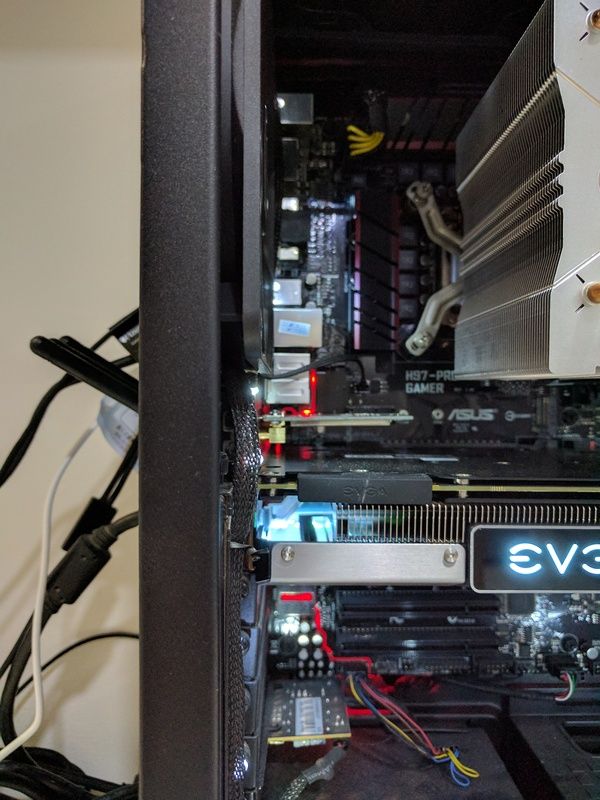 Looks fine to me. PCE-AC68 is a single slot PCIE. Why not PCE-AC88, the price is around the same and it is a better product.  |
|
|
|
|



 Quote
Quote
 0.3048sec
 0.61
0.61
 7 queries
 GZIP Disabled