Outline ·
[ Standard ] ·
Linear+
Home Networking ASUS Malaysia Networking User & Technical Support, Managed by ASUS Malaysia Representative
|
blacktubi
|
 Mar 31 2016, 10:58 PM Mar 31 2016, 10:58 PM
|
-


|
QUOTE(middle_one23 @ Mar 31 2016, 01:38 PM) I'm using Asus RT-N12HP for UniFi Advance 30 plan in a condo. With below setting, my iPad Mini 2 will disconnect & reconnect again intermittently every 5~10 mins: Wireless Mode: N only Channel bandwidth: 40MHZ Is it better to leave them both to "Auto" only? Use 20Mhz for channel bandwidth as 2.4Ghz is already very congested at a typical condo environment. https://support.apple.com/en-us/HT202068 |
|
|
|
|
|
blacktubi
|
Apr 15 2016, 10:34 AM
|
-
|
QUOTE(strafez @ Apr 14 2016, 07:08 PM) Hi, I've tried out using the inSSIDer Home software to check, seems not congested. But how come my neighbours got Max Rate of 300 but I only get Max Rate of 144? Please assist Thanks! ** Ok, my bad just asked google, Its my wireless adapter max speed at 150mbps. But still doesn't make sense when I speed test its only 10ish mbps but LAN cable it can go max at 30mbps. Wireless N 2.4Ghz is very congested nowadays with a lot of interference. You can try to stand closer to your router and see if there's any improvements. |
|
|
|
|
|
blacktubi
|
May 8 2016, 02:06 PM
|
-
|
QUOTE(dark lenanza @ May 8 2016, 07:10 AM) hi sifooo need some advice my stock streamyx modem already died due to lightning struck plan to buy DSL-N12U B1 to replace stock modem my question is does it need "special" setting for my hyyptv decoder or just plug and play? It is just plug and play for Streamyx |
|
|
|
|
|
blacktubi
|
May 16 2016, 12:00 PM
|
-
|
QUOTE(FieldEngineer @ May 16 2016, 11:02 AM) The 3rd Floor wifi connection is week from my ASUS Wifi Router which is situated on the First Floor. So going to buy either an Wifi Router or Wifi Extender to be connected on the third floor. There are a LAN port at the third floor which is connected to the first floor which currently I been used to connect a Amazon Fire TV to the ASUS Wifi Router. So after this, I will connect the Amazon Fire TV via Wifi or LAN with the new Wifi Router/Extender. My question is: 1. Another Wifi Router or Wifi Extender? 2. Suggest brand & model if you would. Thanks You need a second wireless access point.  It depends on your budget. You can use your extra existing router as an access point if you want. |
|
|
|
|
|
blacktubi
|
May 17 2016, 12:25 PM
|
-
|
I tried the RT-AC88U coupled with the new PCE-AC88 recently. I manage to get gigabit speed over wireless.  Time Fibre 500Mbps over wireless should be easy with this combination. Highly recommended to those looking for performance and wired Ethernet is not available. Attached thumbnail(s)
|
|
|
|
|
|
blacktubi
|
May 20 2016, 11:09 AM
|
-
|
Le Fluff
Select bridged mode, RFC 1483 and LLC. Connect from the LAN port of your modem to the WAN port of your router.
Factory reset your Asus router. Use PPPOE. Make sure you do not use any ISP related configuration. Use None for ISP.
If it still does not work, you can just use Automatic IP on your router and leave your ADSL modem on the existing working configuration.
|
|
|
|
|
|
blacktubi
|
May 21 2016, 12:03 PM
|
-
|
QUOTE(Le Fluff @ May 20 2016, 08:31 PM) blacktubiASUSmySome update. Hi guys, I successfully to turned my modem to full bridge mode using the setting blacktubi recommended. It disconnects for a moment, after that I have to manually create a new PPPoE connection from my laptop. On PC after keying in username and password then success! Manage to connect and confirm modem can function under bridge mode. Then went into the wireless router, reset then set up again. This time tried PPPoE option with username and password, but ran into the same problem: "Timeout waiting for PADO packets" - I have tried cloning MAC, changing router IP to 192.168.2.1 because my modem is by default 192.168.1.1. As of now I'm waiting if it can connect. Am I doing this right? Thanks again. Post a screenshot of your WAN > Internet Connection page. I need a screenshot of LAN > IPTV page as well. |
|
|
|
|
|
blacktubi
|
May 21 2016, 12:58 PM
|
-
|
QUOTE(ks1230 @ May 21 2016, 12:13 PM) Hi, ASUSmy the firmware section on the download page seems to be missing from the website..as of now, only utilities can be downloaded but the firmware option is totally missing..  They changed their folder sorting. Select others on the OS selection and you should see the firmware. |
|
|
|
|
|
blacktubi
|
May 21 2016, 02:02 PM
|
-
|
Le Fluff WAN page from the sidebar under Advanced Settings
|
|
|
|
|
|
blacktubi
|
May 21 2016, 02:49 PM
|
-
|
QUOTE(Le Fluff @ May 21 2016, 02:17 PM) blacktubi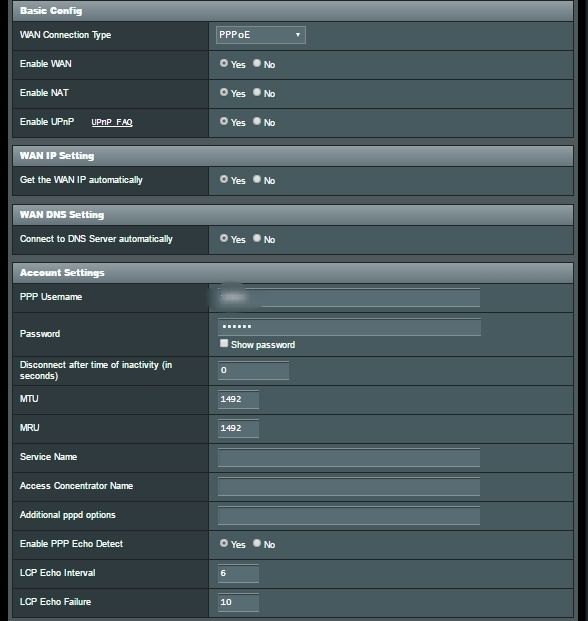 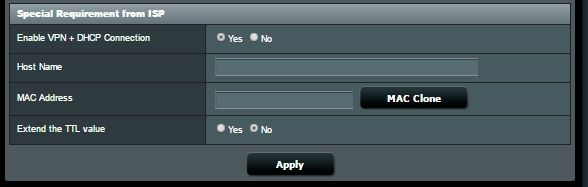 It seems fine to me but I am not a Maxis ADSL user so I can't confirm if you need any additional configurations. Make sure the pppoe username and password is correct. Make sure the DHCP is disabled on your Maxis modem well. |
|
|
|
|
|
blacktubi
|
May 29 2016, 07:01 PM
|
-
|
QUOTE(OKLY @ May 29 2016, 06:31 PM) ASUSmyCan't seem to find any firmware on the 'Driver & Tools' page at asus.com website for RT-N12 D1? https://www.asus.com/Networking/RTN12_D1/HelpDesk_Download/ Select others for your operating system. |
|
|
|
|
|
blacktubi
|
May 29 2016, 11:08 PM
|
-
|
QUOTE(OKLY @ May 29 2016, 07:16 PM) This works for now, but weird that when an OS is selected, no firmware is shown. ASUSmy, any particular reason to this? For some reasons, Asus decided to hide it under the Other OS now.  |
|
|
|
|
|
blacktubi
|
Jun 2 2016, 10:44 PM
|
-
|
QUOTE(sai86 @ Jun 2 2016, 05:49 PM) using D-LInk 850L with starhub, and to my surprise, its WIFI coverage is damn sucks on both 2.4 & 5 ghz. its like less than 5M and worse with wall in between. i would like to know which budget minded router/wifi from Asus is recommended? the price and function of this seems great to me. ASUS WIFI Router RT-N14UHP @ RM3xx i notice in SG they have "Optical Network Terminal (ONT)", so i could just plug out the D-link and replace it with Asus? OR, any dual band can intro? The DIR-850L is like the most basic Wireless AC router. 5Ghz is definitely quite weak on that particular router. I recommend something with Wireless AC if you want to enjoy the full speed of your subscribed plan. Get the Asus RT-AC55UHP, great router. |
|
|
|
|
|
blacktubi
|
Jun 13 2016, 10:14 PM
|
-
|
QUOTE(frey88 @ Jun 13 2016, 09:45 PM) Dear @ASUSmy, I already updated to firmware 3.0.0.4.380.2943 and did a hard reset (push the reset button for 30 seconds). The speed still not preferable. Stand beside your router and perform a speedtest. If the performance is good there, you need a 5Ghz router. 2.4Ghz is very congested, poor performance is very usual. I have seen worst case where it is totally unusable. |
|
|
|
|
|
blacktubi
|
Jun 26 2016, 12:22 AM
|
-
|
QUOTE(Evo8020 @ Jun 25 2016, 08:51 PM) Help! I just bought a RT-AC55UHP to replace Unifi stock router. After configuring the Unifi password and rebooted, the router went dead. No LED light in any mode. Try remove the power and reset/rebooted a few time but nothing is happening. What could go wrong? Looks like a hardware fault to me. Try a reset and see if it fixes anything. |
|
|
|
|
|
blacktubi
|
Jul 21 2016, 10:13 PM
|
-
|
QUOTE(qwan1101 @ Jul 21 2016, 08:20 PM) Did you update your firmware for the ac55uhp? Did you encounter any problem.... or smooth sailing as before? I just updated to the latest firmware. You get some new features such as the app compatibility and the stability and performance is better. No weird issues found. |
|
|
|
|
|
blacktubi
|
Jul 23 2016, 12:05 PM
|
-
|
QUOTE(jpong1 @ Jul 22 2016, 12:20 AM) performance in which aspect ? The respond of the user interface is faster. Wireless AC seem faster as well base on the PHY rate. I did not conduct a speedtest. |
|
|
|
|
|
blacktubi
|
Jul 29 2016, 10:29 PM
|
-
|
QUOTE(cyclone2 @ Jul 29 2016, 12:03 PM) Hi AsusMY, I'm currently using RT-AC5300 and setup the PPTP VPN. I'm using Windows 10 to connect back to my home network, it seem that the VPN will get disconnected after 1 or 2 minutes. The firmware version is 3.0.0.4.380_3341. The VPN connection setting is very simple and straightforward. is there anything I miss out? Below is the log file. I recommend OpenVPN as it is more stable and more secure. PPTP is not secure anymore. The drawback is OpenVPN is harder to configure with all the configuration files. |
|
|
|
|
|
blacktubi
|
Aug 1 2016, 02:16 PM
|
-
|
QUOTE(bobchanz @ Aug 1 2016, 12:06 PM) I have the same problem with my wifi connection. First I though because of my apartment use copper reason speed unstable. Then I tried direct connection using LAN I can get stable 27-28mbps. Then I saw this post. I already update to new firmware as link above and factory reset but my wifi connection still not behave well. After some try and error wifi setting I manage to get 20mbps max speed at full bar signal although thru LAN I can get around 27-28mbps. When wifi signal drop from 3 bar to 2 bar, speed also drop very bad. At one point I only can get 3-5mbps only. Is that normal? I just bought this router from TM since they have a very good offer only at RM269. The maximum performance of the wireless connection will drop as the signal gets weaker. That's why some users have to resort to having multiple access point in a home. You can try to position your router better to get better signal around your house. |
|
|
|
|
|
blacktubi
|
Aug 3 2016, 07:04 PM
|
-
|
QUOTE(firdausbhari @ Aug 3 2016, 02:25 PM) i know it might sound funny or crazy, but my router is really warm. i was thinking to buy a cheap cooling pad. do u guys think thats a good idea or im just gonna waste my money. Your router is warm due to Asus routers come with a huge chunk of heatsink to dissipate the heat rather than some other manufacturers who don't even bother to put on a heatsink and the heat stay on the chipset rather than being dissipated. I would not worry too much about the heat, they are designed for much higher temperature than that. Just ensure you keep at a well ventilated place. |
|
|
|
|



 Quote
Quote
 0.3080sec
 0.31
0.31
 7 queries
 GZIP Disabled