Outline ·
[ Standard ] ·
Linear+
Home Networking ASUS Malaysia Networking User & Technical Support, Managed by ASUS Malaysia Representative
|
jusbella
|
 Jan 6 2016, 10:58 PM Jan 6 2016, 10:58 PM
|

|
It's not router, it's called btu aka modem. QUOTE(AaronFPS @ Jan 6 2016, 10:49 PM) i got it to work, thanks anyway i think i didn't connect a third lan cable from the old router to new router that's why it wasn't working i just bought N12HP from castleIT around RM220 |
|
|
|
|
|
jusbella
|
Jan 8 2016, 11:29 AM
|
|
|
Cool... pls update on ur site too. QUOTE(ASUSmy @ Jan 8 2016, 11:24 AM) Hi rjflyguy, Below is the link to download the beta firmware for the RT-AC55UHP. https://www.asuswebstorage.com/navigate/s/6...A49EA86234C9A2YThank you |
|
|
|
|
|
jusbella
|
Jan 11 2016, 12:35 AM
|
|
|
QUOTE(triad @ Jan 11 2016, 12:31 AM) N56 wan port and lan port is 100 mbps or 1000 mbps? @ASUSmy 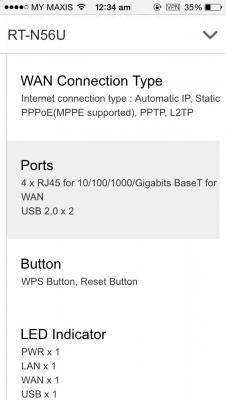
|
|
|
|
|
|
jusbella
|
Jan 13 2016, 05:30 PM
|
|
|
port forward. if still same, its ISP capped P2P traffic. QUOTE(ycs @ Jan 13 2016, 05:27 PM) @ASUSmy, bit torent on N56U Firmware Version:3.0.0.4.378_4850 router seems cannot max out download speed, no QOS is there any extra settings needed? |
|
|
|
|
|
jusbella
|
Jan 14 2016, 08:08 AM
|
|
|
Try another lan port. If other port working, means the lan port u plug in spoilt, no way to repair it, need replacement or buy new one. QUOTE(bilaman @ Jan 14 2016, 12:25 AM) hello may i know.. is there any solution for my issue on asus dsl-n12e.. the lan port is not working at all... no green light, my ethernet status in cable unplugged... wireless is working fine.. Thanks.. |
|
|
|
|
|
jusbella
|
Jan 14 2016, 12:24 PM
|
|
|
No. Only one port spoilt.. QUOTE(bilaman @ Jan 14 2016, 12:21 PM) mine all 4 lan ports now working... is it normal for all lan port damage all at once..? |
|
|
|
|
|
jusbella
|
Jan 14 2016, 03:30 PM
|
|
|
Den its might the chip that control all lan port is malfunction. QUOTE(bilaman @ Jan 14 2016, 03:25 PM) Sorry typo... all 4 lan port NOT working.....  |
|
|
|
|
|
jusbella
|
Jan 14 2016, 08:14 PM
|
|
|
F5 to refresh n press YES to cont. QUOTE(D96 @ Jan 14 2016, 08:05 PM) Hi may I know how you guys fix it? Coz recently I'm facing this problem too. After I key in my unifi username and password loading awhile then server not found.  Thank you |
|
|
|
|
|
jusbella
|
Jan 16 2016, 12:04 PM
|
|
|
Press f5 QUOTE(D96 @ Jan 16 2016, 11:34 AM) Hi there, I just bought Asus RT-N12HP last week but when I setup I follow the way that Asus post on YouTube. But when I key in unifi username and password loading awhile then server not found on that page. May I know what's the problem? By the way I exchange for the new router already but still the same. Anyone faced this problem before? How to solve it? Thank you  |
|
|
|
|
|
jusbella
|
Jan 16 2016, 12:40 PM
|
|
|
Yes... QUOTE(D96 @ Jan 16 2016, 12:38 PM) Press F5? Your solved it like this? |
|
|
|
|
|
jusbella
|
Jan 17 2016, 10:26 AM
|
|
|
Hi Asus, regarding the RT-AC55UHP, why only 1 openVPN configuration file able to imported? I need add/import multiple openVPN configuration.... Please in next firmware update make it can support like 20 ovpn can be imported... Thanks.
|
|
|
|
|
|
jusbella
|
Jan 19 2016, 09:58 AM
|
|
|
Yes correct... everytime I wan change server I need to delete the current ovpn den add other one.... QUOTE(ASUSmy @ Jan 19 2016, 09:27 AM) Hi jusbella, Do you mean you wanted to add multiple opvn file in VPN Client? If yes, that's mean that you want to change different openVPN server when needed without importing it each time when changing? Thank you |
|
|
|
|
|
jusbella
|
Jan 19 2016, 11:53 AM
|
|
|
of cos u need receipt.. go back to same shop only. QUOTE(aneip @ Jan 19 2016, 11:52 AM) Do anyone know whether we need receipt to claim for warranty? I got Asus RT-N12HP. |
|
|
|
|
|
jusbella
|
Jan 19 2016, 03:24 PM
|
|
|
Yup, I imported first ovpn, den I try add another ovpn and there is no openVPN selection, only PPTP and L2TP selection only. QUOTE(ASUSmy @ Jan 19 2016, 02:56 PM) Hi jusbella, I have checked with my RD, in VPN client you should be able to add up to maximum of 5 different ovpn. Do you have any difficulty or problem importing second ovpn files? Please refer to below image for 2 different ovpn imported. Thank you |
|
|
|
|
|
jusbella
|
Jan 19 2016, 04:43 PM
|
|
|
The latest from official. Anyway is it limited memory? Because my ovpn required upload cert file too. QUOTE(ASUSmy @ Jan 19 2016, 04:38 PM) Hi jusbella, If not mistaken you are using the RT-AC55UHP and my I know what is your current firmware version? Thank you |
|
|
|
|
|
jusbella
|
Jan 20 2016, 09:42 AM
|
|
|
U got choose SPECIAL REQUIREMENT FROM ISP? den choose UNIFI-HOME... QUOTE(nGeeMoN @ Jan 20 2016, 08:44 AM) Hi ASUSmy, I cannot setup my Unifi 30 on RT-n12HP, the error of "connection timeout" kept pop out. I use the same router for my other line (Unifi 50) and it is all good, not sure whats seems to be the problem here. I just bought 2 of it, both cannot use for Unifi 30 but works on Unifi 50 line. Unifi 30 works on stock router (D-Link and 'the stock gray router' <-- not sure what model) I followed the same steps all the way even restored factory setting many times d. Any tips? |
|
|
|
|
|
jusbella
|
Jan 20 2016, 01:26 PM
|
|
|
Try change to UNIFI-BUSINESS? QUOTE(nGeeMoN @ Jan 20 2016, 12:54 PM) yes I did.. you see, the thing is, only my Unifi 50 (prev is VIP 20) cannot be setup, my other line (Unifi 30) is ok. It is certain that the router is working, but cannot be that I setup wrongly as well. Just wondering if anybody else experience the same thing. |
|
|
|
|
|
jusbella
|
Jan 20 2016, 03:33 PM
|
|
|
go back the same shop and ask lo.. some can some cannot. QUOTE(jerm @ Jan 20 2016, 03:30 PM) not exactly a technical question, but i bought the n14uhp a few days ago, and found that performance is on par as the existing Maxis fiber router. I guess i probably want to go for the AC router since there is a lot of N wireless networks in my condo. do you think i can exchange this n14uhp for the ac55uhp? actually i just wanted to rant.. |
|
|
|
|
|
jusbella
|
Jan 20 2016, 05:10 PM
|
|
|
cannot.. U means u wan add more extra 4mbps? That impossible. QUOTE(iBearJohn @ Jan 20 2016, 05:08 PM) Hi, is it possible to connect Asus AC87U to stock streamyx 4mb stock modem router combo device? |
|
|
|
|
|
jusbella
|
Jan 20 2016, 05:33 PM
|
|
|
yes can, make sure stock modem is in BRIDGE mode, den Asus A87U use PPPoE mode. Or else, stock modem leave it by default, den Asus use DHCP mode. QUOTE(iBearJohn @ Jan 20 2016, 05:32 PM) i mean is it possible to connect Phone line -> Streamyx 4mb stock modem -> Asus A87U router? |
|
|
|
|



 Quote
Quote
 0.0418sec
 0.26
0.26
 7 queries
 GZIP Disabled