Any fix of IPTV for Asus RT-AC86U? I did not using HyppTV but when I set my router as Unifi-Home, my internet speed performance was dropped from 500mbps to 430mbps in speedtest result.
I was switched to Unifi-Business in the IPTV settings. Now the performance of LAN speedtest results was improved to 480~510mbps.
Can you try again, I am able to load my ASUS DDNS.
Thank you
I am queuing in the chat in Unifi website. Something wrong with Unifi today. Both my office and home can't connect to http://iplookup.asus.com/nslookup.php
My Asus 86u just died, there is no light and no response. But this unit I bought in China 3months ago , does Asus malaysia able to provide warranty?
So fast?? Lol, can you describe your house environment? Do you put the router in the dusty area? My house is fully sealed by windows and my RT-AC86U is put inside a cupboard. I never open the my house windows because I only open aircond. So just keep your house away from dust, always keep your house clean. House windows never left opened. Only let oxygen to flow in from toilet exhaust fan and your house main door or kitchen door. My RT-AC86 was bought at September 2018 from Tmall and received at October 2018. Now already been using for half year, never experience your issue. Did you attach two fans at behind the router? Better just do it if you don't. Since my router is putting inside a cupboard, no open air environment but less dusty. The temperature inside the cupboard is higher until 35'c~40'c, that's why I need to attach two fans on the router to prevent it from overheating.
For those who are using RT-AC58U or RT-AC55UHP router and have trouble getting the high speed using LAN, you can try updating the beta firmware below. Do let me know is you have any problem with the firmware.
Anyone knows how to enable NAT acceleration on the AX88U? I can't find it in the router settings even under LAN -> Switch Control
This router does not need NAT acceleration, this function only for mid-end router. High-end router already is default as NAT accelerated because its CPU is fast enough to handle that high speed gigabit connections without the requirement to manually enable the "NAT acceleration", in order to further boost up the CPU speed in the router.
This post has been edited by junclj: Nov 28 2019, 11:11 AM
Thank you for your help. I have contacted Merlin and he gave me a beta version of this firmware, I will try and install it and see what I can do.
Unfortunately, on the link you gave me it's the same version I have installed (without NAT acceleration, "Merlin" says ... and btw - it's just a very big coincidence that we use the same nickname!!!) -> https://www.asus.com/Networking/RTAC55U/HelpDesk_Download/
ASUS RT-AC55U Firmware version 3.0.0.4.382.51812 with the version from the web interface from my router -> Operation Mode:Wireless router Firmware Version:3.0.0.4.382_51812
Anyway, 2 and 3 were already made, with the exception that NAT Acceleration may not be working probably...
I still remember that last time ASUSmy did share RT-AC55UHP (but not RT-AC55U) beta firmware to fix that unifi 500mbps issue. I have no longer using this router for my home Unifi turbo 500mbps. My RT-AC55UHP was now being used as AP. I already upgraded to RT-AC86U since my home upgraded to Unifi Turbo 500mbps and recently I was bought another RT-AC86U to build aimesh in my home. So the extra RT-AC55UHP was still remaining as AP and put to basement ground floor of my 3-storey house. The rest two RT-AC86U was put to living room and upstairs outside of bedrooms.
I’m using desktop with wireless, there few days my connection was unstable and with all connected devices after I use Rt-Ac88u .(Urgent) pls🙏🙏
Did you using any other routers to do as access points with the same wireless SSID with your main router? If yes, this issue is highly caused by the 2.4GHz interference. There has no other way to solve this issue unless you upgrade your desktop to 5GHz AC type wireless adapter. Besides that, 2.4GHz will bring a lot of interference problem becuase I was experienced this before. You should either switch to aimesh node if your routers are all the model of RT-AC68U and above models or switch off the 2.4GHz for your access point.
2.4GHz will bring a lot of interference problem especially when you want to make access points for more than 2 routers. Since I cannot guarantee the channel 1, 6 & 11 do not interference each other because my home got this issue on one of my router RT-AC55UHP. I was upgraded my living room to RT-AC86U, the old RT-AC55UHP was brought down to basement floor of my house.
The two RT-AC86U was switched to aimesh, so there got no issue on 2.4GHz. So now my problem is the one RT-AC55UHP only give me 10mbps download speed and 65mbps upload speed. My home unifi has 500mbps, usually I should get 400mbps download and 100mbps upload speed on wifi.
After I check through the router to find out what is the problem, I was noticed that, this issue is mainly caused by the 2.4GHz channel interference. Eventhough I was make sure that the aimesh and my access point has different channels. The aimesh has channel 11, and my AP has channel 1. The problem is still there, my wifi speed on that AP is really slow, only 10mbps.
So later I was found out the reason then immediately disable the 2.4GHz. My RT-AC55UHP was now left wireless 5GHz and I can get 490mbps on wifi speedtest. However, just to make sure don't go too far away from the router because 5GHz wifi range is short. Anyway, RT-AC55UHP is a high power long range 9dbi wireless router. When I take my phone then go into the toilet of my next room, I still able to load video in 1080p even my wireless signal was dropped down to half.
This post has been edited by junclj: Dec 23 2019, 02:12 PM
Apologize that I am not sure what kind of lan cable is being used on the alarm...how do I check this? its written on the cable right?
The lan cable for the pc which I used is the one came with the new asus router.
The alarm I am using is Paradox alarm with its Internet module IP150.
Do keep me posted.
Thanks.
lol, same with my home alarm with IP150. Paradox already stopped support for PMH, so have no choice to use Asus router because only Asus router got provide free Asus lifetime DDNS. The alarm only can support up to 100mbps I think. My home alarm was plugged to a D-Link gigabit switch (DGS-1016D) but not from the router directly. Since my router is connected to the LAN port 1 of the gigabit switch to make the switch connected to internet. The rest LAN cables, whole house LAN wall plug and CCTV were all connected to the gigabit switch.
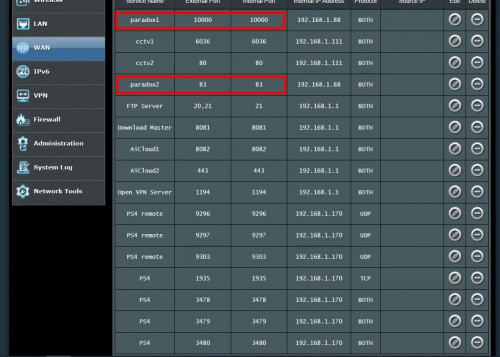
I can give you my reference for port forwarding settings. However the port 83 may different from yours, due to the port 80 was used as my home CCTV. However, the port 10000 was the default port of paradox IP150. This one is used for the mobile apps iParadox or Inside Gold for us to access from outside by 4G or wifi. You may refer the port forward settings of your old router too since all the settings were inside there.
This post has been edited by junclj: Jan 6 2020, 10:24 AM
How come after upgrading my RT86u firmware from 384.81049 to 384.81351, it still show 384.81049? I done it 3 times to be sure but still the same result.
If still unable to upgrade, you may need to reflash the latest firmware in rescue mode. Go to RT-AC86U official website and download "ASUS Firmware Restoration version 2.1.0.2". Also get prepare the latest firmware 3.0.0.4.384.81351.
First, you need to reset your router. So make sure you need to backup your router settings in the "save settings" feature inside your router. If you want to redo the settings manually, so just note down everything important such as unifi pppoe ID and password, port forwarding settings, wifi ssid, password etc before you proceed to reset your router.
The reset button, I think you should know what to do. Usually I am using a pen to stick inside the small hole of my router.
After you reset the router, put your router in front of your PC and use a LAN cable to connect to the PC, set your PC ethernet IPv4 default gateway as 192.168.1.1. So your PC local IP just set whatever you like as long as 192.168.1.xx.
So now, you need to switch off that router. Now use your pen and hold the reset button, another hand to power on the router. Keep hold the reset button until the power LED of your router start to blink off and on very slow. Now you can release the reset button.
Start ASUS Firmware Restoration tool and locate your RT-AC86U to flash the firmware into your router. After done, you may need to wait 5-10 minutes to wait for the router restart.
** How to ensure that your router in rescue mode? You can always open 192.168.1.1 with web browser to check."
This post has been edited by junclj: Jan 6 2020, 05:49 PM
Where can I send my ASUS router RT-AC86U to repair in Penang?
Bought from a seller who apparently imported it from China.
China set or the US set which sold in taobao? I was experienced it, since the US set is so called as the "foreign garbage" in China. I was bought the US set of RT-AC86U then spoil after 3 week of using. So there have no choice, either send back to the seller to replace another one or buy new one from local seller.
I rather choose to buy new one from shopee, either China or Malaysia set. As long as just keep avoid to buy the used US set from Taobao. So now the US set that I bought from taobao was considered as malfunctioned. It can still light up but keep restart every 2 seconds and I totally can't log in to the router because it is malfunctioning.
If you really worried about the router get spoil. Make sure you have to buy a new sealed set, don't care you buy China set or local set. Then attach fans at the behind of this router. I got a china set of RT-AC86U which bought from tmall previously and was start using it since October 2018. It was still running well in good condition because I use fans to keep blowing the router to avoid it get overheat. So now I have threw the US set RT-AC86U. I bought another new china set again from shopee to set it as aimesh node. Also attach a fan to keep blowing at the behind of the router.
This post has been edited by junclj: Jan 22 2020, 10:29 AM
Hi, anyone know how to setup the TM modem huawei HG4280H in bridge mode in order for the router to function properly in router (default) mode. The Asus CS keep say my TM huawei modems is at router wan that why I only get 20- 50Mbps. I using maxis fiber 300Mbpd
You cannot configure the ONU because it was locked. Its the problem of your Asus router. Please upgrade to a higher end Asus router, at least RT-AC68U. Beside that, please try to avoid 2.4GHz wireless connection. If you found that your neighborhood are using a powerful router, their wifi connection may interfering your home wifi connection. That's why you may found only 20mbps on wifi speed. Better is upgrade to RT-AC86U and use the smart connect rule. Turn the 2.4GHz and 5GHz into one SSID only.
This post has been edited by junclj: Feb 13 2020, 09:57 AM


 Dec 17 2018, 08:59 PM


 Quote
Quote


 0.0342sec
 0.62
0.62
 7 queries
 GZIP Disabled