My TUF Ax3000 cannot connect to UNIFI after upgrade firmware to 3.0.0.4.386_45934
already reset but still not working
change router back to tplik, its working fine
CODE
May 5 13:08:10 roamast: ROAMING Start...
May 5 13:08:11 wlceventd: wlceventd_proc_event(527): eth5: Auth E4:AA:EC:13:AA:04, status: Successful (0), rssi:0
May 5 13:08:11 wlceventd: wlceventd_proc_event(556): eth5: Assoc E4:AA:EC:13:AA:04, status: Successful (0), rssi:-69
May 5 13:08:11 wlceventd: wlceventd_proc_event(527): eth5: Auth 8C:D9:D6:36:3D:20, status: Successful (0), rssi:0
May 5 13:08:11 wlceventd: wlceventd_proc_event(556): eth5: Assoc 8C:D9:D6:36:3D:20, status: Successful (0), rssi:-53
May 5 13:08:11 wlceventd: wlceventd_proc_event(491): eth5: Deauth_ind B0:D5:9D:4D:C2:AA, status: 0, reason: Deauthenticated because sending station is leaving (or has left) IBSS or ESS (3), rssi:0
May 5 13:08:12 wlceventd: wlceventd_proc_event(527): eth5: Auth 7C:A7:B0:A0:CF:45, status: Successful (0), rssi:0
May 5 13:08:12 wlceventd: wlceventd_proc_event(556): eth5: Assoc 7C:A7:B0:A0:CF:45, status: Successful (0), rssi:-82
May 5 13:08:16 wlceventd: wlceventd_proc_event(527): eth5: Auth 80:2B:F9:4A:69:97, status: Successful (0), rssi:0
May 5 13:08:16 wlceventd: wlceventd_proc_event(556): eth5: Assoc 80:2B:F9:4A:69:97, status: Successful (0), rssi:-61
May 5 13:08:20 miniupnpd[2254]: SendNATPMPPublicAddressChangeNotification: cannot get public IP address, stopping
May 5 13:08:20 zcip client: configured 169.254.24.91
May 5 13:08:33 wlceventd: wlceventd_proc_event(527): eth5: Auth E0:1F:88:B7:D1:4C, status: Successful (0), rssi:0
May 5 13:08:33 wlceventd: wlceventd_proc_event(556): eth5: Assoc E0:1F:88:B7:D1:4C, status: Successful (0), rssi:-65
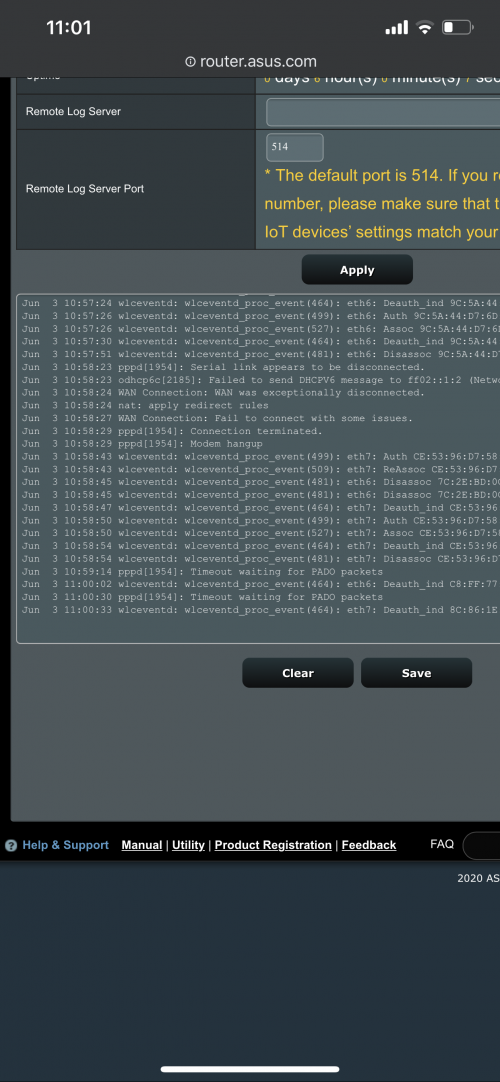
May 5 13:08:33 pppd[2344]: Timeout waiting for PADO packets
May 5 13:09:13 wlceventd: wlceventd_proc_event(527): eth5: Auth B0:D5:9D:4D:C2:AA, status: Successful (0), rssi:0
May 5 13:09:13 wlceventd: wlceventd_proc_event(556): eth5: Assoc B0:D5:9D:4D:C2:AA, status: Successful (0), rssi:-84
May 5 13:09:41 wlceventd: wlceventd_proc_event(491): eth6: Deauth_ind 66:72:B2:8A:C4:D6, status: 0, reason: Deauthenticated because sending station is leaving (or has left) IBSS or ESS (3), rssi:-57
May 5 13:09:41 wlceventd: wlceventd_proc_event(491): eth6: Deauth_ind 66:72:B2:8A:C4:D6, status: 0, reason: Deauthenticated because sending station is leaving (or has left) IBSS or ESS (3), rssi:-57
May 5 13:09:42 wlceventd: wlceventd_proc_event(508): eth6: Disassoc 66:72:B2:8A:C4:D6, status: 0, reason: Disassociated because sending station is leaving (or has left) BSS (8), rssi:0
May 5 13:09:48 pppd[2344]: Timeout waiting for PADO packets
May 5 13:09:49 wlceventd: wlceventd_proc_event(527): eth6: Auth 66:72:B2:8A:C4:D6, status: Successful (0), rssi:0
May 5 13:09:49 wlceventd: wlceventd_proc_event(556): eth6: Assoc 66:72:B2:8A:C4:D6, status: Successful (0), rssi:-51
May 5 13:10:58 kernel: SHN Release Version: 2.0.1 c03f6c5
May 5 13:10:58 kernel: UDB Core Version: 0.2.20
May 5 13:10:58 kernel: sizeof forward pkt param = 192
May 5 05:10:58 BWDPI: fun bitmap = 3
May 5 13:11:04 pppd[2344]: Timeout waiting for PADO packets
May 5 05:11:09 BWDPI: force to flush flowcache entries
May 5 05:11:10 BWDPI: rollback fc
May 5 13:11:10 miniupnpd[2254]: SendNATPMPPublicAddressChangeNotification: cannot get public IP address, stopping
May 5 13:11:16 wlceventd: wlceventd_proc_event(527): eth6: Auth 24:4B:FE:22:97:8C, status: Successful (0), rssi:-55
May 5 13:11:16 wlceventd: wlceventd_proc_event(556): eth6: Assoc 24:4B:FE:22:97:8C, status: Successful (0), rssi:-55
May 5 13:11:16 kernel: Register interface [wds1.0.1] MAC: 3c:7c:3f:a4:b4:6c
<a href='https://pictr.com/images/2021/12/16/BYSL2Z.md.png' target='_blank'>https://pictr.com/images/2021/12/16/BYSL2Z.md.png </a>
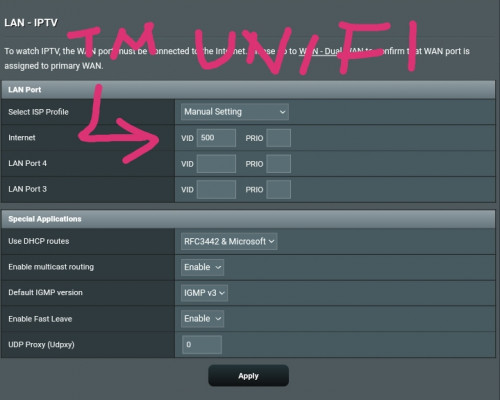
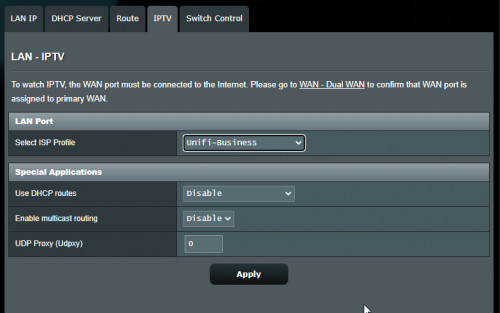
Already check pppoe user is xxxx@unifi and the password is correct? Also set the IPTV ISP profile to Unifi-Home or Unifi-Business?
Try to do hard factory reset then redo all the settings over again.
If still can't then flash your router again with older version firmware.
Download the ASUS Firmware Restoration version 2.1.0.3 from the support page.
Here is the method to flash router firmware by using ASUS Firmware Restoration, you need a Windows PC/Mac OS to do it.
From the video steps inside, if your router default IP is 192.168.50.1, then you have to set your PC ethernet TCP/IPv4 to 192.168.50.10. Don't follow their instruction because 192.168.1.10 is not correct.


 Feb 18 2020, 04:18 PM


 Quote
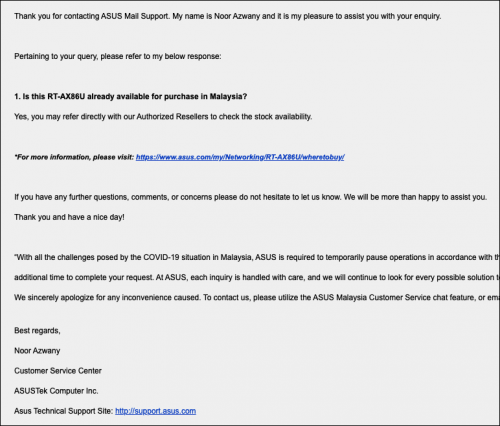
Quote Anyway, I hope they would launch it soon.



 0.0471sec
 0.32
0.32
 7 queries
 GZIP Disabled