Outline ·
[ Standard ] ·
Linear+
Home Networking ASUS Malaysia Networking User & Technical Support, Managed by ASUS Malaysia Representative
|
junclj
|
 Oct 12 2018, 04:00 PM Oct 12 2018, 04:00 PM
|

|
QUOTE(alvinddm @ Oct 12 2018, 03:12 PM) yeah man... troublesome especially when they are not tech savvy why ah cannot see?? how to see now?? why you change the thing?? haiyoh... mine is just keep simple only just to replace the 1 digit only, for example abcde 1.asuscomm.com in my old router then replace to abcde 2.asuscomm.com in my new router. This post has been edited by junclj: Oct 12 2018, 04:00 PM |
|
|
|
|
|
junclj
|
Oct 12 2018, 05:03 PM
|
|
|
QUOTE(jbmsia @ Oct 12 2018, 04:51 PM) Maybe in future you can try this. Before you change over to the new router, you can disable asus ddns or register a new hostname in the old router. Then with the new asus router, register the same hostname which you had in the old router. This way there is no need to change settings for clients. Or you can get asus support to help. I think they need the serial numbers or MAC numbers of the old and new router and they can reset the asus ddns for you. This how I moved my asus hostname to my new asus router when my old asus router stopped working. so I just need to re-register my old router DDNS to other name in order to de-register my current DDNS? This really works? I just thought that if I re-register so many hostname in the same router then later all the hostnames were being used for the same router. |
|
|
|
|
|
junclj
|
Oct 12 2018, 05:39 PM
|
|
|
QUOTE(keyo @ Oct 12 2018, 05:03 PM) HI im using asus RT-AC55UHP but i only get 150-170 mb download speed only asus say its can goes 1200mb tq this may help you https://forum.lowyat.net/index.php?showtopi...post&p=90558874 |
|
|
|
|
|
junclj
|
Oct 12 2018, 08:27 PM
|
|
|
QUOTE(keyo @ Oct 12 2018, 08:18 PM) boss now lagi slow  ok, now go to WAN > Internet Connection, take out a paper and pen. or use notepad to copy down your unifi user name and password and screen shot the rest important settings. Or you can just backup your router settings directly, in Administration > Restore/Save/Upload Setting > Save setting (tick also transfer DDNS name if you have). Then reset your router then retry again after restored your settings. This post has been edited by junclj: Oct 12 2018, 08:28 PM |
|
|
|
|
|
junclj
|
Oct 12 2018, 08:33 PM
|
|
|
QUOTE(keyo @ Oct 12 2018, 08:18 PM) boss now lagi slow ok, you can try contact TM to ask them to reset port. Someone say their 800mbps only can get 300mbps, after TM reset port then now can reach the correct speed. |
|
|
|
|
|
junclj
|
Oct 12 2018, 11:55 PM
|
|
|
QUOTE(stinger @ Oct 12 2018, 10:49 PM) hi guys. I noticed my unifi has upgraded to 500mbps but does RT-N12 D1 can support this WAN speed? the Asus page only mentioned Wifi speed max 300mbps and i run speed test only shows 60mbps  Do i need to change router? Or its unifi problem? Update : Got my answer after see that the WAN and LAN interface only 10/100 BaseT = 100mbps max So anyone have recommendations on Asus router model for Unifi 500 mbps plan? This router is not a gigabit router, the wifi speed labeled as 300mbps but doesn't mean that your LAN port can reach 300mbps. You can check your router ports here > https://www.asus.com/my/Networking/RTN12_D1/specifications/It is 10/100 Base LAN, not a 1000 Base gigabit LAN port. So you need to upgrade your router now, for at least RT-AC66U, or get a better RT-AC68U. My suggestion is RT-AC86U if you can effort. Buy in local with Malaysia warranty or see here |
|
|
|
|
|
junclj
|
Oct 13 2018, 08:51 AM
|
|
|
QUOTE(alpidot @ Oct 13 2018, 06:32 AM) hi TS..TM already upgrade my unifi speed to 500mbps. Planning to change my router and very interested in with lyra for the mesh function. Can it support VLAN for hypptv box?any recommended router that can use at my double storey house. btw, my router is at GF, PS4 and other device mostly at upstairs.TQ I think you better get a better Asus Lyra Trio (for 500mbps) because Asus Lyra is not powerful enough to max up your 500mbps. https://shopee.com.my/ASUS-Lyra-Trio-AC1750...YRoCfYQQAvD_BwEHere is your reference chart, by blacktubi: https://forum.lowyat.net/index.php?showtopi...post&p=90291569This post has been edited by junclj: Oct 13 2018, 09:14 AM |
|
|
|
|
|
junclj
|
Oct 17 2018, 10:32 AM
|
|
|
QUOTE(techhunter @ Oct 17 2018, 01:25 AM) Alright. I just change it to english right? I see some write here update to merlin firmware blabla. No time do reading, so direct ask here. By the way, many thanks I think the stock Asus firmware will automatic detect your region fiber optics. I was just bought a RT-AC86U from China too at last few weeks only. I was quite worry about the compatibility issue too before that but thanks to a bro was shared his experience. Mine is China version but when I plug in from my unifi btu, the router will automatically detect my fiber broadband region. So there has a drop down list to let me to choose "Unifi-home" in the LAN > IPTV option. You also can do manual setting, just set Internet to 500, in case if you not find "Unifi-home" in the drop down list. I did not mess with merlin custom firmware, I just use the stock firmware. I did not modify or upgrade the firmware since it is already the latest firmware version during I received the router. |
|
|
|
|
|
junclj
|
Oct 18 2018, 01:35 PM
|
|
|
QUOTE(^Ware^wolf @ Oct 18 2018, 12:29 PM) anyone know if RT-N12 can support up to 300Mbps ? what is the max speed we can get from this router for Unifi 300Mbps ? Thanks Just look for AC routers, just to avoid N routers. You need 802.11ac wifi routers with gigabit ethernet. |
|
|
|
|
|
junclj
|
Oct 19 2018, 12:34 PM
|
|
|
QUOTE(tomastan4134 @ Oct 19 2018, 12:19 PM) anyone know the asus rt-ac88u can support unifi's playtv/hypptv? how to configure in router setting? is there a specific lan port for unifi IPTV? coz there got 8 lan ports. normal asus router will specify lan 4 - unifi IPTV. please help? you may check inside LAN > IPTV, the setting "IPTV STB Port" will tell you which port was set to IPTV. LAN4 or LAN8, you may refers to there. |
|
|
|
|
|
junclj
|
Oct 19 2018, 01:20 PM
|
|
|
QUOTE(tomastan4134 @ Oct 19 2018, 01:01 PM) okie thanks. does the ac88u have the default unifi setting build in? or need to configure it manually it is global firmware. If you plug to a TM BTU, the Asus router will automatically detect your line is belong to certain fiber optics region. 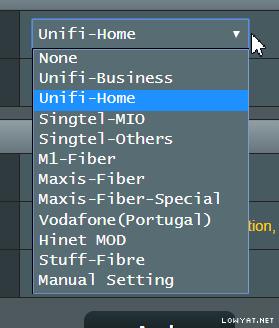 |
|
|
|
|
|
junclj
|
Oct 20 2018, 12:57 PM
|
|
|
QUOTE(Eternalgl0ry @ Oct 20 2018, 02:08 AM) I asked and all say pre order only =,= No stock. if the router in singapore can be use for unifi would be much better because i have a cousin who travel there every few days Buy from China sure got stock. I don't mind if no warranty to claim because I have confident on Asus routers. Just attach fan on the router to avoid heating. |
|
|
|
|
|
junclj
|
Oct 24 2018, 10:18 AM
|
|
|
QUOTE(Eternalgl0ry @ Oct 24 2018, 01:39 AM) Singapore asus routers are much more cheaper in Malaysia ... what? Even by conversion can save more than few hundreds. What worries me is whether can use for unifi.. because some routers out there does not have the unifi settings inside Anyone know when and what price is the AX11000 You can buy one to build aimesh. China asus routers are much more cheaper than Malaysia too but I still can connect it to unifi without issue. about AX11000 It's around RM2,800~RM2,900 in China https://detail.tmall.com/item.htm?spm=a230r...d=3821158424821This post has been edited by junclj: Oct 24 2018, 10:20 AM |
|
|
|
|
|
junclj
|
Oct 24 2018, 10:48 AM
|
|
|
QUOTE(ASAP @ Oct 24 2018, 10:38 AM) Hi all, Is it true that Asus GT-AC5300 can achieve 800Mbps through 5ghz wifi? https://www.youtube.com/watch?v=CiBfJip5DgwThanks It is quite true because video is shared my Asus MY official. |
|
|
|
|
|
junclj
|
Oct 27 2018, 12:19 PM
|
|
|
QUOTE(sze_nian @ Oct 27 2018, 09:44 AM) Hi Asus, I just bought an Asus DSL AC52U modem router for my Unifi Lite (the package is 10Mbps down and 5Mbps up, it still using normal rj11 phone line like streamyx). Following the guide on your YouTube page, I only manage to get 10.5Mbps download and 0.9Mbps upload while using the original modem provided by TM (ZTE ZXHN H267A) I can gain 11.7Mbps down and 4.5Mbps up. No matter how many times I run the test, is the same. Any solution? Thank you. Quite good already can get 11.7mbps dl and 4.5mbps ul. Since vdsl2 speed reducing is depends on the length of copper wire. |
|
|
|
|
|
junclj
|
Oct 27 2018, 12:25 PM
|
|
|
QUOTE(vez @ Oct 26 2018, 10:54 PM) ASUSmyi am using RT-AC68U, latest firmware when i NAT Acceleration CTF (Cut Through Forwarding) is enabled i can get max speed 500Mbps for my UniFi 500Mbps package when i disabled it, i only can get 300Mbps the problem is when i enabled, after few days, my speed test might drop and drop until 20-30Mbps... if disabled, i can consistently getting 300Mbps forever when running speed test (somehow unable to achieve 500Mbps) any Asus sifus can helps? if i leave it disabled, my speed test only close to 300Mbps unable to reach 500Mbps if i leave if enabled, day by day the router speed seems dropping and have to restart Have you attach fans at the behind of your router to reduce heat? I heard that RT-AC68U is always got overheat issue and will reduce performance when overheating. NAT Acceleration will consume much of CPU usage and overheating. Like you say if disable can get stable 300mbps. Or you can upgrade to RT-AC86U and make your current router as AiMesh node. RT-AC86U do not has NAT acceleration option because its CPU is already powerful enough to speed up your 500mbps. This post has been edited by junclj: Oct 27 2018, 12:27 PM |
|
|
|
|
|
junclj
|
Oct 27 2018, 12:35 PM
|
|
|
QUOTE(vez @ Oct 27 2018, 12:31 PM) i also think want to change to 86U, if it was old router unable to support 500Mbps and need rely on NAT acceleration, i might as well grab a new one  just wonder whether 86U will have same issue if getting new one no need rely on NAT acceleration that causes problem, i will just get a new one since this 68U i use for 2-3 years already... can just make it as second router AC86U don't have overheating issue, CPU is 1.8Ghz dual core. Faster than AC88U and has a very powerful long range 2.4Ghz. |
|
|
|
|
|
junclj
|
Oct 27 2018, 12:52 PM
|
|
|
QUOTE(sze_nian @ Oct 27 2018, 12:44 PM) But still, even the ZTE modem that was given by TM/Unifi can easily achieve that speed. Just wondering what causing the upload speed to be so low. - ZTE ZXHN H267A snr 15.6db down/8db up speedtest 11.7Mbps down/4.5Mbps up - Asus DSL-AC52U snr 26db down/10db up speedtest 10.5Mbps down/0.9Mbps up No matter how much test I try it’s in that range. I’m wondering is it something to do with my settings or what. You modem got Nat Acceleration option too? in the LAN > Switch Control |
|
|
|
|
|
junclj
|
Oct 28 2018, 08:53 PM
|
|
|
QUOTE(sze_nian @ Oct 27 2018, 09:34 PM) Just cant work. direct connect RJ11 line from splitter to the DSL-AC52U, setup WAN Transfer mode set to VDSL WAN (PTM), follow everything shown in https://www.youtube.com/watch?v=yfz7xw86ap0 but no luck. DSL link cant even connect up. But when setup as normal like for streamyx (Which WAN Trans mode is ADSL WAN(ATM)) it will work, in DSL log, it shows like this. [attachmentid=10088883] in DSL Settings shown like so [attachmentid=10088886] following are the settings from ZTE H267A [attachmentid=10088888] [attachmentid=10088889] perhaps you need to call @ASUSmy for help. only @ASUSmy can help you to fix the firmware and share their fixed beta firmware to you. This post has been edited by junclj: Oct 28 2018, 08:56 PM |
|
|
|
|
|
junclj
|
Nov 2 2018, 09:01 AM
|
|
|
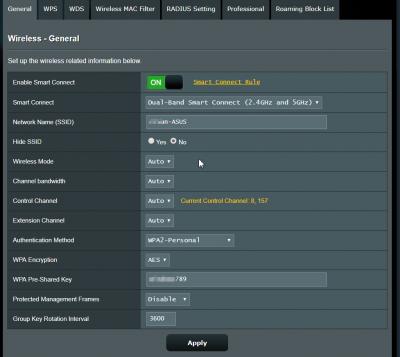
QUOTE(angelic88 @ Oct 28 2018, 12:03 PM) Recently I ran into this problem where iPhone switching between 2.4ghz and 5ghz (same ssid) will have a short 5-10 second reconnection downtime Before this it was working fine as seamlessly Recently upgraded to unifi 500Mbps Router is N66u Anyone face this issue before ? Hi, if you want to set your 2.4 & 5GHz both to same SSID, perhaps you need to buy a higher-end router. RT-AC86U got the smart connect feature which allow you to connect both 2.4Ghz and 5GHz without reconnection downtime issue. Here is the feature to solve 2.4Ghz & 5Ghz problem. When I go far will automatic switch to 2.4GHz and go near will automatic switch to 5GHz. 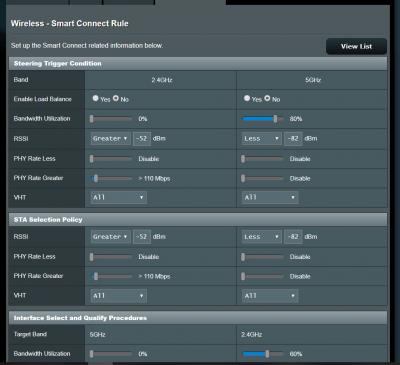
|
|
|
|
|



 Quote
Quote
 0.2380sec
 0.60
0.60
 7 queries
 GZIP Disabled