
Welcome Guest ( Log In | Register )

Outline · [ Standard ] · Linear+

Home Networking ASUS Malaysia Networking User & Technical Support, Managed by ASUS Malaysia Representative

views
     
junclj
post Dec 18 2021, 09:52 AM

Look at all my stars!!
*******
Senior Member
2,348 posts

Joined: Apr 2008


QUOTE(Rainings @ Dec 18 2021, 12:08 AM)
Just started to use RT-AX55
why it suddenly switched my LAN speed from 1Gbps to 100Mbps?
It was fine when I setup the router. Right now it back to 100Mbps
Im using Cat6 cable.
I am already on latest firmware.
Tried all the different port it cannot go back to 1Gbps, what happens here?
Port4 able to detected the cable, but no internet access, cannot login to the router, only show BTU login page. (is this normal or faulty?)
user posted image
After multiple plug and unplug somehow it back to 1Gbps again.  blink.gif
*
Check your LAN cable with a tester. Make sure all 1 - 8 lights are all flashes continuously.
1 - stripe orange
2 - orange
3 - stripe green
4 - blue
5 - stripe blue
6 - green
7 - stripe brown
8 - brown

1,2,3,6 are data transfer wires, while 4,5,7,8 are DC power.
If either one of 4,5,7,8 have problem, your network connections will became 100mbps only.
If either one of 1,2,3,6 have problem, you will can't get any connections. You need to repair the connector with crimping tool.

Just buy the full set of repair kit from shopee
https://shopee.com.my/search?keyword=lan%20crimping%20kit

-----------------------------------------------------------
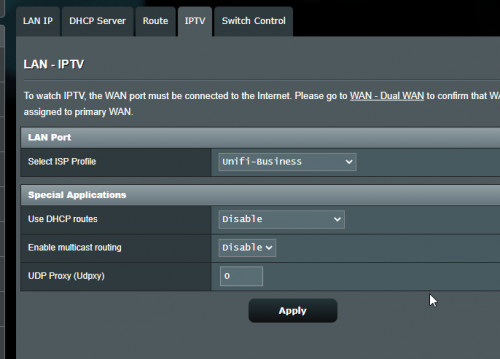
For your second problems, about the port 4 issue. My recommendation is to change your router IPTV settings to Unifi-Business. No matter that you are home user or business user because Unifi-Business can free out all the 4 ports. If you don't have Unifi-TV set-top-box, just switch to Unifi-Business.
user posted image

This post has been edited by junclj: Dec 18 2021, 10:06 AM
junclj
post Dec 18 2021, 12:25 PM

Look at all my stars!!
*******
Senior Member
2,348 posts

Joined: Apr 2008


QUOTE(Rainings @ Dec 18 2021, 12:13 PM)
I just dont understand why it randomly changes my speed to 100Mbps, it was still fine when I turn on the PC.
I check again like after 1hr it shows Megabit instead of Gigabit.
user posted image
Okay i did some digging, turns out other's asus router have this issue.
Omg this is just stupid.
Port4 works now, it can now connect to internet but it just getting 100Mbps instead of 1Gbps.
I just google around, many ppl using asus router also had this issue, seriously whats going on here.
*
Most probably is the LAN cable has problem, need to replace or repair. Inside your LAN cable has 8 wires, there have 8 pins on your LAN cable head connectors. Either one of the pin 4,5,7,8 was oxidized or not contact well. That's why you need to replace a piece of new CAT6 LAN cable or just buy a set of crimping tool, that comes with LAN cable tester. You need to repair the crystal head with new one.

Better just buy the shield types
https://shopee.com.my/Cat6-Crystal-8Pin-RJ4...6486.4534809725
junclj
post Dec 18 2021, 08:41 PM

Look at all my stars!!
*******
Senior Member
2,348 posts

Joined: Apr 2008


QUOTE(Rainings @ Dec 18 2021, 03:23 PM)
omg.. doh.gif
I donno asus router so picky for the cable.
I will test for awhile see how it goes.. damn man i have high expectation on asus router.
Next time should just go with TP link
*
Sometimes it does not relate to the router, I have one of the CAT6 cables that connect from my gigabit switch to my PC and always drop to 100mbps too. I just straight take out a LAN cable crimping tool to cut out both side head then replace new one.

Just follow the 568b standard, self DIY not difficult to learn too.

junclj
post Dec 28 2021, 08:03 PM

Look at all my stars!!
*******
Senior Member
2,348 posts

Joined: Apr 2008


I got one question to ask about the Asus router. Did anyone here notice that when we set our 5GHz wifi to channel 36, 40, 44 or 48. The speedtest result on wifi can reach to maximum speed but if we set the channel to 149, 153, 157, 161 or 165, the speedtest result on wifi only have 95% out of maximum speed. Especially when I set the channel to 165, I only can get 150mbps on speedtest. Why?

Now I was just locked my 5GHz to channel 36 in order to enjoy the maximum internet speed.
junclj
post Dec 29 2021, 08:56 AM

Look at all my stars!!
*******
Senior Member
2,348 posts

Joined: Apr 2008


QUOTE(JohnLai @ Dec 28 2021, 09:42 PM)
user posted image

Look closely on why you only get 150Mbps when you forced channel 165. Only 20Mhz is allowed for channel 165.

As for the 36 - 48 = duh......it is law of physics. 5170Mhz - 5250Mhz is lower than 149 - 165 5735Mhz-5815Mhz. The lower the frequency, the easier for the signal to move around obstacles.

If you need refresher on frequency law of physics, watch this youtube video by Digi from a long time ago.


*
Last time I really don't know the 5GHz wifi speed is related to channels. I just left them "auto". No wonder why sometimes my router can't get full speed on speedtest. Now I better just lock it to channel 36.
junclj
post Dec 30 2021, 09:54 AM

Look at all my stars!!
*******
Senior Member
2,348 posts

Joined: Apr 2008


QUOTE(AV_2018 @ Dec 29 2021, 06:20 PM)
I noticed RT-AC68U when set to lower channels (36-48) the signal is significantly weaker. When set to 149-161 the signal is strong.
*
Signal is stronger but wifi speed is getting slower. I would prefer to wifi speed > signal strength because I have 1 unit RT-AX86U with 2 units of RT-AC86U as aimesh. So don't worry about the signal problem.
junclj
post Dec 31 2021, 09:07 AM

Look at all my stars!!
*******
Senior Member
2,348 posts

Joined: Apr 2008


QUOTE(LuckyLim @ Dec 30 2021, 10:08 PM)
what is DFS channel ?
*
not-recommend to enable it, just stay with channels 36-48
junclj
post Dec 31 2021, 09:10 AM

Look at all my stars!!
*******
Senior Member
2,348 posts

Joined: Apr 2008


QUOTE(afif92 @ Dec 31 2021, 01:51 AM)
For my setup, I'm using DFS channel with 160MHz for third band wifi backhaul. Ez to get 800Mbps for Unifi at second node.
*
You can get high speed easily but need to sacrifice wifi signal strength.
junclj
post Jan 10 2022, 11:16 AM

Look at all my stars!!
*******
Senior Member
2,348 posts

Joined: Apr 2008


QUOTE(Singh93 @ Jan 8 2022, 06:47 PM)
Hi recently had power trip, funny part only router can't turn on, wondering if send back for warranty claim, will Asus layan? Using ax88u.
*
Maybe just need to replace the power adapter
junclj
post Mar 5 2022, 03:13 AM

Look at all my stars!!
*******
Senior Member
2,348 posts

Joined: Apr 2008


Hi ASUSmy, I want to ask about a question about unifi TV vlan500/600 tagging issue.

I have 1 unit RT-AX86U as main router and 2 units RT-AC86U as aimesh node with 2 units TP-link easy smart switches.
My unifi is located at upstairs with ethernet networking. I was successfully tagged the vlan500 and vlan600 through my 1st easy smart switch down to my living room 2nd easy smart switch.
My 1st RT-AC86U is located in my living room which is connected to my 2nd easy smart switch.

I tag my first easy smart switch, vlan500 port 1 untagged then port 2-15 tagged then port 16 not member. Then vlan600 to port 16 untagged then port 2 tagged, the rest are not member.
The PVID settings is Port 2 PVID 1, Port 16 PVID 600, the rest are PVID 500.
Port 1 is connected from my main router. Port 2 is linking down to downstairs in my living room.
My 2nd easy smart switch is vlan500 port 1 tagged, port 2-7 untagged, port 8 not member, then vlan600 port 1 tagged, port 8 untagged, the rest not member.
The PVID settings is Port 1 PVID 1, Port 8 600, the rest are 500.

So my 1st RT-AC86U connected to the port 2 of my 2nd easy smart switch and no issue to connect to wifi. I can get connected to the internet without problem.
UnifiTV is connected to the port 8 of my 2nd easy smart switch and able to stream the live channels without problem.

However, come to my 2nd RT-AC86U which is located in the basement floor (downstairs again from living room). No matter how do I configure the vlan and pvid, I still can't make my 2nd RT-AC86U get connected to the ethernet. My 2nd RT-AC86U is linked to the port 6 of my 1st easy smart switch. I was tried to link another ethernet LAN cable from my main router LAN2 to my 1st easy smart switch for example port 14. Then try to change the default vlan1 port 6 and port 14 to not member, then create another new vlan2 to set port 6 and port 14 as untagged. Then set port 6 and 14 to PVID 2 but I still can get my 2nd RT-AC86U get connected to aimesh.

Any solution to make my 2nd RT-AC86U to get connected to the aimesh?
I am deciding to buy another new easy smart switch to link my 2nd RT-AC86U if really can't solve this problem.

This post has been edited by junclj: Mar 5 2022, 03:17 AM

5 Pages « < 3 4 5Top
 

Change to:
| Lo-Fi Version
0.0401sec    0.50    7 queries    GZIP Disabled
Time is now: 6th December 2025 - 03:48 PM