Outline ·
[ Standard ] ·
Linear+
Home Networking ASUS Malaysia Networking User & Technical Support, Managed by ASUS Malaysia Representative
|
afif92
|
 Mar 4 2021, 11:52 PM Mar 4 2021, 11:52 PM
|

|
QUOTE(ktek @ Mar 4 2021, 11:43 PM) this able fix izit Version 9.0.0.4.386.41994 Beta Version 2021/02/01 71.29 MBytes ASUS RT-AX82U Firmware version 9.0.0.4.386.41994 (Beta Version) Security Fixed: Fixed CVE-2020-25681, CVE-2020-25682, CVE-2020-25683, CVE-2020-25687, CVE-2020-25684, CVE-2020-25685, CVE-2020-25686 Please be noted this is a quick fix beta version for DNSmasq vulnerabilities. Refer to "Method 2: Update Manually" in https://www.asus.com/support/FAQ/1008000 to update this firmware. Please unzip the firmware file first then check the MD5 code. MD5: 6e581237f8c272fa7e0c82879f3bc1e9 I'm not sure but I can switch ON/OFF LED on XT8 at Aimesh -> Node 1 -> Management section. |
|
|
|
|
|
afif92
|
Mar 5 2021, 04:05 PM
|
|
|
QUOTE(danielyeap @ Mar 5 2021, 09:36 AM) "d) I can reach more than 800Mbps if speedtest without others use the wifi, mostly at midnight. Other time, only can reach about 750Mbps to 800Mbps because of other users also use the internet. I'm using AX200 adapter. Normally choose Global Forway." That's very impressive. I really do not know what I did wrong. The crazily slow WIFI speed of the main node aside, I can only normally reach 500+Mbps on the MESH node at most times. Any idea what should I check? I have been through 2 firmwares (both are official ASUS - not beta) and the condition remains the same. Thanks in advance. Please try beta one first. |
|
|
|
|
|
afif92
|
Mar 7 2021, 03:26 PM
|
|
|
QUOTE(hsunl @ Mar 7 2021, 03:13 PM) Just bought a RT AX86U with latest firmware Version 3.0.0.4.386.41535. Problem encountered with my sonos system. Connection not stable. Google source advice to roll back firmware 3.0.0.4.384_9918. May i know where to look for this old firmware from asus website. Checked and there was no old firmware in their official website. Please kindly assist me. TQ very much If sonos speaker use 2.4GHz, you may try disable smart connect and disable wifi 6 for 2.4GHz only. |
|
|
|
|
|
afif92
|
Mar 7 2021, 04:21 PM
|
|
|
QUOTE(hsunl @ Mar 7 2021, 03:55 PM) Yeah.. This morning already did that. No luck. Problem still there. Disable smart connect and wifi 6 for 2.4GHz Did you enable any QOS? You can try disable Universal beamforming and Multi user MIMO at Professional setting for 2.4GHz. |
|
|
|
|
|
afif92
|
Mar 12 2021, 12:28 AM
|
|
|
QUOTE(cskean @ Mar 11 2021, 11:08 PM) Whats the main difference between AX55 & AX56U? Price seems to be 40% more for AX56U... no usb port so many features in there like sharing storage, internet usb dongle are removed. |
|
|
|
|
|
afif92
|
Mar 17 2021, 01:36 AM
|
|
|
QUOTE(XeactorZ @ Mar 16 2021, 10:46 PM) asus router inside got speedtest? how come I could not find it on my tuf-ax3000  It is beside web history in adaptive qos section |
|
|
|
|
|
afif92
|
Mar 17 2021, 08:02 PM
|
|
|
QUOTE(XeactorZ @ Mar 17 2021, 07:12 PM) Looks nothing No wonder you don't have. It is only on the latest 386 version firmware. This post has been edited by afif92: Mar 17 2021, 08:03 PM |
|
|
|
|
|
afif92
|
Mar 18 2021, 12:53 AM
|
|
|
QUOTE(XeactorZ @ Mar 17 2021, 11:40 PM) No wonder As few page previously somebody said latest firmware got bug, that why until right now I still haven't update the firmware yet  If you are already ok with that firmware, just stick with it. If using RT-AX3000, I will suggest to use Merlin. |
|
|
|
|
|
afif92
|
Mar 18 2021, 01:51 AM
|
|
|
QUOTE(XeactorZ @ Mar 18 2021, 01:09 AM) Will continue stick for current firmware, until next firmware nobody complaint about it then will update Btw I use tuf-ax3000, reason being I need to use vpn for multiple device In Merlin, you can do it too but with more advanced function. |
|
|
|
|
|
afif92
|
Mar 20 2021, 08:59 AM
|
|
|
QUOTE(satriaguy @ Mar 20 2021, 07:48 AM) can i still get the latest/last firmware for RT-AC55UHP, asus official site seem remove this router already. Thanks You still can search the discontinued model in Support Section by the way Here it is - https://www.asus.com/my/supportonly/RT-AC55.../HelpDesk_BIOS/This post has been edited by afif92: Mar 20 2021, 09:00 AM |
|
|
|
|
|
afif92
|
Mar 22 2021, 10:15 PM
|
|
|
QUOTE(XeactorZ @ Mar 21 2021, 10:56 PM) Nope, 200mbps is connected using nordvpn sofware on pc If use openvpn client feature on asus router, speed normally around 50mbps As I need to download the config from nordvpn website, and it doesn't allow me to choose which server Since on computer, if I notice this SG server is slow, then I switch to another one  Actually you can download your preferred server by changing server name at download link |
|
|
|
|
|
afif92
|
Mar 22 2021, 10:41 PM
|
|
|
QUOTE(blacktubi @ Mar 22 2021, 10:38 PM) I happen to found this link recently. Used to do the manual way previously. https://nordvpn.com/ovpn/wow, better way.. thanks |
|
|
|
|
|
afif92
|
Mar 26 2021, 05:20 PM
|
|
|
Hi @Asusmy, I just want to check whether I'm using the right setting or not.
I have AX86U as main and XT8 as node. If I'm using default wireless region Asia, the channel available for 5GHz for AX86U is only from 36-64. If use those channel my XT8's wireless dedicated backhaul will not work.
Then, I change the region to USA, the channel for AX86U have 100-161. I just any from those and voila the DWB is working again.
If I want to use dual band router as main and triband as node, is it okay to use The United States region?
Thanks.
|
|
|
|
|
|
afif92
|
Mar 30 2021, 03:30 PM
|
|
|
QUOTE(ASUSmy @ Mar 30 2021, 10:16 AM) Hi afif92, Below image should be the 5GHz channel for Asian region. I am using United States region for my RT-AX92U so that I can get the 160MHz bandwidth. Thank you Yeah I also choose United States too because want to get 160MHz DFS channel.. Thanks for the reply.. Now I know it is not wrongdoing for changing the region.. AX86U can use 36MHz for 160Mhz but XT8 can't recognize it for backhaul as the backhaul band only use UNII-3 channel. When using channel 36 160MHz at AX86U, the XT8 will connect using 2.4GHz only. Last month, I help someone setting his AX11000 also need to change to US region as want to utilize 160Mhz at second band. This post has been edited by afif92: Mar 30 2021, 10:05 PM |
|
|
|
|
|
afif92
|
Apr 20 2021, 12:34 AM
|
|
|
QUOTE(blacktubi @ Apr 18 2021, 06:25 PM) What routers do you use in your AiMesh setup? I will suggest upgrading to the stock firmware and perform a full hard reset to fix your AiMesh issues. Merlin is not always on the latest ASUS GPL branch that contain AiMesh related fixes.  For 386 branch, Merlin now always have the latest GPL. |
|
|
|
|
|
afif92
|
May 2 2021, 01:59 AM
|
|
|
QUOTE(dadah @ May 1 2021, 11:19 PM) i am still having the problematic bug with the router. I cannot get to the router page with 192.168.1.1  but the router.asus bug is fixed. Mostly new Asus router uses 192.168.50.1 |
|
|
|
|
|
afif92
|
Jul 26 2021, 08:26 AM
|
|
|
QUOTE(Reyz @ Jul 26 2021, 08:23 AM) 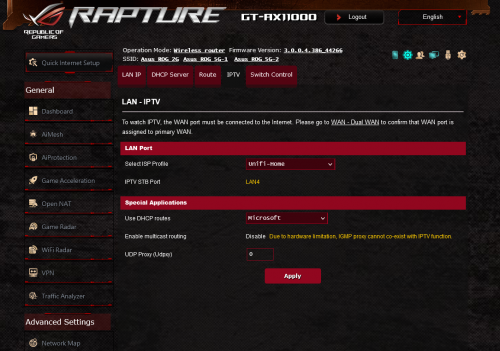 is it in here? yes.. just change to unifi- business profile.. |
|
|
|
|
|
afif92
|
Jul 27 2021, 10:48 AM
|
|
|
QUOTE(tyja @ Jul 27 2021, 07:05 AM) guys, need help here. just bought xt8. one at first floor (main), the other one at second floor. set backhaul 5gh2 to 160 ax only. i can get 250++ at second floor. but at the first floor, i also got 250++. less than 3meter from main router, using laptop with ax200. connection show mine is 1.2gbps. Im on unifi 500mbps if you want to get real speed 160MHz which is 2400Mbps, you must connect to 5GHz-2 that is usually being hidden. |
|
|
|
|
|
afif92
|
Aug 8 2021, 03:04 AM
|
|
|
QUOTE(redoxon @ Jul 31 2021, 09:04 PM) Hi, recently upgraded to Zenwifi AX RT8, firmware version 3.0.0.4.3846_43181, with Unifi 500mbps package. On my pc with lan connection, speedtest gets the full speed at 500+mbps download, and 100+ mpbs upload, while using my phone, sitting in front of the main router, the download speed is half at 200+ mbps while upload is 100+mbps. Is this to be expected from wireless connection? or are there ways to improve the speed? If you have windows pc, try install winFi Lite for Win 10.. Then, you check if the wireless width shows other than 80MHz like 40MHz or 20MHz.. New firmware is not stable in terms of this thing.. So, you must restart both of them or just restart the wifi This post has been edited by afif92: Aug 8 2021, 10:20 AM |
|
|
|
|
|
afif92
|
Aug 8 2021, 10:19 AM
|
|
|
deleted
This post has been edited by afif92: Aug 8 2021, 10:20 AM
|
|
|
|
|



 Quote
Quote
 0.0438sec
 0.23
0.23
 7 queries
 GZIP Disabled