Welcome Guest ( Log In | Register )

5 Pages < 1 2 3 4 > » Bottom

Outline · [ Standard ] · Linear+

Home Networking ASUS Malaysia Networking User & Technical Support, Managed by ASUS Malaysia Representative

views
     
afif92
post Dec 23 2020, 12:04 AM

Casual
***
Junior Member
374 posts

Joined: Mar 2010
QUOTE(arrsoo @ Dec 22 2020, 08:40 PM)
oh my! so, eventually you replace your ac88u routers?
*
yes.. if wanna change, I suggest you wait for the promotion like 12.12, 11.11 in shopee or lazada.. you can get discount more than RM 200 for most >RM1k items
afif92
post Dec 23 2020, 09:25 PM

Casual
***
Junior Member
374 posts

Joined: Mar 2010
QUOTE(vez @ Dec 23 2020, 07:27 PM)
i did tried with 160Mhz previously, same result sweat.gif
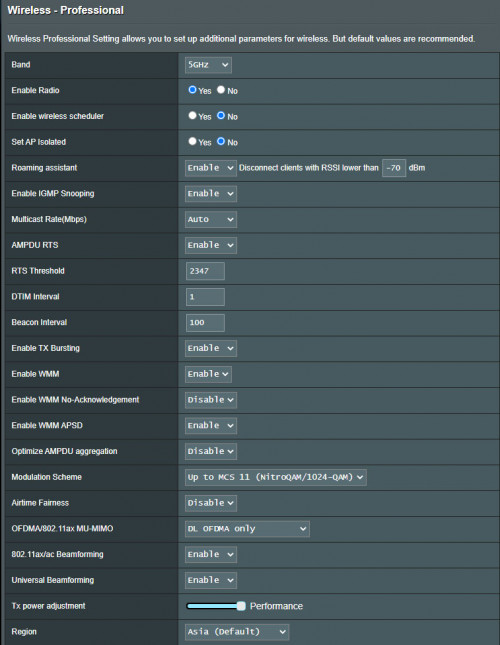
the professional settings as below:-
[attachmentid=10735379]
not on by default sweat.gif double checked and is off
Malaysia model smile.gif

did try again unchecked AX, unchecked DFS / 160Mhz and use WPA2, the result same ~250-300Mbps

i also tried reset my iphone network settings, wondering problem with phone because i tested with 12 pro and 11 pro both yield almost same result... i did use my 12 pro phone to tried at my friend house Time Fibre 1Gbps, can reach 600-700Mbps with 5Ghz band (probably is due to the stock router provided by time)

my phone is without case sweat.gif previously i thought case will affect but seems not

latest update i tried with latest iPad Air, due to no speedtest app i tried with web version sweat.gif, can achieve 500Mbps
[attachmentid=10735502]
then i quickly tried with web version in my iphone 12 pro, able to achieve 500Mbps as well
[attachmentid=10735503]

i also monitor the traffic monitor in router web through out the speed test, it doest peak at >500Mbps
[attachmentid=10735512]

now is how come the speedtest app and web version gave different result consistently 😂
*
For private address in wifi setting, are you still enable or disable it? You may test with disable one.
afif92
post Dec 24 2020, 03:20 PM

Casual
***
Junior Member
374 posts

Joined: Mar 2010
QUOTE(yongtjunkit @ Dec 24 2020, 07:09 AM)
hmm.gif my AX92U is having the same issue, rebooting doesn’t seem to fix the issue as it’s stuck at authorizing
*
After this, we can just easily use Instant Guard vpn connection to connect directly from anywhere to our Asus router. I've already tried it and can configure my router easily even from mobile data.

Even this Let's Encrypt problem still occur, I can connect using Instant Guard app through ddns and just using router IP in browser to configure.

This post has been edited by afif92: Dec 24 2020, 03:23 PM
afif92
post Jan 6 2021, 02:04 AM

Casual
***
Junior Member
374 posts

Joined: Mar 2010
QUOTE(MarekWRO @ Jan 5 2021, 11:50 PM)
Hi i found solution... during setup process i have selected option: WAN - Internet Connection > Special Requirement from ISP > Spoof LAN TTL value
When it is set to ON .. all Samsung devices WIFi is corrupted ... 2.4G and 5G
when it is set to OFF all running fine.
*
Asus router default setting always set to NO for Spoof LAN TTL value. Did you adjust it?
afif92
post Jan 10 2021, 10:39 AM

Casual
***
Junior Member
374 posts

Joined: Mar 2010
QUOTE(ultra.m.a.n @ Jan 10 2021, 09:33 AM)
Should we buy 2 normal router (2x AX82u) or Zen WIFi XT8 (twin pack)?
Which one is better and recommended setup in term of Wifi signal and speed?

Going to setup with ethernet backhaul.
*
For ethernet backhaul, I suggest get at least AX86U for main router and for node any AX router that you are interested

Zenwifi XT8 only suitable when wireless backhaul is needed as it has triband.
afif92
post Jan 13 2021, 10:20 PM

Casual
***
Junior Member
374 posts

Joined: Mar 2010
QUOTE(RViN @ Jan 13 2021, 09:48 PM)
Anyone faced this issue before? I'm running an Asus AC86U, never had problems with it up to a few hours ago when my internet suddenly became very slow.

I rebooted the router, and then the router refused to re-connect.

Looking at the syslog I see this pattern repeating:
I've tried restoring factory settings and that didn't change anything.

CODE
May  5 13:06:56 nat: apply redirect rules error!
May  5 13:06:58 pppd[1490]: PPP session is 44906 (0xaf6a)
May  5 13:06:58 pppd[1490]: Connected to 00:00:5e:00:01:36 via interface br1
May  5 13:06:58 pppd[1490]: Using interface ppp0
May  5 13:06:58 pppd[1490]: Connect: ppp0 <--> br1
May  5 13:06:58 pppd[1490]: Remote message: Authentication success,Welcome!
May  5 13:06:58 pppd[1490]: PAP authentication succeeded
May  5 13:06:58 pppd[1490]: peer from calling number 00:00:5E:00:01:36 authorized
May  5 13:06:58 pppd[1490]: LCP terminated by peer
May  5 13:07:01 nat: apply redirect rules error!
May  5 13:07:01 pppd[1490]: Connection terminated.
May  5 13:07:01 pppd[1490]: Sent PADT
May  5 13:07:01 pppd[1490]: Modem hangup


It keeps throwing that 'LCP terminated by peer' message. I was ready to assume the problem must be with TM since I've not done any changes to the router recently, but I thought I'd try using the TP link router that TM provided to me before which I never took out of the box. Funny thing is, internet works fine on that.

Looks like then its an issue with my AC86U? Any ideas what could be causing this? From Googling it seems the LCP Terminated by peer message is due to a hangup from the ISP side? Should I reach out to TM on this? But if its an issue on their side why would the stock TP Link router work?
*
I'm also faced this problem last hour. Now it is already connected. Hope you also get connected at this moment.

This post has been edited by afif92: Jan 13 2021, 10:20 PM
afif92
post Jan 28 2021, 11:33 PM

Casual
***
Junior Member
374 posts

Joined: Mar 2010
QUOTE(kkm @ Jan 28 2021, 11:01 PM)
asusMY blacktubi

I'm thinking of setting up Aimesh with 3 routers, my AX3000, AC5300 and an old AC68u. Since the AC5300 is tri-band but the other 2 are dual band, would it be better to use the AC5300 as the primary, and the other 2 as secondary nodes?

What is your advice?
*
It can run even triband at node like mine XT8 as node and AX86U as main.

The triband node will use third band as backhaul. So, third band and second band at main will run same channel while second band node run at its own choice.

For your situation, the first way is if want to avoid bandwidth loses too much for end devices, you may run AC5300 as main and others as node but I'm afraid it will not enable Wifi 6 for AX3000. This maybe okay if you still don't use Wifi 6 devices.

The other way if need to use Wifi 6, you must set AX3000 as main and others as node.

Hope my explanation could help you a bit
afif92
post Jan 28 2021, 11:54 PM

Casual
***
Junior Member
374 posts

Joined: Mar 2010
QUOTE(kkm @ Jan 28 2021, 11:44 PM)
Thanks. I do need to use Wifi 6. You mean I can't connect to the AX3000 on Wifi 6 if it's a secondary node?
*
I don't know if it (Wifi 6) will auto enable by default. You may try first that setup and use wifi analyzer app to check for Wifi 6 signal.
afif92
post Jan 29 2021, 05:00 PM

Casual
***
Junior Member
374 posts

Joined: Mar 2010
QUOTE(footie_ft @ Jan 29 2021, 04:05 PM)
Question: I got ax3000 (main) and ac68u (mesh) with Unifi 100MB. Is this enough to support 4 workstation (online meeting and class), 2 iPad, 2 phone and 1 TV?

The ax3000 will disconnect/hang sometimes for few minutes and affect all devices. I think issue with device more than Unifi as I was not able to connect using Asus app to it. I have just updated the firmware today but problem still persist. It's getting harder for me to work this way.
*
It is more than enough. Maybe you can try factory reset them by removing node first and then factory reset main router with tick initialize all setting.
afif92
post Jan 29 2021, 06:20 PM

Casual
***
Junior Member
374 posts

Joined: Mar 2010
QUOTE(footie_ft @ Jan 29 2021, 05:39 PM)
Good idea. Will try swap my ac68u as main and try. Will update.

If ax3000 is the issue, it is disappointing. Or the other firmware, Merlin would be better?
*
Which one is your version, RT-AX3000 or TUF-AX3000? IF RT-AX3000, you can give it a try to Merlin.
afif92
post Jan 29 2021, 09:31 PM

Casual
***
Junior Member
374 posts

Joined: Mar 2010
QUOTE(footie_ft @ Jan 29 2021, 09:10 PM)
Rt-ax3000. If I flash to Merlin, did it mean ac68u also need to be Merlin?
*
No need but it is better to update it with too because Merlin beta 5 use latest update from Asus
afif92
post Feb 3 2021, 06:11 PM

Casual
***
Junior Member
374 posts

Joined: Mar 2010
QUOTE(desires2 @ Feb 3 2021, 05:59 PM)
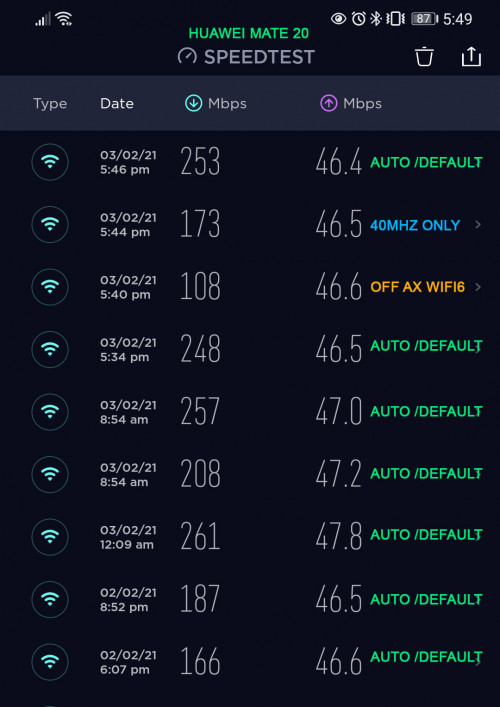
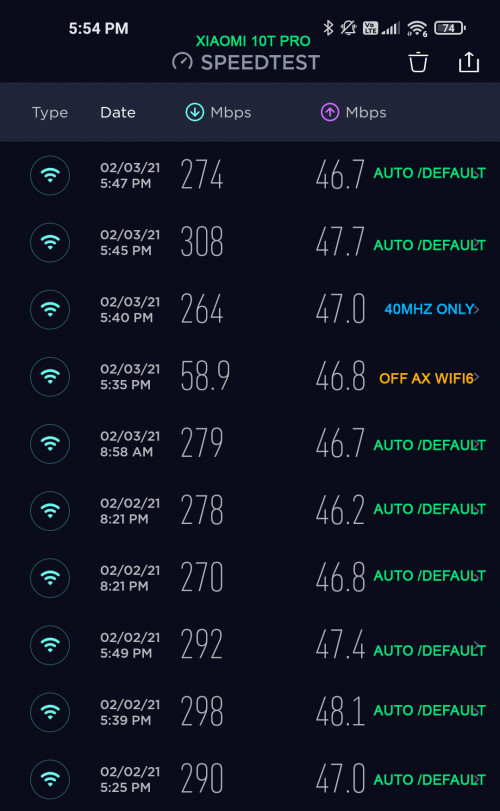
Thanks for reply, tried ~ result more worst  sweat.gif  sweat.gif
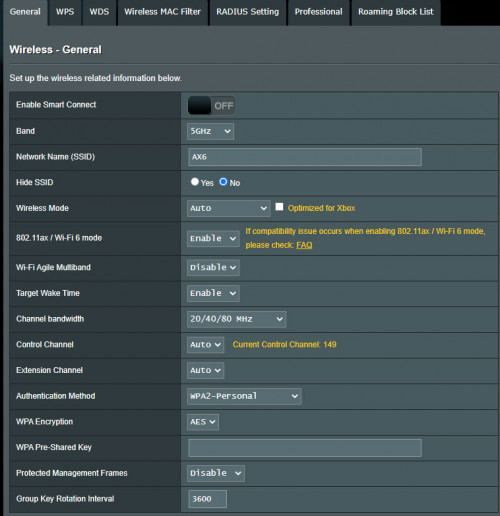
Thanks for reply, please check the attached screenshot ^^ all is default setting
Qos/Priority Setting is OFF
Thanks for reply biggrin.gif, tried ~ xiaomi 10t pro (wifi 6) not much different, but huawei mate 20 drop alot when switch to only 40mhz

rclxub.gif  rclxub.gif  rclxub.gif  cry.gif  cry.gif

Firmware Version:3.0.0.4.384_9428, or should i try the latest beta firmware?  confused.gif  confused.gif

user posted image
user posted image
user posted image
user posted image
*
use latest beta or just give it a try for latest merlin firmware (prefer this one). after load new firmware, factory reset and tick initialize too.
afif92
post Feb 7 2021, 01:10 AM

Casual
***
Junior Member
374 posts

Joined: Mar 2010
QUOTE(matrism @ Feb 7 2021, 12:02 AM)
Hey guys.. i have asus zen xt8.. using wifi 6.. but i cant get above 500mbps. Wifi network link showing 1200mbps. any ideas? Direct lan i can reach 900+ mbps.
*
1200Mbps is maximum link for 5GHz-1.

For 5GHz-2, you can get 2400Mbps if enable 160MHz and use DFS channel from 100-128 but that channel will be hidden if using wireless backhaul. You can set them to be visible.

If test by using speedtest.net, must test using various server because different server, different result. To get accurate result, must test using iPerf 3.
afif92
post Feb 15 2021, 06:25 PM

Casual
***
Junior Member
374 posts

Joined: Mar 2010
QUOTE(Mavik @ Feb 15 2021, 04:44 PM)
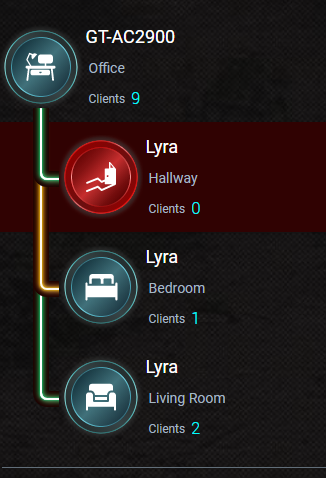
Quick question everyone, I currently have AIMesh setup at home using the ASUS Lyra and this is the current mapping I have.

user posted image

How can I set which node should connect to which node instead of it all pointing directly to my GT-AC2900 instead?

I would like for it to ideally connect from

GT-AC2900 -> Living Room -> Hallway -> Bedroom

Is there a setting in the Router settings for me to do that?
*
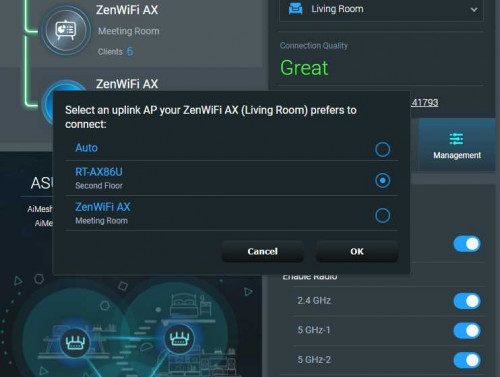
It might be possible if you have updated Lyra firmware with the latest 386 beta firmware but need to get that firmware from 52asus.com or someone in snbforums.com

You will have this kind of settings after upgrade.

user posted image

But if you do the chain setting like that without having node that has dedicated backhaul like XT8, you might end up having slow download speed on the last node.
afif92
post Feb 25 2021, 10:02 PM

Casual
***
Junior Member
374 posts

Joined: Mar 2010
QUOTE(ArrowHater @ Feb 25 2021, 09:29 PM)
Hi, recently i bought Asus XT8. I have Unifi Plus box. I want to connect unifi plus box by lan. It connected to LAN 3 port as by default setting but it seems the plus box didn’t connected to it. Any idea how to solve this?
*
If new Unifi Plus Box no need to use the special LAN port for IPTV.. Just use normal LAN or WiFi..
afif92
post Feb 26 2021, 02:16 AM

Casual
***
Junior Member
374 posts

Joined: Mar 2010
QUOTE(nill @ Feb 25 2021, 11:11 PM)
We still need to allocate one LAN port in main router if want to use UniFi, right? If yes, might as well use that port.
For Asus router, you just choose Unifi-Business profile and the iptv port will be normal port.
afif92
post Mar 3 2021, 12:24 AM

Casual
***
Junior Member
374 posts

Joined: Mar 2010
QUOTE(danielyeap @ Mar 2 2021, 09:29 PM)
How do you do "disabling 2.4Ghz on the AiMesh page"?

I clicked on the "AiMesh" tab on the left panel and then I selected the Mesh node (the main one does not have the "Management" option").

However, there is no option to disabling anything under "Management" (only "USB Application, Reboot Node and Remove Node).

I suspect the 2.4GHz is coming from the MESH node.

==========================================

2.4GHz network aside, I also found that the main router cannot hit or near my Unifi top speed of 800Mbps.

The MESH node, however, is able to give at least 500+Mbps (have also seen 700+Mbps at times).

The strange thing is that if I connect to the LAN port of the main router (reminder: AP mode), I can get 800Mbps consistently.

Any clue why the main router is slower in WIFI speed (NOTE: Using WIFI6 capable devices)?

Thanks.
*
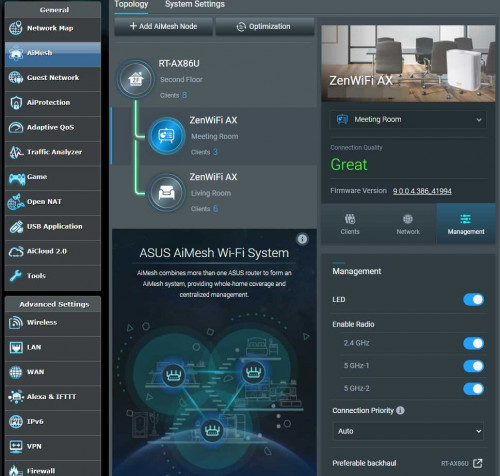
Maybe your node still not update to latest Aimesh 2.0 firmware yet. That's why you didn't have that option to turn off wireless radio at node

user posted image

This post has been edited by afif92: Mar 3 2021, 12:26 AM
afif92
post Mar 4 2021, 03:08 PM

Casual
***
Junior Member
374 posts

Joined: Mar 2010
QUOTE(danielyeap @ Mar 4 2021, 08:18 AM)
Thanks. I updated the firmware to the latest => 3.0.0.4.386_41793-gdb31cdc
Now, I can see the enable/disable radio option.

However, I am still bothered by the slow WIFI speed of the MAIN router.

[SETUP]
UNIFI 800Mbps
Main node = 1st floor living area (center)
MESH node = ground floor living area (center)
AP Mode only (Modem -> Mikrotik router -> XT8 Main node -> XT8 MESH node

Whenever, my WIFI6 devices are connected to the MAIN node, it can only get about 300Mbps when I am very near to it (about 1-2m away).
However, if I get further from the MAIN node, I can get about 500Mbps (eg. In one of the bedrooms on the 1st floor).
If I am connected to the MESH node, I can consistently get 500-700Mbps.

I know the 5GHz-1 is maxed out at 1200Mbps (2x2).
The 5GHz-2 (backhaul) is maxed out at 4804Mbps (4x4).
I do not think that's the root cause, but I have exhausted all my knowledge (noob) on how to improve the WIFI speed of the MAIN node.

While the WIFI speed of the main node is disappointing, but the coverage/penetration of the 2 nodes is excellent!

Any help please? Thanks.

[UPDATE]: I just got 760Mbps (webe server) download from the main node just now by literally standing next to it. I also found that different Speedtest.net servers gives different speed result. Now, I am starting to wonder whether the slow WIFI speed is caused by the XT8 or Speedtest.net. I can consistently get 800Mbps through LAN of my Mikrotik router though.
*
You must update to latest Beta 41994.

That official one might be have problem.

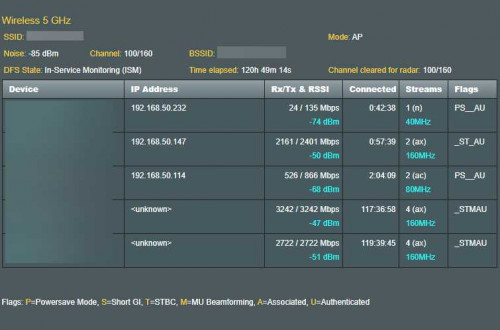
I also have used it and I observed that one of XT8's fronthaul sometimes only will broadcast 20MHz bandwith and not 80MHz and need to be rebooted each time that happen.

Now I'm no longer faced it after upgrade to 41994 latest beta.

Sometimes, the nodes also suddenly disconnect and reconnect back to my main router (AX86U) and now over 100hrs connected, it does not happen anymore.

user posted image

This post has been edited by afif92: Mar 4 2021, 03:14 PM
afif92
post Mar 4 2021, 10:16 PM

Casual
***
Junior Member
374 posts

Joined: Mar 2010
QUOTE(danielyeap @ Mar 4 2021, 03:57 PM)
Hi @afif92
Thanks for your reply.

I am not a WIFI expert, so please bear with me:
(a) How do you know the broadcast has downgraded to 20MHz from 80MHz?
NOTE: My "Channel bandwidth" is currently set to 20/40/80MHz

(b) I am unable to find the page similar to the screenshot that shows the connected duration that you shared. Is it only available through Beta 41994?

© How did you detect the sudden disconnection of the node to the main router?

(d) It seems you are on UNIFI 800 too. Can I know what is your normal WIFI speed through Speedtest.net and which server do you normally choose?

Thanks.
*
a) I'm using software like Wifi Analyzer (Android) or WinFi Lite (Win10)

b) that page can be found in system log -> wireless log but this beautiful page only available if using Asus Merlin Firmware.

c) I'm seeing it thru that wireless log page. Mostly after 2 days, one of the node will renew it connected time. So from that time, I know it is reboot or reconnect.

d) I can reach more than 800Mbps if speedtest without others use the wifi, mostly at midnight. Other time, only can reach about 750Mbps to 800Mbps because of other users also use the internet. I'm using AX200 adapter. Normally choose Global Forway.
afif92
post Mar 4 2021, 10:17 PM

Casual
***
Junior Member
374 posts

Joined: Mar 2010
QUOTE(ktek @ Mar 4 2021, 06:01 PM)
boss. i install ax11000 master & ax82u node by mesh mode.
is there a way to change node rgb color
*
Have you update your node to the latest firmware?

5 Pages < 1 2 3 4 > » Top
 

Change to:
| Lo-Fi Version
0.0502sec    0.32    7 queries    GZIP Disabled
Time is now: 11th December 2025 - 07:43 AM