Welcome Guest ( Log In | Register )

13 Pages « < 8 9 10 11 12 > » Bottom

Outline · [ Standard ] · Linear+

Home Networking ASUS Malaysia Networking User & Technical Support, Managed by ASUS Malaysia Representative

views
     
jusbella
post Mar 20 2020, 10:28 AM

Look at all my stars!!
*******
Senior Member
3,035 posts

Joined: Dec 2011


QUOTE(yongtjunkit @ Mar 20 2020, 10:24 AM)
Does this count as an overload?
Usually only see below 10% cpu usage for both CPU cores, today suddenly see high cpu usage... and the web UI is slow
Is there any way to see what is hogging the CPU resources?
Router: RT-AC68U
user posted image
*
Torrenting.....

Try reboot and observe again.
jusbella
post Apr 7 2020, 10:39 PM

Look at all my stars!!
*******
Senior Member
3,035 posts

Joined: Dec 2011


QUOTE(fongkeeyik360 @ Apr 7 2020, 10:22 PM)
[email=ASUSmy]ASUSmy[/email]

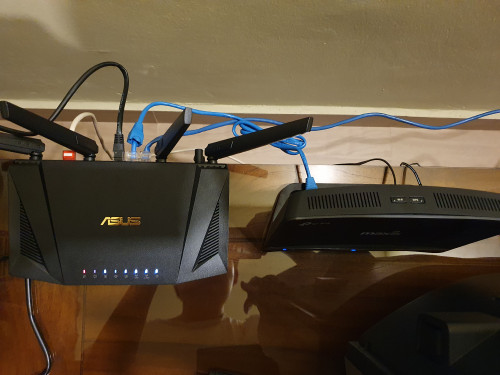
I followed your steps. Reinstall firmware 3.0.0.4.384_8591 > factory reset > setup again. But still the same problem, once connect with maxis router through LAN 3 for VOIP my Asus router straight away disconnect and reboot.

Below photos is my connection and Asus router disconnected from internet

user posted image
user posted image
*
I assume white cable is from Modem, correct?

Black cable is port 3 right? what equipment is tat?

This post has been edited by jusbella: Apr 7 2020, 10:40 PM
jusbella
post Apr 8 2020, 02:33 PM

Look at all my stars!!
*******
Senior Member
3,035 posts

Joined: Dec 2011


Check you have hide SSID or not?
QUOTE(cucubud @ Apr 8 2020, 02:14 PM)
Hi ASUSmy,

Currently I am using Asus RT-AC1300UHP router on Unifi.
Firmware Version: 3.0.0.4.382_52134

My problem is I have one Lenovo laptop cannot detect the WiFi SSID from this router but can see all the neighbours WiFi SSID.

I setup a Hotspot from my phone, this laptop can detect the SSID, managed to log in and surf the internet.

I borrowed a Asus RT-AC86U router to test. The Lenovo laptop can see the WiFi SSID, managed to log in and surf the internet.

Why is it that the Lenovo laptop cannot see the WiFi SSID from the RT-AC1300UHP router?
How to solve this problem?
*
Hardware acceleration try On / Off to test which one working.
QUOTE(doket @ Apr 8 2020, 02:29 PM)
hello, ASUSmy,

i am using asus RT-ac88u and with Firmware Version:3.0.0.4.384_81790 on unifi.

i want to ask why Bandwidth Limiter not working? i already set rule for the target i want limited but it still have speed over the rule i set...
*
This post has been edited by jusbella: Apr 8 2020, 02:33 PM
jusbella
post Apr 8 2020, 03:14 PM

Look at all my stars!!
*******
Senior Member
3,035 posts

Joined: Dec 2011


Seem weird, try change the channel.

Another case you might saved the SSID previously, try manage known SSID in the laptop, then choose forgot the SSID and try connect again.

QUOTE(cucubud @ Apr 8 2020, 03:01 PM)
Hi jusbella,

Thank you for your quick reply.

The SSID is visible. All my other laptops and mobile devices can see the SSID except the Lenovo laptop.
*
This post has been edited by jusbella: Apr 8 2020, 03:17 PM
jusbella
post Apr 8 2020, 03:18 PM

Look at all my stars!!
*******
Senior Member
3,035 posts

Joined: Dec 2011


Another case you might saved the SSID previously, try manage known SSID in the laptop, then choose forgot the SSID and try connect again.

QUOTE(cucubud @ Apr 8 2020, 03:17 PM)
Tried already. No improvement at all.
*
jusbella
post Apr 8 2020, 11:05 PM

Look at all my stars!!
*******
Senior Member
3,035 posts

Joined: Dec 2011


AFAIK whenever u set OVPN for router, all connection will be using VPN connection.

Maybe u can try this? https://www.vpnuniversity.com/routers/use-s...-asuswrt-merlin

QUOTE(ben3003 @ Apr 8 2020, 10:57 PM)
anyone know for asus merlin, how to set vpn client exclusive for a specific device? i am using nordvpn. i tried set to exclusive but there is not option to choose only which device passthru the vpn
*
This post has been edited by jusbella: Apr 8 2020, 11:10 PM
jusbella
post May 24 2020, 03:58 PM

Look at all my stars!!
*******
Senior Member
3,035 posts

Joined: Dec 2011


QUOTE(kslim21 @ May 24 2020, 11:33 AM)
Hi,

Is it possible to use RT-AC55UHP to pair with RT-AC66U as repeater or in AiMesh mode without LAN cable?

I'm looking for setup guide to extend the WIFI range to the blind spots at my house's 1st floor using RT-AC55UHP, after purchasing RT-AC66U as main router.

Thank you very much.
*
https://www.asus.com/microsite/AiMesh/en/index.html
jusbella
post May 31 2020, 11:15 AM

Look at all my stars!!
*******
Senior Member
3,035 posts

Joined: Dec 2011


QUOTE(Fantasia @ May 31 2020, 10:38 AM)
Hi, I just setup AX3000. I find that in the WebUI under IPTV, if I wanted to set the VLAN manually, I need to type the VLAN ID manually for Internet and IPTV. If I want to enable VLAN ID 500 for LAN1-3, I type "1-3" in VID? How about SSID using this VLAN ID too? And also, may I know what is PRIO?
*
Priority, just leave it default.
jusbella
post Jun 20 2020, 11:37 AM

Look at all my stars!!
*******
Senior Member
3,035 posts

Joined: Dec 2011


QUOTE(playxboxwii @ Jun 20 2020, 10:44 AM)
I actually did have WiFi mesh tp link deco m5 but it doesn’t work cover the whole area for some reason
I also have netgear ac1200 WiFi extender that could not reach the area
I’m suspecting either there something blocking the signal or the rt n16 router is could not send the signal
I did some speed test and the router is the worst..getting like below 30mbps download
With netgear is a bit better in 5ghz at around 100mbps , tp link much better at almost 300mbps
But all of this speed are only in my room where I set up my router.
Once I go out of the room speed and signal decrease
I did put another deco m5 at the dead zone..below 10mbps only
*
You might consider get Ruckus AP with all wiring, mesh is not possible in your case.
jusbella
post Jun 22 2020, 08:56 AM

Look at all my stars!!
*******
Senior Member
3,035 posts

Joined: Dec 2011


QUOTE(playxboxwii @ Jun 22 2020, 03:36 AM)
Is it same as router? Or need wiring?
Nver heard of it
Tq for suggestion will google around

I think mesh works it just ..i think i hve so many electronic devices/thick wall/glasses ?
*
Yes it's just like router, try get a router that can set as AP mode then all connected using wiring then everything will be stable.

And yes a lot of devices will interfere your mesh, as mesh also using wireless bridging each other.

This post has been edited by jusbella: Jun 22 2020, 08:57 AM
jusbella
post Jul 13 2020, 11:01 PM

Look at all my stars!!
*******
Senior Member
3,035 posts

Joined: Dec 2011


QUOTE(joeyrm @ Jul 13 2020, 10:38 PM)
Hi AsusMy,

I have updated my AX3000 router to the latest firmware this afternoon, however, i'm currently being refused connection to the router's admin page once the internet is up. I have rebooted and factory reset the router multiple times today with the same result.

Please do note that i cant send any feedback due to the issue. Please escalate this issue to the Asus tech team on this bug.  FYI, I have used Edge, chrome, safari browsers and even asus app to access the page but to no avail..
*
Try access using this link https://192.168.0.1:8443/

jusbella
post Jul 13 2020, 11:10 PM

Look at all my stars!!
*******
Senior Member
3,035 posts

Joined: Dec 2011


QUOTE(joeyrm @ Jul 13 2020, 11:07 PM)
Cannot get access.  Even after i disabled the https, still encounter the same problem..  The only way to get in is too reboot the router, and get in before the internet connection gets up.
*
Maybe can revert back old firmware?
jusbella
post Jul 17 2020, 09:55 PM

Look at all my stars!!
*******
Senior Member
3,035 posts

Joined: Dec 2011


QUOTE(shadowblack @ Jul 17 2020, 08:19 PM)
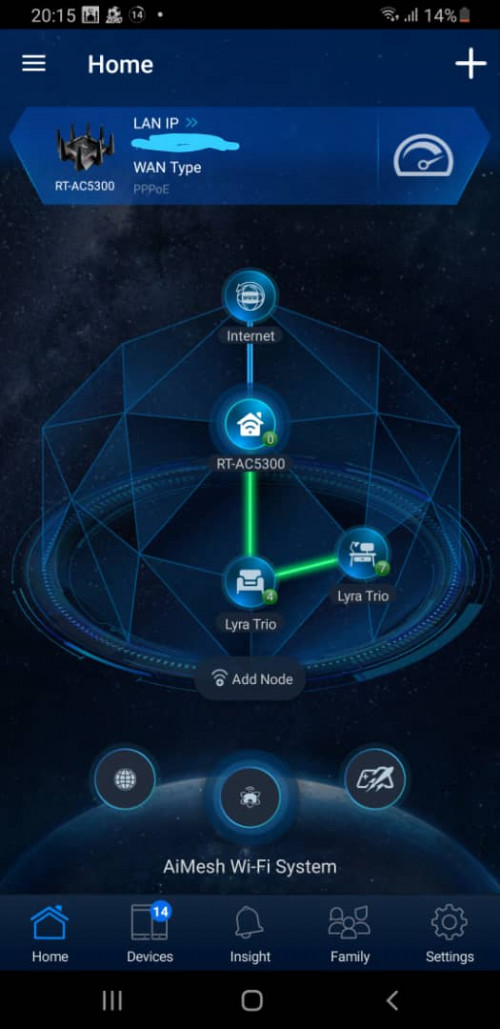
Anyone use AiMesh here? I just started using AiMesh. Using rt-ac5300 as main router and 2 lyra trio as node. I realize that when my laptop connect to the node, sometimes it will have auto dc and reconnect. I realize it when Im playing online game, I will have ping spike or dc. But when I turn off both node and my laptop connect to the main router, it seems smooth and no ping spike. Anybody know how to solve this problem?

Both node have great/green connection. Even my other device connect to the node sometimes will auto dc. Here is my aimesh map. My couter and both lyra is currently on latest firmware

user posted image
*
How far the 2 node between router and each other?
jusbella
post Jul 21 2020, 08:36 PM

Look at all my stars!!
*******
Senior Member
3,035 posts

Joined: Dec 2011


QUOTE(wongth7 @ Jul 21 2020, 08:10 PM)
hi asus, i'm using RT-AC66U B1 with 3.0.0.4.385_20630 firmware.

my 2.4ghz wifi keep dropping occasionally, i checked the log and it shows this....what do i need to do?

Jul 21 19:36:28 syslog: WLCEVENTD wlceventd_proc_event(481): eth1: Disassoc 24:18:1D:16:FC:FC, status: 0, reason: Disassociated because sending station is leaving (or has left) BSS (8)
Jul 21 19:36:36 syslog: WLCEVENTD wlceventd_proc_event(500): eth2: Auth 24:18:1D:16:FC:FC, status: Successful (0)
Jul 21 19:36:36 syslog: WLCEVENTD wlceventd_proc_event(529): eth2: Assoc 24:18:1D:16:FC:FC, status: Successful (0)
Jul 21 19:36:36 syslog: WLCEVENTD wlceventd_proc_event(481): eth1: Disassoc 24:18:1D:16:FC:FC, status: 0, reason: Disassociated because sending station is leaving (or has left) BSS (8)
Jul 21 19:36:42 syslog: WLCEVENTD wlceventd_proc_event(481): eth2: Disassoc 24:18:1D:16:FC:FC, status: 0, reason: Disassociated because sending station is leaving (or has left) BSS (8)
*
Got channel fly option? Turn it off if there is channel fly option.

If not, try change the channel to 11 only and test if this still happening or not.

This post has been edited by jusbella: Jul 21 2020, 08:37 PM
jusbella
post Aug 2 2020, 12:07 AM

Look at all my stars!!
*******
Senior Member
3,035 posts

Joined: Dec 2011


QUOTE(tharmaraj @ Aug 2 2020, 12:05 AM)
how to setup ASUS RT-AX56U with UNIFI modem? Please guide me because it's not detecting the connection. Thanks.
*
https://www.blacktubi.com/unifi/setup-asus-...comment-page-5/
jusbella
post Aug 2 2020, 01:28 AM

Look at all my stars!!
*******
Senior Member
3,035 posts

Joined: Dec 2011


QUOTE(tharmaraj @ Aug 2 2020, 01:21 AM)
works perfectly. Thank you. thumbup.gif
*
Should thanks blacktubi
jusbella
post Oct 23 2020, 10:00 PM

Look at all my stars!!
*******
Senior Member
3,035 posts

Joined: Dec 2011


QUOTE(fox_shinoda @ Oct 23 2020, 09:53 PM)
My RT AX3000 can’t update to latest firmware. Tried over the phone app failed, a few times

Open the gui over pc browser, once go into firmware upgrade, it will just stuck on Firmware Downloading... screen and doesn’t do anything
*
Just go to Asus official site manual download the firmware then push the update by load the firmware file you downloaded.
jusbella
post Oct 23 2020, 11:02 PM

Look at all my stars!!
*******
Senior Member
3,035 posts

Joined: Dec 2011


QUOTE(fox_shinoda @ Oct 23 2020, 10:42 PM)
I already downloaded the official latest firmware, but can’t get to select it via gui. As soon as clicking on the firmware update tab on the browser, a new pop up downloading firmware appear and just stuck there
*
Use other browser like Firefox or internet explorer.
jusbella
post Oct 26 2020, 10:43 AM

Look at all my stars!!
*******
Senior Member
3,035 posts

Joined: Dec 2011


QUOTE(nitehawk @ Oct 26 2020, 10:02 AM)
Hi,
Is it possible to restart Wi-Fi without restarting RT-AC86U router?
*
Disabled the wifi then enable back wifi consider restart?
jusbella
post Nov 18 2020, 08:59 PM

Look at all my stars!!
*******
Senior Member
3,035 posts

Joined: Dec 2011


QUOTE(AlexisStarZ @ Nov 18 2020, 08:54 PM)
Ya is working, just no idea why unable to browse http://router.asus.com hmm.gif

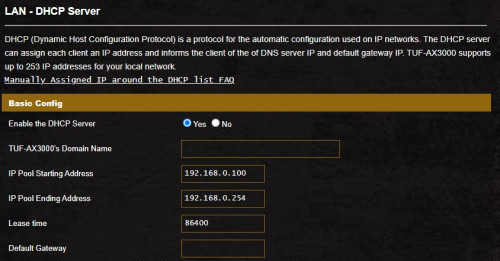
btw, I had set DHCP starting address from 192.168.0.100 onwards (as photo below), how come the ip address that my device connected to it getting ip address 192.168.0.200+ onwards?
Just check, my PS4 getting 192.168.0.230 innocent.gif
I thought it should be start from 192.168.0.100?

user posted image
*
It's work that way, because ip range is 0.100 - 0.254, so randomly within those range.

Or else u can reduce it to 0.100 - 0.105 only 6 ip will be given.

This post has been edited by jusbella: Nov 18 2020, 09:00 PM

13 Pages « < 8 9 10 11 12 > » Top
 

Change to:
| Lo-Fi Version
0.0469sec    0.36    7 queries    GZIP Disabled
Time is now: 11th December 2025 - 05:27 AM