Outline ·
[ Standard ] ·
Linear+
Home Networking ASUS Malaysia Networking User & Technical Support, Managed by ASUS Malaysia Representative
|
jusbella
|
 Nov 23 2020, 08:34 PM Nov 23 2020, 08:34 PM
|

|
QUOTE(smilealwaysz @ Nov 23 2020, 08:30 PM) Hi AsusMY, i have updated the device firmware to this version, but the VoIP is still not working, is there any setting need to be done from Maxis Archer C5v? or just purely plug and play to LAN Port 3? Maxis router no need to do any configuration. It's plug and play. Make sure the router state which Lan port is for voip. Then plug in Lan port voip to your maxis wan port. That's it. |
|
|
|
|
|
jusbella
|
Nov 23 2020, 09:56 PM
|
|
|
QUOTE(smilealwaysz @ Nov 23 2020, 09:54 PM) By right there is no any configuration on maxis router. Anyway can u captured the Asus router setting LAN, iptv section see what the setting look like? |
|
|
|
|
|
jusbella
|
Nov 23 2020, 10:06 PM
|
|
|
QUOTE(mrjhsk @ Nov 23 2020, 10:04 PM) Sorry, very noob in this.. Basically No internet. Browser says DNS_PROBE_FINISHED_NO_INTERNET So it works for a while.... after some time... this pop up . and it is still connected to the wifi but No Internet Seem it's dns issue, you may check your network adapter ipv4 dns setting either put auto or else use Google dns. That it. |
|
|
|
|
|
jusbella
|
Nov 23 2020, 10:14 PM
|
|
|
QUOTE(smilealwaysz @ Nov 23 2020, 10:12 PM) Here you go.. All are default settings, never changed anything. 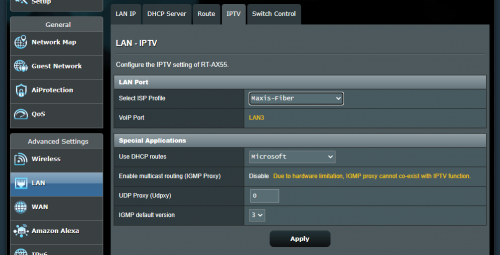 Seems ok. BTW did u try use back maxis router and voip work? |
|
|
|
|
|
jusbella
|
Nov 23 2020, 10:28 PM
|
|
|
QUOTE(smilealwaysz @ Nov 23 2020, 10:21 PM) Yes, voip worked when i use back maxis router. Could u go to Lan, iptv section, then profile change to custom / manual, capture what the vlan ID for port 3? |
|
|
|
|
|
jusbella
|
Nov 23 2020, 10:34 PM
|
|
|
QUOTE(smilealwaysz @ Nov 23 2020, 10:32 PM) This? 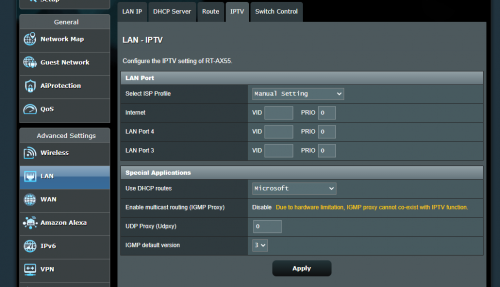 Yes correct. Internet u put 621 Then port 3 put 821 and port 4 put 822. Then test voip on port 3 and 4, see which one working. |
|
|
|
|
|
jusbella
|
Nov 23 2020, 10:37 PM
|
|
|
QUOTE(mrjhsk @ Nov 23 2020, 10:35 PM) There's no way to update it anymore... latest version. I am trying something I find online command prompt with administrator access the following ipconfig /release ipconfig /flushdns ipconfig /renew netsh int ip reset netsh winsock reset hope this works. Else I think gotta go get new dongle. Have u tried manual use Google dns under ipv4 setting? |
|
|
|
|
|
jusbella
|
Nov 23 2020, 10:40 PM
|
|
|
QUOTE(mrjhsk @ Nov 23 2020, 10:38 PM) Yeap I did. I normally set it to 8.8.8.8 and 1.1.1.1 Uninstall driver and delete driver. |
|
|
|
|
|
jusbella
|
Nov 23 2020, 10:51 PM
|
|
|
QUOTE(mrjhsk @ Nov 23 2020, 10:50 PM) I uninstalled.... But How do you delete driver? When u uninstall from device manager it'll have delete option, or else just ignore. |
|
|
|
|
|
jusbella
|
Nov 23 2020, 11:22 PM
|
|
|
QUOTE(smilealwaysz @ Nov 23 2020, 11:15 PM) Tried your method, its still not working, both LAN ports 3 or 4 are not working for VoIP, still unable to make calls or receive calls. The phone LED on C5v is not light up. 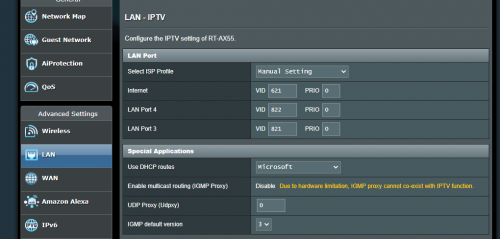 Is the modem from tm? Internet 621 working? |
|
|
|
|
|
jusbella
|
Nov 23 2020, 11:29 PM
|
|
|
QUOTE(shinjite @ Nov 23 2020, 11:27 PM) Try LAN4 port 823, LAN3 is 822 I checked his existing maxis router 822 it's the correct voip vlan. smilealwaysz try put all port 822 and test both port. Make sure use cat5e Lan cable. |
|
|
|
|
|
jusbella
|
Nov 24 2020, 12:02 AM
|
|
|
QUOTE(smilealwaysz @ Nov 23 2020, 11:57 PM) 822 for LAN3 and LAN4 right? not inclusive of internet right? Tested, still same. Yes, Cat 5e cable confirmed. 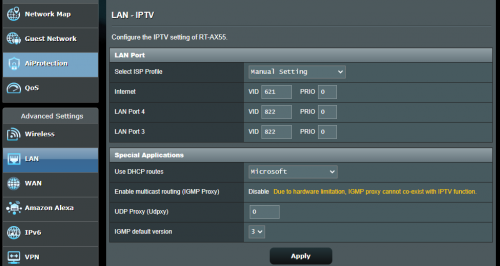 Yes right. 621 maintain. Your case seems to be weird. You try plug in back your maxis router, see which vlan ID voip is connected and work in maxis router setting. |
|
|
|
|
|
jusbella
|
Nov 24 2020, 03:13 AM
|
|
|
QUOTE(smilealwaysz @ Nov 24 2020, 12:57 AM) Once i plug the internet back to Maxis Router, everything works as per usual including VoIP. 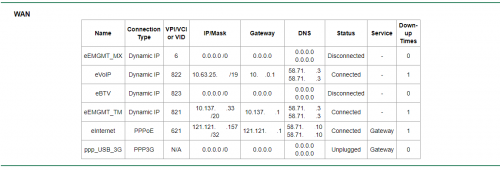 Yeah 822 is correct one. Seems it's the firmware bugs. Try see any latest firmware for your router? |
|
|
|
|
|
jusbella
|
Nov 29 2020, 09:54 AM
|
|
|
Guy why don't consider use synology Nas storage?
|
|
|
|
|
|
jusbella
|
Nov 29 2020, 12:14 PM
|
|
|
QUOTE(mrjhsk @ Nov 29 2020, 12:05 PM) Unfortunately, no... I'm actually waiting for advice for the experts here. Cause I'm out of idea... had a crash course on networking on youtube .... that didn't do a lot of good. Can you capture static route list in your router let us check? |
|
|
|
|
|
jusbella
|
Nov 29 2020, 01:32 PM
|
|
|
QUOTE(mrjhsk @ Nov 29 2020, 01:23 PM) [attachmentid=10705868] Didn't do anything to the static route. Try set it. Host IP: 0.0.0.0 Subnet: 0.0.0.0 or 255.255.255.0 Gateway: your router ip Interface: your pppoe wan. Metric 1 or 0 Test. This post has been edited by jusbella: Nov 29 2020, 01:33 PM |
|
|
|
|
|
jusbella
|
Dec 1 2020, 09:54 PM
|
|
|
URL filter won't work on https and http with compression. U may need to use AI protection feature if have. QUOTE(yhsiau @ Dec 1 2020, 09:43 PM) Hi. ASUSmy, I tried blocking the site: "www.youtube.com" via URL Filter but it's not working. My router is AX86U. I could use some helps. Thanks. |
|
|
|
|
|
jusbella
|
Jan 1 2021, 09:28 AM
|
|
|
Change power adapter. QUOTE(hiroka88 @ Jan 1 2021, 12:22 AM) Hi, everyone My router just suddenly no response, no connection, no lights. It's mean "broken"? 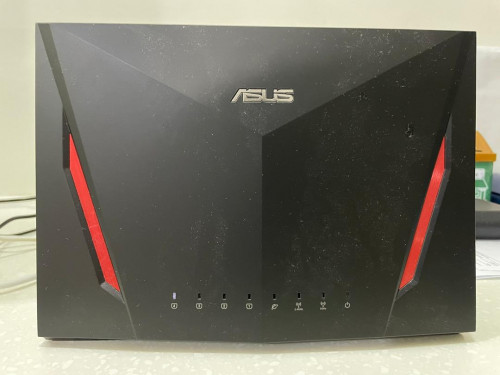 I set this router as aimesh, so no plug in any cable. Only power adapter. |
|
|
|
|
|
jusbella
|
Mar 9 2021, 09:33 AM
|
|
|
Just setup normal PPPoE will do. There is no special ISP requirement. QUOTE(KingArthurVI @ Mar 8 2021, 10:34 PM) Any instructions to set up Asus router with TIME? Nope, TIME didn't use any VLAN tagging. Just normal PPPoE will do. QUOTE(jpong1 @ Mar 9 2021, 09:08 AM) I think after access to router , under ISP, that is "TIME" option, select it will do. |
|
|
|
|
|
jusbella
|
Mar 20 2022, 12:09 PM
|
|
|
ISP side issue. So temporary please use IPv4. QUOTE(Singh93 @ Mar 20 2022, 08:45 AM) Ipv6 significantly slower than ipv4 for ax88u, can advice what is wrong |
|
|
|
|



 Quote
Quote

 0.0380sec
 0.78
0.78
 7 queries
 GZIP Disabled