

Anyone own rt1200g+? Can it handle unifi 500mbps?
Home Networking ASUS Malaysia Networking User & Technical Support, Managed by ASUS Malaysia Representative
Home Networking ASUS Malaysia Networking User & Technical Support, Managed by ASUS Malaysia Representative
|
|
 Nov 24 2018, 03:00 PM Nov 24 2018, 03:00 PM
Return to original view | Post
#161
|
 
Senior Member
3,034 posts Joined: Dec 2011  
|
Anyone own rt1200g+? Can it handle unifi 500mbps?
|
|
|
|
|
|
Dec 7 2018, 01:53 PM
Return to original view | Post
#162
|
|
Senior Member
3,034 posts Joined: Dec 2011
|
QUOTE(sHawTY @ Dec 7 2018, 01:41 PM) Anyone can share their UTorrent Port Forwarding configuration in their ASUS routers? You internet line is unifi or maxis?I've tried everything aside from disabling the Windows 10 firewall to open the port but UTorrent still say that my port is not open Don't tell me to go into PortForward website, already done that, still doesn't work It used to work on my RT-AC68U but after I switch to RT-AC86U then to GT-AC5300, it no longer works On Windows 10 by the way  |
|
|
Dec 14 2018, 08:03 PM
Return to original view | Post
#163
|
|
Senior Member
3,034 posts Joined: Dec 2011
|
QUOTE(wanjun23 @ Dec 14 2018, 05:01 PM) Are you saying that i have to set up VLAN manually in order to use IPTV? What if i only use unifi internet service? Just put all port same vlan id will do. |
|
|
Dec 15 2018, 11:45 AM
Return to original view | Post
#164
|
|
Senior Member
3,034 posts Joined: Dec 2011
|
QUOTE(wanjun23 @ Dec 15 2018, 11:25 AM) Same VLAN id as in 500? You can follow his guide. If u don't use unifitv then u can ignore the guide and put all same vlan id can liao.Do i just set the same as blacktubi guide? |
|
|
Dec 19 2018, 12:39 PM
Return to original view | Post
#165
|
|
Senior Member
3,034 posts Joined: Dec 2011
|
QUOTE(GreenSamurai @ Dec 19 2018, 12:28 PM) Anyone here bought and used asus lyra before? Any personal experience reviews? blacktubi https://www.blacktubi.com/review/asus-lyra-mesh-wifi/ |
|
|
Dec 25 2018, 04:05 PM
Return to original view | Post
#166
|
|
Senior Member
3,034 posts Joined: Dec 2011
|
QUOTE(Singleon @ Dec 25 2018, 03:55 PM) Hi, U need use beta firmware.. Read old post you'll understand.My unifi got turbo-ed to 500mbps But I unable to reach near by speed (WiFi 5ghz and Lan cable) Router Firmware already uptodate I reported the issue to unifi and they came to diagnose the matter. They used their TP-Link 1200ac Able to reach nearby speed (WiFi 5ghz and Lan cable) They suspect something to do with the router. Are u able to assist me? Tak akan cheap router performs better than this ac1900?? Hope you can assist me on this matter Many thanks Attached the pict here. My wan got 1gbps And my Lan1 too Lan1 is my pc. Ignore my lan2,3 and 4 It’s my other equipments 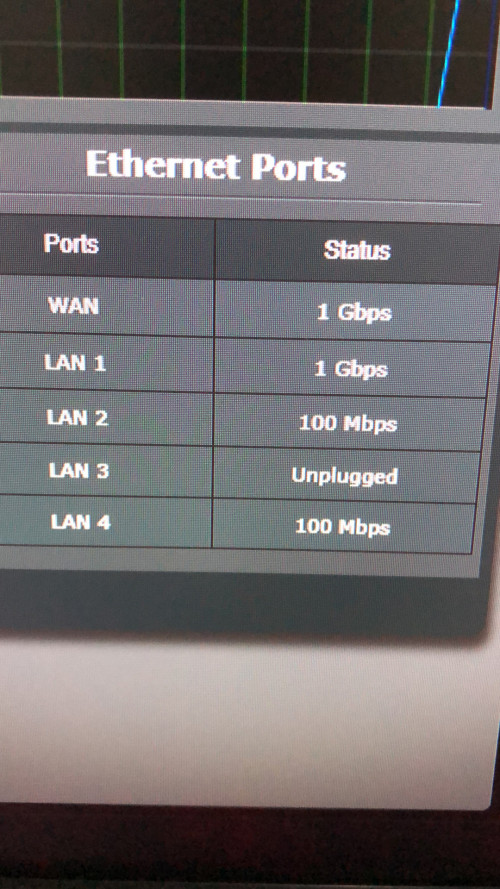 |
|
|
|
|
|
Jan 10 2019, 08:05 AM
Return to original view | Post
#167
|
|
Senior Member
3,034 posts Joined: Dec 2011
|
QUOTE(yongtjunkit @ Jan 10 2019, 07:21 AM) 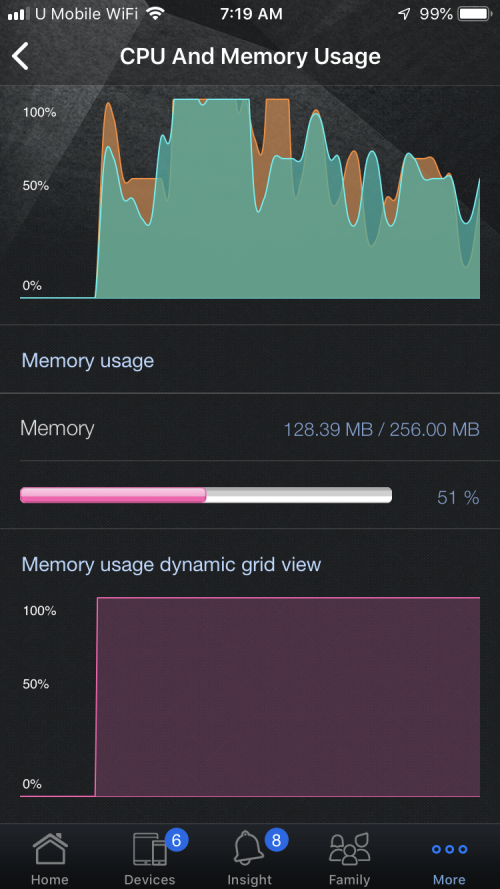 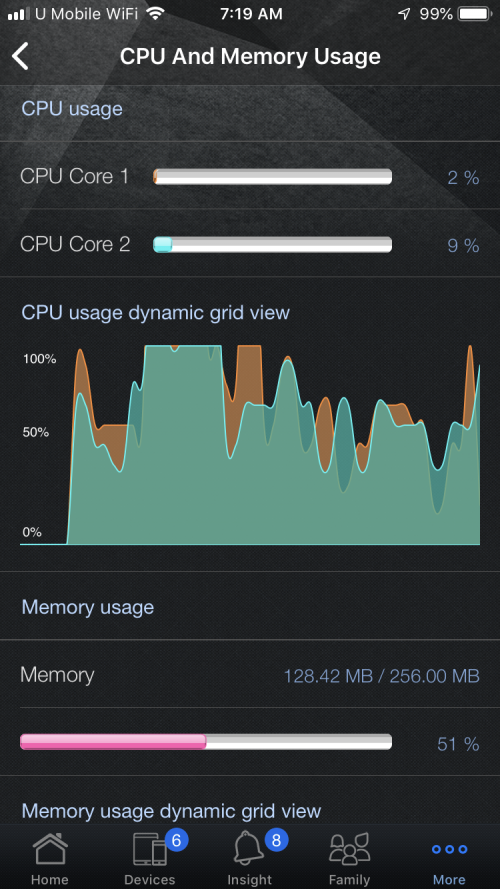 Hi, is the cpu and ram usage normal for my ASUS rt ac 68u |
|
|
Jan 18 2019, 01:15 PM
Return to original view | Post
#168
|
|
Senior Member
3,034 posts Joined: Dec 2011
|
QUOTE(optimisez @ Jan 18 2019, 12:02 PM) Hi @ASUSmy, Got hard reset?I found that after I updated firmware of my ASUS DSL-AC52U Dual-Band Wireless-AC750 Gigabit VDSL2/ADSL2+ Modem Router to latest version (1.1.2.3_617-gfa1b634 2018/12/05 at the time of writing) , my laptop with Killer Wireless 1535 no longer able to use 5GHz band to surf internet. Currently I only can use internet with 2.4 GHz band. |
|
|
Mar 30 2019, 08:58 PM
Return to original view | Post
#169
|
|
Senior Member
3,034 posts Joined: Dec 2011
|
QUOTE(blacktubi @ Mar 30 2019, 01:56 PM) What is your current ONU situation now? Any guide on dell powerconnect 6248p?For most TM single ONU implementation, LAN 1 is configured for Unifi and LAN 3 is for Maxis. Switch A Switch Port 1 -> ONU LAN 1 Switch Port 2 VLAN 500 -> BRT-AC828 WAN 1 Switch Port 3 VLAN 600 -> HyppTV Switch B Switch Port 1 -> ONU LAN 3 Switch Port 2 VLAN 621 -> BRT-AC828 WAN 2 It is possible to do it with just a single switch but I separated it for simplicity sake. Anyways, HyppTV is a bit of a hit or miss, some users face connectivity issues when using the TP-Link switch. I suspect it got something to do with TP-Link Multicast implementation. https://www.blacktubi.com/guide/make-any-ro...-work-on-unifi/ |
|
|
Apr 10 2019, 07:59 PM
Return to original view | Post
#170
|
|
Senior Member
3,034 posts Joined: Dec 2011
|
QUOTE(darkskies @ Apr 10 2019, 03:39 PM) hiya. Dns put auto or use Google dns.Asus RT14UHP Gateway 192.168.1.1/24 L3 switch Port 24 ->192.168.1.2 to Gateway LAN1. PC1 192.168.2.5/24 GW192.168.2.1 DNS:192.168.1.1 PC2 192.168.3.6/24 GW192.168.3.1 DNS:192.168.1.1 PC3 192.168.4.6/24 GW192.168.4.1 DNS:192.168.1.1 Static route->192.168.2.0/24 to 192.168.1.1 metric 1 LAN Static route->192.168.3.0/24 to 192.168.1.1 metric 1 LAN Static route->192.168.4.0/24 to 192.168.1.1 metric 1 LAN Cannot go internet. All PC can pink internally . Any idea ? |
|
|
Apr 12 2019, 05:22 PM
Return to original view | Post
#171
|
|
Senior Member
3,034 posts Joined: Dec 2011
|
QUOTE(darkskies @ Apr 12 2019, 05:07 PM) Ny idea if my settings are wrong ? Setting wrong no connection. |
|
|
Jun 1 2019, 01:04 PM
Return to original view | Post
#172
|
|
Senior Member
3,034 posts Joined: Dec 2011
|
QUOTE(Rexoz @ Jun 1 2019, 11:41 AM) Hi guys, Where u buy it? Try check log see what caused the issue.I have just purchased AX88U and its only 2 days and im already facing some issues. - The WAN LED on the router seems like to be either blank out or turned red after every hour and then returning back to normal, can anyone advice me to fix this? It kinda looks like some sort of reboot? The LAN is also connected to my TV so when this happens all my internet stops for 1 minute before it returns back to normal - I have already updated to the latest version of firmware 384_5951 - Did few times of factory reset This is very worrisome as I keep getting dc in the middle of something and I am not sure whether its the firmware or hardware faulty? Just only purchased 2 days ago. Help needed  |
|
|
Jun 18 2019, 03:44 PM
Return to original view | Post
#173
|
|
Senior Member
3,034 posts Joined: Dec 2011
|
QUOTE(lalula2 @ Jun 18 2019, 12:42 PM) Hi can I know which model that can support maxis business fibre and can setup vpn connection to access my synology NAS from outside? Synology have built in quickconnect ID which is act as DDNS, so VPN is not required.Thanks. To access from outside you just need to enter the quickconnect ID will do. |
|
|
|
|
|
Jun 18 2019, 04:14 PM
Return to original view | Post
#174
|
|
Senior Member
3,034 posts Joined: Dec 2011
|
QUOTE(lalula2 @ Jun 18 2019, 03:57 PM) Thanks for reply. My advice is, never ever map the drive, because ransonware will attack those network drive or something like "distributed advert" in visible network.I have multiple users connect to this NAS. I mapped network drive so ease of access of multiple computers. I have previously setup the VPN in my synology and it worked. Now suddenly vpn cannot connect from outside. I suspect is the new router caused this but Im not sure though. So I thought changing a router might work? Any pros here can give me guidance? Im not network expert.  Your best choice will be install Synology Drive, more info u can refer here: https://www.synology.com/en-global/dsm/feature/drive These feature act like dropbox folder. You may play around it then you will understand already. And make sure you have auto backup as well in your synology, may suggest you use hyper backup or something like that, you need to familiar which backup solution is best for you. |
|
|
Aug 29 2019, 02:34 PM
Return to original view | Post
#175
|
|
Senior Member
3,034 posts Joined: Dec 2011
|
QUOTE(bug_vengeance @ Aug 29 2019, 02:25 PM) does ASUS RT-AC55UHP support AiMesh features ? https://www.asus.com/us/support/FAQ/1035163/ |
|
|
Sep 1 2019, 07:07 PM
Return to original view | Post
#176
|
|
Senior Member
3,034 posts Joined: Dec 2011
|
QUOTE(fat cat @ Sep 1 2019, 07:06 PM) hey guys, is it possible to migrate all existing setting from previous asus router to new one? No, not possible.currently have rt n14 uhp. gonna upgrade to rt ac 68u |
|
|
Nov 14 2019, 09:18 PM
Return to original view | Post
#177
|
|
Senior Member
3,034 posts Joined: Dec 2011
|
QUOTE(uberific @ Nov 14 2019, 09:07 PM) Hi i just bought a unit RT-AC86U, now my unifi cant connect even settings are done correctly. WAN led on the router is forever red. Any idea how i fix this? Did u choose correct profile under Lan, iptv section?its a local unit i guess, bought from All-IT Make sure pppoe password correct as well. |
|
|
Nov 15 2019, 12:36 PM
Return to original view | Post
#178
|
|
Senior Member
3,034 posts Joined: Dec 2011
|
QUOTE(uberific @ Nov 14 2019, 11:00 PM) Is this correct? what does it mean by LAN4. That's correct setting, try capture how ur connection between modem and the router.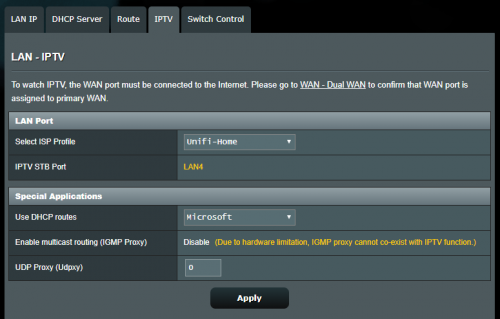 i played around with the Unifi home and unifi business. Funny thing is that i cant get an IP using uinifi home but i got connected with no internet on unifi business |
|
|
Dec 15 2019, 12:31 PM
Return to original view | Post
#179
|
|
Senior Member
3,034 posts Joined: Dec 2011
|
QUOTE(Jegane @ Dec 15 2019, 12:16 PM) Hi guys, I recently got a AX88U as my main Aimesh Router and retire my AC86U as Aimesh node, heres the problem, the AX88U keeps disconnecting randomly from my Unifibiz and won't reconnect back, have to reboot manually to have it connected back, sometimes it takes a few days for it to happen, sometimes one day 2-3 times, I have no idea what triggered it to disconnect, I have the fans running on it and all, so overheating shouldn't be an issue. It can be very annoying during business hours as my accounting software requires to keep connected to the internet. MTU size?I've tried swapping back the AC86U as Aimesh router and the AX88U as node, the disconnecting stops, so I suspect its the problem with the AX88U, I even tried AsusWRT merlin on both, or either one of the routers, same result also, now using the latest official firmware back as I feel the Aimesh on merlinWRT sucks. so ASUSmy, is it a problem with my unit? or is there some setting I missed with unifibiz on this AX88U? Can claim warranty or something if its unit problem? |
|
|
Mar 9 2020, 04:40 PM
Return to original view | Post
#180
|
|
Senior Member
3,034 posts Joined: Dec 2011
|
Wi-Fi ECO Mode decreases the Wi-Fi power and data rate to save on power usage.
http://asusroutermanual.blogspot.com/2015/...i-eco-mode.html QUOTE(MonsterJ9 @ Mar 9 2020, 04:24 PM) What for WiFi eco mode? Will eco mode reduce WiFi range? This post has been edited by jusbella: Mar 9 2020, 04:41 PM |
| Change to: |  0.0849sec 0.0849sec
 0.56 0.56
 7 queries 7 queries
 GZIP Disabled GZIP Disabled
Time is now: 9th December 2025 - 12:09 PM |
 Quote
Quote