Outline ·
[ Standard ] ·
Linear+
Home Networking ASUS Malaysia Networking User & Technical Support, Managed by ASUS Malaysia Representative
|
jusbella
|
 Sep 29 2018, 02:26 PM Sep 29 2018, 02:26 PM
|

|
QUOTE(blacktubi @ Sep 29 2018, 02:21 PM) IP Camera can easily saturate a typical wireless connection and he got 8 of them. Not to mention that IP camera runs on 2.4Ghz only.  Range extender is only going to make things worst. Get another access point and hope for the best. Consider mesh solution. Also think so, but mesh using 5ghz, think should get around 4-5 unit since house quiet big and wireless is shorter distance only. |
|
|
|
|
|
jusbella
|
Oct 1 2018, 10:57 PM
|
|
|
QUOTE(laihuhng @ Oct 1 2018, 10:40 PM) @ASUSmy, my 1+ month old rt-ac86u defective, strong burnt smell from the inside. Where should I send it for repair, in Penang? Dissapointing .... Send back to the same shop u buy, they will help u do warranty. waiting their call when the stock is ready to collect. |
|
|
|
|
|
jusbella
|
Oct 1 2018, 11:30 PM
|
|
|
QUOTE(jassergck @ Oct 1 2018, 11:15 PM) Why i cannot commec to internet using asus ac5300? pls refer here: https://www.blacktubi.com/unifi/setup-asus-router-for-unifi/ |
|
|
|
|
|
jusbella
|
Oct 2 2018, 07:44 AM
|
|
|
QUOTE(laihuhng @ Oct 2 2018, 07:17 AM) I can't since I bought it online. It's a Malaysia set though. You can contact the online seller they'll guide u. |
|
|
|
|
|
jusbella
|
Oct 6 2018, 04:17 PM
|
|
|
blacktubi Do aimesh can join other mesh by using Lan backhaul? I do need all wireless same ssid across all router that joined mesh.
|
|
|
|
|
|
jusbella
|
Oct 7 2018, 03:36 PM
|
|
|
QUOTE(blacktubi @ Oct 7 2018, 02:34 PM) SSID will be the same for everything in the mesh network. That’s the whole point of mesh else you are better off running repeaters. You can select Ethernet as backhaul. That good 👍 thanks! |
|
|
|
|
|
jusbella
|
Oct 9 2018, 08:48 AM
|
|
|
QUOTE(cyberpigworld @ Oct 9 2018, 01:21 AM) I am having an issue with my Asus 1200G+ how can I make the internet speed increase in the ethernet? Now time offer me 500mbps. my internet keep on showing the max is 100mbps. QUOTE(thsam3009 @ Oct 9 2018, 07:06 AM) Hi all, My Time Internet just upgraded to 500mbps and i using rt-1200g+ router. but get around 300Mbps on 5ghz by s9+. Is it normal? I Make sure your btu port is 1gbps. Asus 55uhp n 1200g+ CPU is less than 1ghz which they can't handle 500mbps++ Try get asus rt86u which CPU is 1.8ghz, the processor can handle 500mbps++ This post has been edited by jusbella: Oct 9 2018, 08:48 AM |
|
|
|
|
|
jusbella
|
Oct 9 2018, 09:52 AM
|
|
|
QUOTE(blacktubi @ Oct 9 2018, 09:29 AM) Firmware upgrade for 55UHP is coming out soon.  Never mind you test with latest firmware see how much mbps they can handle. Then keep us up to date, thank you. |
|
|
|
|
|
jusbella
|
Oct 9 2018, 10:21 AM
|
|
|
QUOTE(blacktubi @ Oct 9 2018, 10:07 AM) The router is fully capable of handling 900Mbps on TIME but it is just that the VLAN mode will disable hardware NAT. Let's hope Asus can fix it. Alright, waiting your test |
|
|
|
|
|
jusbella
|
Oct 10 2018, 11:04 PM
|
|
|
QUOTE(ulala2 @ Oct 10 2018, 10:36 PM) I'm using ASUS RT-AC55UHP, technically it should able to achieve 1 GB in wired and 300mb on 2.4g and 866 in 5g. With Cat 6 cable, in both wired and wireless max i only can achieved 2xx closed to 300mb. Is there someone else use this router can achieve more than 500 mb? Is because the CPU can't handle vlan tagging with that speed. If you using TIME then you can reach 800++mbps, that because TIME doesn't use vlan tagging. Anyway new firmware coming soon and we all hope can fix the slow speed issue, blacktubi will test it out once latest firmware available and he'll report here. This post has been edited by jusbella: Oct 10 2018, 11:04 PM |
|
|
|
|
|
jusbella
|
Oct 11 2018, 12:08 AM
|
|
|
QUOTE(ulala2 @ Oct 10 2018, 11:32 PM) So meaning is not my pc problem, is the router problem? my firmware version is: Version 3.0.0.4.382.50702 2018/07/16 32.96 MBytes Ya router problem.. U just wait asusmy release latest firmware then wait blacktubi do test, he will report here eventually. |
|
|
|
|
|
jusbella
|
Oct 11 2018, 04:33 PM
|
|
|
QUOTE(ASUSmy @ Oct 11 2018, 10:27 AM) Hi All, For those who are using RT-AC58U or RT-AC55UHP router and have trouble getting the high speed using LAN, you can try updating the beta firmware below. Do let me know is you have any problem with the firmware. https://www.asuswebstorage.com/navigate/s/B...8A1EEFE35D1B98YAs for the RT-AC86U HyppTV problem, we are looking at the problem now. We will get back to you ASAP. Thank you all for your patient. your research now. |
|
|
|
|
|
jusbella
|
Oct 11 2018, 07:54 PM
|
|
|
QUOTE(blacktubi @ Oct 11 2018, 06:55 PM) Tested and problem solved Haha alright... Everybody should relieved now. |
|
|
|
|
|
jusbella
|
Oct 20 2018, 06:51 PM
|
|
|
QUOTE(myc2d @ Oct 20 2018, 05:33 PM) I am using AC68U with hard disk attached, today when i try to access the samba from my laptop (win10) using 10.168.1.1 (router ip) , it prompted that the router needs smb2 or higher. May i know how can i enable smb2 on the router ? Its ur windows disabled SMB v1, you need to enable it then you can access it. U need to click RUN, then enter "optionalfeatures.exe" without quote, den enter, then scroll till you founded SMB 1.0/CIFS File Sharing support, then expand it, then tick CLIENT only, den done. Be reminded there is worse exploit in smb v1, tat why Microsoft disable it by default, if your pc is not turn on 24 hours then its safe to use. Otherwise, use at ur own risk. |
|
|
|
|
|
jusbella
|
Oct 20 2018, 09:00 PM
|
|
|
QUOTE(voncrane @ Oct 20 2018, 08:57 PM) Any idea which decent routers support smb2? Currently no. But there is custom firmware for asus, Merlin firmware, do it if you comfortable. But not all Asus model supported. |
|
|
|
|
|
jusbella
|
Oct 23 2018, 08:23 PM
|
|
|
QUOTE(erik8lyt @ Oct 23 2018, 07:12 PM) 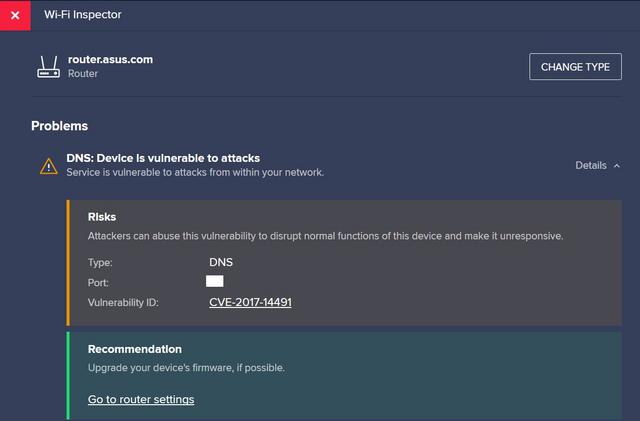 This is the result I got after the scan using Avast Wi-Fi Inspector. I checked that I'm using the latest firmware from the Asus Malaysia website and there is no need to upgrade. Should I just ignore it? That's for enterprise user only. You can ignore if you not using for 24/7 without turn off. If you need protect from those attack, you need have Firewall hardware, and install End Point security protection. |
|
|
|
|
|
jusbella
|
Oct 25 2018, 08:30 AM
|
|
|
QUOTE(sheemmet @ Oct 25 2018, 12:10 AM) lol , ever since no 3rd party antivirus in windows , i think it is much safer  built in asus has firewall i think much enough?  Not enough. If its enough, this market won't have Fortinet, Watchguard, SonicWall, Juniper etc... |
|
|
|
|
|
jusbella
|
Oct 25 2018, 07:06 PM
|
|
|
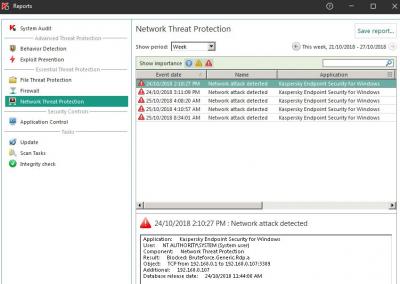
QUOTE(sheemmet @ Oct 25 2018, 05:26 PM) lol , what kind of webbie u all browse until asus router couldn't block all? hmm , only u know yourself ya  Well, its basic knowledge. Below is from one of my customer office using fortinet firewall. Just basic usage, with Kaspersky Endpoint Security installed too. Security is not 100% perfect at all, we need a lot of prevention too. The last picture is network attack which does RDP attack by finding right password and attack the server, its ransomware kind of attack. So in conclusion, internet world is not safe anymore, the traffic around the world is infected by anything non stop, the traffic will keep going and going to find devices that vulnerability to attack then they will attack it immediately. Attached thumbnail(s)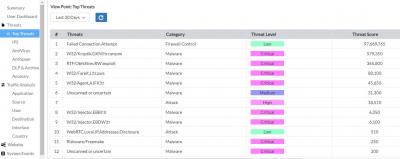


|
|
|
|
|
|
jusbella
|
Nov 20 2018, 12:37 PM
|
|
|
QUOTE(Kevin_Low @ Nov 20 2018, 12:34 PM) Hi guys my first time setup a ac86u bought from China. I have this problem, it didn't show that option to choose unifi home or ppope. I have key in the ISP got it from unifi. Am I doing it wrong? Go to LAN, then IPTV, from there can see ISP profile? |
|
|
|
|
|
jusbella
|
Nov 20 2018, 12:59 PM
|
|
|
QUOTE(Kevin_Low @ Nov 20 2018, 12:52 PM) Wow Thanks so much hahaha, u are really life saver, been stuck for hours. Didn't knew under IPTV setting Enjoy your internet  |
|
|
|
|



 Quote
Quote
 0.0354sec
 0.44
0.44
 7 queries
 GZIP Disabled