Welcome Guest ( Log In | Register )

Bump Topic Topic Closed RSS Feed
140 Pages « < 106 107 108 109 110 > » Bottom

Outline · [ Standard ] · Linear+

 The LCD Monitor v12.

views
     
justintga
post Jan 15 2014, 10:19 PM

Enthusiast
*****
Senior Member
978 posts

Joined: Jan 2005
From: London


QUOTE(zerorating @ Jan 15 2014, 03:30 PM)
why you didnt read my old comment, just use quickgamma, do a RGB calibration, make sure the red, gree, blue colour on  gamma 2.2 range is nearly similar. instead of changing gamma level on ICC profile or windows, you change it on the rgb level on your monitor, this is the same done for TV calibration, so you can use all the application that is not ICC-profile aware (e.g Hardware-accelerated video output). All this free of charge without using hardware calibrator, but of course hardware calibrator provide much better result.

dont just take ICC profile or other RGB level configuration from other users, the ccfl/led light provided by ccfl/led backlit/edge-lit does not always produce similar colour/brightness and can be yellowish from time to time, the result is also depend on the room ambient light as well. That why calibration is recommended from time to time
*
Worked perfectly! Thanks!

AlanSiew
post Jan 16 2014, 05:13 PM

Enthusiast
*****
Senior Member
807 posts

Joined: Jan 2009
Does any sifu using Dell P2314H this monitor? Can share some review about this monitor please?icon_question.gif

Sifus, that Dell P2314H is not use PWM to control brightness? icon_question.gif
0168257061
post Jan 16 2014, 05:38 PM

EimiFukada
********
All Stars
14,242 posts

Joined: Jul 2007
From: JAVABUS


QUOTE(ragnarock2005 @ Jan 15 2014, 08:24 PM)
im looking the lcd for gaming purpose and sometime i also do some image editing n designing in autocad...and my budget within the range price of alienware lcd
i prefer 24" screen...any suggestion? which on are better Dell Ultrasharp or BenQ gaming series?
tq notworthy.gif
*
ultrasharp all the way.
you cry when you go back to TN panel for editing.

awwyiss drool.gif
still finding time to suit the brightness and color. sweat.gif
My old 2233sw is so dim and yellowish.
SUSwilsonjay
post Jan 17 2014, 01:18 AM

6 Stars Social Justice Warrior
******
Senior Member
1,605 posts

Joined: Feb 2006


QUOTE(0168257061 @ Jan 16 2014, 11:41 PM)
awwyiss  drool.gif
still finding time to suit the brightness and color.  sweat.gif
My old 2233sw is so dim and yellowish.
*
may i know wat model is this? available here already?

zerorating
post Jan 17 2014, 02:31 AM

Miskin Adab
*****
Senior Member
975 posts

Joined: Aug 2007
From: Lokap Polis


QUOTE(0168257061 @ Jan 16 2014, 05:38 PM)
ultrasharp all the way.
you cry when you go back to TN panel for editing.
*
well TN panel is also subject for improvement as well, even though it is sucks at viewing angle, there are still room for improvement for contrast ratio, colour production (true 8bit panel), resolution and higher refresh rate (TN still king for this).

I'm still believe that the latest TN panel should be comparable or somewhat better compared to year 2010 e-ips panel. Au Optronics, Samsung and Chimei Innolux still have funding on TN panel RnD as the panel is cheap to make (lower scrap ratio compared to IPS or VA), easier to market on low-price market. Also, BenQ gaming monitor is not cheap, i'm sure the panel is expensive (which should have older IPS-panel performance in contrast ratio and colour production but at much more higher refresh rate). The new Gaming Monitor should please alot of users (especially serious gamers) except minority people who cares about colour critical work or working with wide gamut content.

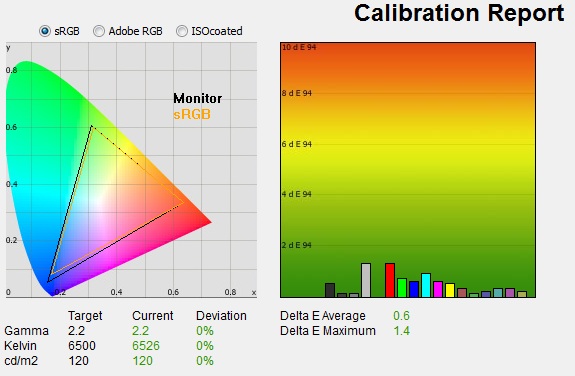
see below for asus vg278he monitor, the delta value after calibration is awesome for a TN monitor, this monitor using ChiMei Innolux (CMI) M270HHF-L10 panel
» Click to show Spoiler - click again to hide... «

http://www.tftcentral.co.uk/reviews/asus_vg278he.htm

But if a gamers didnt mind to play game at 60hz with v-sync on which provide slower update from mouse response to the monitor, of course a monitor with IPS, PLS or VA panel is a good buy (more value for the money). Even I am impress on My monitor with 12ms native response rate VA panel handling motion and games.

This post has been edited by zerorating: Jan 17 2014, 03:01 AM
0168257061
post Jan 17 2014, 07:33 AM

EimiFukada
********
All Stars
14,242 posts

Joined: Jul 2007
From: JAVABUS


QUOTE(wilsonjay @ Jan 17 2014, 01:18 AM)
may i know wat model is this? available here already?
*
u2414h
some seller already start selling.
lingloong has it for 919 i think.

QUOTE(zerorating @ Jan 17 2014, 02:31 AM)
well TN panel is also subject for improvement as well, even though it is sucks at viewing angle, there are still room for improvement for contrast ratio, colour production (true 8bit panel), resolution and higher refresh rate (TN still king for this).

I'm still believe that the latest TN panel should be comparable or somewhat better compared to year 2010 e-ips panel. Au Optronics, Samsung and Chimei Innolux still have funding on TN panel RnD as the panel is cheap to make (lower scrap ratio compared to IPS or VA), easier to market on low-price market.  Also, BenQ gaming monitor is not cheap, i'm sure the panel is expensive (which should have older IPS-panel performance in contrast ratio and colour production but at much more higher refresh rate). The new Gaming Monitor should please alot of users (especially serious gamers) except minority people who cares about colour critical work or working with wide gamut content.

see below for asus vg278he monitor, the delta value after calibration is awesome for a TN monitor, this monitor using ChiMei Innolux (CMI) M270HHF-L10 panel
» Click to show Spoiler - click again to hide... «

http://www.tftcentral.co.uk/reviews/asus_vg278he.htm

But if a gamers didnt mind to play game at 60hz with v-sync on which provide slower update from mouse response to the monitor, of course a monitor with IPS, PLS or VA panel is a good buy (more value for the money). Even I am impress on My monitor with 12ms native response rate VA panel handling motion and games.
*
Coming from a TN panel to IPS I am sure no one would go back.
If the price is significant low then it is different story.

Just compare says an average 23" monitor.
U2312HM cost about RM589 around there.
Other 23" might cost 400-500 ish.
It is still worth the money to go for u2312hm.
dell premium panel warranty is there to backing you up.
some model allow you to exchange even with 1 dead pixel.
besides, i don't think there are major complaints about dell services.


zerorating
post Jan 17 2014, 05:43 PM

Miskin Adab
*****
Senior Member
975 posts

Joined: Aug 2007
From: Lokap Polis


QUOTE(0168257061 @ Jan 17 2014, 07:33 AM)
u2414h
some seller already start selling.
lingloong has it for 919 i think.
Coming from a TN panel to IPS I am sure no one would go back.
If the price is significant low then it is different story.

Just compare says an average 23" monitor.
U2312HM cost about RM589 around there.
Other 23" might cost 400-500 ish.
It is still worth the money to go for u2312hm.
dell premium panel warranty is there to backing you up.
some model allow you to exchange even with 1 dead pixel.
besides, i don't think there are major complaints about dell services.
*
you got it wrong, premium panel warranty only covers bright/stuck pixel, for dead pixel, i guess you still need 7 of it sweat.gif however having 1 stuck pixel is really annoying doh.gif, i can live with dead pixels whistling.gif

Anyway your old 2233w is crap anyway in today standard because during the time was marketed, monitor with good panel having a hefty price and competition were all using more crapper TN panel screen. However, TN panel are getting much more better (since they need to compete with different Panel technology now) ,If demo in lowyat plaza, some monitor that uses TN panel(not the cheap TN monitor) are producing really good picture and quite good color production, even u2312hm color temperature looks too warm, screens look too dim and missing lots of details. One monitor that really impress me were S27C750P (which use S-PVA panel), but too bad the monitor stand were set too high and the price too high.

It is still recommended to use TN panel monitor for gaming and it is used on gaming monitor due to higher refresh rate and faster pixel response, unless if some scientist able to find how to improve IPS/VA/PLS panel response rate marginally, the gaming monitor will still equipped with TN panel monitor. Since gaming monitor are expensive, it is plain wrong to put TN panel with mediocre color performance.


as for u2312hm, it is not as good as its old brother u2311h which having really good image quality right out the box, honestly calibration are seems not needed, just need to reduce the brightness and you are good to go, but too bad, u2311h only last a year in the market, maybe it is not marginal enough for dell, as for u2312hm, it is still a good buy

This post has been edited by zerorating: Jan 17 2014, 06:04 PM
0168257061
post Jan 17 2014, 06:02 PM

EimiFukada
********
All Stars
14,242 posts

Joined: Jul 2007
From: JAVABUS


QUOTE(zerorating @ Jan 17 2014, 05:43 PM)
you got it wrong, premium panel warranty only covers bright/stuck pixel, for dead pixel, i guess you still need 7 of it  sweat.gif however having 1 stuck pixel is really annoying  doh.gif, i can live with dead pixels  whistling.gif

Anyway your old 2233w is crap anyway in today standard because during the time was marketed, monitor with good panel having a hefty price and competition were all using more crapper TN panel screen. However, TN panel are getting much more better (since they need to compete with different Panel technology now) ,If demo in lowyat plaza, some monitor that uses TN panel(not the cheap TN monitor) are producing really good picture and quite good color production, even u2312hm color temperature looks too warm, screens look too dim and missing lots of details. One monitor that really impress me were S27C750P (which use S-PVA panel), but too bad the monitor stand were set too high and the price too high.

as for u2312hm, it is not as good as its old brother u2311h which having really good image quality right out the box, honestly calibration are seems not needed, just need to reduce the brightness and you are good to go, but too bad, u2311h only last a year in the market, maybe it is not marginal enough for dell, as for u2312hm, it is still a good buy
*
I feel more comfortable with U2311H right out of the box compare to 2414H right now.
Yes I have 2311 but it is in KL.
Now back to Sabah for few months so might grab new one to replace the aging 2233SW, turned yellow and dim.
Still need sometime to get use with new monitor tho.

Sam9
post Jan 19 2014, 11:06 PM

Getting Started
**
Junior Member
104 posts

Joined: Oct 2012
Hi, i've got a problem and I need help.

When I connect my laptop(Asus K42J) to my monitor(Philips 274E5) using a HDMI cable my mouse lags on the monitor however it works fine when I connect it using a VGA cable.

Does anyone know why and have a solution?

Thanks.
faezfahmi618
post Jan 20 2014, 06:47 AM

Casual
***
Junior Member
435 posts

Joined: Apr 2010


QUOTE(ik3da @ Jan 17 2014, 10:45 AM)
Hmm, bout to buy Dell U2414H at SGD360 (RM950) but just saw a promotion for XL2411T at SGD399 (RM1050). Tried checking reviews but nothing much on XL2411T so far, any comments? Not sure if the extra RM100 is worth while or to.
*
http://pcmonitors.info/reviews/benq-xl2411t
djlah
post Jan 20 2014, 09:11 AM

Look at all my stars!!
*******
Senior Member
7,723 posts

Joined: Jan 2005
QUOTE(Sam9 @ Jan 19 2014, 11:06 PM)
Hi, i've got a problem and I need help.

When I connect my laptop(Asus K42J) to my monitor(Philips 274E5) using a HDMI cable my mouse lags on the monitor however it works fine when I connect it using a VGA cable.

Does anyone know why and have a solution?

Thanks.
*
if you confirm VGA cable works fine, then this is driver issue. please download your Philips monitor HDMI driver and install, to fix the mouse lags issue.
ik3da
post Jan 20 2014, 10:10 AM

Poisoned, broken, and definitely poorer.
****
Senior Member
545 posts

Joined: Aug 2005
From: Where kiasu/kiasi lives


QUOTE(faezfahmi618 @ Jan 20 2014, 06:47 AM)
Thanks for the link but gonna go with Dell since their presence/support in SG seems better (based on forum folks + customer service). Calling to order the monitor in a while, hopefully can unwrap it before CNY starts biggrin.gif New year, new monitor muahahaha.
fujkenasai
post Jan 20 2014, 11:04 AM

Regular
******
Senior Member
1,137 posts

Joined: Mar 2006
QUOTE(ik3da @ Jan 20 2014, 10:10 AM)
Thanks for the link but gonna go with Dell since their presence/support in SG seems better (based on forum folks + customer service). Calling to order the monitor in a while, hopefully can unwrap it before CNY starts biggrin.gif New year, new monitor muahahaha.
*
which dell mon model are you getting? 24" 27 "?
ik3da
post Jan 20 2014, 11:18 AM

Poisoned, broken, and definitely poorer.
****
Senior Member
545 posts

Joined: Aug 2005
From: Where kiasu/kiasi lives


QUOTE(fujkenasai @ Jan 20 2014, 11:04 AM)
which dell mon model are you getting? 24" 27 "?
*
24"; the U2414H biggrin.gif Thinking of what to do with my old monitor now, not sure if it is worth selling as it is really old.
fujkenasai
post Jan 20 2014, 11:20 AM

Regular
******
Senior Member
1,137 posts

Joined: Mar 2006
QUOTE(ik3da @ Jan 20 2014, 11:18 AM)
24"; the U2414H biggrin.gif Thinking of what to do with my old monitor now, not sure if it is worth selling as it is really old.
*
lol what mon do u have? lol
ik3da
post Jan 20 2014, 11:30 AM

Poisoned, broken, and definitely poorer.
****
Senior Member
545 posts

Joined: Aug 2005
From: Where kiasu/kiasi lives


QUOTE(fujkenasai @ Jan 20 2014, 11:20 AM)
lol what mon do u have? lol
*
A Samsung 226BW, it is getting dimmer and have 1-2 dead/stuck pixels from what I can see. Realized the dead pixels when I keep seeing a mole on my wife's face (my desktop wallpaper) lol. I seen people selling it for SGD50 in SG but not sure that it is worthwhile to sell, probably keep as spare monitor for my future second home media PC.
marfccy
post Jan 20 2014, 12:11 PM

Le Ponyland!!!
*******
Senior Member
4,254 posts

Joined: Nov 2011


QUOTE(ik3da @ Jan 20 2014, 11:30 AM)
A Samsung 226BW, it is getting dimmer and have 1-2 dead/stuck pixels from what I can see. Realized the dead pixels when I keep seeing a mole on my wife's face (my desktop wallpaper) lol. I seen people selling it for SGD50 in SG but not sure that it is worthwhile to sell, probably keep as spare monitor for my future second home media PC.
*
i suggest keeping it as backup monitor when sh!t happens nod.gif

mana tau in case your new monitor got prob la, then you need RMA

at least got spare to keep you entertained
fujkenasai
post Jan 20 2014, 12:13 PM

Regular
******
Senior Member
1,137 posts

Joined: Mar 2006
QUOTE(ik3da @ Jan 20 2014, 11:30 AM)
A Samsung 226BW, it is getting dimmer and have 1-2 dead/stuck pixels from what I can see. Realized the dead pixels when I keep seeing a mole on my wife's face (my desktop wallpaper) lol. I seen people selling it for SGD50 in SG but not sure that it is worthwhile to sell, probably keep as spare monitor for my future second home media PC.
*
yeah im keeping mine as the 3rd monitor, though my hp is dying.

btw why dell? have you compared it with the others?
ik3da
post Jan 20 2014, 12:13 PM

Poisoned, broken, and definitely poorer.
****
Senior Member
545 posts

Joined: Aug 2005
From: Where kiasu/kiasi lives


QUOTE(marfccy @ Jan 20 2014, 12:11 PM)
i suggest keeping it as backup monitor when sh!t happens nod.gif

mana tau in case your new monitor got prob la, then you need RMA

at least got spare to keep you entertained
*
Touch wood bro! LoL - I will cry if my new monitor RMA so soon hahaha. Calling up the Dell lady now.
marfccy
post Jan 20 2014, 12:22 PM

Le Ponyland!!!
*******
Senior Member
4,254 posts

Joined: Nov 2011


QUOTE(ik3da @ Jan 20 2014, 12:13 PM)
Touch wood bro! LoL - I will cry if my new monitor RMA so soon hahaha. Calling up the Dell lady now.
*
better safe than sorry right? icon_idea.gif

besides, throw in an extra monitor. use dual can boost productivity and simplifies things biggrin.gif

140 Pages « < 106 107 108 109 110 > » Top
Topic ClosedOptions
 

Change to:
| Lo-Fi Version
0.0570sec    0.81    6 queries    GZIP Disabled
Time is now: 4th December 2025 - 11:31 AM