Welcome Guest ( Log In | Register )

Bump Topic Topic Closed RSS Feed
126 Pages « < 105 106 107 108 109 > » Bottom

Outline · [ Standard ] · Linear+

 The SSD Thread V3, The Speed You Need

views
     
1024kbps
post Apr 23 2013, 11:40 AM

李素裳
*******
Senior Member
6,015 posts

Joined: Feb 2007


QUOTE(joonwei23 @ Apr 23 2013, 11:37 AM)
Is it a must to install the firmware for the ssd from the website ?
using plextor m5s
*
Not really a must, but its recommended, For Plextor firmware update, you can use this http://www.pendrivelinux.com/yumi-multiboot-usb-creator/
to create bootable thumbdrive/sdcard to update the SSD firmware, without using DVD-R/RW.
Yagami5159
post Apr 23 2013, 11:41 AM

I CAN'T BELIEVE THIS SHIT
******
Senior Member
1,120 posts

Joined: May 2012
From: shitville in shitlaysia


QUOTE(joonwei23 @ Apr 23 2013, 12:37 PM)
Is it a must to install the firmware for the ssd from the website ?
using plextor m5s
*
Not really, some said it provides "extra speed" but I say let the AS SSD decide.
By the way, mine was already updated the lastest v1.03 when I bought it from the store, so no update was needed.
joonwei23
post Apr 23 2013, 11:42 AM

Regular
******
Senior Member
1,019 posts

Joined: Sep 2009
QUOTE(Yagami5159 @ Apr 23 2013, 11:41 AM)
Not really, some said it provides "extra speed" but I say let the AS SSD decide.
By the way, mine was already updated the lastest v1.03 when I bought it from the store, so no update was needed.
*
how do I check the firmware from my desktop ? sweat.gif
1024kbps
post Apr 23 2013, 11:44 AM

李素裳
*******
Senior Member
6,015 posts

Joined: Feb 2007


QUOTE(joonwei23 @ Apr 23 2013, 11:42 AM)
how do I check the firmware from my desktop ?  sweat.gif
*
Use ASS SSD whistling.gif
http://www.softpedia.com/get/System/Benchm...Benchmark.shtml
bleh broken link lol

This post has been edited by 1024kbps: Apr 23 2013, 11:47 AM
Yagami5159
post Apr 23 2013, 11:45 AM

I CAN'T BELIEVE THIS SHIT
******
Senior Member
1,120 posts

Joined: May 2012
From: shitville in shitlaysia


QUOTE(joonwei23 @ Apr 23 2013, 12:42 PM)
how do I check the firmware from my desktop ?  sweat.gif
*
Download this:
AS SSD
it'll show the firmware version...and you can run some test to discover how fast your SSD can withstand.

Edit:
Damn it, 1024kbps ohmy.gif

This post has been edited by Yagami5159: Apr 23 2013, 11:47 AM
horns
post Apr 23 2013, 11:47 AM

\m/
*******
Senior Member
3,038 posts

Joined: Nov 2009
QUOTE(storm88 @ Apr 23 2013, 11:34 AM)
Wonder why you claim mSATA is slower?
*
it's a relative comparison to 2.5" ssd from plextor. iops does play some roles in responsiveness.
storm88
post Apr 23 2013, 12:05 PM

~UncleSam Ready to Rolls~
*******
Senior Member
5,595 posts

Joined: Jan 2003
From: Between Hell and Heaven
QUOTE(horns @ Apr 23 2013, 12:47 PM)
it's a relative comparison to 2.5" ssd from plextor. iops does play some roles in responsiveness.
*
herm... that doesn't sound it provide any solid proof for me.

IOPS is not related to responsiveness.
all responsiveness is related to latency of a drive, or latency caused by the lane speed in a system

So far selling many mSATA SSD but i don't find much complain about "Slower" in comparison cases. There are few cases really did happen M4 mSATA run slower. but latter was solved after an IRST update.
horns
post Apr 23 2013, 12:12 PM

\m/
*******
Senior Member
3,038 posts

Joined: Nov 2009
QUOTE(storm88 @ Apr 23 2013, 12:05 PM)
herm... that doesn't sound it provide any solid proof for me.

IOPS is not related to responsiveness.
all responsiveness is related to latency of a drive, or latency caused by the lane speed in a system

So far selling many mSATA SSD but i don't find much complain about "Slower" in comparison cases. There are few cases really did happen M4 mSATA run slower. but latter was solved after an IRST update.
*
i was hoping you guys who can do some simple benchmarks for us to refer to lol!

from my laptop, plextor m5m msata vs samsung 840 pro 2.5" ssd:

Attached Image

Attached Image

they should share the same everything except for the drives.

Yagami5159
post Apr 23 2013, 12:27 PM

I CAN'T BELIEVE THIS SHIT
******
Senior Member
1,120 posts

Joined: May 2012
From: shitville in shitlaysia


QUOTE(horns @ Apr 23 2013, 01:12 PM)
i was hoping you guys who can do some simple benchmarks for us to refer to lol!

from my laptop, plextor m5m msata vs samsung 840 pro 2.5" ssd:

Attached Image

Attached Image

they should share the same everything except for the drives.
*
One does not simply compare a Marvel Controller SSD with MDX Controller SSD.

Just look at the Specs:

M5M:
Max Sequential Readup to 540 MB/s
Max Sequential Writeup to 430 MB/s

840 Pro:
Sustained Sequential Read540 MB/s
Sustained Sequential Write520 MB/s

doh.gif


horns
post Apr 23 2013, 12:59 PM

\m/
*******
Senior Member
3,038 posts

Joined: Nov 2009
yes! you're right! it's not fair right? actually all i am saying is that the current msata ssd is relatively slower than 2.5" ssd from plextor. i don't mean to say that msata is slower than all types of 2.5" ssd's.

(the solid proof that @storm88 is looking for, like you said, is already in the specs of each ssd from plextor biggrin.gif).

all it matters to me is that most recent ssd releases have reduced price/gb, with better performance.


storm88
post Apr 23 2013, 01:00 PM

~UncleSam Ready to Rolls~
*******
Senior Member
5,595 posts

Joined: Jan 2003
From: Between Hell and Heaven
QUOTE(horns @ Apr 23 2013, 01:12 PM)
i was hoping you guys who can do some simple benchmarks for us to refer to lol!

from my laptop, plextor m5m msata vs samsung 840 pro 2.5" ssd:

Attached Image

Attached Image

they should share the same everything except for the drives.
*
laugh.gif i thought what

Okay, i did some google and found this:
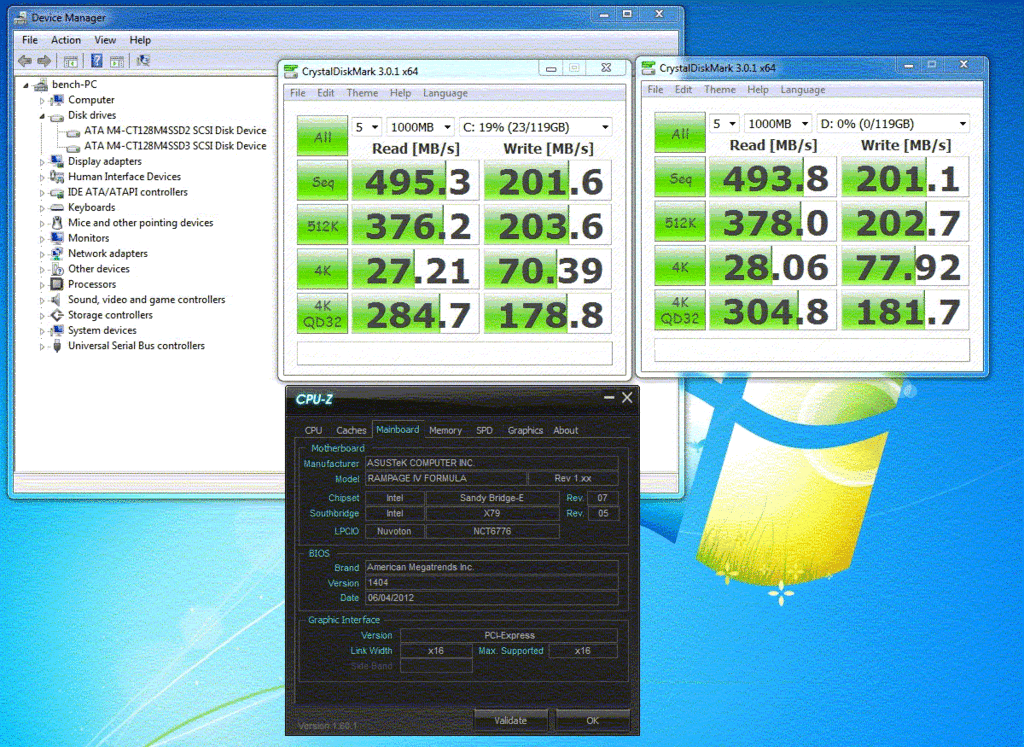
user posted image
M4 SATA vs M4 mSATA.


No insulting here but i can say you are making a wrong direction here.
A correct and accurate comparison should be made on APPLE to APPLE test.
Like i said Crucial M4 SATA and M4 mSATA, as they are build on the same architecture.

but you COMPARE one of the king in the SSD list, Samsung 840 Pro vs medium range mSATA M5M. it's not making sense at all.

edit: After refer to your latter post only finding what you wanted to express. If you had said ”option for faster mSATA SSD is limited" that'll be much different laugh.gif

This post has been edited by storm88: Apr 23 2013, 01:13 PM

horns
post Apr 23 2013, 01:15 PM

\m/
*******
Senior Member
3,038 posts

Joined: Nov 2009
ok smile.gif

you're right it must be apple-to-apple comparison.


joonwei23
post Apr 23 2013, 01:58 PM

Regular
******
Senior Member
1,019 posts

Joined: Sep 2009
any way to cleanup the ssd ?
i heard de fragmenting it's bad for it
storm88
post Apr 23 2013, 02:25 PM

~UncleSam Ready to Rolls~
*******
Senior Member
5,595 posts

Joined: Jan 2003
From: Between Hell and Heaven
QUOTE(joonwei23 @ Apr 23 2013, 02:58 PM)
any way to cleanup the ssd ?
i heard de fragmenting it's bad for it
*
Clean? i don't think u need it. Dont defrag a SSD as it's wasting ur drive's life
Yagami5159
post Apr 23 2013, 02:32 PM

I CAN'T BELIEVE THIS SHIT
******
Senior Member
1,120 posts

Joined: May 2012
From: shitville in shitlaysia


QUOTE(horns @ Apr 23 2013, 01:59 PM)
yes! you're right! it's not fair right? actually all i am saying is that the current msata ssd is relatively slower than 2.5" ssd from plextor. i don't mean to say that msata is slower than all types of 2.5" ssd's.

(the solid proof that @storm88 is looking for, like you said, is already in the specs of each ssd from plextor biggrin.gif).

all it matters to me is that most recent ssd releases have reduced price/gb, with better performance.
*
You're comparing between Samsung and Plextor is like comparing between Lamborghini and Mitsubishi.
Even the price gap between those two are like USD50+ difference.

Newegg:
SAMSUNG 840 Pro Series MZ-7PD256BW 2.5" 256GB SATA III MLC Internal Solid State Drive (SSD)
Plextor M5M PX-256M5M mSATA 256GB SATA III MLC Internal Solid State Drive (SSD)

QUOTE(storm88 @ Apr 23 2013, 02:00 PM)
but you COMPARE one of the king in the SSD list, Samsung 840 Pro vs medium range mSATA M5M. it's not making sense at all.
*
+1

This post has been edited by Yagami5159: Apr 23 2013, 03:09 PM
horns
post Apr 23 2013, 04:53 PM

\m/
*******
Senior Member
3,038 posts

Joined: Nov 2009
QUOTE(joonwei23 @ Apr 23 2013, 01:58 PM)
any way to cleanup the ssd ?
i heard de fragmenting it's bad for it
*
if you're referring to disk optimization:
1. windows 7 - follow the ssd optimization guide at thessdreview.com should be fine enough.
2. windows 8 - you can use the disk optimization to run trim and reboot.

for most ssd's, normally you just leave the pc alone for a few hours to let it have time for garbage collection (some sort of self optimization).

QUOTE(Yagami5159 @ Apr 23 2013, 02:32 PM)
You're comparing between Samsung and Plextor is like comparing between Lamborghini and Mitsubishi.
Even the price gap between those two are like USD50+ difference.

Newegg:
SAMSUNG 840 Pro Series MZ-7PD256BW 2.5" 256GB SATA III MLC Internal Solid State Drive (SSD)
Plextor M5M PX-256M5M mSATA 256GB SATA III MLC Internal Solid State Drive (SSD)
+1
*
hehe i think @storm88 got what i meant. that 'comparison' of mine was not a fair one i know lol!


erik8lyt
post Apr 23 2013, 06:58 PM

Enthusiast
*****
Senior Member
715 posts

Joined: Jan 2008


Can GA-Z77M-D3H detects and fits Samsung 840 Pro very well?
owikh84
post Apr 23 2013, 09:35 PM

i7 Clan
Group Icon
Elite
8,711 posts

Joined: Nov 2007
From: Butterworth, PG / Machang, Kelantan


Is A SATA 3Gb/s Platform Still Worth Upgrading With An SSD?

QUOTE
Results: 4 KB Random Read And Write Performance

This benchmark is the most important for real-world performance, and the fastest hard drive just can’t compete with an SSD when it comes to 4 KB random reads and writes. Samsung's 840 Pro does a little bit better attached to a 6 Gb/s interface compared to the 3 Gb/s port. Its writes are 20 MB/s faster, while its reads are less than 2 MB/s quicker.

Well said in the article, it's the 4K which matters most for real-world performance.
joonwei23
post Apr 23 2013, 10:50 PM

Regular
******
Senior Member
1,019 posts

Joined: Sep 2009
QUOTE(horns @ Apr 23 2013, 04:53 PM)
if you're referring to disk optimization:
1. windows 7 - follow the ssd optimization guide at thessdreview.com should be fine enough.
2. windows 8 - you can use the disk optimization to run trim and reboot.
thanks mate, since I'm using wins 8 I'll use the disk optimization. do I need to run it frequently or ? smile.gif

horns
post Apr 23 2013, 10:57 PM

\m/
*******
Senior Member
3,038 posts

Joined: Nov 2009
QUOTE(joonwei23 @ Apr 23 2013, 10:50 PM)
thanks mate, since I'm using wins 8 I'll use the disk optimization. do I need to run it frequently or ?  smile.gif
*
check here for more details if you will. i usually run it once in a few weeks.

126 Pages « < 105 106 107 108 109 > » Top
Topic ClosedOptions
 

Change to:
| Lo-Fi Version
0.0280sec    0.93    6 queries    GZIP Disabled
Time is now: 12th December 2025 - 09:24 AM
