Outline ·
[ Standard ] ·
Linear+
Samsung Galaxy S III I9300 Official Thread V12, bloatware is updated
|
Andrewtst
|
 Jul 6 2012, 11:30 PM Jul 6 2012, 11:30 PM
|

|
QUOTE(Xabrius @ Jul 6 2012, 11:26 PM) Galaxy Y/W/Ace had that long ago... I was shocked when I just got my S3s that this didnt work/they missed this At last they add-in with graphical to slide. 
Added on July 6, 2012, 11:31 pmI never use Juice Defender, haha! I know it function but I feel not needed. This post has been edited by Andrewtst: Jul 6 2012, 11:31 PM |
|
|
|
|
|
SUSXabrius
|
Jul 6 2012, 11:31 PM
|
|
|
QUOTE(Andrewtst @ Jul 6 2012, 11:30 PM) At last they add-in with graphical to slide. huh? not swiping the status bar left/right to increase/decrease the brightness? |
|
|
|
|
|
Andrewtst
|
Jul 6 2012, 11:31 PM
|
|
|
Now flashing this new firmware. Wish me good luck.
Added on July 6, 2012, 11:32 pmQUOTE(Xabrius @ Jul 6 2012, 11:31 PM) huh? not swiping the status bar left/right to increase/decrease the brightness? Nope, it is add-on a new bar below toggles. 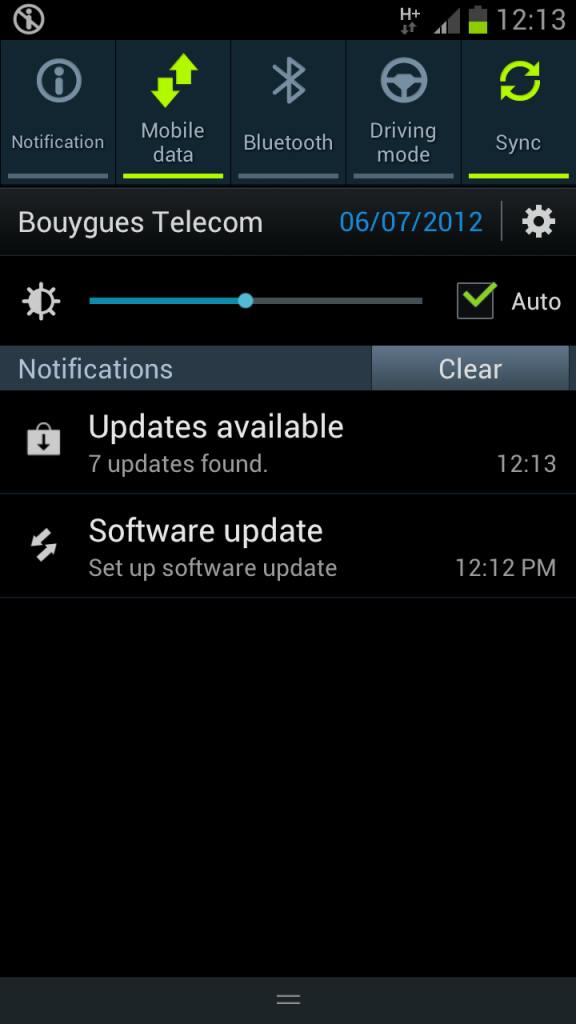
Added on July 6, 2012, 11:34 pmDone flashing, really love that new brightness bar at status notification.  This post has been edited by Andrewtst: Jul 6 2012, 11:34 PM This post has been edited by Andrewtst: Jul 6 2012, 11:34 PM |
|
|
|
|
|
YouDontKnowMyName
|
Jul 6 2012, 11:37 PM
|
|
|
To be honest, I've never touched my brightness settings since i first got the phone. The new OTA update is cool, but it may not be very useful to me. I just set it to AUTO brightness, and i find that its VERY VERY good at automatically tweaking the brightness Unlike iphone (or maybe other android phones), the auto brightness only hovers around the brightness level that was set, which obviously sucks since it's not really a true 'auto brightness' Just my opinion though  |
|
|
|
|
|
SUSDavid83
|
Jul 6 2012, 11:38 PM
|
|
|
I thought you can tune the brightness in the Display settings.
|
|
|
|
|
|
Andrewtst
|
Jul 6 2012, 11:40 PM
|
|
|
I LOVE the NEW CAMERA FEATURES! COOL!  |
|
|
|
|
|
renishi
|
Jul 6 2012, 11:43 PM
|
|
|
can recommend some task manager, battery app and any monitoring apps that will help a newbie? haha thanks
|
|
|
|
|
|
SUSDavid83
|
Jul 6 2012, 11:44 PM
|
|
|
QUOTE(renishi @ Jul 6 2012, 11:43 PM) can recommend some task manager, battery app and any monitoring apps that will help a newbie? haha thanks For Task Manager, just use the application manager widget from Samsung. Very handy. Battery apps? For monitoring or for saving? |
|
|
|
|
|
YouDontKnowMyName
|
Jul 6 2012, 11:44 PM
|
|
|
QUOTE(Andrewtst @ Jul 6 2012, 11:40 PM) I LOVE the NEW CAMERA FEATURES! COOL! » Click to show Spoiler - click again to hide... « LOOKS GOOD, can't wait!!   This post has been edited by YouDontKnowMyName: Jul 6 2012, 11:45 PM This post has been edited by YouDontKnowMyName: Jul 6 2012, 11:45 PM |
|
|
|
|
|
apisfires
|
Jul 6 2012, 11:46 PM
|
|
|
QUOTE(Andrewtst @ Jul 6 2012, 11:40 PM) I LOVE the NEW CAMERA FEATURES! COOL! dude, hope can flash your theme after this.. you will recompile it back using new toggle right? |
|
|
|
|
|
Andrewtst
|
Jul 6 2012, 11:47 PM
|
|
|
Ok, here the Changes I found for XXBLFB, beside it is far smoother than any previous release.      
Added on July 6, 2012, 11:48 pmQUOTE(YouDontKnowMyName @ Jul 6 2012, 11:44 PM) LOOKS GOOD, can't wait!! Yup QUOTE(apisfires @ Jul 6 2012, 11:46 PM) dude, hope can flash your theme after this.. you will recompile it back using new toggle right? Yup This post has been edited by Andrewtst: Jul 6 2012, 11:48 PM |
|
|
|
|
|
mdzaboy
|
Jul 6 2012, 11:49 PM
|
|
|
OTA already released?
|
|
|
|
|
|
ZeneticX
|
Jul 6 2012, 11:49 PM
|
|
|
i remember i saw some1 post this before but forgot where it went
how to remove picasa pics from gallery ?
|
|
|
|
|
|
Andrewtst
|
Jul 6 2012, 11:50 PM
|
|
|
QUOTE(mdzaboy @ Jul 6 2012, 11:49 PM) Nope, no new firmware for Malaysia yet, I flash UK release. |
|
|
|
|
|
mdzaboy
|
Jul 6 2012, 11:54 PM
|
|
|
QUOTE(Andrewtst @ Jul 6 2012, 11:50 PM) Nope, no new firmware for Malaysia yet, I flash UK release. oh..i tried to update seems no update available..haha  |
|
|
|
|
|
FallenOut
|
Jul 6 2012, 11:54 PM
|
|
|
QUOTE(XeactorZ @ Jul 6 2012, 11:27 PM) yup already seedin now QUOTE(Andrewtst @ Jul 6 2012, 11:40 PM) I LOVE the NEW CAMERA FEATURES! COOL! tis is wicked cool hopin for deodexed soon |
|
|
|
|
|
momiji_chan
|
Jul 6 2012, 11:57 PM
|
Getting Started

|
QUOTE(YouDontKnowMyName @ Jul 6 2012, 11:37 PM) To be honest, I've never touched my brightness settings since i first got the phone. The new OTA update is cool, but it may not be very useful to me. I just set it to AUTO brightness, and i find that its VERY VERY good at automatically tweaking the brightness Unlike iphone (or maybe other android phones), the auto brightness only hovers around the brightness level that was set, which obviously sucks since it's not really a true 'auto brightness' Just my opinion though Oh i thought using auto brightness will consume more battery life? |
|
|
|
|
|
renishi
|
Jul 7 2012, 12:00 AM
|
|
|
David- battery app for monitoring and saving
And I can't find the task manager widget that u mention. Currently I am accessing from it through the home button
This post has been edited by renishi: Jul 7 2012, 12:06 AM
|
|
|
|
|
|
XeactorZ
|
Jul 7 2012, 12:06 AM
|
|
|
QUOTE(Andrewtst @ Jul 6 2012, 11:40 PM) I LOVE the NEW CAMERA FEATURES! COOL! wow nice QUOTE(FallenOut @ Jul 6 2012, 11:54 PM) thanks for telling |
|
|
|
|
|
SUSDavid83
|
Jul 7 2012, 12:08 AM
|
|
|
QUOTE(renishi @ Jul 7 2012, 12:00 AM) David- battery app for monitoring and saving And I can't find the task manager widget that u mention. Currently I am accessing from it through the home button Find it from Widgets drawer. If still not available, download it back from Samsung Apps. |
|
|
|
|





 Quote
Quote





 0.0286sec
 0.16
0.16
 6 queries
 GZIP Disabled