Outline ·
[ Standard ] ·
Linear+
Y580/Y480/N56 Battlefield, Y480 3630QM+GT650m=2599, Y580 FHD 3630QM+GTX660m=2999,white, Win8
|
rockccf
|
 Aug 11 2012, 01:05 PM Aug 11 2012, 01:05 PM
|
Getting Started


|
QUOTE(xeoctic @ Aug 11 2012, 12:36 PM) where do you buy your laptop?? so far any heat problem? I bought it at Notebook shop @ Digital Mall PJ. I played few matches of DOTA 2. The laptop got hot especially the left keyboard side. Once I finished the game, the heat will go off very fast. I am using CM notepal U3 BTW. This post has been edited by rockccf: Aug 11 2012, 01:06 PM |
|
|
|
|
|
alpha001
|
Aug 11 2012, 01:21 PM
|
|
|
QUOTE(sss2sssss @ Aug 11 2012, 02:01 PM) Every vent equip with one fan, I'll show u tmr, my cooler left at my rent house there...lol so u re in vacation somewhere...lol |
|
|
|
|
|
sss2sssss
|
Aug 11 2012, 01:32 PM
|
|
|
QUOTE(alpha001 @ Aug 11 2012, 01:21 PM) so u re in vacation somewhere...lol No, I just back to my hometown for few days....lol |
|
|
|
|
|
rc2x
|
Aug 11 2012, 01:44 PM
|
|
|
QUOTE(rockccf @ Aug 11 2012, 10:41 AM) Got myself a Y580 FHD. The laptop is simply awesome. Best value for money.
Added on August 11, 2012, 11:10 amOn my nvidia control panel, I only see 3D Settings followed by Adjust image settings with preview Manage 3D settings Set Physx Configuration Do i have to set the default graphic processor to nvidia? If i play games, i suppose the laptop will be using the GTX 660M to render the graphics right? The Y580 is on optimus then. You can set it on the GTX660 as default. BTW, does the keyboard flex? |
|
|
|
|
|
sss2sssss
|
Aug 11 2012, 01:55 PM
|
|
|
QUOTE(rc2x @ Aug 11 2012, 01:44 PM) The Y580 is on optimus then. You can set it on the GTX660 as default. BTW, does the keyboard flex? BTW if u install Beta driver I dont advice u set it to run NVIDIA GPU directly, coz it will stress it even u no really using it and cause driver stop working.... |
|
|
|
|
|
rc2x
|
Aug 11 2012, 02:06 PM
|
|
|
QUOTE(sss2sssss @ Aug 11 2012, 01:55 PM) BTW if u install Beta driver I dont advice u set it to run NVIDIA GPU directly, coz it will stress it even u no really using it and cause driver stop working.... I believe it wouldn't give much impact in terms of low usage. Sometimes i really doubt its on the Nvidia card even though you've set it on as default.  |
|
|
|
|
|
sss2sssss
|
Aug 11 2012, 02:19 PM
|
|
|
QUOTE(rc2x @ Aug 11 2012, 02:06 PM) I believe it wouldn't give much impact in terms of low usage. Sometimes i really doubt its on the Nvidia card even though you've set it on as default. As I say is Beta Driver not WQHL Driver, of course WQHL driver u can u that coz they can depend on what program are u sing and adjust the clock speed, but in 304.79 beta driver it will always run at highest clock speed and make GPU always in high temp and make driver stop working |
|
|
|
|
|
ck.chunkeat
|
Aug 11 2012, 02:58 PM
|
|
|
QUOTE(t3n @ Aug 11 2012, 12:53 PM) I am free today and here is my Y480 + U2 cooler.. For me its perfect fit..!! » Click to show Spoiler - click again to hide... «  Uploaded with ImageShack.us Uploaded with ImageShack.us Uploaded with ImageShack.us Uploaded with ImageShack.usThanks alot  Btw,can i see how did you set up your fans and which vent holes it is blowing?  Now,waiting for ppl with y480+u3 to post their pics...anyone?  |
|
|
|
|
|
t3n
|
Aug 11 2012, 07:23 PM
|
|
|
QUOTE(ck.chunkeat @ Aug 11 2012, 02:58 PM) Thanks alot Btw,can i see how did you set up your fans and which vent holes it is blowing? Now,waiting for ppl with y480+u3 to post their pics...anyone? I put the fan at the red square area (pls dont complain my bad drawing)   Uploaded with ImageShack.us |
|
|
|
|
|
alpha001
|
Aug 11 2012, 07:28 PM
|
|
|
QUOTE(t3n @ Aug 11 2012, 08:23 PM) I put the fan at the red square area (pls dont complain my bad drawing) Uploaded with ImageShack.usthis is from below rite |
|
|
|
|
|
sss2sssss
|
Aug 11 2012, 07:38 PM
|
|
|
QUOTE(t3n @ Aug 11 2012, 07:23 PM) I put the fan at the red square area (pls dont complain my bad drawing) Uploaded with ImageShack.usI think u should put on vent..... |
|
|
|
|
|
t3n
|
Aug 11 2012, 07:40 PM
|
|
|
QUOTE(alpha001 @ Aug 11 2012, 07:28 PM) Yup... Right side is the bottom of heat sink
Added on August 11, 2012, 7:41 pmQUOTE(sss2sssss @ Aug 11 2012, 07:38 PM) I think u should put on vent..... Its better to put on air intake hole to provide cool air into your system... This post has been edited by t3n: Aug 11 2012, 07:41 PM |
|
|
|
|
|
sss2sssss
|
Aug 11 2012, 07:47 PM
|
|
|
QUOTE(t3n @ Aug 11 2012, 07:40 PM) Yup... Right side is the bottom of heat sink
Added on August 11, 2012, 7:41 pmIts better to put on air intake hole to provide cool air into your system... What I mean is this....lol This is my cooling fan location 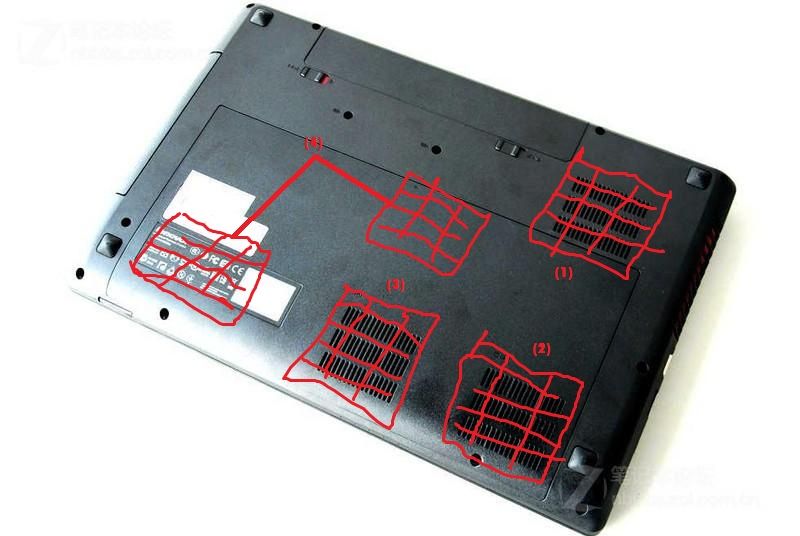 the (4) one is switchable, since it not so important, now I put (4) together with (2) and (3) to balance the cooler pad |
|
|
|
|
|
t3n
|
Aug 11 2012, 07:51 PM
|
|
|
QUOTE(sss2sssss @ Aug 11 2012, 07:47 PM) What I mean is this....lol This is my cooling fan location the (4) one is switchable, since it not so important, now I put (4) together with (2) and (3) to balance the cooler pad I misunderstand your vent hole, haha.. I think it should be call air intake hole? Correct me if i am wrong I put the fan according to the thermal report attached in the first page, as you can see the RAM side is actually not that hot. Thats why I focus on heat sink and mid area. I got 2 fan only  |
|
|
|
|
|
sss2sssss
|
Aug 11 2012, 07:58 PM
|
|
|
QUOTE(t3n @ Aug 11 2012, 07:51 PM) I misunderstand your vent hole, haha.. I think it should be call air intake hole? Correct me if i am wrong I put the fan according to the thermal report attached in the first page, as you can see the RAM side is actually not that hot. Thats why I focus on heat sink and mid area. I got 2 fan only the thermal report seems to be wrong a bit, the mid area actually is the HDD area and u actually can put ur fan down to the mid air intake hole coz that hole is for HDD one... If not apply any cooler pad, right side of the laptop which u can feel is the hottest and according to HWMonitor HDD is the hottest when without cooler pad... |
|
|
|
|
|
t3n
|
Aug 11 2012, 08:02 PM
|
|
|
QUOTE(sss2sssss @ Aug 11 2012, 07:58 PM) the thermal report seems to be wrong a bit, the mid area actually is the HDD area and u actually can put ur fan down to the mid air intake hole coz that hole is for HDD one... If not apply any cooler pad, right side of the laptop which u can feel is the hottest and according to HWMonitor HDD is the hottest when without cooler pad... Hehe i use SSD...!! |
|
|
|
|
|
ben83
|
Aug 11 2012, 11:45 PM
|
|
|
Anyone face problem with vertical and horizontal scrolling with the touchpad? Mine is not working.
|
|
|
|
|
|
sss2sssss
|
Aug 11 2012, 11:47 PM
|
|
|
QUOTE(ben83 @ Aug 11 2012, 11:45 PM) Anyone face problem with vertical and horizontal scrolling with the touchpad? Mine is not working. U got install driver properly?? BTW I'm using two finger scrolling(vertical and horizontal), seems like it can't accept one finger scrolling |
|
|
|
|
|
ben83
|
Aug 11 2012, 11:52 PM
|
|
|
QUOTE(sss2sssss @ Aug 11 2012, 11:47 PM) U got install driver properly?? BTW I'm using two finger scrolling(vertical and horizontal), seems like it can't accept one finger scrolling Fixed, one finger scrolling is possible. Just need to go into detailed settings of the Synaptics touch pad |
|
|
|
|
|
CKKwan
|
Aug 12 2012, 07:47 AM
|
|
|
Does Y580 FHD version comes with Bluetooth or it is really optional? If optional, how and where can I have it added?
I can't imagine Y580 comes without a BT. There are soo many BT PDA / Smartphone / PADs around these day.
|
|
|
|
|



 Quote
Quote





 0.0599sec
 0.77
0.77
 6 queries
 GZIP Disabled