Welcome Guest ( Log In | Register )

Bump Topic Topic Closed RSS Feed
7 Pages < 1 2 3 4 5 > » Bottom

Outline · [ Standard ] · Linear+

Hardware 2012 NEW MacBook Pro | MacBook Air Users Thread, Version 9.0 - 95%/92% score on Gdgt.com!

views
     
TSstringfellow
post Jun 21 2012, 01:27 AM

Ultrawide | 4K | VR
********
Senior Member
11,305 posts

Joined: Jan 2003
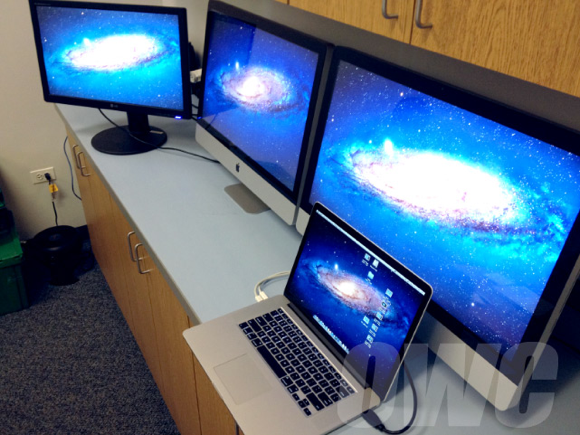
Retina Display MacBook Pro can run THREE external displays simultaneously.

Just in case you run out of space of on that Retina screen. wink.gif

QUOTE

user posted image

Other World Computing posted this picture on their blog showing a MacBook Pro with Retina Display hooked up to a pair of iMacs serving as Thunderbolt displays and a third monitor via HDMI. This setup powers four screens with a total of 15,680,000 pixels.

The writer of the post, OWC Mike, seemed impressed with the performance of the MacBook Pro:
- "Moving images and media didn’t create any lag and we were able to play video on all four displays simultaneously."

Apple officially supports hooking three monitors into the Retina MacBook Pro, noting in the Thunderbolt ports FAQ in its Support Knowledge Base:
- "MacBook Pro (Retina, Mid 2012) can support an HDMI-compatible device on its HDMI port while also using two Thunderbolt displays."

This makes the Retina MacBook Pro the first Mac -- other than a tower-based workstation like the Mac Pro -- to natively power four displays simultaneously.

TSstringfellow
post Jun 21 2012, 01:42 AM

Ultrawide | 4K | VR
********
Senior Member
11,305 posts

Joined: Jan 2003
This thread is for MacBook Pro and MacBook Air queries, please direct your Mac Mini queries here: http://forum.lowyat.net/index.php?showtopi...767&hl=Mac+Mini

This post has been edited by stringfellow: Jun 21 2012, 01:43 AM
TSstringfellow
post Jun 21 2012, 04:31 PM

Ultrawide | 4K | VR
********
Senior Member
11,305 posts

Joined: Jan 2003
Working professionals usually keep their work related documents on external hard drives. Get the 256GB choice unless you have the dough.

Going to USB3, you get around 80-110MB/s transfer speed, depending on the rotational speed of your external hard drive platter. I get 80MB/s on my 1.5TB Seagate GoFlex USB3 5400rpm external hard drive. I toyed with the idea of getting the Thunderbolt adapter for this drive, but the bottleneck is the 5400rpm HDD itself.

Testing this with a 240GB SSD Thunderbolt LaCie drive I borrowed from a friend, I get around 400MB/s transfer. The best would be from my Pegasus R4, around 550-600MB/s but this unit isn't portable. The WD Thunderbolt Duo 6TB I have clocks in at 160-180MB/s.

This post has been edited by stringfellow: Jun 21 2012, 04:40 PM
TSstringfellow
post Jun 22 2012, 09:48 AM

Ultrawide | 4K | VR
********
Senior Member
11,305 posts

Joined: Jan 2003
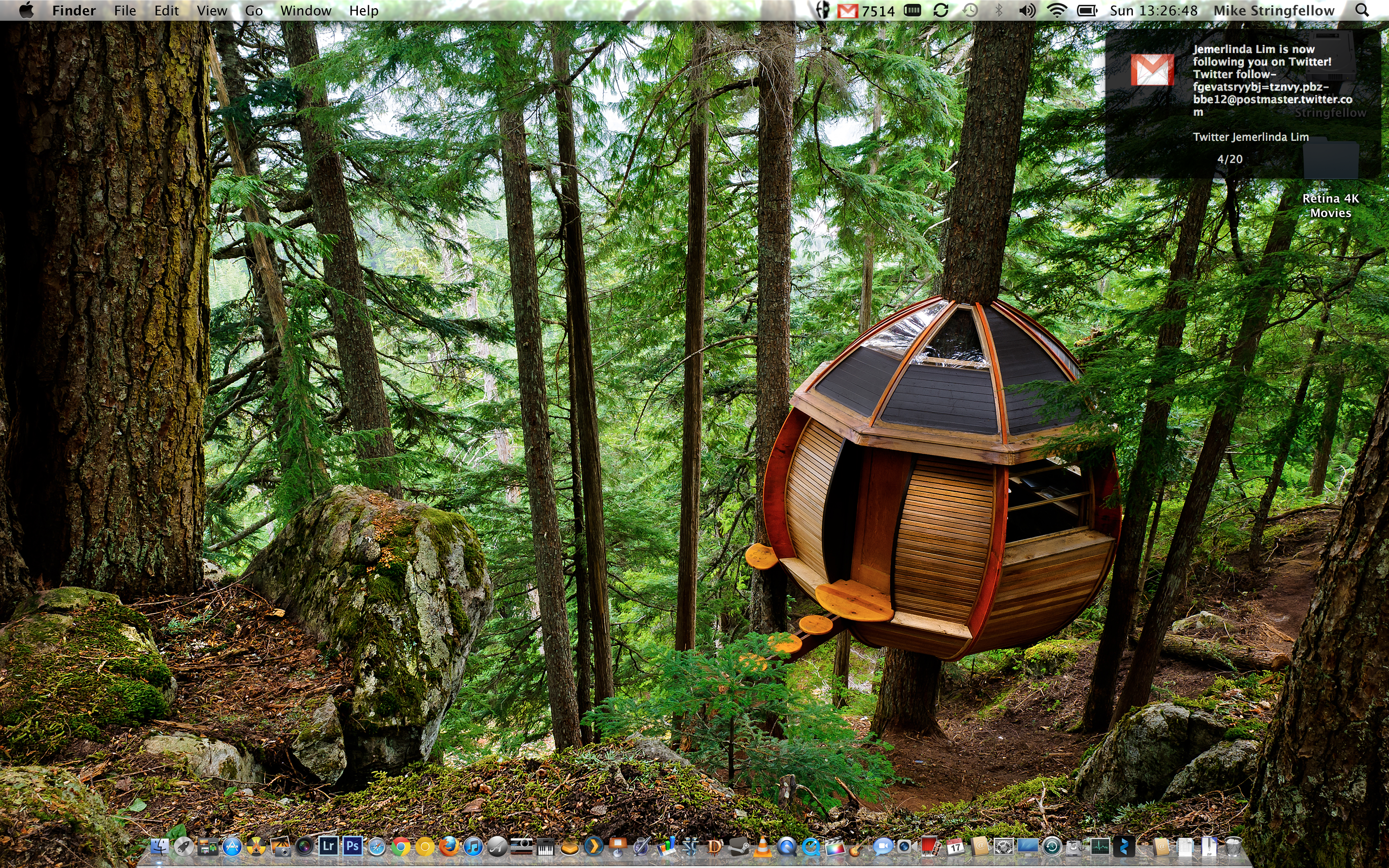
This is how Mac OS X looks like at 2880x1800. I use the app "Change Resolution".

Warning: Super large image size.
» Click to show Spoiler - click again to hide... «

TSstringfellow
post Jun 22 2012, 10:21 AM

Ultrawide | 4K | VR
********
Senior Member
11,305 posts

Joined: Jan 2003


This is Retina Display MBP running 3 external monitors, and running Mountain Lion Developer Preview. Notice there are no lag whatsoever. Also, the Safari lag has even been eliminated on Mountain Lion.

Mountain Lion is coming next month, free for all new Mac purchases.
TSstringfellow
post Jun 22 2012, 10:45 AM

Ultrawide | 4K | VR
********
Senior Member
11,305 posts

Joined: Jan 2003
Another example of how densely packed the pixels on this Retina Display is.

Warning: Image size is 11MB. This is a screenshot of my desktop at 2880x1800 using "Change Resolution" app.

» Click to show Spoiler - click again to hide... «


Those interested on how to unlock the 2880x1800 resolution on your Retina Display MBP, here is the link.

This post has been edited by stringfellow: Jun 22 2012, 10:59 AM
TSstringfellow
post Jun 22 2012, 11:14 AM

Ultrawide | 4K | VR
********
Senior Member
11,305 posts

Joined: Jan 2003
I'll have to concede that moving between "Best for Retina" resolution settings on the Display Preferences and the 4 other scaled resolution options will introduce noticeable lag in scrolling high res thumbnails in iPhoto or Safari in Retina. Apple did put a mention before changing to scaled resolution that it'll affect performance. *Restarting the MBP RD at the same resolution, mitigates it somewhat*. Mountain Lion should put this issue to rest.

But they were right that 1920x1200 on scaled resolution is the highest workable resolution that is comfortable doing your work on. Any higher, using the "Change Resolution" app, will result in having to squint to look. I have 20/20 vision (work demands it), can see fine, but it's not fun having to squint all the time to see 2880x1800 icons on a busy wallpaper. tongue.gif

"Best for Retina" is 2880x1800 sampled at 1440x900, so everything looks super sharp. For bigger workspace desktop, 1920x1200 is best. Or connect 3 external displays. tongue.gif

This post has been edited by stringfellow: Jun 22 2012, 11:36 AM
TSstringfellow
post Jun 22 2012, 11:44 AM

Ultrawide | 4K | VR
********
Senior Member
11,305 posts

Joined: Jan 2003
QUOTE(xboxnerd @ Jun 22 2012, 11:30 AM)
Mr. Stringfellow, still remember me man? how is everything?

We used to challenge each other on xbox live back in 06? I actually just got myself the 2012 11" air i7/2.0/8GB/256. Pretty happy with my purchase since i have upgraded from my core duo black book.
*
Yup, I remembered you. I don't game a lot these days, everybody seems to be clanning up and I'm not into groupies. tongue.gif I'm a "come in, shoot a few heads, get out" kinda guy.

Congratulations on your purchase. I spec-ed up your config, it's pretty much how much I paid for my Ultimate 11" 2011 MBA. You got a pretty good deal there. I spec-ed up 2012's Ultimate 11" MBA at the Store, and costs more than a base-spec Retina Display! sweat.gif

I have a soft spot for MBA, I've been using it since its first appearance. Yes, the first version that constantly overheats cos the vents at the back aren't properly positioned. tongue.gif
TSstringfellow
post Jun 24 2012, 01:44 AM

Ultrawide | 4K | VR
********
Senior Member
11,305 posts

Joined: Jan 2003
QUOTE(liwei92 @ Jun 23 2012, 11:52 PM)
Think that was because of unoptimized apps ...think ml will makes it better

http://www.anandtech.com/show/6023/the-nex...-display-review

this review is till date the best review
check it out haters and fans
*
This part of his review I generally agree with:

QUOTE
To be quite honest, the hardware in the rMBP isn’t enough to deliver a consistently smooth experience across all applications. At 2880 x 1800 most interactions are smooth but things like zooming windows or scrolling on certain web pages is clearly sub-30fps. At the higher scaled resolutions, since the GPU has to render as much as 9.2MP, even UI performance can be sluggish. There’s simply nothing that can be done at this point - Apple is pushing the limits of the hardware we have available today, far beyond what any other OEM has done. Future iterations of the Retina Display MacBook Pro will have faster hardware with embedded DRAM that will help mitigate this problem. But there are other limitations: many elements of screen drawing are still done on the CPU, and as largely serial architectures their ability to scale performance with dramatically higher resolutions is limited.

Some elements of drawing in Safari for example aren’t handled by the GPU. Quickly scrolling up and down on the AnandTech home page will peg one of the four IVB cores in the rMBP at 100%.

The GPU has an easy time with its part of the process but the CPU’s workload is borderline too much for a single core to handle. Throw a more complex website at it and things get bad quickly. Facebook combines a lot of compressed images with text - every single image is decompressed on the CPU before being handed off to the GPU. Combine that with other elements that are processed on the CPU and you get a recipe for choppy scrolling.

To quantify exactly what I was seeing I measured frame rate while scrolling as quickly as possible through my Facebook news feed in Safari on the rMBP as well as my 2011 15-inch High Res MacBook Pro. While last year’s MBP delivered anywhere from 46 - 60 fps during this test, the rMBP hovered around 20 fps (18 - 24 fps was the typical range).

Remember at 2880 x 1800 there are simply more pixels to push and more work to be done by both the CPU and the GPU. It’s even worse in those applications that have higher quality assets, the CPU now has to decode images at 4x the resolution of what it’s used to. Future CPUs will take this added workload into account, but it’ll take time to get there.

The good news is Mountain Lion provides some relief. At WWDC Apple mentioned the next version of Safari is ridiculously fast, but it wasn’t specific about why. It turns out that Safari leverages Core Animation in Mountain Lion and more GPU accelerated as a result. Facebook is still a challenge because of the mixture of CPU decoded images and a standard web page, but the experience is a bit better. Repeating the same test as above I measured anywhere from 20 - 30 fps while scrolling through Facebook on ML’s Safari.

Whereas I would consider the rMBP experience under Lion to be borderline unacceptable, everything is significantly better under Mountain Lion. Don’t expect buttery smoothness across the board, you’re still asking a lot of the CPU and GPU, but it’s a lot better.


Logical and common sensical conclusion out of the need to drive that much more pixels with what's on board. The question here is, where is your threshold as a potential buyer? If you're non-forgiving to a fault, then the non-Retina MBP is a more logical choice. If you're like me and willing to ride it out with them and see this issue handled in Mountain Lion, here is the reason MBP RD is for me. Sure, not butter smooth, my Air 11" wasn't either. I come from Air 11". Folks coming from MBP, iMacs and more powerful Mac ecosystem, may not like what they experience when it comes to "buttery-smoothness", but even the mighty Anand gave it the Editor's Award:

QUOTE
It’s because all of this that I’m doing something I’ve never done before in an Apple review. We rarely give out Editor’s Choice awards at AnandTech, and I’m quite possibly the stingiest purveyor of them. I feel that being overly generous with awards diminishes their value. In this case, all of the effort Apple has put into bringing a Retina Display to the MacBook Pro is deserving of one.

I’m giving the MacBook Pro with Retina Display our bronze Editor’s Choice award. Making it the first Mac to ever receive one. It would have been a silver had the software story been even stronger (iWork, Mountain Lion, Office and Photoshop being ready at launch would have been a feat worth rewarding). And it would have been a gold had Apple been able to deliver all of that but without sacrificing end-user upgradability. Which brings me to my final point.

I accept the fact that current mobile memory and storage form factors preclude the creation of the thinnest and lightest form factors. But I would like to see Apple push for the creation of industry standard storage and memory form factors that wouldn’t hinder the design of notebooks like the Retina Display equipped Macbook Pro. Apple has already demonstrated that it has significant pull with component vendors, this should be possible. The motivation behind doing so is no different from the motivation driving the use of Retina Displays: for the betterment of the end user experience.
Not without its fault, but not faults that's overblown out of proportion like some of the sneaky ones here try to portray it. If you don't trust my take on it, trust Anand's. And he's the pickiest when it comes to exposing hardwares at fault.

This post has been edited by stringfellow: Jun 24 2012, 01:45 AM
TSstringfellow
post Jun 24 2012, 12:43 PM

Ultrawide | 4K | VR
********
Senior Member
11,305 posts

Joined: Jan 2003
QUOTE(erymanthus @ Jun 24 2012, 07:27 AM)
Hi, I have been reading the discussion above.
It's mentioned that MBP RD can only achieve 20 to 30frame rate compared to non RD MBP at 48-60frame per second.... Does it happen only if you are using the highest display resolution?
Do you have this issue if you run your MBP RD at the Best For Retina Display resolution.?
Thanks

It's quite disheartening to read that non Retina Display MBP is better then the RD MBP

Thanks for feedback.

I'm new to MBP and I'm planning to book one in July or August. Hope to make the right decision whether to go for RD or not
*
The non-Retina has to push only 1440x900, Retina has to push 4 times of that, while still keeping things coherent on the UI and the background processes. Pushing 4 times the numbers of pixels isn't an easy feat.

That framerate mentioned was Safari scrolling, not the UI elements in Lion. And it is scrolling at 1440x900 sampled at 2880x1800. I do not have issues running at "Best For Retina", the problem gets more evident at 1680x1050 or the 1920x1200 sampled, because as how Anand describes it, these resolution are doubled (3360x2100 and 3840x2400, way beyond the Retina's 2880x1800) and then down sampled back to 2880x1800 into the native Retina resolution. Sampling at these scaled resolution will always take a performance hit.

He also mention, as how I've mentioned earlier as well, that Mountain Lion will take advantage of the hardware, using Core Animation processes, and speeds up this lag in Lion. Lion do not take advantage of this, hence therefore you see hi mentioning that even scrolling in Safari around will shoot up one of the 4 IVB cores to 100%.


Added on June 24, 2012, 12:47 pm
QUOTE(BRY7 @ Jun 24 2012, 11:26 AM)
read many reviews, but I'm really confused.
Apple added four times the pixels, but why does it still shrink when its at 2880x1800? :s
shouldn't the icon have more detail?
*
HiDPI. Read what Anand has to say in in his review. Apple does not expose that resolution because it is not workable at that resolution unless you have super eagle eyes. Simple test,go to you notebook run now, run though all the supported resolution and see how the UI elements behave. They will shrink.

Apple adds more pixels, yes that is current. But The space they're residing does not increase, instead they're densely packed.


Added on June 24, 2012, 12:52 pm
QUOTE(PS3.Gamer @ Jun 24 2012, 11:17 AM)
+1 rclxms.gif

Not EVERYONE has a RDMBP yet, those who do, good. But we want to discuss about it and its pros and cons. Not see the wallpapers and videos and it supports. Because that's not the only thing thats going to judge weather we buy it or not.

But some are just excited with their new toy I guess.
*
Then come on over, test mine. I have pro apps like Adobe CS6 running, Extended version of Photoshop or Premiere Extended, Lightroom 3.3 just recently updated to Retina, FCPX for video, and Chrome Canary, dev channel Chrome browser supporting Retina but uses its own rendering engine, Sound quality wise, I've Fidelia FHX to test. Diablo 3, StarCraft 2 and Portal 2 if you game. That should've been a clue when you bother looking at the screenshots I posted. rolleyes.gif

The least I can do compared to troll-baiters who have nothing to contribute other than posting single one-liners of his Kopitiam-style posts.

This post has been edited by stringfellow: Jun 24 2012, 12:54 PM

TSstringfellow
post Jun 24 2012, 01:24 PM

Ultrawide | 4K | VR
********
Senior Member
11,305 posts

Joined: Jan 2003
QUOTE(melvin418 @ Jun 24 2012, 01:06 PM)
Anyone tried installing windows on rmbp?
*
Last checked, Windows Bootcamp drivers aren't available yet. Particularly display drivers. Maybe things has changed since then.

Gonna be a better person and not feed the troll. Oh hey, I see someone reported this post earlier than I am, thanks whoever you are. Let's get back on track.

Just for kicks though:

» Click to show Spoiler - click again to hide... «


This post has been edited by stringfellow: Jun 24 2012, 01:32 PM
TSstringfellow
post Jun 24 2012, 01:33 PM

Ultrawide | 4K | VR
********
Senior Member
11,305 posts

Joined: Jan 2003
QUOTE(zad78 @ Jun 24 2012, 01:29 PM)
Sorry for asking....wat is MDs?...medical degrees...medical devices?..mat despatches?....
In another world....just bought the new MBA 13 inch...seems to be lot faster compared to my old mba...
*
SATA 3 6Gbps flash storage helps. Proprietary connectors though. Not to mention IVB. 4 or 8GB? I still miss my old MBA form factor.
TSstringfellow
post Jun 24 2012, 01:38 PM

Ultrawide | 4K | VR
********
Senior Member
11,305 posts

Joined: Jan 2003
Anyone interested to test drive the apps mentioned in the spoilered screenshot, welcomed to do so. I'm heading to this audiophile meet now, and will be there probably until late.


Added on June 24, 2012, 1:40 pm
QUOTE(BRY7 @ Jun 24 2012, 01:37 PM)
bro, this is already full scale at best retina right?  biggrin.gif
*
Yup. Download the image and you'll see from the file info that it is 2880x1800. The difference is, in "Best for Retina" display settings, the UI element take the size of 1440x900 elements. The text size, the icon sizes are all the size you'll see from a 1440x900 UI behavior.

This post has been edited by stringfellow: Jun 24 2012, 01:41 PM
TSstringfellow
post Jun 24 2012, 01:46 PM

Ultrawide | 4K | VR
********
Senior Member
11,305 posts

Joined: Jan 2003
QUOTE(BRY7 @ Jun 24 2012, 01:44 PM)
okay, so in which setting does the Safari scrolling lags?
*
Not evident on the "Best for Retina" settings, as far as I can see. More noticeable on the higher 1680x1050 and 1920x1200 because of the nature of Apple's sampling engine, AND the fact that it doesn't take advantage of Core Animation hardware.
TSstringfellow
post Jun 24 2012, 01:50 PM

Ultrawide | 4K | VR
********
Senior Member
11,305 posts

Joined: Jan 2003
QUOTE(zad78 @ Jun 24 2012, 01:48 PM)
Got the 4gb...well...this is my portable laptop anyways...used specifically for powerpoint presentation and word documents...so 8gb is too overpowered for me...oh ya....does macs have any app to convert any documents formats to pdf? Like windows got this program called cute pdf writer? Any help will be much appreciated...
*
Preview does it. Any text editing app in Mac OS X IIANM, has the "save as PDF" feature built into them. That's how I converted my monthly work roster to PDF for viewing on my iPhone/iPad.
TSstringfellow
post Jun 24 2012, 01:56 PM

Ultrawide | 4K | VR
********
Senior Member
11,305 posts

Joined: Jan 2003
Those on the fence, I'd say stay until Mountain Lion. If it fixes the lag or if it annoys you that much, then go for non-Retina MBP or MBA. I'm just sick of being stuck in the 1920x res for more than 10 years already on portable computers. Apple pushing this forward means other manufacturers (read: PC) now have to step up and do comparably similar or get left out. It's the race to the bottom when it comes to PCs (whoever supplies the cheapest with whatever standards acceptable to general public, wins), and I'm glad that with the MBA, companies like Asus has stepped up with their Asus ZenBook Prime. Otherwise there won't be any motivation to improve display user experience.
TSstringfellow
post Jun 24 2012, 02:00 PM

Ultrawide | 4K | VR
********
Senior Member
11,305 posts

Joined: Jan 2003
QUOTE(zad78 @ Jun 24 2012, 01:57 PM)
Thanks..what I meant actually is a virtual printer apps whereby when you select this as a default printer...it will convert the output automatically into pdf doc...does mac have those apps? thanks in advance.


Added on June 24, 2012, 1:58 pm
Thanks...
*
The way me and Olivur quoted is the way it's done on Mac. The PDFs are in a booklet document style once converted. Try it.
TSstringfellow
post Jun 24 2012, 02:10 PM

Ultrawide | 4K | VR
********
Senior Member
11,305 posts

Joined: Jan 2003
That depends. If you present them in iWork apps, why not get a "DisplayPort/Thunderbolt to HDMI" cable and connect them to your presentation display? I do that with my Plex app, watching movies with audio (Thunderbolt/DP carries sound over the cable)connected via HDMI on hotel HDTVs.

That way you don't have to convert anything and present them as they are. Probably just need to get a good wireless presenter, or in the case of iWork apps, you can straight use your iPhone as a wireless presenter.
TSstringfellow
post Jun 24 2012, 02:24 PM

Ultrawide | 4K | VR
********
Senior Member
11,305 posts

Joined: Jan 2003
QUOTE(zad78 @ Jun 24 2012, 02:19 PM)
That scenario might be practical if you want to do presentation. But in my case, its the audiences that wanted my presentation for their references. So i'm thinking of converting it to pdf for copyright purposes. Will try both of your suggestion and see how it goes.
*
You can embed author's name and copyrighting straight into the PDF file from the "Save as PDF" feature mentioned earlier. Very convenient.

QUOTE(liwei92 @ Jun 24 2012, 02:22 PM)
Lol i just realize that rmbp doesnt have the optical drive..i mean i knew it already bt didnt give much thought bout it
Only when im thinking of installing window on it with dvd i bought for my mbp late 2011 , thn i suddenly realize  how the f*** im going to use that dvd in the upcoming rmbp
*
Remote Disc?

TSstringfellow
post Jun 24 2012, 02:50 PM

Ultrawide | 4K | VR
********
Senior Member
11,305 posts

Joined: Jan 2003
Screen saver. Kicks in at 3 minutes. Also, I have rotating wallpapers.

Never had a case of burn-in on my Mac. I even left Plex running static when I had to leave to entertain guests over, and it's smart enough to dim and turn its screen off.


Added on June 24, 2012, 2:52 pm
QUOTE(echoesian @ Jun 24 2012, 02:49 PM)
I'm dilemma in choosing either MBA 13" 4GB or 8GB RAM and 128GB or 256GB SSD. I don't have heavy collection of media to store, but I definitely need at least 10-20GB partition for Windows. The applications that I use mainly Web Browsing, MS Office sometimes photo editing using Adobe Photoshop. The addition of RM300 for upgrade to 8GB RAM I think it's still reasonable but the cost of RM900 upgrading the SSD to 256GB is really need to think more about it.
*
Get the 8GB RAM, stick with 128GB. You can supplement with USB3 and Thunderbolt external drives later. I wish I could have all the necessary fast storage internally for my own workflow (scratch disk for video editing, pro App compositions, etc.), but with fast external Thunderbolt drives, it's like having an internal drive plugged in when you need it.

This post has been edited by stringfellow: Jun 24 2012, 02:52 PM

7 Pages < 1 2 3 4 5 > » Top
Topic ClosedOptions
 

Change to:
| Lo-Fi Version
0.0434sec    0.77    7 queries    GZIP Disabled
Time is now: 21st December 2025 - 10:49 AM