Welcome Guest ( Log In | Register )

Bump Topic Topic Closed RSS Feed
126 Pages « < 50 51 52 53 54 > » Bottom

Outline · [ Standard ] · Linear+

 Jailbreak and Unlock Discussion v4, READ: ABSOLUTELY NO DISCUSSION ON PIRACY

views
     
frozzbyte
post May 28 2012, 07:22 PM

Feeling butthurt lately? Like I care
*******
Senior Member
3,657 posts

Joined: May 2005
If you always sync with your PC, there's no need to transfer purchase. Everytime you sync, any apps downloaded from iPhone will automatically transfered to iTunes unless you never sync to that particular PC before.
vexus
post May 28 2012, 07:28 PM

Master of Eatery & Sleeping
*******
Senior Member
6,659 posts

Joined: Jan 2003
From: Palace of sexology


unable to jailbreak tried v 2.0 and 2.02. Error could not connect to lockdownd ??

wonder how to resolve it?


Added on May 28, 2012, 7:56 pmwasting time jailbreaking. reset here reset there end up get nothing.

This post has been edited by vexus: May 28 2012, 07:56 PM
TakoC
post May 28 2012, 09:12 PM

Look at all my stars!!
*******
Senior Member
2,081 posts

Joined: Mar 2012
Backed up my phone, yet to jailbreak to the newest version.

For those that had, how's things going? tongue.gif
joonwei23
post May 28 2012, 09:18 PM

Regular
******
Senior Member
1,019 posts

Joined: Sep 2009
Guys, is it possible to make bitesms to have the ios 5 notification when a message appears ? like the one that comes out from the top. because bitesms interrupts when i'm playing a game.
unlike ios5, it just appears on top.
lawr0202
post May 28 2012, 09:56 PM

New Member
*
Junior Member
29 posts

Joined: May 2012


I got one blank icon on the homescreen after successful jailbreak
Anyone knows how to solve this problem permanently besides SBSettings?
I read something called "libhide", anyone knows how that works?
shawn87
post May 28 2012, 10:10 PM

Look at all my stars!!
*******
Senior Member
2,154 posts

Joined: May 2009
From: Terengganu

QUOTE(lawr0202 @ May 28 2012, 09:56 PM)
I got one blank icon on the homescreen after successful jailbreak
Anyone knows how to solve this problem permanently besides SBSettings?
I read something called "libhide", anyone knows how that works?
*
sbbsetting does solve the problems permanently for me.. after some crash i did the same thing n it works flawlessly..
sbsetting method doesnt work for u?
evoangel
post May 28 2012, 10:20 PM

Casual
***
Junior Member
440 posts

Joined: Jan 2007
From: Kepong/PJ


Tested on 3GS. Everything went thru smoothly with absinthe 2.0.2.
Mr Cola
post May 28 2012, 10:54 PM

Casual
***
Junior Member
387 posts

Joined: Aug 2008
From: KL


Sharing my experience..

I'm using iPhone 4 OS 5.0.1 jailbr0k3n, I backup all my data n 1st of all I proceed to upgrade my iP4 to 5.1.1.

I tested both OTA (firmware update via device - wifi) & also via iTunes usb "update" & "restore" (I'm using latest iTunes, tested diff ports, paused anti virus *kaspersky*) but it come to no avail. Encounter countless different error from 2digits (if not mistaken eg: 10, 15) to 4digits 4xxx, bla-bla.. Follow all the troubleshootings provided by Apple Support but still failed!! Search Google for solutions.. tested few methods (below) but doesn't work for me :

1. TinyUmbrella - enter DFU & fix recovery > then restore again - failed
2. TinyUmbrella - shift restore 5.1.1 while running umbrella's tss - failed
3. Enter DFU mode then shift + restore iPhone3,1_5.1.1_9B206_Restore.ipsw - failed

I've spent all above methods for hours but I never give up!! Lastly I found an effective method (at least it worked for me) :

Download redsn0w 0.9.11b4
Download iPhone3,1_5.1.1_9B206_Restore.ipsw (via: iClarified)
Open Redsn0w > go to Extra > create custom firmware via "Custom IPSW" > select iPhone3,1_5.1.1_9B206_Restore.ipsw > it will create NO_BB_iPhone3,1_5.1.1_9B206_Restore.ipsw..
Finally! shift + restore via iTunes & make sure select NO_BB_iPhone3,1_5.1.1_9B206_Restore.ipsw!!
DONE!!

Successfully updated to 5.1.1 > then jailbr3ak via Absinthe 2.0, success!!


HOWEVER I AM NOT RESPONSIBLE IF SOMETHING WHERE GOES WRONG HERE. But seems to have fixed the issue for me with no problems. DO IT AT YOUR OWN RISK!!!

P/s: iP4s can update 5.1.1 via itunes without any prob (tested 1 4s - no prob). Above method for iP4 which I tested.. If 4s facing this prob, can try this method at your own risk.. biggrin.gif Hope my method helps.. sorry if this method has been posted before me as it's kinda-sorta impossible for me to read-thru all the replies... biggrin.gif

This post has been edited by Mr Cola: May 28 2012, 10:58 PM

tashfinsheikh
post May 28 2012, 10:58 PM

Maxis Dealer
****
Senior Member
646 posts

Joined: Nov 2008
From: Malaysia


QUOTE(lawr0202 @ May 28 2012, 09:56 PM)
I got one blank icon on the homescreen after successful jailbreak
Anyone knows how to solve this problem permanently besides SBSettings?
I read something called "libhide", anyone knows how that works?
*
I got a blank icon and what I did to fix that was restarted my device and it was fixed
TSazraeil
post May 28 2012, 11:12 PM

Prince of Ravens
*******
Senior Member
4,286 posts

Joined: Jun 2008
QUOTE(tashfinsheikh @ May 28 2012, 02:21 PM)
so means if you have not yet jailbroken before than erase the gs.apple.com from host file

if have jailbroken before then need to enter ?
*
The only reason you would want to have gs.apple.com is to bypass the Apple server.

The reasons for bypassing the Apple server are several

1. You want to restore your iPhone to a firmware that is no longer signed by Apple, thus only Cydia (with the SHSH) can act as the verification server

2. You want to restore to a custom firmware to preserve your baseband

3. You want to downgrade your firmware

If you are planning for the above, the you need to have the host file pointing to Cydia instead of the apple server

If you are on a factory unlocked phone and would like to restore to the latest firmware from Apple, then you want Apple to verify the firmware and you need to remove the gs.apple.com from the host file.
D-Frog
post May 28 2012, 11:59 PM

Look at all my stars!!
*******
Senior Member
2,983 posts

Joined: Nov 2011
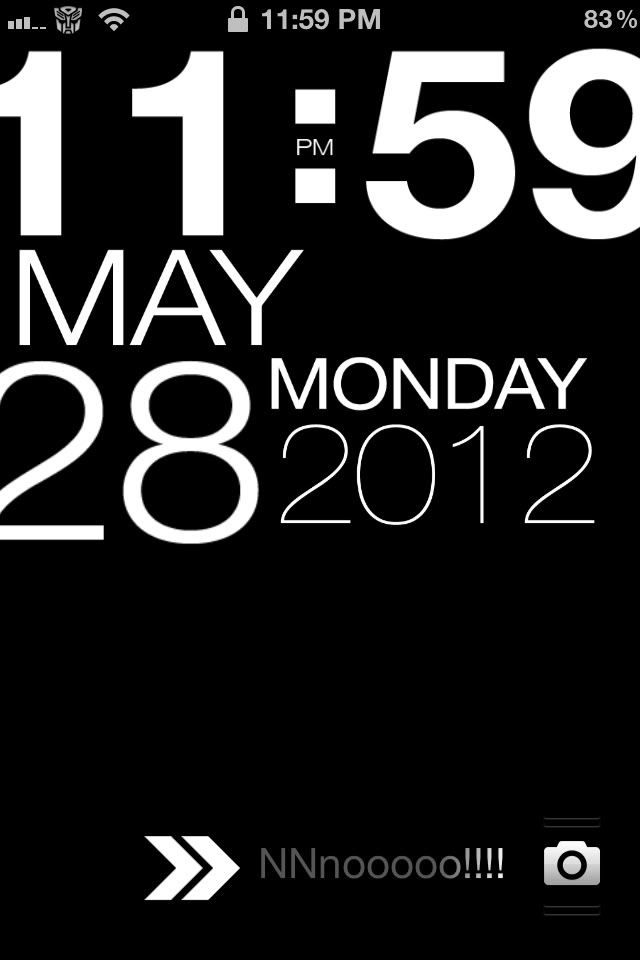
Sexy or not ? brows.gif
Typophone4
user posted image
DjS
post May 29 2012, 11:32 AM

New Member
*
Junior Member
49 posts

Joined: May 2011
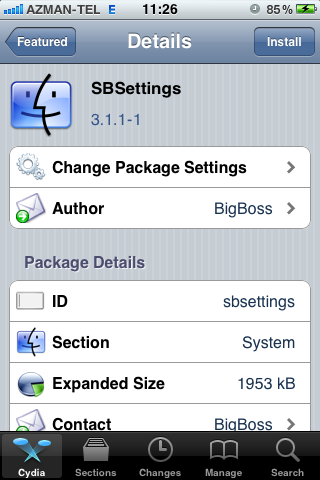
can i ask something that why the cydia source i click in but no product information shown at all? previous jailbreak cydia version still will show some picture hows it looks like and some brief info...

eg:
user posted image
but now mine is all empty just have install button on top right and manage on top left... what product info and picture also no....

is it due to now cydia is peak period so this problem occurs?
somemore many question marks ? show front of sources icon...without icon picture

This post has been edited by DjS: May 29 2012, 11:33 AM
akkihiko
post May 29 2012, 11:33 AM

アキヒコ
******
Senior Member
1,602 posts

Joined: Apr 2007
From: KL


very nice, but the clock will cover most of lockscreen wallpaper rite? how to edit the transformer icon next to wifi icon? hmm.gif

» Click to show Spoiler - click again to hide... «


This post has been edited by akkihiko: May 29 2012, 11:33 AM
frozzbyte
post May 29 2012, 11:41 AM

Feeling butthurt lately? Like I care
*******
Senior Member
3,657 posts

Joined: May 2005
QUOTE(joonwei23 @ May 28 2012, 09:18 PM)
Guys, is it possible to make bitesms to have the ios 5 notification when a message appears ? like the one that comes out from the top. because bitesms interrupts when i'm playing a game.
unlike ios5, it just appears on top.
*
Go to BiteSMS -> Settings (the gear icon) -> Quick Reply -> Alert Style -> Use Apple settings

Make sure in notifications, you set the original message to the banner style
eikan
post May 29 2012, 11:43 AM

Casual
***
Junior Member
326 posts

Joined: Jan 2003
From: Shah Alam
QUOTE(akkihiko @ May 29 2012, 11:33 AM)
very nice, but the clock will cover most of lockscreen wallpaper rite? how to edit the transformer icon next to wifi icon?  hmm.gif

» Click to show Spoiler - click again to hide... «

*
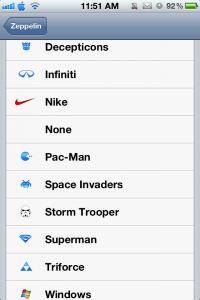
cydia>zeppelin
Mr Cola
post May 29 2012, 11:55 AM

Casual
***
Junior Member
387 posts

Joined: Aug 2008
From: KL


QUOTE(eikan @ May 29 2012, 11:43 AM)
cydia>zeppelin
*
+1

It has lots of default choices..

» Click to show Spoiler - click again to hide... «


You can also create your own custom made icon image & place it into /Library/Zeppelin. biggrin.gif

This post has been edited by Mr Cola: May 29 2012, 11:55 AM
DjS
post May 29 2012, 12:28 PM

New Member
*
Junior Member
49 posts

Joined: May 2011
QUOTE(DjS @ May 29 2012, 11:32 AM)
can i ask something that why the cydia source i click in but no product information shown at all? previous jailbreak cydia version still will show some picture hows it looks like and some brief info...

eg:
user posted image
but now mine is all empty just have install button on top right and manage on top left... what product info and picture also no....

is it due to now cydia is peak period so this problem occurs?
somemore many question marks ? show front of sources icon...without icon picture
*
can refer this website to solve tis problem?
Cydia showing no information
by deleting /var/root/Library/Caches/com.saurik.Cydia ?

anyone face this before?


joonwei23
post May 29 2012, 12:32 PM

Regular
******
Senior Member
1,019 posts

Joined: Sep 2009
QUOTE(frozzbyte @ May 29 2012, 11:41 AM)
Go to BiteSMS -> Settings (the gear icon) -> Quick Reply -> Alert Style -> Use Apple settings

Make sure in notifications, you set the original message to the banner style
*
yeah, got it. i emailed biteSMS earlier when the forum was down.
got the same reply biggrin.gif
nevertheless, thank you smile.gif

hmm but i can't find biteSMS on the notification part ?

This post has been edited by joonwei23: May 29 2012, 12:39 PM
D-Frog
post May 29 2012, 12:44 PM

Look at all my stars!!
*******
Senior Member
2,983 posts

Joined: Nov 2011
Any nice lockscreen guys?
DjS
post May 29 2012, 12:44 PM

New Member
*
Junior Member
49 posts

Joined: May 2011
QUOTE(DjS @ May 29 2012, 12:28 PM)
can refer this website to solve tis problem?
Cydia showing no information
by deleting  /var/root/Library/Caches/com.saurik.Cydia ?

anyone face this before?
*
Problem solve it was solve by delete it /var/root/Library/Caches/com.saurik.Cydia ...
googles does help me on this.... notworthy.gif

126 Pages « < 50 51 52 53 54 > » Top
Topic ClosedOptions
 

Change to:
| Lo-Fi Version
0.0266sec    0.85    6 queries    GZIP Disabled
Time is now: 5th December 2025 - 11:06 AM