

Untethered Jailbreak 5.1.1 is releasing tomorrow
Source
This post has been edited by tashfinsheikh: May 24 2012, 10:37 PM
Jailbreak and Unlock Discussion v4, READ: ABSOLUTELY NO DISCUSSION ON PIRACY
Jailbreak and Unlock Discussion v4, READ: ABSOLUTELY NO DISCUSSION ON PIRACY
|
|
 May 24 2012, 10:36 PM May 24 2012, 10:36 PM
Return to original view | Post
#1
|
 
Senior Member
646 posts Joined: Nov 2008 From: Malaysia   
|
Untethered Jailbreak 5.1.1 is releasing tomorrow
Source This post has been edited by tashfinsheikh: May 24 2012, 10:37 PM |
|
|
|
|
|
May 25 2012, 03:00 PM
Return to original view | Post
#2
|
|
Senior Member
646 posts Joined: Nov 2008 From: Malaysia
|
QUOTE(shurebeta @ May 25 2012, 02:49 PM) noob questions. according to his blog, caniphone 3gs ios 5.1.1 can be untethered jailbreak now?  Source |
|
|
May 25 2012, 04:57 PM
Return to original view | Post
#3
|
|
Senior Member
646 posts Joined: Nov 2008 From: Malaysia
|
QUOTE(D-Frog @ May 25 2012, 04:54 PM) NO , I meant is, when we jaiblreaking, everything will be gone rite? Select Restore from previous backup and it will transfer everything back to your jailbroken iPad So how do I transfer it back without using itunes?  |
|
|
May 25 2012, 06:23 PM
Return to original view | Post
#4
|
|
Senior Member
646 posts Joined: Nov 2008 From: Malaysia
|
QUOTE(D-Frog @ May 25 2012, 06:10 PM) WOw, jsut came back from a 2km jogging, my restore still haven't finish .TT 40gb data might take some time  Go for another 4 km jog by then it would be done  |
|
|
May 25 2012, 09:18 PM
Return to original view | Post
#5
|
|
Senior Member
646 posts Joined: Nov 2008 From: Malaysia
|
Tried jailbreaking, and failed
 |
|
|
May 25 2012, 09:21 PM
Return to original view | Post
#6
|
|
Senior Member
646 posts Joined: Nov 2008 From: Malaysia
|
Anyone else facing problem while jail breaking ? stuck at waiting for process
and suddenly finish and nothing happens ? |
|
|
|
|
|
May 25 2012, 09:27 PM
Return to original view | Post
#7
|
|
Senior Member
646 posts Joined: Nov 2008 From: Malaysia
|
it shows "Something seems to have gone wrong" after that it recovers to default , not sure why
|
|
|
May 25 2012, 09:33 PM
Return to original view | Post
#8
|
|
Senior Member
646 posts Joined: Nov 2008 From: Malaysia
|
QUOTE(K810i @ May 25 2012, 09:23 PM) hey guys, i have been stuck in here for kind of long, 4s 16GB facing this same problem is it a fail or i should continue waiting ?  |
|
|
May 25 2012, 10:01 PM
Return to original view | Post
#9
|
|
Senior Member
646 posts Joined: Nov 2008 From: Malaysia
|
Those who can't jailbreak follow these instructions :-
QUOTE(sauying @ May 25 2012, 09:59 PM) For those cannot JB - credit to sauyingIf you're using IPAD 2, make sure it is not 32nm model 1. Download latest IOS 5.1.1 IPSW from http://www.weiphone.com/ios/ 2. Backup your IPAD with Itunes 3. Hold 'SHIFT' and CLICK on RESTORE BUTTON in ITUNES 4. Select your downloaded IPSW (may rename into .ipsw ) 5. Restoring ... and JB 越狱万岁! |
|
|
May 25 2012, 10:08 PM
Return to original view | Post
#10
|
|
Senior Member
646 posts Joined: Nov 2008 From: Malaysia
|
QUOTE(fox dead22 @ May 25 2012, 10:03 PM) just JB it....works like magic are you using iPhone 4 or 4s  or ipad ? Added on May 25, 2012, 10:09 pm QUOTE(ClarenceNg @ May 25 2012, 10:08 PM) what bout iphone? same method just download iPhone 4 or 4s firmware instead of iPad one by scrolling bellow still got stucked and got the recovery and thn nth happen in the end make sure your model no matches the one you are downloading  This post has been edited by tashfinsheikh: May 25 2012, 10:10 PM |
|
|
May 26 2012, 12:06 AM
Return to original view | Post
#11
|
|
Senior Member
646 posts Joined: Nov 2008 From: Malaysia
|
QUOTE(fizzy15 @ May 25 2012, 11:51 PM) got the same message.. how many time should i retry? QUOTE(x132755 @ May 25 2012, 11:57 PM) also got the same msg.. seem cant complete.. follow this guidesomething wrong d.. normally after reboot should bump an msg out u can cclick ok, but dun hv.. anyone know what problem? QUOTE(sauying @ May 25 2012, 09:59 PM) For those cannot JB 1. Download latest IOS 5.1.1 IPSW from Click here 2. Backup your iDevice with Itunes 3. Hold 'SHIFT' and CLICK on RESTORE BUTTON in ITUNES 4. Select your downloaded IPSW (may rename into .ipsw ) 5. Restoring ... and JB 越狱万岁! |
|
|
May 26 2012, 12:56 AM
Return to original view | Post
#12
|
|
Senior Member
646 posts Joined: Nov 2008 From: Malaysia
|
QUOTE(D-Frog @ May 26 2012, 12:25 AM) Help guys,. I can't sync my iphone for music and video drag all the music and video from your library (that you want to copy) and drop it on your iOS device  |
|
|
May 26 2012, 01:04 AM
Return to original view | Post
#13
|
|
Senior Member
646 posts Joined: Nov 2008 From: Malaysia
|
QUOTE(D-Frog @ May 26 2012, 01:01 AM) i don't have, T.T are you sure you have backed up properly as for me it restored everything Now trying my best to recall what I have |
|
|
|
|
|
May 26 2012, 01:40 AM
Return to original view | Post
#14
|
|
Senior Member
646 posts Joined: Nov 2008 From: Malaysia
|
QUOTE(shawn87 @ May 26 2012, 01:26 AM) itunes do backup pictures right? i now back up ady.. restoring to latest firmware.. pls verified before its gone.. so fat the most important thing is contact list Yea it backups all the pics  |
|
|
May 26 2012, 01:41 AM
Return to original view | Post
#15
|
|
Senior Member
646 posts Joined: Nov 2008 From: Malaysia
|
QUOTE(D-Frog @ May 26 2012, 01:38 AM) me and my bro both 4s succesful, Might try on the new ipad, oh wait, is it able? I have jail broken my iPad 3 dun worry Added on May 26, 2012, 1:42 am QUOTE(shawn87 @ May 26 2012, 01:41 AM) i do double back up.. i copied all the pictures into my computer.. what im worried now is the contact.. touch wood scare anything wrong.. lol For Mac it sync automatically over iCloud with Mac contacts app, not sure about windows though, and pics are auto sync with iPhoto...This post has been edited by tashfinsheikh: May 26 2012, 01:42 AM |
|
|
May 26 2012, 02:45 PM
Return to original view | Post
#16
|
|
Senior Member
646 posts Joined: Nov 2008 From: Malaysia
|
QUOTE(poex @ May 26 2012, 02:41 PM) All sifus,i tried few times shift+restore updating to 5.1.1 from 5.0.1 using the downloaded ipsw.. un-tick this button from your tiny umbrella usually this fixes that issue but itunes keep always prompt me the 1600 error..then i will stuck in recovery mode..luckily tiny umbrella can kick me out from recovery loop..if not lagi susah.. I hv tried delete the apple host, but itunes still prompt same error..now i lost already.. Wht i suppose to do?anyone can help? 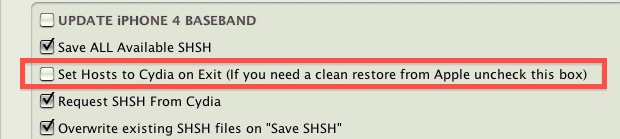 |
|
|
May 26 2012, 02:59 PM
Return to original view | Post
#17
|
|
Senior Member
646 posts Joined: Nov 2008 From: Malaysia
|
QUOTE(poex @ May 26 2012, 02:49 PM) Thx boss..do u mean after untick the option i need to run TU during the restore? It will fix 1600 error and let you restore to 5.1.1 using iTunes |
|
|
May 26 2012, 06:14 PM
Return to original view | Post
#18
|
|
Senior Member
646 posts Joined: Nov 2008 From: Malaysia
|
http://cydiablog.com/absinthe-2.0.1-tool/
They have released a new version which fixes the “waiting for process to complete” continues into “hmm something seems to have gone wrong” issue All you have to do is, retry jailbreaking iPhone, iPad or iPod touch with Absinthe 2.0.1. It will work like a charm for you. In case it doesn’t work, restore your device to fresh 5.1.1 through iTunes and Jailbreak it using Absinthe 2.0.1 |
|
|
May 27 2012, 05:58 PM
Return to original view | Post
#19
|
|
Senior Member
646 posts Joined: Nov 2008 From: Malaysia
|
QUOTE(alucard89 @ May 27 2012, 05:50 PM) Guys, I just use Absinthe 2.0.1 to jailbreak my 3gs. If cydia is working means it is successfully jailbrokenAnd halfway I get error 'Could not connect to lockdownd. Aborting." But I do see Cydia icon on the second screen. And so far Cydia seems to be functioning and I'm able to use it. So would you say the jailbreak works? |
|
|
May 27 2012, 10:36 PM
Return to original view | Post
#20
|
|
Senior Member
646 posts Joined: Nov 2008 From: Malaysia
|
QUOTE(shark7 @ May 27 2012, 10:21 PM) which is faster? iTubes is fasterso the sync no need to do? iCloud uploads the data to iCloud server , if you are not on unlimited plan you will reach your quota easily + iCloud gives 5GB free storage space and if you have more than 5gb of data to backup it won't be able to backup QUOTE(shawn87 @ May 27 2012, 10:28 PM) Can some one advice me why iTunes doesnt backup my photos? It auto backups for me through iTunes > iPhoto every time I connect my iPad  but I am on mac but I am on mac |
|
Topic ClosedOptions
|
| Change to: |  0.0370sec 0.0370sec
 0.60 0.60
 7 queries 7 queries
 GZIP Disabled GZIP Disabled
Time is now: 3rd December 2025 - 02:23 PM |
 Quote
Quote