Welcome Guest ( Log In | Register )

Bump Topic Topic Closed RSS Feed
35 Pages « < 30 31 32 33 34 > » Bottom

Outline · [ Standard ] · Linear+

 Ivy Bridge Overclocking V1 | 3770K/3570K | Z77, Torture Your CPU, Post It Here!

views
     
TSowikh84
post Apr 21 2013, 08:23 AM

i7 Clan
Group Icon
Elite
8,711 posts

Joined: Nov 2007
From: Butterworth, PG / Machang, Kelantan


QUOTE(cstkl1 @ Apr 20 2013, 06:31 PM)
dude all those dram refresh interval are wrong. hence y u getting stability but not really any much bandwidth gain.

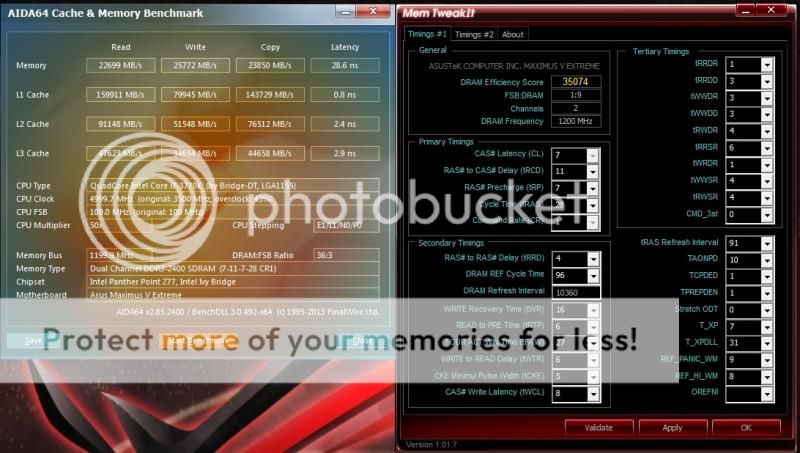
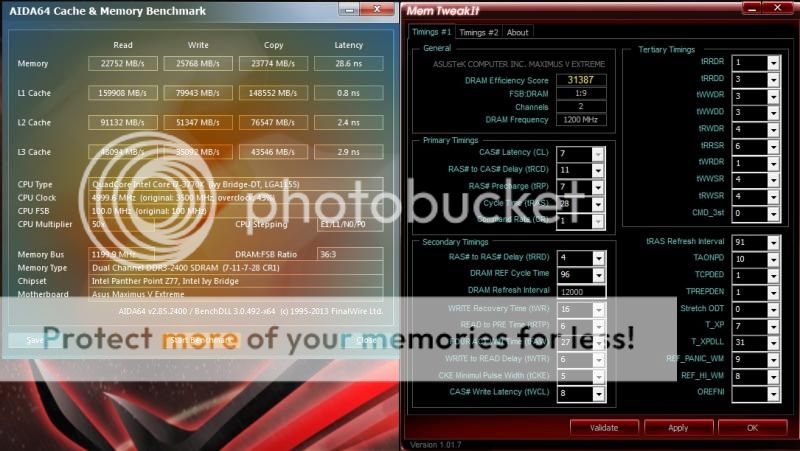
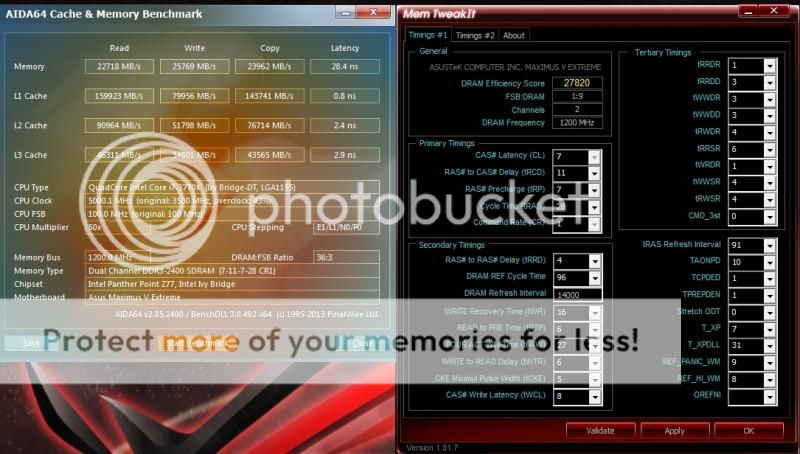
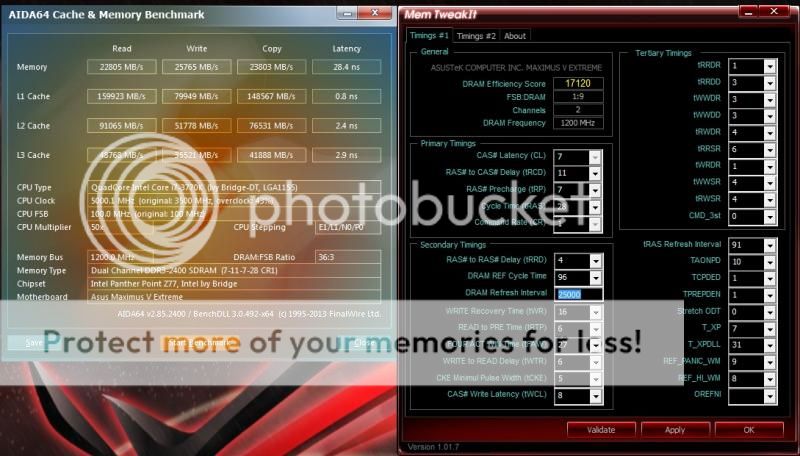
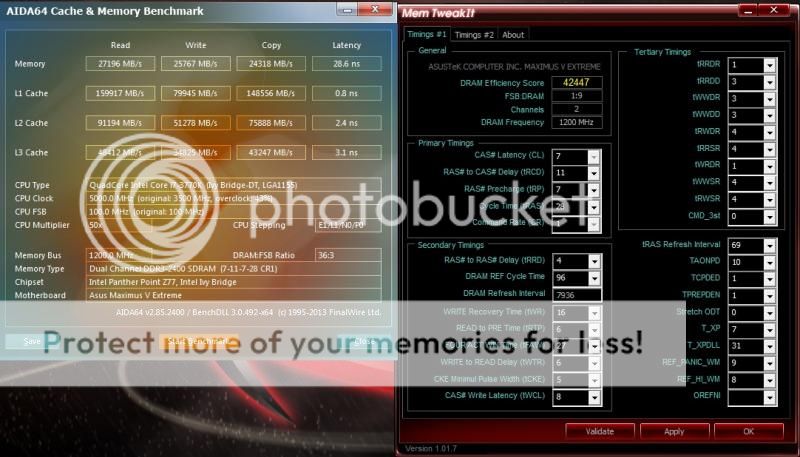
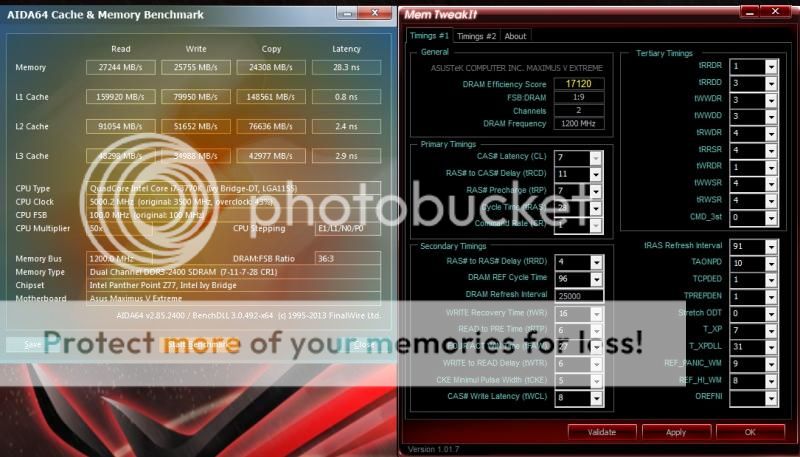
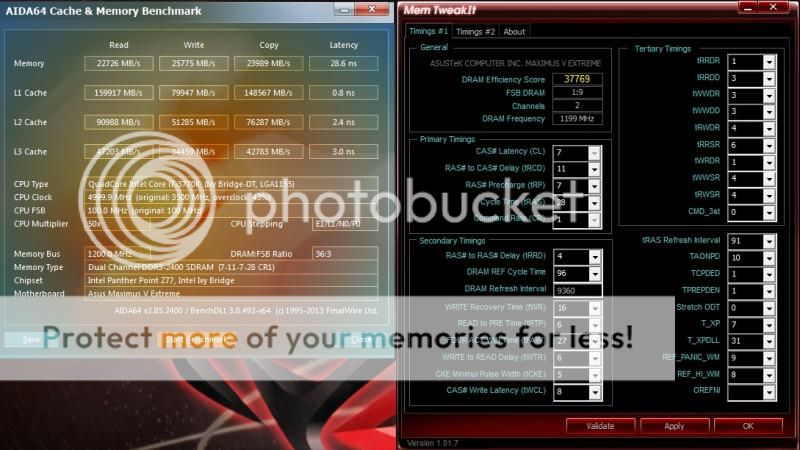
I don't know. But I have tried some different tREFI from 7936 up to 25000 the bandwidth is still the same.
Isn't 2400 peak at 19200 but I got more than that?

QUOTE
2400MHz PC3-19200 - peak data transfer rate: 19200 MBps


tREFI: 10360
user posted image

tREFI: 12000
user posted image

tREFI: 14000
user posted image

tREFI: 25000
user posted image

Until I adjusted tRRSR from 6 to 4

tRRSR: 4
user posted image

user posted image

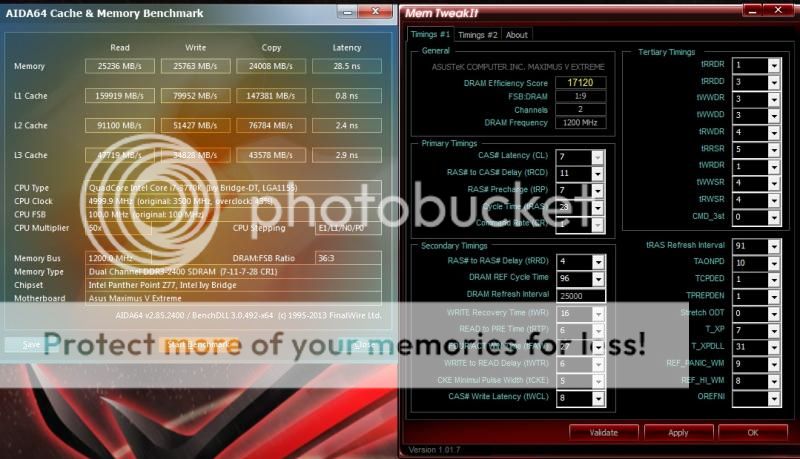
tRRSR: 5
user posted image

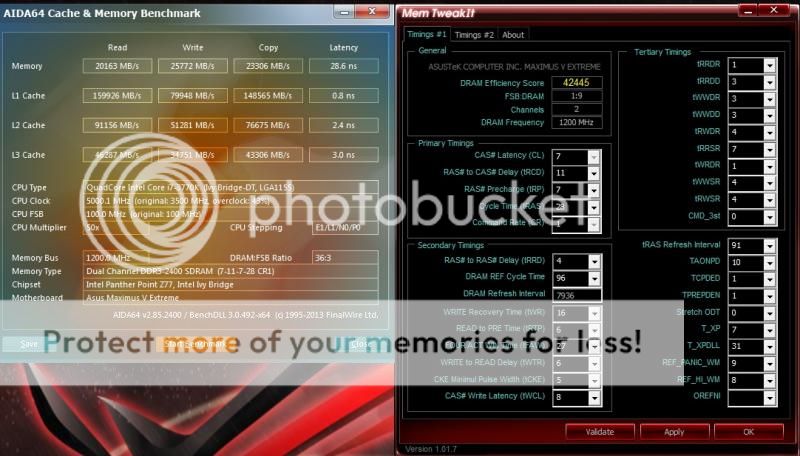
The higher the tRRSR the lower the bandwidths.

tRRSR: 7
user posted image

Maybe you could give some advices on this.

Btw, welcome back bro. thumbup.gif
TSowikh84
post Apr 22 2013, 10:49 AM

i7 Clan
Group Icon
Elite
8,711 posts

Joined: Nov 2007
From: Butterworth, PG / Machang, Kelantan


Thanks for the PMs.
Well I can't make it worked but nevermind.

1200 x 7.8 = 9360

user posted image

As for SuperPi32m 5Ghz Ivy All Out Challenge!, the tREFI might not be a meaningful number as it doesn't really affect much on performance. But I didn't test stability performance on different tREFI values perhaps later once I got some time.


TSowikh84
post Apr 22 2013, 02:14 PM

i7 Clan
Group Icon
Elite
8,711 posts

Joined: Nov 2007
From: Butterworth, PG / Machang, Kelantan


QUOTE(stasio @ Apr 22 2013, 01:10 PM)
The "boys" at GB OC Lab..............

new WR..................7186.54 MHz (114.08 * 63) on UP7.
Congrats guys!

http://gigabytedaily.blogspot.com/2013/04/...t-visitors.html
http://valid.canardpc.com/show_oc.php?id=2777368
*
Insane chip they got there. With that voltage I'm pretty sure that they still have backup score waiting for Asus' answer. laugh.gif
TSowikh84
post Apr 22 2013, 06:03 PM

i7 Clan
Group Icon
Elite
8,711 posts

Joined: Nov 2007
From: Butterworth, PG / Machang, Kelantan


QUOTE(stasio @ Apr 22 2013, 02:59 PM)
Hehe,
voltage can be higher then that and with liquid nitrogen (-196C) only!

And I didn't saw anybody high result, with 4/4 cores.

btw,
somebody ask which cheap is better Costa or Malay.
As already stated before here .......is just luck.

Exsample latest Malay chip (don't know batch yet).......5GHz with only 1.28Vcore.
*
Yupe, it's all depends on your luck. In my case, I have two of the good chips at the moment:

1) Malaysia: lower VID but IMC 2777 max
2) Costa Rica: higher VID but IMC 2933 max

I think I will not buy Ivy anytime soon since Haswell is around the corner. biggrin.gif
TSowikh84
post Apr 23 2013, 12:46 PM

i7 Clan
Group Icon
Elite
8,711 posts

Joined: Nov 2007
From: Butterworth, PG / Machang, Kelantan


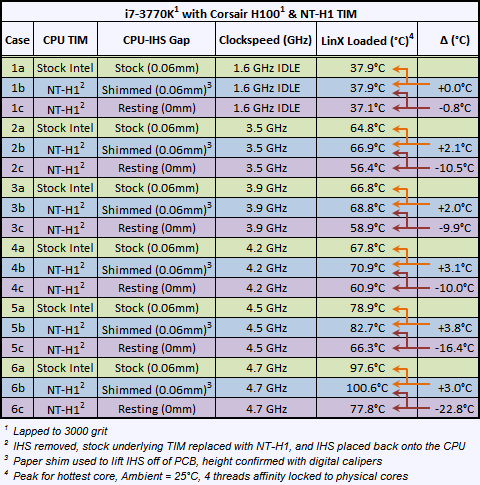
It is fine to use TIM as long as they don't put the black adhesive glue too thick or the air gap between the IHS to the die is not too large that would be okay already.

QUOTE(owikh84 @ Jan 14 2013, 10:59 PM)
An interesting post about the culprit behind the overheating issues of Ivy

user posted image
the black adhesive glue is too thick making the gap between the die and IHS wider than it should be.

Source
*
This post has been edited by owikh84: Apr 23 2013, 12:48 PM
TSowikh84
post Apr 24 2013, 07:17 AM

i7 Clan
Group Icon
Elite
8,711 posts

Joined: Nov 2007
From: Butterworth, PG / Machang, Kelantan


QUOTE(stasio @ Apr 24 2013, 12:45 AM)
Just found on facebook...........hard to beleive (or this realy call GOLD chip).........5.6GHZ @ 1.15V  shocking.gif

http://valid.canardpc.com/show_oc.php?id=2779898

or 6.3GHz @ 1.38V
http://valid.canardpc.com/show_oc.php?id=2780190

also here:
https://www.facebook.com/mad.tse
*
Holy %$&%*&*@^ what an insane chip! shocking.gif
But don't know whether it is a correct vCore reading until he tries it on another mobo and verified by digital multimeter.
If true then it should be a 7.5GHz chip with 117MHz BCLK.
If false then Gigabyte... doh.gif
TSowikh84
post Apr 24 2013, 10:06 AM

i7 Clan
Group Icon
Elite
8,711 posts

Joined: Nov 2007
From: Butterworth, PG / Machang, Kelantan


QUOTE(trisx @ Apr 24 2013, 09:05 AM)
Anybody using bios 1707 for m5g ? I realized after updating to this, I can't start my PC normally. Need to reset CMOS every time wanna start it, else it won't power up . Quite weird or am I missing something out ?
*
QUOTE(stasio @ Apr 24 2013, 09:06 AM)
Why always Gigabyte.  flex.gif

Stepping 3 will be retail?

*
False sensor? biggrin.gif
No idea on the CPU stepping but from your pic it looks like Intel is going to release C3 stepping.
So far we only have details on the Z87 chipset stepping which will be launched with C1 stepping. C2 stepping which fixed the USB3.0 problem will be in mass production in mid-August.
TSowikh84
post Apr 24 2013, 10:50 AM

i7 Clan
Group Icon
Elite
8,711 posts

Joined: Nov 2007
From: Butterworth, PG / Machang, Kelantan


QUOTE(stasio @ Apr 24 2013, 10:37 AM)
Yea,will be similar situation as with P67 series....... rclxub.gif

B2=>B3

Z87
C1=>C2
*
Looks like that bro, those early adopters will be forced to exchange their board C1 to C2 stepping starting from Aug two months after launching. sad.gif
But this time at least we know this issue earlier before release date.
TSowikh84
post Apr 24 2013, 09:51 PM

i7 Clan
Group Icon
Elite
8,711 posts

Joined: Nov 2007
From: Butterworth, PG / Machang, Kelantan


QUOTE(trisx @ Apr 24 2013, 06:46 PM)
U mean my mobo sensor ? Or might it be BIOS itself ?
*
Sorry I quoted wrongly i was referring to stasio's post earlier.
Alright, I don't know what's wrong with your PC, if not OCed do you have this boot issue.
What did you mean by PC can't start normally? Can post or not?
TSowikh84
post Apr 24 2013, 11:42 PM

i7 Clan
Group Icon
Elite
8,711 posts

Joined: Nov 2007
From: Butterworth, PG / Machang, Kelantan


QUOTE(trisx @ Apr 24 2013, 10:11 PM)
Ok, my PC running on stock. LED all lighting up when I switch ON. But when I hit start button, nothings happen. No fan spinning, or even nothing displayed at Q-code.
Just only reseated my CPU, cooler and everything. Now running my mobo outside of my case. Been clearing CMOS around 10 - 15 times n now finally manage to boot. I dont know whats worng with it.
*
I think there's no better way than RMA it.
TSowikh84
post Apr 25 2013, 06:56 AM

i7 Clan
Group Icon
Elite
8,711 posts

Joined: Nov 2007
From: Butterworth, PG / Machang, Kelantan


QUOTE(trisx @ Apr 24 2013, 11:50 PM)
Is it possible PSU faulty ? Running on AX650 tho. Maybe should I try with diff PSU before sending out for RMA perhaps ?
*
Like raydenex said, you may try another PSU, RAM, GC, or even CPU if you have spare smile.gif
Now, two of my 7970s are not working properly, not detected correctly as HD7900 series in device manager, causing sudden shutdown after booting into windows.
I suspect it's either my GC, mobo PCIe slots, or PSU problem.

QUOTE(andydutz @ Apr 24 2013, 11:54 PM)
i attempted to delid my 3770k yesterday using vise+hammer+wood, but i just cant delid the damn thing. just now went really2 crazy and took a thin blade, delid, booted and whaddaya know, success. rclxm9.gif
if u noticed the cpu pcb closely, you will see some battle scar the cpu taken during my hammer session. tongue.gif
but the proc still alive and kickin' (im using my pc to type diz post)
Ill post some before/after pics once my liquid ultra arrive in couple of days.  notworthy.gif
*
Good job! We got another success story here.
My chip also has some scratches on PCB, but fortunately it's still alive & rocks.
Pls share some OC results or cooling improvement of the delidded CPU. CLU is the best TIM after CL Pro that I have ever owned. CLU outperforms Arctic MX-4 by 9-10C: Proof
Good luck!

QUOTE(ocz @ Apr 25 2013, 01:24 AM)
Latest try. With Gigabyte Z77X-D3H + i7 3770K + H100
Still new here. sad.gif
*
Nice try. But prime95 25.x is kinda old and doesn't have AVX instruction to stress the overclocks accurately.
Without this AVX libraries it's like stressing half of the performance of the Ivy. The latest one is posted in Post#1.

TSowikh84
post Apr 25 2013, 08:39 AM

i7 Clan
Group Icon
Elite
8,711 posts

Joined: Nov 2007
From: Butterworth, PG / Machang, Kelantan


QUOTE(trisx @ Apr 25 2013, 08:14 AM)
Will try diff PSU later n update here. I hear slow buzzing sound from my PSU , but it is normal right ?
*
The buzzing noise came from coil whine, which is normal for mos/some PSUs.
I had 4x Corsair AX1200, 2x HX1000, TX750 all suffered from this buzzing sound. biggrin.gif
XFX Black 750W and Aerocool Strike X 1100W didn't have this issue.
Can I say this is due to Corsair or OEM poor manufacturing, poor PCB contact, poor soldering & poor glue contact? HAHA
TSowikh84
post Apr 25 2013, 11:14 AM

i7 Clan
Group Icon
Elite
8,711 posts

Joined: Nov 2007
From: Butterworth, PG / Machang, Kelantan


QUOTE(raydenex @ Apr 25 2013, 10:55 AM)
Consider yourself lucky already, with just a PSU swap your problem isolated and identified. Imagine if swapping PSU did not solve the problem... then you'll be fiddling with your rig still trying to find the culprit hehe.. Apalagi, send it to RMA bro smile.gif

Corsair AX650 is OEM manufactured by who? Seasonic?
*
AX850/AX750/AX65 OEMed by Seasonic: Source

AX1200 is Flextronics: Source
TSowikh84
post Apr 25 2013, 01:48 PM

i7 Clan
Group Icon
Elite
8,711 posts

Joined: Nov 2007
From: Butterworth, PG / Machang, Kelantan


QUOTE(trisx @ Apr 25 2013, 01:15 PM)
Weird that gold class PSU can easily kaput within few months
*

Coincidentally, gold price is also dropping worldwide lol.

How about try Platinum PSU? biggrin.gif
TSowikh84
post Apr 25 2013, 11:03 PM

i7 Clan
Group Icon
Elite
8,711 posts

Joined: Nov 2007
From: Butterworth, PG / Machang, Kelantan


QUOTE(trisx @ Apr 25 2013, 01:51 PM)
haha really, LOL

just found a similar case to mine at corsair forum
AX650 not powering up

He ends up RMA'ing the PSU as well tho.

Just 1 question lingering in my mind, would that be my PSU cables got defect? since i've been bending them to do my wire management and all because i've been thinking that, what if they replaced my PSU but the problem still persist cause of spoilt cables? This maybe sounds stupid LOL  laugh.gif
*
Could be bent ATX pins etc.
I have solved my 7970s issues, one of the PCIe cables that I sleeved myself has loosen pins LOL. Maybe I force it too hard due to short cable routed from top case of LD V8 sweat.gif
Now 3-way CF is working perfectly again. icon_idea.gif
TSowikh84
post Apr 25 2013, 11:22 PM

i7 Clan
Group Icon
Elite
8,711 posts

Joined: Nov 2007
From: Butterworth, PG / Machang, Kelantan


QUOTE(stasio @ Apr 25 2013, 11:11 PM)
"False sensor" continue today..........6.574GHz @ 1.416V  rclxub.gif

http://valid.canardpc.com/show_oc.php?id=2782456

https://www.facebook.com/hkepc

Intel Core i7-3770K 6.68GHz @ 1.44v !! HKEPC Lab Test :

https://www.facebook.com/photo.php?v=10151893407320031
*
Still no 7.5GHz? hmm.gif
TSowikh84
post Apr 29 2013, 12:50 PM

i7 Clan
Group Icon
Elite
8,711 posts

Joined: Nov 2007
From: Butterworth, PG / Machang, Kelantan


QUOTE(andydutz @ Apr 29 2013, 11:17 AM)
Bro owikh, i need ur advice on cpu lapping.

Can i direct use 3000grit sandpaper for lapping(mirror finish) or shud i use step by step lapping(starting from 220, 400, 800 n so on) ?
*
Actually you can, just that it might take longer time to sand if you start from a higher grit.

When you are switching to different grit you are actually just sanding out the scratches left from the previous grit. If you start with lower grit then you tend to get really deeper scratches.
TSowikh84
post Apr 29 2013, 05:23 PM

i7 Clan
Group Icon
Elite
8,711 posts

Joined: Nov 2007
From: Butterworth, PG / Machang, Kelantan


QUOTE(andydutz @ Apr 29 2013, 01:42 PM)
So what if i use 220, 800, 2000 and finally 3000? Shud be ok i think? I fear later if too much sanding ihs becomes thinner, later on contact between waterblock and ihs will have huge gap..
*

Yes, that's in correct order. Always start from lower grit to higher.
Don't sand it too long then you should be fine. You might wanna google for CPU lapping tips/guides for more info.
Good luck!
TSowikh84
post May 3 2013, 06:52 AM

i7 Clan
Group Icon
Elite
8,711 posts

Joined: Nov 2007
From: Butterworth, PG / Machang, Kelantan


QUOTE(souq @ May 2 2013, 09:33 PM)
hehe. yup... pisau lipat... hehe
ok here is my latest OC.. i will stop here i maybe, enough voltage and temperature rise...
tak berani to increase more voltage.. what do you guys think?
*

Well done. Nothing wrong with the settings and temps except for the minimum ones.
Are they really your idle temps or you launched RealTemp during priming?
Your CPU's vCore is like any other average chip.

TSowikh84
post May 4 2013, 10:02 AM

i7 Clan
Group Icon
Elite
8,711 posts

Joined: Nov 2007
From: Butterworth, PG / Machang, Kelantan


QUOTE(spdboyz @ May 3 2013, 09:53 PM)
Will a different in ram latency effect processor overclocking stability?

Today I just sold my i5 3570k(Malaysia) and bought another i5 3570k(Costa Rica) hoping to found a better chip than my previous 3570k. In the end, it is just the same. Need 1.356v for 4.4Ghz.

My ram is Corsair Vengeance 1600Mhz cl8 2x4GB. Will changing the latency from c8 to c9 improved stability?
*
Higher CAS and other timings if set correctly generally will improve stability, but at lower performance.

A quick alternative to cut down the vCore is to grab the ASRock OC Formula and expect to get at least 0.06v lower than any Asus mobo.

On your current board, you might try to increase the CPU PLL volt from 1.80v to 1.85v/1.90v. You might get lower vCore without hurting the performance.

35 Pages « < 30 31 32 33 34 > » Top
Topic ClosedOptions
 

Change to:
| Lo-Fi Version
0.0543sec    0.26    7 queries    GZIP Disabled
Time is now: 2nd December 2025 - 01:49 AM