Welcome Guest ( Log In | Register )

Bump Topic Topic Closed RSS Feed
35 Pages « < 32 33 34 35 >Bottom

Outline · [ Standard ] · Linear+

 Ivy Bridge Overclocking V1 | 3770K/3570K | Z77, Torture Your CPU, Post It Here!

views
     
TSowikh84
post Jun 1 2013, 01:58 PM

i7 Clan
Group Icon
Elite
8,711 posts

Joined: Nov 2007
From: Butterworth, PG / Machang, Kelantan


QUOTE(hanny562 @ Jun 1 2013, 01:24 PM)
Thanks Kevin , yea need a very big balls to do it, and yes thank god it's alive, when first I scratched the PCB , I was like almost heart attack and can't wait to test it out and luckily it still kicking XD

I believe if used custom WC it can drop more XD but seems like need slightly more liquid ultra to full the gap between IHS and the DIE, or else if the layer too thin, the TIM can't reach the IHS =x

But Kelvin, will the scratch affect the performance on the processor?
@raydenex can find Nicolasteoh ,

https://forum.lowyat.net/index.php?showtopic=1702139&hl=
Thanks XD time to delid your  biggrin.gif
I used Pen Knife, but XL size pen knife seems too big to get into the GAP, that's why my PCB full of scratch >< recommend to use razer blade which is thinner or small pen knife ><
hah can try to do it , just use thin knife + don't shake + make the straight in the gap then can already XD
*
I just use one drop of Liquid Pro and spread it to a thin layer with the provided cotton bud.
The scratches on the PCB will not affect anything, your chip will work just perfectly.
TSowikh84
post Jun 5 2013, 11:24 AM

i7 Clan
Group Icon
Elite
8,711 posts

Joined: Nov 2007
From: Butterworth, PG / Machang, Kelantan


QUOTE(Ardy7201 @ Jun 5 2013, 10:27 AM)
Hello, im totally newbie...

i7 3770k + Noctua NH-D14 CPU Cooler + Asrock Z77 Extreme 4 + GTX 680. how to overclock? on the BIOS? no software? want better FPS in gaming...
can someone please teach/guide me to overclock? max i can get with stable?

ardyshazril@yahoo.com
*
There are some OC guides in the first post of this thread including ASRock mobo.

Depends on the chip by rights an average 3770K should be able to do 4.5-4.6GHz on air.

Good luck!


TSowikh84
post Jun 9 2013, 10:19 AM

i7 Clan
Group Icon
Elite
8,711 posts

Joined: Nov 2007
From: Butterworth, PG / Machang, Kelantan


For 4 dimms it will stress the IMC and requiring a bump on the VCCSA and VCCIO.

Give it VCCSA 1.25v, VCCIO 1.15v (both limit @ 1.3v)

Run HyperPi for quick stability before proceeding for LinX and Prime95.
TSowikh84
post Jun 10 2013, 12:20 AM

i7 Clan
Group Icon
Elite
8,711 posts

Joined: Nov 2007
From: Butterworth, PG / Machang, Kelantan


QUOTE(amadzack @ Jun 9 2013, 10:50 PM)
thanks for the tips bro..
with VCCSA 1.20v Vccio 1.15v
it's easy to POST,but still cant get it stable
i thing,i might have a bad IMC chip..
*
It could be IMC issue, BIOS settings or mobo incompatibility.
FYI, ASUS makes 4 dimms setup easier with their T-Topology featuring on their Z77 and latest chipsets.

QUOTE
Ultimately though, this topology upgrade means it is easier than ever to attain even more overclocking frequency and timing efficiency, and it further enhances the stability potential of 4-DIMM setups.


user posted image
TSowikh84
post Jun 11 2013, 09:01 AM

i7 Clan
Group Icon
Elite
8,711 posts

Joined: Nov 2007
From: Butterworth, PG / Machang, Kelantan


QUOTE(cstkl1 @ Jun 11 2013, 08:29 AM)
hmm dont get it how gaygay on stock for 2133mhz on 4770k the read on aida is so high at 32k.

user posted image
*
Wrong thread bro smile.gif
It might be something to do with the timings that are tighten on Gigabyte especially the tRRSR. You should compare it with MVIE.
TSowikh84
post Jul 25 2013, 09:06 AM

i7 Clan
Group Icon
Elite
8,711 posts

Joined: Nov 2007
From: Butterworth, PG / Machang, Kelantan


QUOTE(shepard @ Jul 5 2013, 06:56 PM)
Hi OC sifus,

I just bought a new costa rica chip 3570k..dunno whether this is good but that's what I think so far. this chip so far stable at:
4.5GHz @ 1.165v
4.6GHz @ 1.225v

and now I'm running at 4.8GHz and still testing. Vcore at 1.335v set in BIOS so far no stability issue(super pi/crysis 3/3dmark11) but later tonight will run LinX and P95.
any 3570k owner care to share their OC and vcore please? sorry I'm not going to read previous pages cause its too much 100++ pages sweat.gif.

anyhow this 3570k is definitely better than my previous 3770k which needs ~ 1.41v at 4.8GHz. here's a screenshot after finishing Super Pi check:

update: 5.0GHz for this cpu needs 1.45v to be able to bootup to windows..gonna try crysis3 later see if it can hold up or not, wongtheboy proc is even better than this but nonetheless this 3570k is still better than prev 3770k in terms of oc smile.gif

*
Nice chip bro. You should be able to run 5.0 for 24/7 if you decided to delid it.

QUOTE(refor_matt @ Jul 25 2013, 01:39 AM)
Greetings to all the experts on this thread.

I've been stress testing my 3770K @ 4.4Ghz using the custom prime95 test for 6+ hours, and it appears to be stable thus far.
I'm concerned that I've got a 'bad' chip though. Is my chip is running unusually hot for a modest 500Mhz overclock?

Screenshot:

BIOS settings, misc details:
» Click to show Spoiler - click again to hide... «


Assuming Prime95 runs fine for at least another 6 hours, would the above settings be reasonably safe for long term use?
*

Your temps looks normal for an overclocked Ivy, even though it is just a moderate OC.
Once the stability test passed for long hours, the OC should be fine for 24/7.
Instead of auto vCore, I'd set manually @ ~ 1.184v. Auto means you let mobo BIOS decides for you. Try lower vCore, if possible.

TSowikh84
post Jul 25 2013, 09:57 AM

i7 Clan
Group Icon
Elite
8,711 posts

Joined: Nov 2007
From: Butterworth, PG / Machang, Kelantan


QUOTE(refor_matt @ Jul 25 2013, 09:39 AM)
Ok. Thanks for the reassurance on the temps.

Managed to run prime95 14+ hours without issues thus far.  smile.gif
» Click to show Spoiler - click again to hide... «


Addendum to my previous post:
I previously tried to OC to 4.5Ghz, but core0 failed prime95 barely 4 hours into the test. After fiddling around in the BIOS several times, now my CPU multiplier simply won't go above 44x, even though I've defined the limit to be 45x. doh.gif Hence the discrepancy in the multiplier value shown in CPUz.
*

Looks like your chip needs more juices for 4.5. Try upping your vCore to say 1.2v etc.
As for the locked multi @ 44x, try enabling C-state and Speedstep aka EIST. Use the latest BIOS already?
TSowikh84
post Jul 29 2013, 01:44 PM

i7 Clan
Group Icon
Elite
8,711 posts

Joined: Nov 2007
From: Butterworth, PG / Machang, Kelantan


QUOTE(udin901 @ Jul 27 2013, 04:50 PM)
i go for stock also got the same problems...
*
Found a similar BSOD issue HERE
TSowikh84
post Aug 5 2013, 06:07 PM

i7 Clan
Group Icon
Elite
8,711 posts

Joined: Nov 2007
From: Butterworth, PG / Machang, Kelantan


QUOTE(8u8u @ Aug 5 2013, 03:47 AM)
yea...how to identify the issue ah??there stated hardware failure...but no say which hardware...
Why even though i disabled c-state my clock speed still drops to 1.6ghz when idle?? sad.gif  sad.gif
*
In windows, right-click on desktop > Screen Saver > Change power settings > choose High Performance

btw, the cores failing during priming might be due to bad OC settings, insufficient/excessive voltages, wrong memory timings etc..

This post has been edited by owikh84: Aug 5 2013, 06:08 PM
TSowikh84
post Aug 13 2013, 06:04 PM

i7 Clan
Group Icon
Elite
8,711 posts

Joined: Nov 2007
From: Butterworth, PG / Machang, Kelantan


QUOTE(exspade @ Aug 13 2013, 04:15 PM)
Hi im new to overclock smile.gif
I have a i5-3570k and Asus p8z77v-lx
Have i met the requirement to oc my proc ?
Anyone can give me simple steps to oc my proc around 4.0ghz ?
My room is currently not that hot cause got ceiling fans and aircond
Btw i'm using a cm v6gt cooler  notworthy.gif Thanks
*
Yes, 3570K is overclockable with ASUS P8Z77V-LX. By rights, 4.2-4.4GHz should be achievable on air but it's all depends on your chip strength.

OC Tips & Guides
AnandTech - Undervolting & Overclocking on Ivy Bridge
shamino's Mem OC Guide on M5G
Z77 UEFI OC Tuning Guide
Gigabyte Ivy Bridge/Z77 Overclocking Guide
ASUS Maximus V Formula OC Guide
Sandy / Ivy Bridge | Complete Overclocking Guide | *ASRock Edition*
owikh84's BIOS settings for 5GHz
Memory Overclocking Guide for Intel Ivy Bridge platform
Overclocking i5 3570K using Asus P8Z77-V LX

This post has been edited by owikh84: Aug 13 2013, 06:04 PM
TSowikh84
post Aug 17 2013, 11:17 AM

i7 Clan
Group Icon
Elite
8,711 posts

Joined: Nov 2007
From: Butterworth, PG / Machang, Kelantan


QUOTE(e-jump @ Aug 17 2013, 10:13 AM)
sigh =__=
Do we have a bad-chip club in here? doh.gif
My 3570k is terrible, even on water. the volt scales so bad by 4.3G =__=
I was ok w/ 1.16v up to 4.2G, then from there onwards every 100mhz jump needs .06v =__= playing w/ other volts n llc gives me nothing for lower vcore.
Not only that, core#1 n #2 is having 7C higher temp then #0 n #3 on full load =__=. terrible temps at 4.4G
Does using on-chip hd4000 hinders my OC, since i dont have dedicated gpu?
i have always had back luck w/ dud chip since my K7 days sad.gif

3570k
asrock z77ext4 *i have fan blowing the mosfets
2x4g ripsjaws has been put at loose timing so i can focus on cpu
375w enermax noisetaker *psu seems solid as i monitor the voltage fluctuation and no big ripples. from my k8 days

*my loop consist of 380i, SRI 240 blown by arctic F12 push-pull, D5 pump
*
The bad-chip club belongs to [WTS] in garage sales. laugh.gif
Using iGPU will put a stress on your chip and contribute some heat hence a dedicated graphics card is recommended for overclocking.
Yeah it is normal to have such bad voltage scaling in which the chip will not scale linearly and more to exponentially.
I have seen some chips scaled very bad with voltage especially 4.5GHz onwards including 4.9 to 5.0 ie. 1.49v to 1.55v and still unstable.
A good board with a strong VRM power delivery such as ASRock OC Formula will provide you a good low vCore that you won't find it on any other mobo including ROG's M5E.
So, it is also dependent on the mobo you are using.


TSowikh84
post Sep 18 2013, 06:20 AM

i7 Clan
Group Icon
Elite
8,711 posts

Joined: Nov 2007
From: Butterworth, PG / Machang, Kelantan


QUOTE(Lokie90 @ Sep 17 2013, 11:46 PM)
Helloe To All Sifus smile.gif

I'm still newbies here .. Would like to learn OC ..

I Just complete all my things was ready to OC ..

Here my Spec :
I5 3570k
Z77 Extreme 4
Corsair H100i Hydro Series
Kingston HyperX Beast 2400mhz

Never done OC before.. And really don't know ..
How to OC smile.gif

But its look like.. My spec was ready for OC ..
Any 1 can teach me ?

Also .. What's software do I need to monitoring
Temperature?
Any link I can watch before I started to learn OC?

Thanks Guys smile.gif
*
Pls check out Post #1 of this thread for OC Guides and temp monitoring app (RealTemp).
Good luck
TSowikh84
post Sep 19 2013, 06:41 AM

i7 Clan
Group Icon
Elite
8,711 posts

Joined: Nov 2007
From: Butterworth, PG / Machang, Kelantan


QUOTE(Lokie90 @ Sep 18 2013, 09:53 PM)
Hye Alls Lyn.NET

Newbies Here..

This Is my First OC with This result..

is This OK ? with my Spec?

Intel Core i5 3570k
ASRock Z77 Extreme 4
Corsair H100i Hydro Series
Kingston HyperX Beast 2400
Kingston SSD V300
GTX 560 TI

» Click to show Spoiler - click again to hide... «

*

Welcome to the club mate. Somethings are not right in your OC.

1) your idle temps are way too high. What's your ambient (room) temp?
2) vCore = 1.25v for 4.0Ghz is too much. Try lower vCore ie. 1.225v, 1.2v, 1.175v, 1.15v, 1.1v, 1.05v etc...
3) your prime95 version is kinda old. Pls try the latest version 28.1 Build2: http://www.mediafire.com/?pj2erd72t1oyb8n

TSowikh84
post Sep 19 2013, 12:56 PM

i7 Clan
Group Icon
Elite
8,711 posts

Joined: Nov 2007
From: Butterworth, PG / Machang, Kelantan


QUOTE(Lokie90 @ Sep 19 2013, 12:13 PM)
( WTAsk )

I'm using Corsair H100i

Why my CPU block icon LED colour changed to RED colour ya?
Before This Blue..
*
I think you should refer to user manual for more details.

TSowikh84
post Sep 20 2013, 06:37 AM

i7 Clan
Group Icon
Elite
8,711 posts

Joined: Nov 2007
From: Butterworth, PG / Machang, Kelantan


QUOTE(gxthelord @ Sep 19 2013, 11:13 PM)
Hi all kinda new here too but I managed to oc my 3570k with as rock z77 xtreme to 4.2ghz. Regarding to stress test cab we use the both 1322 mfft and 1792mfft custom test 15min to test the stability? Cuz its stated there for sandy bridge users. :/ can't upload my pic cuz p1 wimax down T.T
*
I haven't tested the 1322/1792 with Ivy but I think it's applicable for any platform.
TSowikh84
post Sep 28 2013, 06:42 PM

i7 Clan
Group Icon
Elite
8,711 posts

Joined: Nov 2007
From: Butterworth, PG / Machang, Kelantan


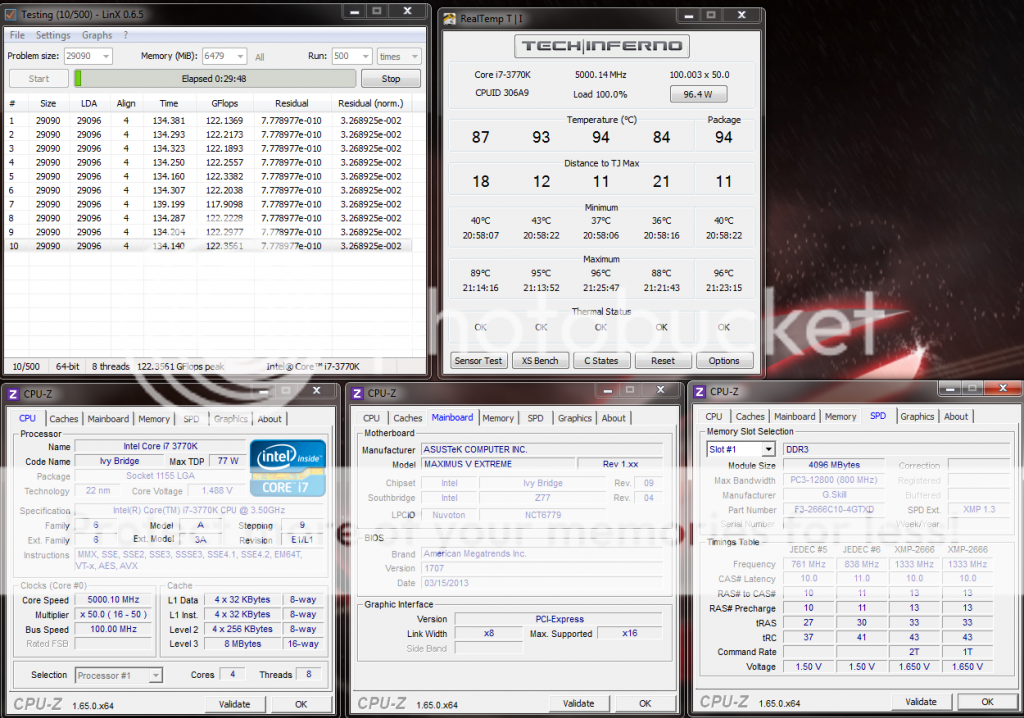
Just tested. The latest LinX 0.6.5 (11.1) is still yielding 120+ GFlops for Ivy.

user posted image

Haswell will give 200+ GFlops and most ppl will hit TJmax when stressing as low as 4.5GHz sweat.gif
TSowikh84
post Oct 6 2013, 11:46 AM

i7 Clan
Group Icon
Elite
8,711 posts

Joined: Nov 2007
From: Butterworth, PG / Machang, Kelantan


QUOTE(NewbieBetta @ Oct 3 2013, 05:27 PM)
cheers bro, I read somewhere saying that if going for OC Ivy chip is better than Haswell in term of heat dissipation??
*
Both are actually same hot. It is not a good idea to compare Haswell @ 5.0GHz with Ivy @ 5.0GHz, considering Haswell has roughly 10% IPC performance gain over Ivy.
Hence, you are going to compare like Haswell @ 4.7GHz vs Ivy @ 5.0GHz.

TSowikh84
post Oct 14 2013, 04:22 PM

i7 Clan
Group Icon
Elite
8,711 posts

Joined: Nov 2007
From: Butterworth, PG / Machang, Kelantan


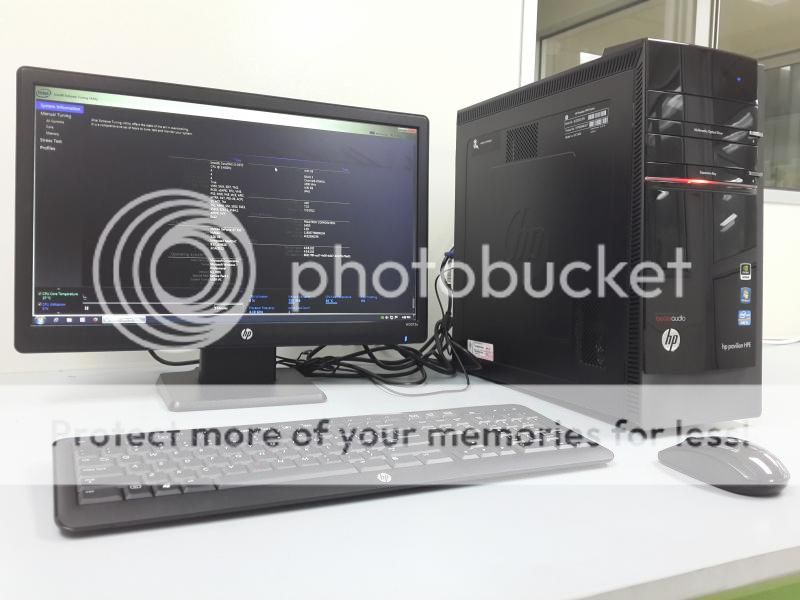
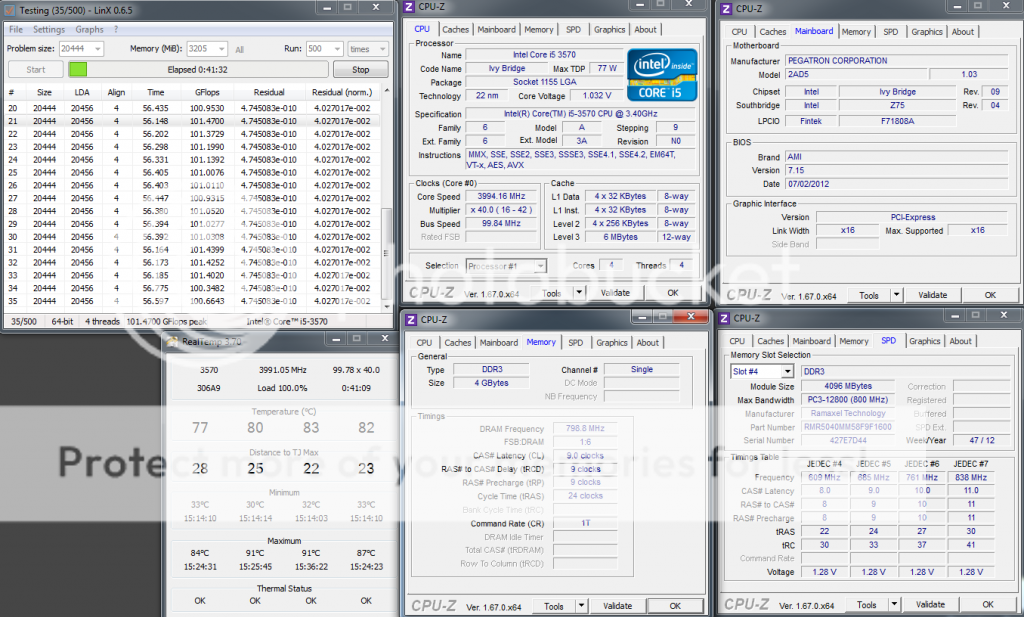
Today is a rainy day. So sleepy in the office so I decided to overclock my office rig the HP pavilion HPE H8-1340D.

The machine is powered by i5 3570, cooled by Intel stock HSF, and single stick of 4GB Ramaxel 1600MHz C11 RAM:
user posted image

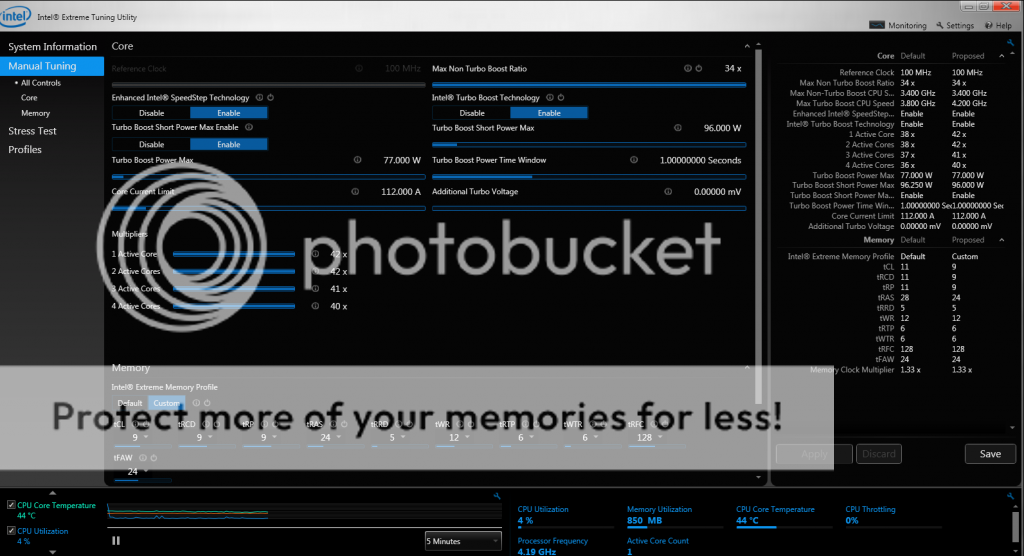
i5 3570 3.4GHz @ 4.0GHz | 1 X 4GB Ramaxel 1600MHz 11-11-11-28-1T @ 1600MHz 9-9-9-24-1T
user posted image

Intel Extreme Tuning Utility is used to tweak the overclock.
user posted image
TSowikh84
post Oct 14 2013, 08:36 PM

i7 Clan
Group Icon
Elite
8,711 posts

Joined: Nov 2007
From: Butterworth, PG / Machang, Kelantan


QUOTE(gsan @ Oct 14 2013, 07:06 PM)
wtf...you oc your office pc...lol

I also have one HP high-end workstation pc in under my name in office, i7 with 16gb ram... never think to go oc it le
*
Hehe.. better don't kill it if it's out of warranty already. I have 3 other HPE in my lab with i5 3470 + 8GB RAM and waiting to be tortured haha. laugh.gif
TSowikh84
post Oct 15 2013, 07:01 PM

i7 Clan
Group Icon
Elite
8,711 posts

Joined: Nov 2007
From: Butterworth, PG / Machang, Kelantan


Got bored again today I am working in the lab although it's a public holiday outside lol.

i5 3550 3.3GHz @ 3.9GHz | 4GB Kingston 1333C11 + 4GB Hyundai 1600C11 @ 1600MHz 9-9-9-24-1T

user posted image

user posted image

35 Pages « < 32 33 34 35 >Top
Topic ClosedOptions
 

Change to:
| Lo-Fi Version
0.0521sec    0.80    7 queries    GZIP Disabled
Time is now: 1st December 2025 - 05:03 PM