Welcome Guest ( Log In | Register )

Bump Topic Topic Closed RSS Feed
35 Pages « < 31 32 33 34 35 >Bottom

Outline · [ Standard ] · Linear+

 Ivy Bridge Overclocking V1 | 3770K/3570K | Z77, Torture Your CPU, Post It Here!

views
     
TSowikh84
post May 4 2013, 10:13 AM

i7 Clan
Group Icon
Elite
8,711 posts

Joined: Nov 2007
From: Butterworth, PG / Machang, Kelantan


QUOTE(souq @ May 3 2013, 08:27 PM)
yes .. this is the temp when i do nothing.. processor was delided.. huhu
*
The temps look fine. Idle temps should be the same or slightly higher than room/ambient temp so I could see that you rig is running in a airconded room.
Coollaboratory Liquid Ultra/ Pro would give you at least 10C than any normal thermal paste, this result applies for delidded chips only.
TSowikh84
post May 4 2013, 11:36 AM

i7 Clan
Group Icon
Elite
8,711 posts

Joined: Nov 2007
From: Butterworth, PG / Machang, Kelantan


QUOTE(raydenex @ May 4 2013, 10:40 AM)
Bro owikh84, is it normal for these Ivy's to have such large differences of temp between the 4 cores? My current 3770k has the first core usually idling at 42*C with the rest of the 3 idling around 35/36*C (non-aircond room). But when under Linx load, all 4 are usually about equal 68/69*C. I've realised even since switching to Intel/Ivy I've been too anal and obsessed about temperatures.
*
The temp difference between core is normal since previous generations. You might even see one core is 10C hotter than the rest.

The hottest core is usually the most active one, although at idle state. You might see the core temps change when changing to different thermal paste, heatsink/waterblock, mounting orientation etc.

Check out post #2 there are submissions by others to compare with your temps.
TSowikh84
post May 6 2013, 05:27 PM

i7 Clan
Group Icon
Elite
8,711 posts

Joined: Nov 2007
From: Butterworth, PG / Machang, Kelantan


QUOTE(spdboyz @ May 6 2013, 09:50 AM)
My chip is still not stable at 4.5Ghz even after increasing CPU PLL volt to 1.90v and Vcore at 1.40x. At 1.33x Vcore, 4.4Ghz runs perfectly stable.
Is my chip is limited to 4.4Ghz?
*
No limit by rights any K Ivy can OC 4.5Ghz easily.
I guess your chip loves more voltage. Pump more vCore until it stable.
TSowikh84
post May 6 2013, 11:12 PM

i7 Clan
Group Icon
Elite
8,711 posts

Joined: Nov 2007
From: Butterworth, PG / Machang, Kelantan


QUOTE(spdboyz @ May 6 2013, 10:11 PM)
More Vcore->my H80 can't take it anymore cry.gif
*
It's a cooling limit then. Stay at 4.4GHz or upgrade your cooler. smile.gif
TSowikh84
post May 8 2013, 06:30 PM

i7 Clan
Group Icon
Elite
8,711 posts

Joined: Nov 2007
From: Butterworth, PG / Machang, Kelantan


QUOTE(noobianz @ May 8 2013, 04:20 PM)
i keep getting whea error when overclocking my 3570k to 4.5ghz but no bsod and prime95 still run like usual. is there anything that i missed?
*
Prime95 small FFT is not that reliable. Try custom blend like this:

QUOTE(eXnikaru @ Apr 26 2013, 04:18 PM)
U all can test the system stability in shorter time with prime95..
Just select custom and test with
1344fft 1344fft 1minute 80-90% available ram for 15mins
If can passed the test u can test with 1792fft 1792fft 1minute 80-90% available ram for 15mins too..

If passed 2 tests on certain vcore..then your system should stable for 12hours prime95 blend test.

the 1344 and 1792 fft is the extremely hard and best test for stability

Normally,if your system is unstable..one of the workers in prime95 will stop/BSOD will happen within 10mins of both test
*
Good luck.

QUOTE(codenamew @ May 8 2013, 05:18 PM)
Try upping ur vcore.
*
+1.
TSowikh84
post May 11 2013, 09:42 AM

i7 Clan
Group Icon
Elite
8,711 posts

Joined: Nov 2007
From: Butterworth, PG / Machang, Kelantan


QUOTE(fongzai92 @ May 11 2013, 02:53 AM)
Hi guys.. I got my rig setup for few months d, 3770k + asus Z77 V-LK.. managed to oc up to 4.4 for a stable. and tried few times to get 4.5 anyhow still dont get to stable with 4.5 by increasing so much of voltage. I wonder is that worth for so much of addition Voltage for that 0.1Ghz ? Usually all i wan for my processing power to do rendering only.. 3dsmax..
*
The higher the speed/frequency, the faster the performance.
So, if your cooler still can take care of the heat, I don't see why not overclocking it to as maximum as possible.
Good luck!
TSowikh84
post May 13 2013, 06:51 AM

i7 Clan
Group Icon
Elite
8,711 posts

Joined: Nov 2007
From: Butterworth, PG / Machang, Kelantan


QUOTE(hirie @ May 12 2013, 09:33 PM)
sup guys..checking in..done 'the prime test' for 1 hour..this is the result

Hirie | 3570k | 4.7Mhz | Asrock Z77E-ITX | Water

p/s: got BSOD with 0x9C after restart  rclxub.gif , increased Turbo Voltage..hopefully its stable  thumbup.gif
*

Not bad. Please use custom blend and stress at least 90% RAM which might affect vCore too.

TSowikh84
post May 13 2013, 06:55 AM

i7 Clan
Group Icon
Elite
8,711 posts

Joined: Nov 2007
From: Butterworth, PG / Machang, Kelantan


QUOTE(fongzai92 @ May 12 2013, 03:29 PM)
i hav a wc set running.. just wonder is that worth for the 0.1ghz for so much voltage...
*
Worth is something that only you can determine.
TSowikh84
post May 13 2013, 03:28 PM

i7 Clan
Group Icon
Elite
8,711 posts

Joined: Nov 2007
From: Butterworth, PG / Machang, Kelantan


QUOTE(hirie @ May 13 2013, 02:28 PM)
bumped the offset voltage to +0.060v(suspected due to bluescreen on idle), turbo voltage at +0.133..run the custom blend test and got screen lockup at 1hour mark..restart pc and it cant post and cycle many times w/o ending..cleared cmos and still the same..removed 1 ram stick, it able to post, remove the other and install back, able to post, resitted both ram, able to post..any1 can tell me what im dealing with..hehehe rclxub.gif and do u oc on offset or fixed voltage..
*

Stressing more RAM will stress the IMC thus require you to bump up the VCCSA as well.
Stock VCCSA is 0.925v. Max 1.25v. Trial and error. Every chip has different IMC strength.
Other than that, it might be insufficient vCore etc.
TSowikh84
post May 18 2013, 08:10 AM

i7 Clan
Group Icon
Elite
8,711 posts

Joined: Nov 2007
From: Butterworth, PG / Machang, Kelantan


QUOTE(raydenex @ May 18 2013, 03:02 AM)
need some advice/opinion;

I've seen some 3770K @ 4.4ghz/4.5ghz yield more gflops in Linx, do I need to turn off HyperThreading to get such result?
Even I turned off HT in BIOS, appears all 8 core/threads still have activity when fire up Prime95/Linx.. what gives? Sabertooth z77 mobo.
And not liking the temps at all under Linx test. Its sub 80*C on all cores on Prime95 tho.

thanks guys.
*
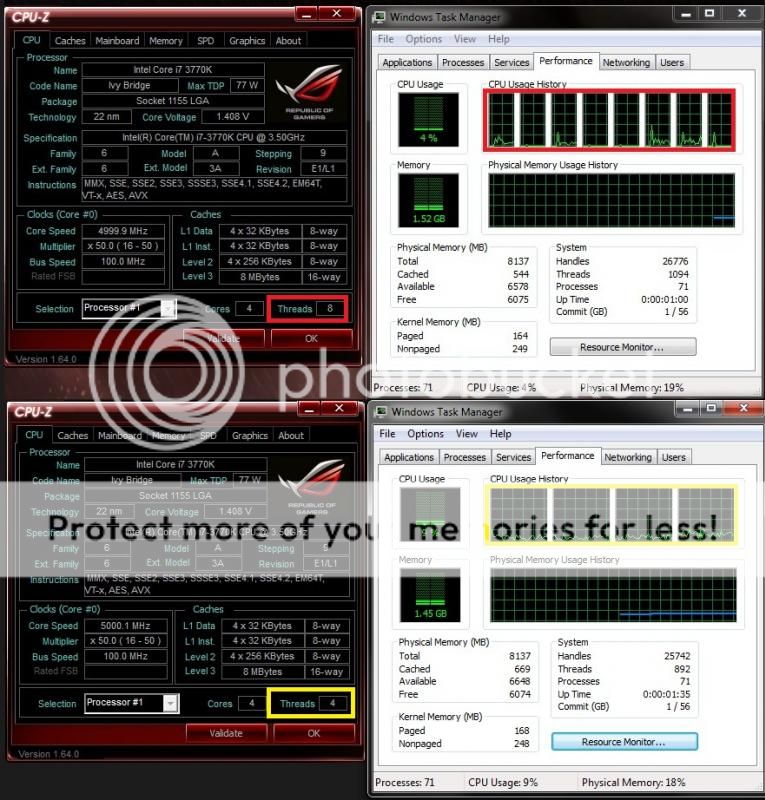
You will get more GFlops with HT off because the 4 extra threads have to run on the same amount of cores.
Something wrong with your bios, HT on will have 8 threads & HT off 4 threads.

user posted image


TSowikh84
post May 19 2013, 10:53 PM

i7 Clan
Group Icon
Elite
8,711 posts

Joined: Nov 2007
From: Butterworth, PG / Machang, Kelantan


QUOTE(scwong93 @ May 19 2013, 10:56 AM)
if remove IHS and use arctic mx 4, what is the temperature drop
*
9-10C drop.
Coolaboratory Liquid Ultra/Pro will give another 10C drop.
TSowikh84
post May 19 2013, 11:11 PM

i7 Clan
Group Icon
Elite
8,711 posts

Joined: Nov 2007
From: Butterworth, PG / Machang, Kelantan


QUOTE(scwong93 @ May 19 2013, 11:04 PM)
so you mean now my 3770k overclock to 4.8ghz @ 1.38 V temperature 85C , using the coolaboratory + ihs removal = 65C ?
*
yes indeed it's an 20C improvement with delid + Coolaboratory
TSowikh84
post May 19 2013, 11:22 PM

i7 Clan
Group Icon
Elite
8,711 posts

Joined: Nov 2007
From: Butterworth, PG / Machang, Kelantan


QUOTE(scwong93 @ May 19 2013, 11:19 PM)
bro do you know any expert that show tutorial on how to do ihs removal with correct way. wanna try it out, but too afraid to do as it is easy to spoil the chip @.@
*
I find THIS is the best chip delidding guide.
Good luck.
TSowikh84
post May 20 2013, 06:48 AM

i7 Clan
Group Icon
Elite
8,711 posts

Joined: Nov 2007
From: Butterworth, PG / Machang, Kelantan


QUOTE(raydenex @ May 20 2013, 12:03 AM)
Finally got around to letting Prime95 run longer than a few minutes; 1 hr 25 mins preset Blend test OK. Temperatures look better because I turned on the air-conditioning.

Manual mode (non offset mode) in BIOS setting Vcore to 1.185v but in Windows CPU-Z showing me 1.192v instead, and even weirder when load-testing it goes to 1.200v shown in CPU-Z, any idea why like this?

Image 1 shows right before I stop Prime95;
Image 2 after, and all temps back to Idle temps.

When offset mode is disabled, load-line calibration (LLC) will be active and causing vdrop/vdroop depending on the level you choose.
The vCore accuracy is depends on mobo BIOS.
You might even see a discrepancy with a digital multimeter (DMM) which is supposed to be the most accurate reading in real world.

FYI, the LLC works like this:
user posted image

So, in your case the vCore is vdrop'ping from 1.192v to 1.2v under load with higher LLC level selected.

TSowikh84
post May 20 2013, 10:01 AM

i7 Clan
Group Icon
Elite
8,711 posts

Joined: Nov 2007
From: Butterworth, PG / Machang, Kelantan


QUOTE(raydenex @ May 20 2013, 07:43 AM)
ok got it.. thanks! Also in CoreTemp, the VID value shows 1.1759v ..another value which is far from 1.185v lol

better to use offset mode or manual? trouble is I haven't been able to make much sense of how offset mode works.

thanks in advance.
*

Don't get confused with VID vs vCore as they are different. Every chip was born with its own default VID which is unique from one chip to another. vCore is something that you can set manually in BIOS whilst VID you can't.

VID as shown in CoreTemp, will change with vCore increase. Basically VID is the amount of needed voltage shot into the CPU at startup. It will increase along with the overclock you are applying. Offset mode usually will use this VID to give the final vCore = VID + offset

The vCore shown in CPU-Z is the actual voltage being supplied to the CPU. Manual mode vCore = vCore set in BIOS + LLC

There is an offset mode guide in the first post of this thread and these voltages terms have been discussed for quite a few times already.

I have been using manual mode so far I'm happy with it.

This post has been edited by owikh84: May 20 2013, 10:18 AM
TSowikh84
post May 20 2013, 01:36 PM

i7 Clan
Group Icon
Elite
8,711 posts

Joined: Nov 2007
From: Butterworth, PG / Machang, Kelantan


QUOTE(raydenex @ May 20 2013, 10:25 AM)
Thanks for the explanation, crystal clear now. I suppose I'll stay on manual mode too. Contemplating if its worth pushing forward to 4.6 or stay at 4.5 as a daily 24/7 usage OC.

What I did notice was this 3770k required less vcore to hit 4.5 than my earlier 3570k.
*
Generally 3770K has lower VID than 3570K.
TSowikh84
post May 22 2013, 11:36 PM

i7 Clan
Group Icon
Elite
8,711 posts

Joined: Nov 2007
From: Butterworth, PG / Machang, Kelantan


QUOTE(hanny562 @ May 22 2013, 10:47 PM)
Join intel family 2 days ago ( previously AMD owner)

This is my first attempt of overclock Intel CPU.

Proc : Intel Core i5-3570k @ 4.7Ghz
Vcore : 1.35v ( will try lower it and test again)
Motherboard : MSI z77 mpower
RAM : Gskill RipjawsX DDR3 2133 2x4GB
Cooler : Antec Kuhler H2O 920

Prime95 test with 128 min ttf and 90% Max RAM.

haven't delid yet...will try higher speed after buying Custom WC and delided.
[attachmentid=3452057][attachmentid=3452092]
*
Voting for delid! thumbup.gif

QUOTE(raydenex @ May 22 2013, 11:16 PM)
the max temps in your first attached image rather scary biggrin.gif
*
As explained earlier,
QUOTE(OC4/3 @ May 18 2013, 04:22 PM)
Don't worry about temperature
As long as below 105 C on IBT you are fine
Real life won't hit such high temperature one smile.gif
*
TSowikh84
post May 23 2013, 06:41 AM

i7 Clan
Group Icon
Elite
8,711 posts

Joined: Nov 2007
From: Butterworth, PG / Machang, Kelantan


QUOTE(hanny562 @ May 22 2013, 11:42 PM)
Hey Kevin ^^

actually wanted to delid it before first install...but worry too much and not so confident to do that ..worried that will damage the proc >< but will do it soon after getting WC and CLU ~
*
Actually delidding is very easy and I have done mine twice within 10 mins lol. But you gotta have balls for that and be extra careful do not accidentally cut or scratch the die and the PCB.
TSowikh84
post May 23 2013, 06:51 AM

i7 Clan
Group Icon
Elite
8,711 posts

Joined: Nov 2007
From: Butterworth, PG / Machang, Kelantan


QUOTE(stasio @ May 23 2013, 06:43 AM)
Yea.......... rclxms.gif

*
lol like that also can?!!
So, don't need to worry about what to do with your dead chip yeah it can turn to a useful keychain
TSowikh84
post Jun 1 2013, 07:17 AM

i7 Clan
Group Icon
Elite
8,711 posts

Joined: Nov 2007
From: Butterworth, PG / Machang, Kelantan


QUOTE(hanny562 @ Jun 1 2013, 02:39 AM)
Fianlly delid my Intel I5-3570k, there's few scratches on the PCB, the copper in the PCB even exposed abit..

but luckily my proc has strong life to survive after delid ><

Scared me when there's few deep scratches.

Before delid, Xigmatek TIM + Antec Kuhler H2O 920

After delid Coollaboratory Liquid Ultra + Antec Kuhler H2O 920
On-Die TIM : Coollaboratory Liquid Ultra
IHS TIM :  Coollaboratory Liquid Ultra

*
Well done Han! Thumb up that you got balls to delid the IHS out of craps.

You are lucky to find the chip is still alive and kicking although the PCB copper is exposed. Most people killed it just like that.

Nice temperature improvement that is a huge drop right from 90C+ to 70C+ thanks to the Liquid Ultra and no more excessive gap between the IHS and die.

35 Pages « < 31 32 33 34 35 >Top
Topic ClosedOptions
 

Change to:
| Lo-Fi Version
0.0502sec    0.76    7 queries    GZIP Disabled
Time is now: 4th December 2025 - 07:37 AM