

QUOTE(ketapang @ Nov 16 2012, 11:14 PM)
Bro you got any good2 3570k for sale? 

I don't have any 3570K or chip for sale atm.Pls try your luck at garage sales.
Ivy Bridge Overclocking V1 | 3770K/3570K | Z77, Torture Your CPU, Post It Here!
|
|
 Nov 17 2012, 12:09 AM Nov 17 2012, 12:09 AM
Return to original view | Post
#421
|
 
Elite
8,711 posts Joined: Nov 2007 From: Butterworth, PG / Machang, Kelantan   
|
QUOTE(ketapang @ Nov 16 2012, 11:14 PM) Bro you got any good2 3570k for sale? I don't have any 3570K or chip for sale atm.Pls try your luck at garage sales. |
|
|
|
|
|
Nov 24 2012, 10:34 PM
Return to original view | Post
#422
|
|
Elite
8,711 posts Joined: Nov 2007 From: Butterworth, PG / Machang, Kelantan
|
QUOTE(trisx @ Nov 24 2012, 10:26 PM) I just realize that my idle temp without OC n auto voltage is 40c I thought it was 32C previously, no?Quite high eh? Or is it normal given my ambient temp around 30c You might wanna remount your cooler, reapply TIM, check the airflow inside the casing. QUOTE(trisx @ Jun 22 2012, 12:38 AM) Just set up my system also 3770k, maximus 5 gene with hyper 212 push pull artic f12. On stock getting 32c temp. Quite good I think. Will try clock it higher n strees this weekeend  |
|
|
Nov 24 2012, 10:45 PM
Return to original view | Post
#423
|
|
Elite
8,711 posts Joined: Nov 2007 From: Butterworth, PG / Machang, Kelantan
|
QUOTE(trisx @ Nov 24 2012, 10:39 PM) Yup, but recently i changed to TJ08-E and reapply new Artic MX4. Try reseat the cooler then. Hopefully it's not that internal TIM underneath the IHS running dry. I guess 212 Evo not seated correctly perhaps? Since the airflow pretty good with the huge 180mm fan as intake insinde TJ08-e. Last time use cap ayam fan with Elite 430 only  |
|
|
Nov 25 2012, 10:10 AM
Return to original view | Post
#424
|
|
Elite
8,711 posts Joined: Nov 2007 From: Butterworth, PG / Machang, Kelantan
|
QUOTE(arerife @ Nov 25 2012, 12:28 AM) Sammy green already in the town, notice from pos laju need to self collect cuz not at home tadi.... haihhhh It's been discussed quite a few times here. Some ppl might even get one of the cores 10C hotter than the rest.My idle temp for core a bit problem, 40C but 1,2 and 3 only 32C. Why? QUOTE(owikh84 @ Jul 31 2012, 11:05 AM) The temp difference between cores is normal since previous gens. core temp variation is normal; also, sensors vary - they are not bad but are tiny little things, accurate only when close to the shutoff temp, and we must expect variation. So, intrinsic variation + sensor variation = variation reported temps. Also different cores work at different rates, therefore some will normally run a little hotter than others. Coz say Core 1 is working a little harder than core 0, even at idle, that core will be a little bit hotter than Core 0. Just an example. |
|
|
Nov 25 2012, 11:15 AM
Return to original view | Post
#425
|
|
Elite
8,711 posts Joined: Nov 2007 From: Butterworth, PG / Machang, Kelantan
|
QUOTE(namh @ Nov 25 2012, 10:46 AM) hi guys, wanna throw a noob question.. 3.8GHz is the turbo speed of 3570K so stock heatsink fan (HSF) should be able to handle the heat. Even 4.0GHz is fine on stock cooler.i have following this thread while looking for a motherboard to pair with i5 3570K CPU.. finally i choose Asus P8Z77-M since this is chosen by a few of the member in the first page.. after i finished setup everything including windows, i installed coretemp apps.. from there i can see, the CPU always go MAX at 3.8GHz.. is this auto overclock is done by Asus motherboard?? is it safe to let it go with the default heatsink?? To get rid of the constant max clock, you could enable SpeedStep (EIST) & C1E in BIOS. It is a power saving feature. |
|
|
Nov 25 2012, 05:49 PM
Return to original view | Post
#426
|
|
Elite
8,711 posts Joined: Nov 2007 From: Butterworth, PG / Machang, Kelantan
|
ASRock OC Formula is a solid board, rocks stable at 5.0GHz under water.
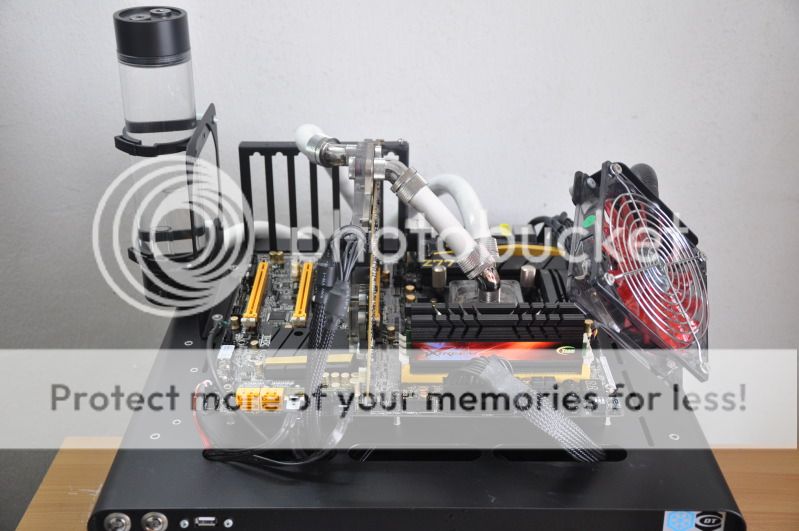 CPU: Intel Core i7 3770K @ 5.0GHz MB: ASRock OC Formula, BIOS P1.60 DRAM: Team Xtreem 2600 10-12-12-25-1T 2 X 4GB GPU: Gigabyte HD7970, MSI's special BIOS, Driver Catalyst 12.11 beta, CAP 12.10 Storage: 2x Crucial M4 128GB, FW 000F ODD: LiteON DVD-RW PSU: Corsair AX1200 Cooling: Custom watercooling - EK Supreme HF plate #6 CPU waterblock, 2x XSPC RX360 radiator, Swiftech MCP655 pump, EK FC7970 GPU waterblock, EK Multioption X2 Advanced reservoir, XSPC 1/2" ID 3/4" OD white tubing, 12x Scythe GT AP-15 1850rpm 120mm fan + Aerocool Shark 120mm fan, Coolaboratory Liquid Pro thermalpaste etc. Casing: Dismatech Easy Dual V2 Bench Table OS: Windows 7 Ultimate 64-bit SP1 LinX 0.64 AVX (11.0.1.005) | 5.0GHz @ 1.416v 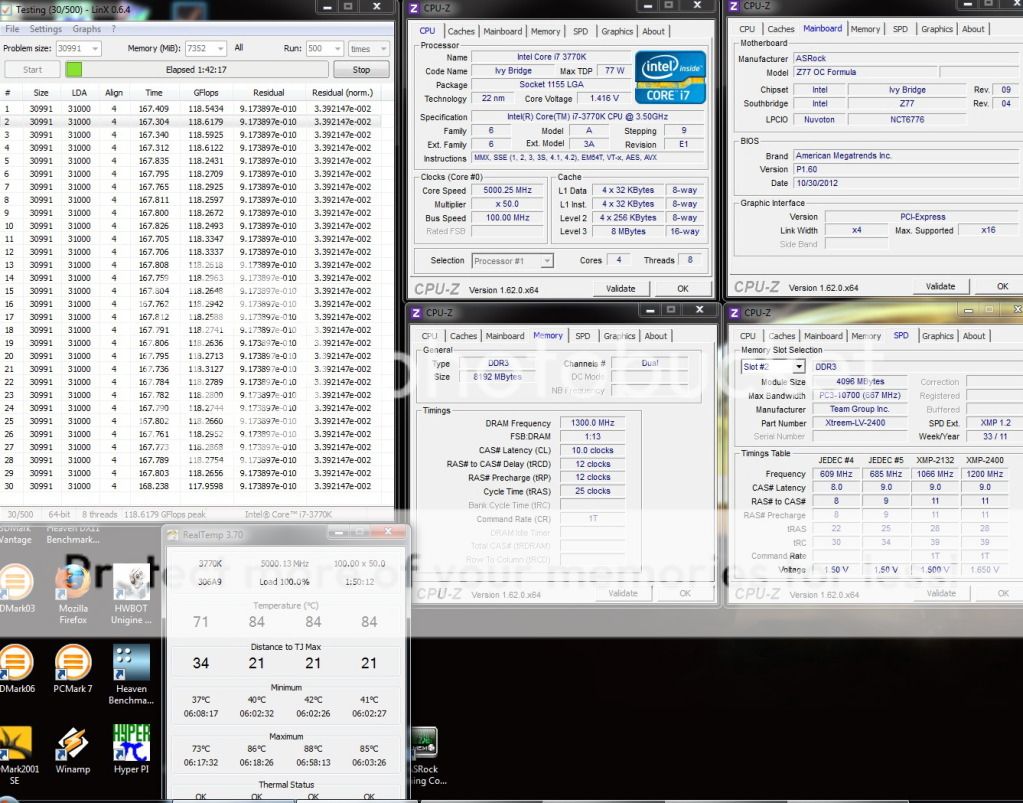 Prime95 27.7 AVX | 5.0GHz @ 1.440v 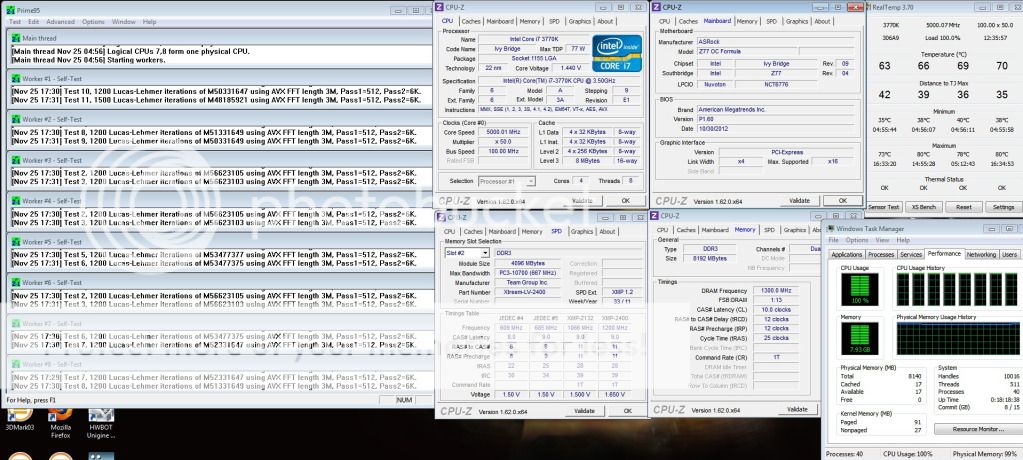 * P95 needs more vCore than LinX My review can be found HERE Hope you guys like it.  |
|
|
|
|
|
Nov 25 2012, 08:54 PM
Return to original view | Post
#427
|
|
Elite
8,711 posts Joined: Nov 2007 From: Butterworth, PG / Machang, Kelantan
|
QUOTE(ketapang @ Nov 25 2012, 07:02 PM) Bro owikh, both ihs and waterblock use liquid pro? I removed the IHS and let the chip run nakedly with Liquid Pro applied. |
|
|
Nov 26 2012, 12:09 AM
Return to original view | Post
#428
|
|
Elite
8,711 posts Joined: Nov 2007 From: Butterworth, PG / Machang, Kelantan
|
QUOTE(lat_lonelyboyz @ Nov 26 2012, 12:03 AM) On Formula OC, 5.0GHz used same vCore as M5E bro? what about temp accuracy? I don't have any DMM or measuring device to test so don't know how accurate are the voltages and temps.For now you just can compare LinX between ASRock OC Formula & Asus MVE 3770K @ 5.0GHz ASRock: 1.416v Asus: 1.456v This post has been edited by owikh84: Nov 26 2012, 12:09 AM |
|
|
Nov 26 2012, 12:22 AM
Return to original view | Post
#429
|
|
Elite
8,711 posts Joined: Nov 2007 From: Butterworth, PG / Machang, Kelantan
|
QUOTE(lat_lonelyboyz @ Nov 26 2012, 12:17 AM) Means ASRock used a bit less vCore setting than Asus and didnt accurate? As mentioned earlier,I don't have any DMM or measuring device to test so don't know how accurate are the voltages and temps. On top of that, it is known that voltage are different from board to board. |
|
|
Nov 26 2012, 06:41 AM
Return to original view | Post
#430
|
|
Elite
8,711 posts Joined: Nov 2007 From: Butterworth, PG / Machang, Kelantan
|
QUOTE(lat_lonelyboyz @ Nov 26 2012, 01:02 AM) Delid done. run naked but core temp higher than before delid. 32-47-40-35 figure something like that. core 1 and 4 running ok with low temp but core 2 and 3 seems like overheat You should check your cooler mounting or try another cooler. |
|
|
Dec 1 2012, 09:20 AM
Return to original view | Post
#431
|
|
Elite
8,711 posts Joined: Nov 2007 From: Butterworth, PG / Machang, Kelantan
|
QUOTE(lat_lonelyboyz @ Dec 1 2012, 04:52 AM) Mount IHS back + MX4 and 4.5GHz hit 100°c max. Totally my chip cant run too high as hot temp. Replacing higher performance cooling system might be solve this prob Looks like you need a better cooler. |
|
|
Dec 2 2012, 08:53 PM
Return to original view | Post
#432
|
|
Elite
8,711 posts Joined: Nov 2007 From: Butterworth, PG / Machang, Kelantan
|
QUOTE(J-Shen @ Dec 2 2012, 06:42 PM) hey guys,may i know if intel b75 or h77 chipset support intel xmp technology? and intel i5 2400 can compatible with intel xmp? By rights B75 and H77 would support XMP: http://www.asus.com/Motherboards/Intel_Soc...#specifications http://www.asus.com/Motherboards/Intel_Soc...#specifications but that depends on BIOS of the mobo i5 2400 supports XMP: http://www.intel.com/content/dam/www/publi...2-datasheet.pdf |
|
|
Dec 7 2012, 06:53 AM
Return to original view | Post
#433
|
|
Elite
8,711 posts Joined: Nov 2007 From: Butterworth, PG / Machang, Kelantan
|
QUOTE(arerife @ Dec 7 2012, 05:16 AM) are motherboard effect RAM timing? BIOS settings, vdimm, VCCSA, VCCIO, RAM module, IMC will affect timing.Many said 2200Mhz at CL10 @ 1.55v I can't make it stable. EVEN 10-11-11-28. Very frustrated right now.  I can run 2133MHZ at 10-10-10-24 . Are the motherboard effect the timing? Because this asus p8p67 only support maximum 2200Mhz RAM. And Sammy green is not on the ram support list. You might get a bad stick as compared to others. This post has been edited by owikh84: Dec 7 2012, 12:31 PM |
|
|
|
|
|
Dec 14 2012, 10:47 AM
Return to original view | Post
#434
|
|
Elite
8,711 posts Joined: Nov 2007 From: Butterworth, PG / Machang, Kelantan
|
QUOTE(trisx @ Dec 13 2012, 11:02 PM) Just received my sammy green from NewEgg but too bad left it at office Congratz on ownership.  Sigh cant wait to test it out  Pls try 2600 10-12-12 @ 1.68v |
|
|
Dec 15 2012, 08:54 AM
Return to original view | Post
#435
|
|
Elite
8,711 posts Joined: Nov 2007 From: Butterworth, PG / Machang, Kelantan
|
QUOTE(trisx @ Dec 15 2012, 01:11 AM) 2600Mhz 10 12 12 Use Samsung 2X4GB medium mem profile?Error at Loop 7 even bumped to 1.75v. Not going higher than that i think since it is naked Try upping VTT to 1.15v-1.25v Or lower VCCSA 1.05v-1.175v QUOTE(trisx @ Dec 15 2012, 01:32 AM) 2400MHz 11-11-11 1T @ 1.55v Well done. Now try 9-11-11-25-1TQUOTE(trisx @ Dec 15 2012, 01:40 AM) Can someone help me? Something wrong with AI Suite. Reinstalling it might help.What file is exactly missing? I couldn't figure it out  |
|
|
Dec 15 2012, 04:32 PM
Return to original view | Post
#436
|
|
Elite
8,711 posts Joined: Nov 2007 From: Butterworth, PG / Machang, Kelantan
|
QUOTE(trisx @ Dec 15 2012, 01:40 PM) Was using medium mem profile. Well maybe because i bumped VCCSA up till 1.2v Some OC gurus from XS forum claimed that these Sammy chips can handle voltages up to around 2v.I'll try it lower it down later Btw Kevin is it safe to bench ram at 1.75v without any additional cooling for the ram itself? Not for 24/7 usage perhaps. Of course that would be for short term benching. On the bright side, it doesn't cost much & life-time warranty is provided. |
|
|
Dec 15 2012, 09:36 PM
Return to original view | Post
#437
|
|
Elite
8,711 posts Joined: Nov 2007 From: Butterworth, PG / Machang, Kelantan
|
QUOTE(trisx @ Dec 15 2012, 09:27 PM) tighter timing VS higher clock Most of the time, higher clock is faster.which 1 should be the best choice? Added on December 17, 2012, 11:24 am QUOTE(trisx @ Dec 15 2012, 01:40 AM) Can someone help me? I saw this on another website. This trick works perfectly!What file is exactly missing? I couldn't figure it out QUOTE When booting I get error message under "asus setup" 105814 Log.iniis Lost? Hi, you probably ran Ccleaner or similar and deleted this log file from your temporary folder, that is in use by a scheduled task. Go to Control Panel > Administrative Tools, on the Task scheduler pane expand the "task scheduler library". Open Asus and select the " i-setup" task , delete it, and you are done. This post has been edited by owikh84: Dec 17 2012, 11:25 AM |
|
|
Dec 17 2012, 08:07 PM
Return to original view | Post
#438
|
|
Elite
8,711 posts Joined: Nov 2007 From: Butterworth, PG / Machang, Kelantan
|
QUOTE(trisx @ Dec 17 2012, 06:44 PM) Thanks Kevin! Finally I manage to get rid of that stupid warning ! No problem bro. Actually i got this annoying warning message on my rig last night. Googled up and found the solution.  Another problem is MemTweakIt always minimized when i set Font to "Medium" |
|
|
Dec 23 2012, 11:04 PM
Return to original view | Post
#439
|
|
Elite
8,711 posts Joined: Nov 2007 From: Butterworth, PG / Machang, Kelantan
|
QUOTE(teamloks @ Dec 23 2012, 07:19 PM) think to delid too but scared lol.. idk i stress over 2 hours my heatsink not hot at all Nice chip you got there bro.btw here my test Qualified for delid club |
|
|
Dec 27 2012, 09:51 PM
Return to original view | Post
#440
|
|
Elite
8,711 posts Joined: Nov 2007 From: Butterworth, PG / Machang, Kelantan
|
QUOTE(pristine @ Dec 27 2012, 08:36 PM) can't really find a good place to ask this, so I'll ask here. Older chipsets certainly had some issues with populated DIMMs, had to bump up vdimm, lower DRAM frequency or loosen timings. But this doesn't happen on Ivy, its memory sub-system has been reworked.planning on overclocking an i5k ivy, got a question on the ram. should I get 2x 8 GB sticks, 4x 4 GB sticks or 4x 8 GB sticks? read all over the place that filling up all the DIMM slots affects overclock? got an MSI Z77 MPower, if that's relevant. Generally populated DIMMs is harder to OC, but clock to clock as compared to none populated it is faster in performance. T-branch minimizes the skew between slots on the same channel thus higher clocking effectiveness. The larger the capacity per stick, the harder the overclock. Seldom see people overclock with 8GB sticks but I got one kit of 4 X 4GB Team Xtreem 2600MHz which is working perfectly at rated specs on 4 DIMMs. They are able to clock 2800MHz at full bank too! However, if you chose to have more capacity instead of playability then 4 X 8GB would be fine. |
|
Topic ClosedOptions
|
| Change to: |  0.0516sec 0.0516sec
 0.44 0.44
 7 queries 7 queries
 GZIP Disabled GZIP Disabled
Time is now: 15th December 2025 - 06:03 AM |
 Quote
Quote