Welcome Guest ( Log In | Register )

Bump Topic Topic Closed RSS Feed
35 Pages « < 18 19 20 21 22 > » Bottom

Outline · [ Standard ] · Linear+

 Ivy Bridge Overclocking V1 | 3770K/3570K | Z77, Torture Your CPU, Post It Here!

views
     
TSowikh84
post Nov 2 2012, 05:11 PM

i7 Clan
Group Icon
Elite
8,711 posts

Joined: Nov 2007
From: Butterworth, PG / Machang, Kelantan


QUOTE(objectifyme @ Nov 2 2012, 12:37 PM)
Hi guys, quick question. smile.gif

I've recently purchased a 3770K and am getting these idle temps on a Corsair H80:

27
29
25
32

I've read that core 3 normally runs cooler than the other cores but for some reason core 3 for me is always warmer. This happened with a 2600K as well. I'm wondering if this is normal or if I didn't apply the thermal paste evenly or something.

Edit: I'm running stock clocks and voltage. I'm also using the latest Core Temp to monitor temps.
*
QUOTE(owikh84 @ Jul 31 2012, 11:05 AM)
The temp difference between cores is normal since previous gens.

core temp variation is normal; also, sensors vary - they are not bad but are tiny little things, accurate only when close to the shutoff temp, and we must expect variation.

So, intrinsic variation + sensor variation = variation reported temps.

Also different cores work at different rates, therefore some will normally run a little hotter than others. Coz say Core 1 is working a little harder than core 0, even at idle, that core will be a little bit hotter than Core 0. Just an example.
*
TSowikh84
post Nov 2 2012, 09:09 PM

i7 Clan
Group Icon
Elite
8,711 posts

Joined: Nov 2007
From: Butterworth, PG / Machang, Kelantan


QUOTE(arerife @ Nov 2 2012, 06:54 PM)
Im using hyper 212 pull push should be more than 4.0 i think.
but what do you mean stock voltage?


Added on November 2, 2012, 6:56 pmAnd since there are many temperature to monitor.
which one the important one?
If for amd its only depend on cpu temp.
*

Hyper212 should be able to handle up to 4.3-4.4GHz.
Actually there's no set voltage but just a range.
Some say it's around 1.2v but it varies for different mobos. Some boards follow CPU VID, others set CPU VID + offset, some just set whatever they wish. Differences in VRM design, BIOS behaviour, LLC/vdroop/vdrop make all the difference.


Added on November 2, 2012, 9:11 pmCore temps are the most important ones & the only concern for me. Mobo chipset is cool.

This post has been edited by owikh84: Nov 2 2012, 09:11 PM
TSowikh84
post Nov 3 2012, 07:43 AM

i7 Clan
Group Icon
Elite
8,711 posts

Joined: Nov 2007
From: Butterworth, PG / Machang, Kelantan


QUOTE(arerife @ Nov 3 2012, 03:45 AM)
for intel also vcore effect the processor temp?
thanks bro btw.
*
yes of course. The higher the vCore the hotter the core temps.
Same for CPU frequency. The faster the speed, the higher the core temps, even though at the same vCore.
TSowikh84
post Nov 4 2012, 07:11 AM

i7 Clan
Group Icon
Elite
8,711 posts

Joined: Nov 2007
From: Butterworth, PG / Machang, Kelantan


QUOTE(arerife @ Nov 3 2012, 09:45 PM)
This is my first time OC Intel,
So don't mad at me, Im very noob.
Sifu2 here can help me? Im very humble here need some learning.
My temp room around 30C because not using aircond.
4.6Ghz @ 1.27V
*

GFlops is low bcoz your're not using Win7 SP1 or the latest LinX in which you should get 100+.
TSowikh84
post Nov 5 2012, 07:08 PM

i7 Clan
Group Icon
Elite
8,711 posts

Joined: Nov 2007
From: Butterworth, PG / Machang, Kelantan


QUOTE(lat_lonelyboyz @ Nov 5 2012, 06:15 PM)
Mind to use RealTemp 3.70? Because CoreTemp is not accurate as well Sorry didnt noticed that u are using newer version of CoreTemp. Wanna see ur RealTemp figure as mine also same oc setup with 4.6GHz using Hyper 212 Evo

Edited. Some crazy tried today noon biggrin.gif Hitting 100°c in 34°c ambient and poor air flow casing cry.gif
*

3570K should get 120+ GFlops and stress all mem
run at least 20 loops. 5 runs or 10 are just not enough.

This post has been edited by owikh84: Nov 5 2012, 07:09 PM
TSowikh84
post Nov 5 2012, 10:38 PM

i7 Clan
Group Icon
Elite
8,711 posts

Joined: Nov 2007
From: Butterworth, PG / Machang, Kelantan


QUOTE(lat_lonelyboyz @ Nov 5 2012, 10:13 PM)
Then push it 5GHz and post it here brows.gif

Our Hyper 212 can't managed 4.7GHz if 24/7 sweat.gif kesian wooo
*
For 5GHz I'm afraid you must delid the IHS & replace TIM.
It is mandatory unless you got a golden chip with 5GHz @ 1.3v
TSowikh84
post Nov 6 2012, 07:11 AM

i7 Clan
Group Icon
Elite
8,711 posts

Joined: Nov 2007
From: Butterworth, PG / Machang, Kelantan


QUOTE(lat_lonelyboyz @ Nov 5 2012, 10:40 PM)
Bro, can help me re-apply the TIM? biggrin.gif Also wanna know that naked chip didn't affect for a long term in use? hmm.gif
*
there's a useful guide on delidding CPU. ==> Link
There's no affect on life span of the delided chip just that you will lose warranty from Intel.
Delidding will give you lower core temps thus extra OC.
TSowikh84
post Nov 6 2012, 06:53 PM

i7 Clan
Group Icon
Elite
8,711 posts

Joined: Nov 2007
From: Butterworth, PG / Machang, Kelantan


QUOTE(ketapang @ Nov 6 2012, 05:39 PM)
Stressing my ram @ 2400mhz 11-13-12-35 2T, i already loosen up the ram timing. So far 50min stable prime95 90%>ram. Should i stick @ 2200mhz 10-11-10-28 1T? hmm.gif
*

If the 2400C11 is stable, i'd choose whichever performs faster.
Run several benchmarks such as Pi, 3DMark etc to compare.
What's the vdimm for 2400C11?

TSowikh84
post Nov 6 2012, 09:16 PM

i7 Clan
Group Icon
Elite
8,711 posts

Joined: Nov 2007
From: Butterworth, PG / Machang, Kelantan


QUOTE(ketapang @ Nov 6 2012, 08:23 PM)
I set it @ 1.65v. Here's 2400Mhz 10-12-12 2T, 1 hour stable. Will stress test longer tonight. biggrin.gif
*
Nice try. Just make sure to use custom blend >90% mem and show us task manager performance tab during stress run.
TSowikh84
post Nov 7 2012, 06:34 AM

i7 Clan
Group Icon
Elite
8,711 posts

Joined: Nov 2007
From: Butterworth, PG / Machang, Kelantan


QUOTE(arerife @ Nov 7 2012, 01:51 AM)
Gflop intelburn test dgn linx get differetn gflop or same?
*
Same as LinX, since they are both using the linpack library.
TSowikh84
post Nov 7 2012, 07:04 AM

i7 Clan
Group Icon
Elite
8,711 posts

Joined: Nov 2007
From: Butterworth, PG / Machang, Kelantan


QUOTE(arerife @ Nov 7 2012, 06:40 AM)
But when i done the same clock and the same stress as usop done i got 119 glops.
Can you explain why this happened?

Sorry for noob question.  tongue.gif
*
Pls provide SS of the IBT run.
TSowikh84
post Nov 7 2012, 08:03 AM

i7 Clan
Group Icon
Elite
8,711 posts

Joined: Nov 2007
From: Butterworth, PG / Machang, Kelantan


QUOTE(arerife @ Nov 7 2012, 07:29 AM)
Maybe cpu-z open the glop reduce. maximum i can get 119 like that. hmm.gif
*

Set stress level to max, so that all mem is stressed.

TSowikh84
post Nov 7 2012, 10:32 AM

i7 Clan
Group Icon
Elite
8,711 posts

Joined: Nov 2007
From: Butterworth, PG / Machang, Kelantan


QUOTE(objectifyme @ Nov 7 2012, 09:32 AM)
Hey guys, regarding Prime95 - what kind of torture test should I run if I am gonna run it over night? Currently P95 has been stable for about 10 hours on blend mode. Should I use a custom test or something?
*
Custom blend is the best option to stress both CPU cores, IMC and RAM.


QUOTE(owikh84 @ Aug 31 2012, 08:59 AM)
Open RealTemp
Execute Task Manager > Performance tab
Launch Prime95 27.7
Choose custom, min FFT 128k, max FFT leave it default, mem to use (see task manager for available mem)
Start stressing
Monitor the max temp make sure it doesn't exceed 105C (TJmax) - speed will go down (throttled) if TJmax is hit to protect the CPU from overheating
Stress it for 3 hours +
Don't stop priming & open CPU-Z
Take screenshot including Prime95 + CPU-Z + Task Manager + RealTemp
*
TSowikh84
post Nov 7 2012, 12:35 PM

i7 Clan
Group Icon
Elite
8,711 posts

Joined: Nov 2007
From: Butterworth, PG / Machang, Kelantan


QUOTE(ketapang @ Nov 7 2012, 12:13 PM)
Going strong for 5 hours but ended up 1 error, 3 cores still going. Need to loose the timing again. sad.gif
*

Good attempt bro. I believe you should get the error faster if min FFT is set to 128k.
TSowikh84
post Nov 7 2012, 05:08 PM

i7 Clan
Group Icon
Elite
8,711 posts

Joined: Nov 2007
From: Butterworth, PG / Machang, Kelantan


QUOTE(ketapang @ Nov 7 2012, 12:43 PM)
How about max fft? I use 8k min & 1792k max. Usually I will get error around 10min if not stable. I read somewhere 1792k & 1344k is good for checking instability.
*

Not sure about that but I always set min 128k. Worth a try anyway. nod.gif

QUOTE(captvizcenzo @ Nov 7 2012, 01:49 PM)
captvizcenzo | 3770K | 4.6GHz (not highest OC) | Maximus V Formula | Water Cooling
*

Well done.
The Command Rate (CR) could be improved.
1T (1N) is faster than 2T (2N) and 2T is faster than 3T

QUOTE(ketapang @ Nov 7 2012, 04:42 PM)
So far 3 hours stable with a bit loose timing, using your recommended setting. Will try for long run tonight. smile.gif
*

Good luck!
TSowikh84
post Nov 8 2012, 12:26 AM

i7 Clan
Group Icon
Elite
8,711 posts

Joined: Nov 2007
From: Butterworth, PG / Machang, Kelantan


QUOTE(lat_lonelyboyz @ Nov 7 2012, 09:02 PM)
Nice bro. Mind to tell me what WC that u are using? Seems nice tempt for 3770K
*
» Click to show Spoiler - click again to hide... «

TSowikh84
post Nov 8 2012, 12:06 PM

i7 Clan
Group Icon
Elite
8,711 posts

Joined: Nov 2007
From: Butterworth, PG / Machang, Kelantan


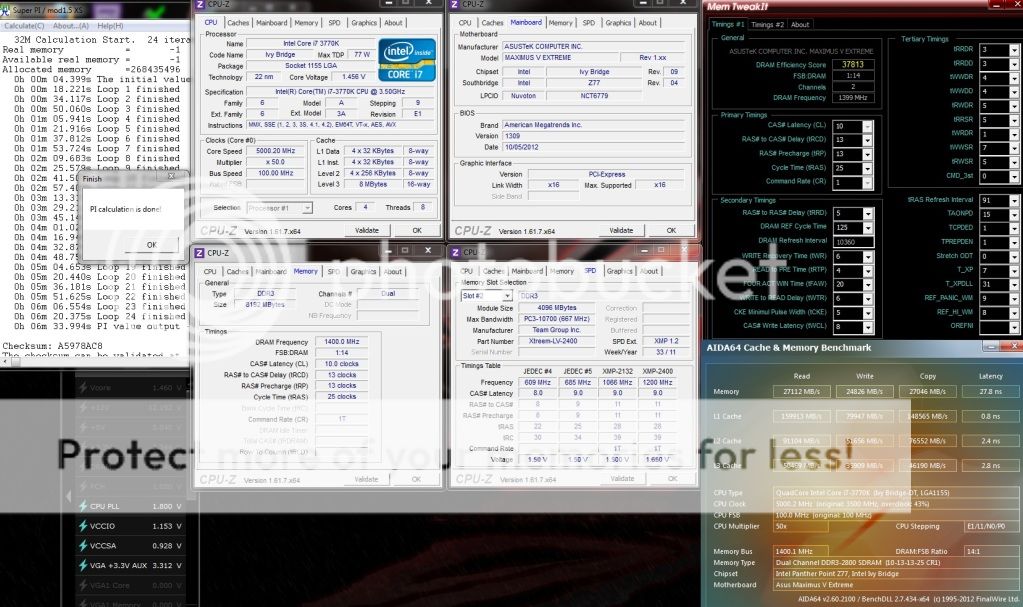
HyniX:

G.Skill 2800C11 @ 2837 11-13-13-25-1T 1.7v
user posted image

G.Skill 2800C11 @ 2856 11-13-13-25-1T 1.71v
user posted image

I think that's the max 32m benchable with this 2800C11 kit

Samsung:
Team Xtreem 2600C10 @ 2800 11-13-13-25-1T @ 1.85v
user posted image

This post has been edited by owikh84: Nov 8 2012, 12:14 PM
TSowikh84
post Nov 8 2012, 08:10 PM

i7 Clan
Group Icon
Elite
8,711 posts

Joined: Nov 2007
From: Butterworth, PG / Machang, Kelantan


QUOTE(lat_lonelyboyz @ Nov 8 2012, 07:13 PM)
Hmm...did something goes wrong with this? Around 117 GFlops @ 4.5GHz. Can't go longer anymore due to hot ambient. Hitting 100°c max  drool.gif
*
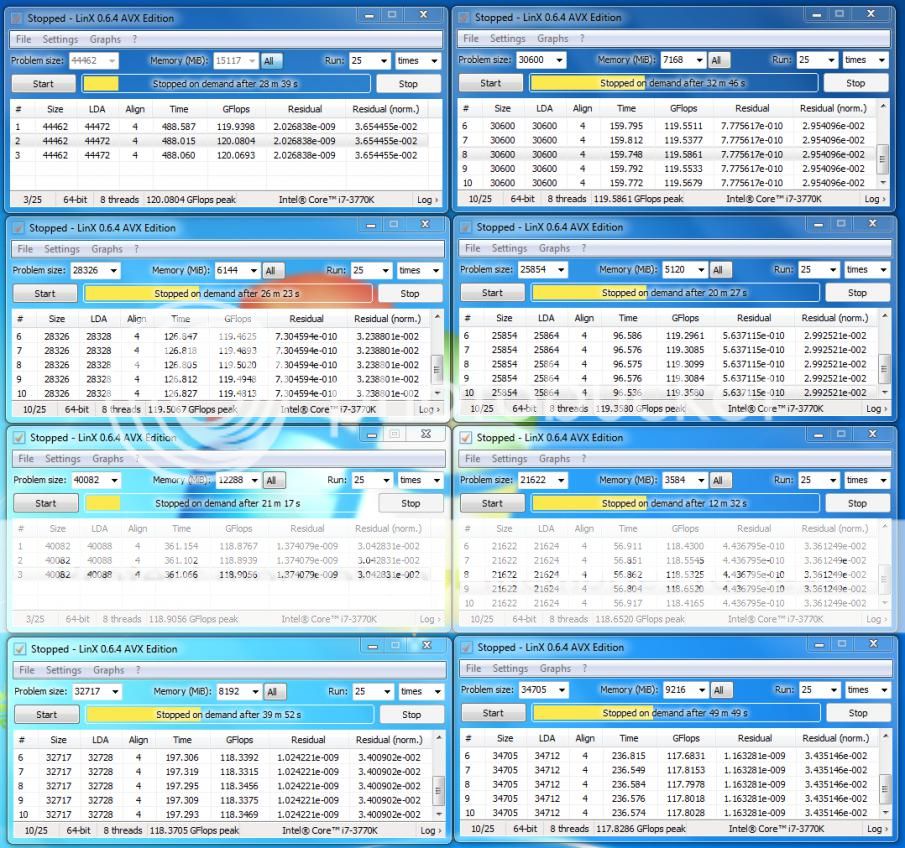
background apps including CPU-Z & RealTemp etc sometime will hurt the GFlops. Close them all while streasing & see how.
Some ppl choose to run LinX in diagnostic mode to eliminate the background progs and select more mem to be stressed.
You might also try set higher priority in LinX setting.
Bump up vcore might as well cure the GFlops.
TSowikh84
post Nov 8 2012, 11:14 PM

i7 Clan
Group Icon
Elite
8,711 posts

Joined: Nov 2007
From: Butterworth, PG / Machang, Kelantan


QUOTE(usop8290 @ Nov 8 2012, 08:52 PM)
does ram capacity effect gflop result?
*
yes, pretty much will. nod.gif
» Click to show Spoiler - click again to hide... «


QUOTE(lat_lonelyboyz @ Nov 8 2012, 09:23 PM)
Same as usop8290 quuestion, 1600MHz ram speed will affect GFlops and OCed RAM will increase GFlops?
*
I don't think RAM frequency will affect much on GFlops as THIS guy got 136 GFlops with just 1600MHz RAM & 3570K

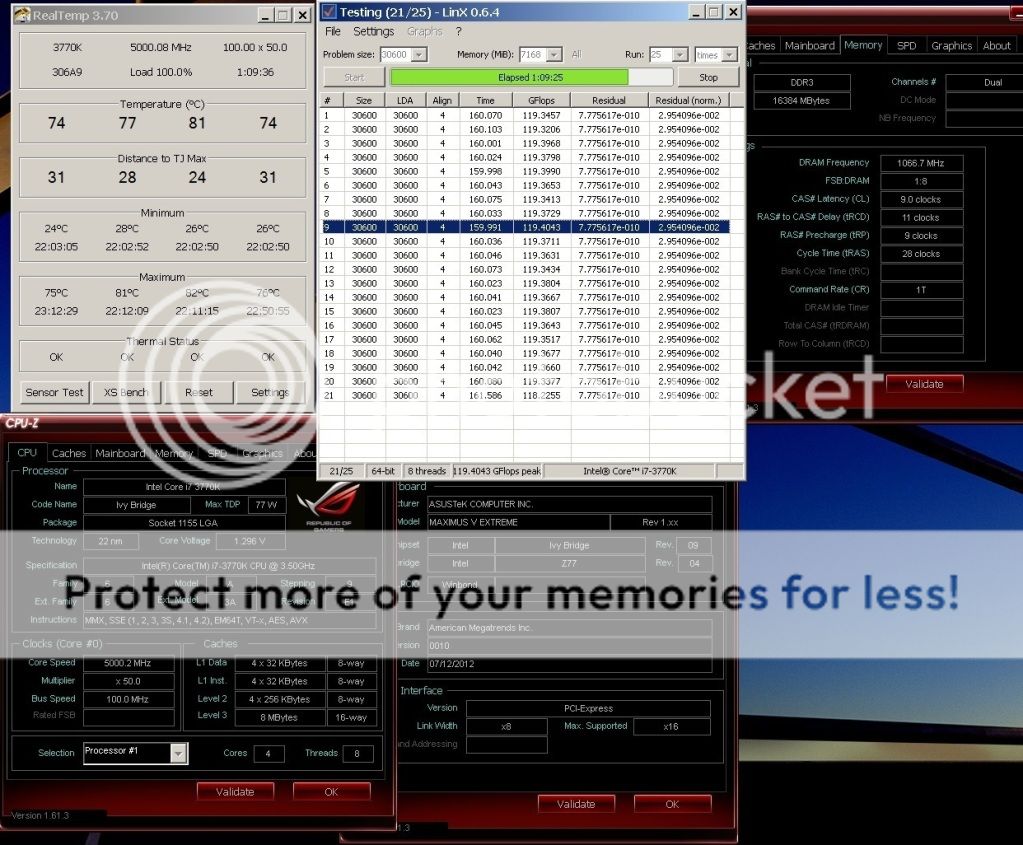
3570K @ 5.0GHz | RAM 1600MHz
» Click to show Spoiler - click again to hide... «


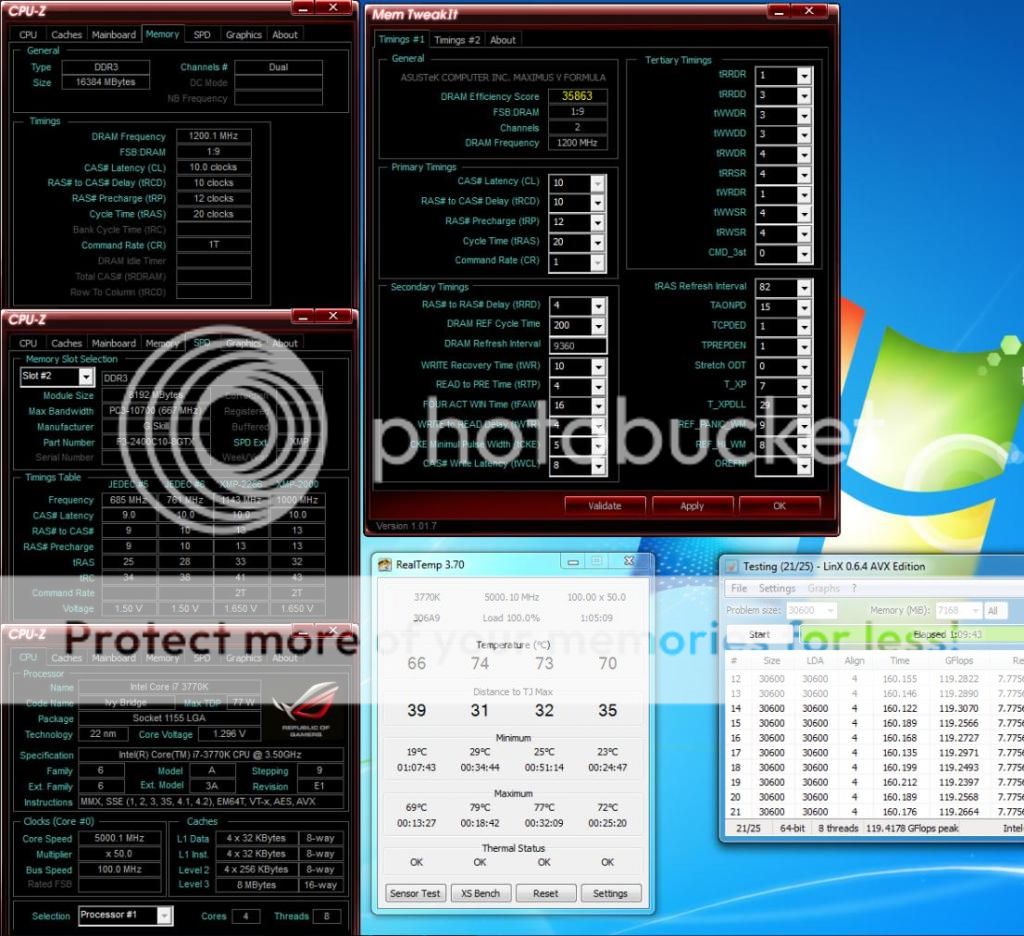
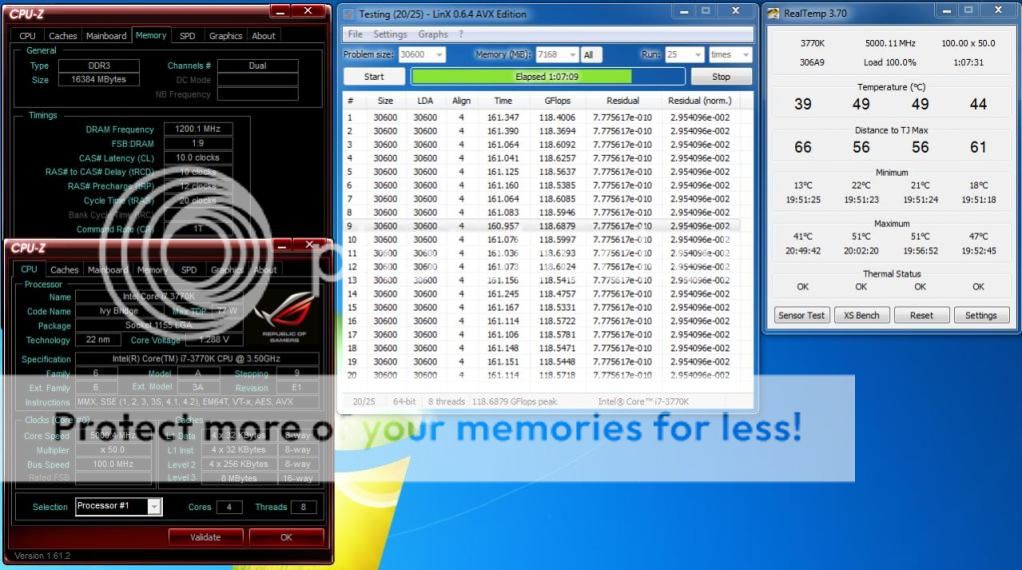
vCore does affect GFlops though...
3770K @ 5.0GHz | RAM 2400MHz
1.296v
» Click to show Spoiler - click again to hide... «


1.288v
» Click to show Spoiler - click again to hide... «


1.296v | RAM 2133MHz
» Click to show Spoiler - click again to hide... «


This post has been edited by owikh84: Nov 8 2012, 11:15 PM
TSowikh84
post Nov 9 2012, 12:37 AM

i7 Clan
Group Icon
Elite
8,711 posts

Joined: Nov 2007
From: Butterworth, PG / Machang, Kelantan


QUOTE(ketapang @ Nov 9 2012, 12:21 AM)
thumbup.gif thumbup.gif rclxms.gif rclxms.gif
Well done and welcome to "delidded Ivy Bridge Club" bro.
Looking forward to seeing improvement over stock TIM.
Pls share with us how's the outcome ya. icon_rolleyes.gif

35 Pages « < 18 19 20 21 22 > » Top
Topic ClosedOptions
 

Change to:
| Lo-Fi Version
0.0520sec    0.25    7 queries    GZIP Disabled
Time is now: 13th December 2025 - 09:27 AM