Welcome Guest ( Log In | Register )

Bump Topic Topic Closed RSS Feed
35 Pages « < 21 22 23 24 25 > » Bottom

Outline · [ Standard ] · Linear+

 Ivy Bridge Overclocking V1 | 3770K/3570K | Z77, Torture Your CPU, Post It Here!

views
     
TSowikh84
post Dec 27 2012, 10:31 PM

i7 Clan
Group Icon
Elite
8,711 posts

Joined: Nov 2007
From: Butterworth, PG / Machang, Kelantan


QUOTE(pristine @ Dec 27 2012, 10:09 PM)
oO. okay. so not too much of a con having a full bank.

guess now I just have to figure out whether I want 16 or 32. haha!
*

Full bank is not a problem for Ivy as long as your mobo/BIOS supports it and there's enough clearance between CPU cooler and the closest DIMM slot you would be fine.
TSowikh84
post Jan 1 2013, 09:37 AM

i7 Clan
Group Icon
Elite
8,711 posts

Joined: Nov 2007
From: Butterworth, PG / Machang, Kelantan


QUOTE(muhiann @ Dec 31 2012, 11:02 PM)
muhiann | i5 3570k | 4.4ghz | msi z77a-g43 | corsair hydro h100i
all power saving feature is on for this oc..very hard to get 4.5ghz stable.no matter i put more voltage intel burn test fail.
*

Well done. Looks like your chip loves more voltage for 4.5. Try upping vCore to 1.3-1.35v, if your cooling still permit. One if the culprits is your mobo has a bad VRM quality, which results in high vCore.

TSowikh84
post Jan 4 2013, 04:42 PM

i7 Clan
Group Icon
Elite
8,711 posts

Joined: Nov 2007
From: Butterworth, PG / Machang, Kelantan


QUOTE(INGfusion @ Jan 4 2013, 04:21 PM)
help !!

when I enable oc my windows will freeze after boot up after 3-5minutes

my oc 4.6ghz @ 1.365V

im using 3570K

and mpower z77

can guide me please
*

1.365v during load or idle? If you are just increase CPU from stock clock to 4.6 without touching other settings such as RAM then insufficient vCore is the only suspect. So, try upping your vCore, notch by notch.

TSowikh84
post Jan 5 2013, 08:48 AM

i7 Clan
Group Icon
Elite
8,711 posts

Joined: Nov 2007
From: Butterworth, PG / Machang, Kelantan


QUOTE(INGfusion @ Jan 4 2013, 04:55 PM)
this is the bios setting
I couldnt see what vCore & load line calibration aka LLC are actually actually set perhaps you should try my advice above, increase your vCore.
Good luck!
TSowikh84
post Jan 9 2013, 12:13 PM

i7 Clan
Group Icon
Elite
8,711 posts

Joined: Nov 2007
From: Butterworth, PG / Machang, Kelantan


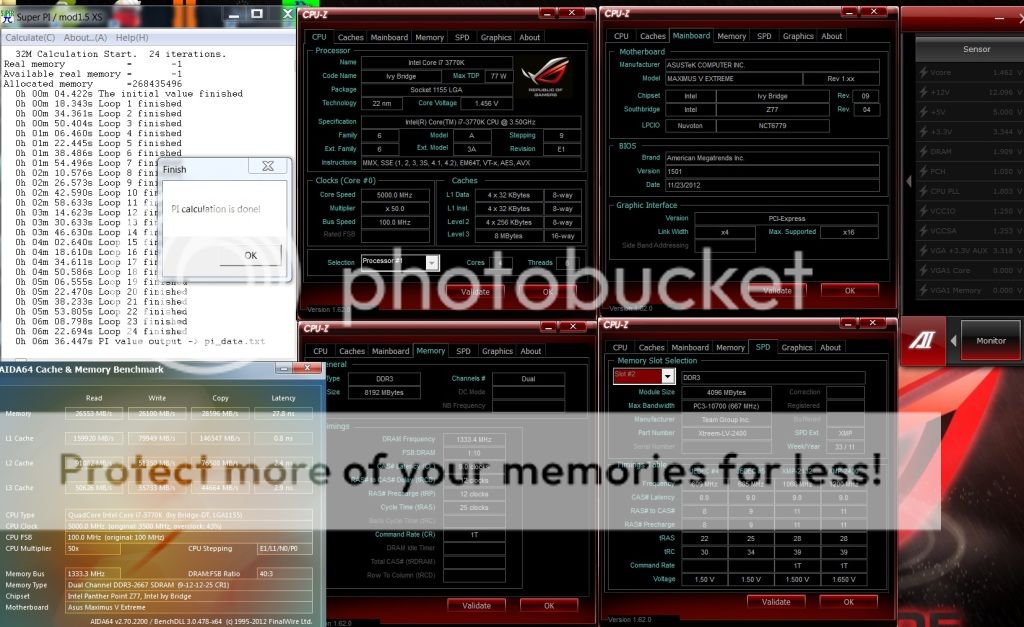
Team Xtreem 2600C10 @ 2666 9-12-12-25-1T

user posted image

The voltages could be adjusted better if I got time later.


TSowikh84
post Jan 9 2013, 07:30 PM

i7 Clan
Group Icon
Elite
8,711 posts

Joined: Nov 2007
From: Butterworth, PG / Machang, Kelantan


QUOTE(tonberry_ax @ Jan 9 2013, 01:03 PM)
I am new in this OC section, can i ask some stupid question? I have a Asus P8Z68-V LX, this model able to do some overclocking? i using 3770k, Arqtik air cooler, CORSAIR VG PC1600 C9 CMZ 4GB X2
*

That board doens't have a lot of the overclocking features of many of the higher-end boards including manual vCore adjustment & lack of power phase.

You might wanna go through THIS GUIDE for more overclocking tips on this board.

Although the CPU is 2600K, basically can be applied on 3770K as well.
TSowikh84
post Jan 10 2013, 06:51 AM

i7 Clan
Group Icon
Elite
8,711 posts

Joined: Nov 2007
From: Butterworth, PG / Machang, Kelantan


New Bios Available for ASUS Maximus V Extreme: 1604
QUOTE
Improve system stability.


TSowikh84
post Jan 10 2013, 10:16 AM

i7 Clan
Group Icon
Elite
8,711 posts

Joined: Nov 2007
From: Butterworth, PG / Machang, Kelantan


QUOTE(pristine @ Jan 10 2013, 09:12 AM)
Question for you guys here. If I were to OC my cpu and have a dual boot win 7 and osx machine, is it possible?
*

As referred to THIS GUIDE, it is possible.
But why dont you try it yourself and share with us.
TSowikh84
post Jan 10 2013, 12:37 PM

i7 Clan
Group Icon
Elite
8,711 posts

Joined: Nov 2007
From: Butterworth, PG / Machang, Kelantan


QUOTE(tonberry_ax @ Jan 10 2013, 10:34 AM)
Thanks for the tips bro. I follow the exact setting include changing CPU Voltage : .130
but i get this BSOD
what should i do?  hmm.gif
*
Could be memory issues. Did you overclock your RAM?
Don't do it at the moment. Check out your BSOD the nvlddmkm.sys is related to nVidia graphic card.
You should update your graphic card driver.
Besides that insufficient vCore also might cause the BSOD, try upping vCore to 1.35-1.4v, if your cooling still allow.

This post has been edited by owikh84: Jan 10 2013, 12:49 PM
TSowikh84
post Jan 10 2013, 01:03 PM

i7 Clan
Group Icon
Elite
8,711 posts

Joined: Nov 2007
From: Butterworth, PG / Machang, Kelantan


QUOTE(tonberry_ax @ Jan 10 2013, 12:50 PM)
i din't overclock it, in fact it underclock to 1333mhz when i switch to auto mode. It's that safe to upping the vCore that high? Because i notice the temp rises from 40-50C to almost 60C.
*
Tjmax is 105C, so it is still safe to increase the vCore. smile.gif
The RAM you can always set to rated speed/timings manually, but advice don't touch anything on memory first before you got the CPU overclocked stably.
TSowikh84
post Jan 10 2013, 11:04 PM

i7 Clan
Group Icon
Elite
8,711 posts

Joined: Nov 2007
From: Butterworth, PG / Machang, Kelantan


QUOTE(mikko2 @ Jan 10 2013, 09:46 PM)
tuniq tx4 is this good thermal paster for overclock??
*

It is a good TIM but outrageously difficult to apply due to its stickiness.
MaximusPC suggested it performs better than Arctic MX-4.
But I'd highly recommend Coollaboratory Liquid Ultra. From my own experience Liquid Ultra is 9-10C better than MX-4. Proof

TSowikh84
post Jan 10 2013, 11:23 PM

i7 Clan
Group Icon
Elite
8,711 posts

Joined: Nov 2007
From: Butterworth, PG / Machang, Kelantan


Suddenly felt boring just now. Decided to delid my 2nd chip which is IMC 2800+ capable.

So this is the b*tch I bought for RM1.5k+ few months ago,
user posted image

IHS was beaten by a big size stationery knife within 5 minutes! It was quick.
user posted image

The residual black adhesive is removed by my fingernails,
user posted image

Applied Liquid Pro (elder bro of Liquid Ultra) on four sides: CPU die, IHS top and bottom, waterblock base.
Note that IHS is installed, hence the CPU is not running nakedly biggrin.gif

So, here's the results. Looks impressive, now with a 2800MHz rated RAM kit
user posted image

I believe that LinX is still possible on this chip. Stay tuned. icon_rolleyes.gif

This post has been edited by owikh84: Jan 10 2013, 11:23 PM
TSowikh84
post Jan 11 2013, 12:00 AM

i7 Clan
Group Icon
Elite
8,711 posts

Joined: Nov 2007
From: Butterworth, PG / Machang, Kelantan


QUOTE(tonberry_ax @ Jan 10 2013, 11:29 PM)
hi owikh84, i updated my nvidia driver and turn up the cpu voltage to 1.35V. so far so good now. smile.gif

But i had a question, for CPU-Z at memory section i see ur FSB:DRAM is 1:14, and mine is 1:5, is that consider stable? I read some article that says FSB:DRAM should be 1:1 to get the system stability... Please advice smile.gif
*
Glad to hear that you managed to get rid of that BSOD. Hopefully the current settings serve you well. So I think it's due to insufficient vCore.
The FSB:DRAM = 1.1 most stable is not true and baseless especially when you're dealing with integrated memory controller (IMC) built on the current architecture.
After looking at some of my rigs, with BCLK (FSB) 100, these are what CPU-Z shows for FSB:DRAM; 1:9, 1:10, 1:11, 1:13, 1:14. The biggest factor has a lot to do with what the CPU's IMC can support & handle those RAM frequencies.
To cut a long story short: My advice is to get the best RAM and CPU one can get to get the best performance. And don't mind no ratios.

QUOTE(mikko2 @ Jan 10 2013, 11:43 PM)
Collaboratory Liquid Pro or Ultra better?? what is the price o.o
*
Liquid Pro is better, but it's not available locally.
You must import Pro from Coollaboratory website.

TSowikh84
post Jan 11 2013, 12:04 AM

i7 Clan
Group Icon
Elite
8,711 posts

Joined: Nov 2007
From: Butterworth, PG / Machang, Kelantan


QUOTE(tonberry_ax @ Jan 11 2013, 12:03 AM)
i trying to up the multiplier from 46 to 47 it show up this screen, is that my proc reach max performance?
*

No, any Ivy chip can easily hit 5.0GHz, with proper cooling of course.
And your BSOD is caused by insufficient vCore again.
So pump more juice to it.

TSowikh84
post Jan 11 2013, 12:36 AM

i7 Clan
Group Icon
Elite
8,711 posts

Joined: Nov 2007
From: Butterworth, PG / Machang, Kelantan


QUOTE(tonberry_ax @ Jan 11 2013, 12:21 AM)
hmmm now my vCore is 1.4
when getting up to 48 multiplier it has this BSOD, and window says will shout down in 1 min popup.
i am now using 47, ok atm....
*
You better stop at 4.7 or 4.6. Run some stress tests posted in Post #1.
Good luck icon_rolleyes.gif
TSowikh84
post Jan 11 2013, 10:29 AM

i7 Clan
Group Icon
Elite
8,711 posts

Joined: Nov 2007
From: Butterworth, PG / Machang, Kelantan


QUOTE(tonberry_ax @ Jan 11 2013, 10:22 AM)
hi owikh84 i testing using PassMark BurnInTest , the memory cant pass 1 cycle. Later on it has this BSOD  hmm.gif
Whats your advice?
*
Memory/RAM related.
Could you pls show us your BIOS settings especially the voltages & timings.
TSowikh84
post Jan 11 2013, 11:31 PM

i7 Clan
Group Icon
Elite
8,711 posts

Joined: Nov 2007
From: Butterworth, PG / Machang, Kelantan


QUOTE(tonberry_ax @ Jan 11 2013, 10:59 AM)
okies, i will show you after bck frm office. As i rmb my vCore still at 1.4. What about the timing? which section was it?

updates:
this is the setting i changed. Others is auto according to the guide.

*
Since it's memory related issue you could try to bump up DRAM voltage (vdimm)
Obviously timing is referring to DRAM timing control in your picture.
TSowikh84
post Jan 13 2013, 05:24 PM

i7 Clan
Group Icon
Elite
8,711 posts

Joined: Nov 2007
From: Butterworth, PG / Machang, Kelantan


QUOTE(tonberry_ax @ Jan 13 2013, 04:48 PM)
how much memory i should bump? And what timing should i adjust?
*
1.5v
9-9-9-24
Command rate 2N
TSowikh84
post Jan 13 2013, 09:19 PM

i7 Clan
Group Icon
Elite
8,711 posts

Joined: Nov 2007
From: Butterworth, PG / Machang, Kelantan


QUOTE(tonberry_ax @ Jan 13 2013, 08:43 PM)
only apply on primary timing? secondary & third all is auto?
*

Let the subtimings set to auto.

TSowikh84
post Jan 14 2013, 11:49 AM

i7 Clan
Group Icon
Elite
8,711 posts

Joined: Nov 2007
From: Butterworth, PG / Machang, Kelantan


QUOTE(tonberry_ax @ Jan 14 2013, 10:09 AM)
when i do burnInTest the core #0 to #3 reaches almost 100C. its that safe? How to reduce the heat? by lower the VCore or multiplier?
*

On stress test as long as it's below TJMax 105C then you should be fine because in daily routine works you will not hit this kind of temp.

There are several ways to reduce the heat/temp:
Upgrade to a better air cooler/fans or watercooling etc if got budget
Reapply a better thermal paste
decrease vCore
decrease CPU PLL voltage
Buy a case with better airflow
If you dont mind to void Intel warranty, delid the internal heat spreader (IHS)
Etc....

35 Pages « < 21 22 23 24 25 > » Top
Topic ClosedOptions
 

Change to:
| Lo-Fi Version
0.0400sec    0.51    7 queries    GZIP Disabled
Time is now: 15th December 2025 - 09:52 AM