Welcome Guest ( Log In | Register )

71 Pages « < 67 68 69 70 71 >Bottom

Outline · [ Standard ] · Linear+

 Sony XPERIA/Tablet S™ Official Thread | V1, Sony XPERIA Tablet Z™ announced

views
     
kysham
post Apr 13 2013, 11:15 AM

Photo Fanatics
*******
Senior Member
3,461 posts

Joined: Feb 2007
From: Kota Kinabalu, Sabah


QUOTE(Spootid @ Apr 11 2013, 04:45 PM)
500-600 only...??? that low aaa...???
*
2 newer generations out already.... what do you expect? blush.gif Welcome to the digital age.... cry.gif

That's why I gave up trying to upgrade my tablet S. Pakai sampai hancur lah. I do like the fact that the screen is still very good, even by today's standard. And I can pluck in a full sized SD card, so I can view the photos from my digital cam (which is also using an SD card) direction from the tablet.
Spootid
post Apr 13 2013, 12:04 PM

Casual
***
Junior Member
405 posts

Joined: Sep 2004
QUOTE(kysham @ Apr 13 2013, 11:15 AM)
2 newer generations out already.... what do you expect?  blush.gif Welcome to the digital age....  cry.gif

That's why I gave up trying to upgrade my tablet S. Pakai sampai hancur lah. I do like the fact that the screen is still very good, even by today's standard. And I can pluck in a full sized SD card, so I can view the photos from my digital cam (which is also using an SD card) direction from the tablet.
*
Well... I think like that oso la... better keep till the tablet kaput... then only buy new one.
countdracula
post Apr 13 2013, 12:50 PM

Casual
***
Junior Member
480 posts

Joined: Apr 2007
From: Cheras


QUOTE(kysham @ Apr 13 2013, 11:15 AM)
2 newer generations out already.... what do you expect?  blush.gif Welcome to the digital age....  cry.gif

That's why I gave up trying to upgrade my tablet S. Pakai sampai hancur lah. I do like the fact that the screen is still very good, even by today's standard. And I can pluck in a full sized SD card, so I can view the photos from my digital cam (which is also using an SD card) direction from the tablet.
*
100% agreed!!! Using it to watch video & web surfing. Although quite slow but still bearable. Listening to music & radio is very good. The only headache I got is to get a casing/cover. The existing one has stared to get wear off.

kysham
post Apr 13 2013, 12:59 PM

Photo Fanatics
*******
Senior Member
3,461 posts

Joined: Feb 2007
From: Kota Kinabalu, Sabah


QUOTE(countdracula @ Apr 13 2013, 12:50 PM)
100% agreed!!! Using it to watch video & web surfing. Although quite slow but still bearable. Listening to music & radio is very good. The only headache I got is to get a casing/cover. The existing one has stared to get wear off.
*
Go naked. tongue.gif
Ratbert
post Apr 13 2013, 01:03 PM

New Member
*
Junior Member
35 posts

Joined: Jul 2011
Hehe, if wanna get a new tablet, then retire the tablet s to become a home device lo... can jadi remote control, or deskclock, digital photo frame...

It's one reason y i like the STS, can keep at home and it will still serve a purpose.. smile.gif
sleever
post Apr 14 2013, 02:51 PM

New Member
*
Junior Member
16 posts

Joined: May 2006
Just bought mine yesterday. The only thing about this Xperia Tablet that grabs my attention is the full size SD Card slot, where I can insert my sdcard from my camera and view /edit the pics without using my laptop. Then I dont have to bring my bulky laptop on a vacation lol. No other tablet offers that feature, even the upcoming Xperia tablet Z. I know some tablets have the Micro Sd slot, but I think its easier to stick with the full size card, without using the adaptor. I guess im gonna use this one for a long long time.

The one thing That Annoys Me Is when I Typed Something In Here It Went Like This (im Typing In It Right Now), First Letter of Every Word goes Capital. Ive Tried To find It In The Settings But I Cant Find it. Any Help?

Thinking to buy the case with keyboard. Is it available at any Sony shop?

So far Im Happy with It.
kysham
post Apr 16 2013, 12:19 PM

Photo Fanatics
*******
Senior Member
3,461 posts

Joined: Feb 2007
From: Kota Kinabalu, Sabah


QUOTE(sleever @ Apr 14 2013, 02:51 PM)
Just bought mine yesterday. The only thing about this Xperia Tablet that grabs my attention is the full size SD Card slot, where I can insert my sdcard from my camera and view /edit the pics without using my laptop. Then I dont have to bring my bulky laptop on a vacation lol. No other tablet offers that feature, even the upcoming Xperia tablet Z. I know some tablets have the Micro Sd slot, but I think its easier to stick with the full size card, without using the adaptor. I guess im gonna use this one for a long long time.

The one thing That Annoys Me Is when I Typed Something In Here It Went Like This (im Typing In It Right Now), First Letter of Every Word goes Capital. Ive Tried To find It In The Settings But I Cant Find it. Any Help?

Thinking to buy the case with keyboard. Is it available at any Sony shop?

So far Im Happy with It.
*
Same reason I'm keeping my even older Tablet S. About your keyboard issue. I am not sure how to help. I don't have this issue.... sorry dude.
Ratbert
post Apr 16 2013, 07:04 PM

New Member
*
Junior Member
35 posts

Joined: Jul 2011
since u just bought it, maybe try factory reset first?
sleever
post Apr 18 2013, 01:22 AM

New Member
*
Junior Member
16 posts

Joined: May 2006
QUOTE(kysham @ Apr 16 2013, 12:19 PM)
Same reason I'm keeping my even older Tablet S. About your keyboard issue. I am not sure how to help. I don't have this issue.... sorry dude.
*
It's ok bro it's already solved. Just turned off the numeric keypad function and it's all right. lol

QUOTE(Ratbert @ Apr 16 2013, 07:04 PM)
since u just bought it, maybe try factory reset first?
*
I just updated to the latest version (not JB though), why going backwards?

---

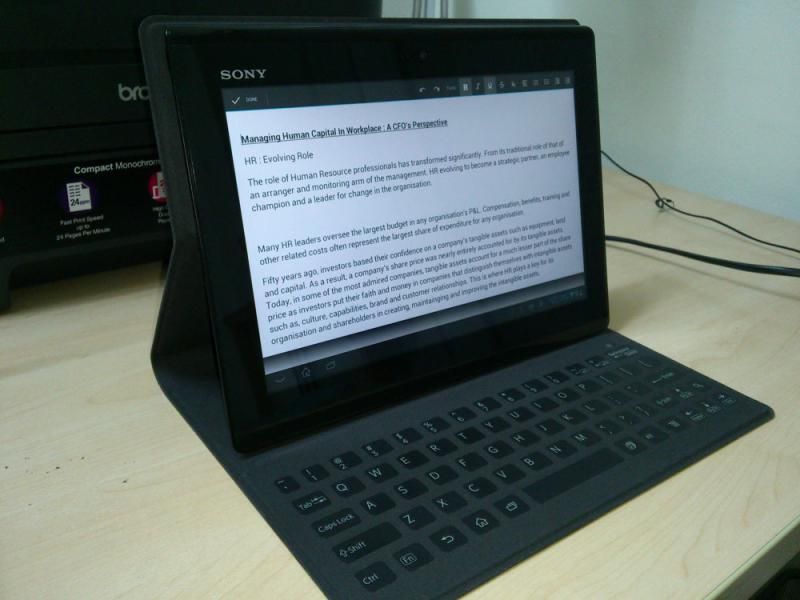
Ok early this evening I just couldn't resist myself, so I bought this thing:
user posted image

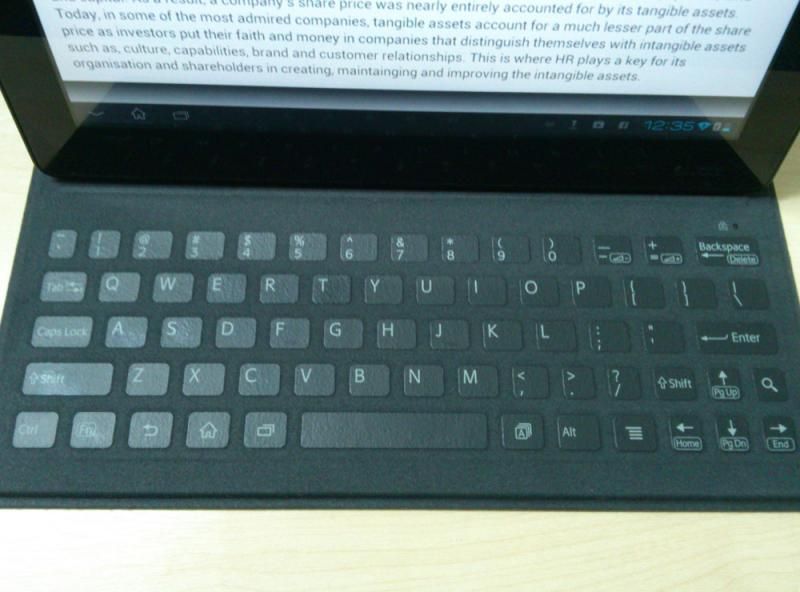
Yep probably you guys already saw this so just a quick review about this case:
user posted image

The Touch Keyboard You need to get used to it first before getting to the typing comfort zone. Sometimes I dont look at the keyboard but I do get typos since I'm not familiar with it yet.
user posted image

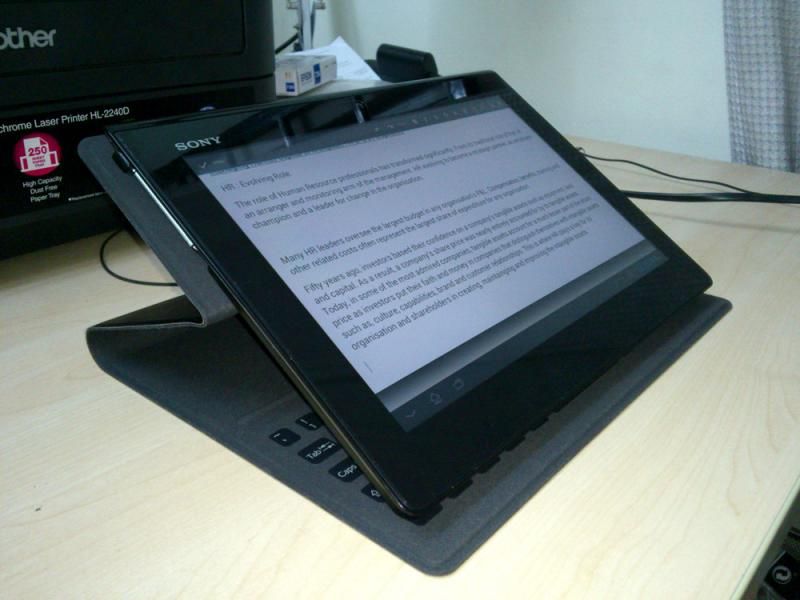
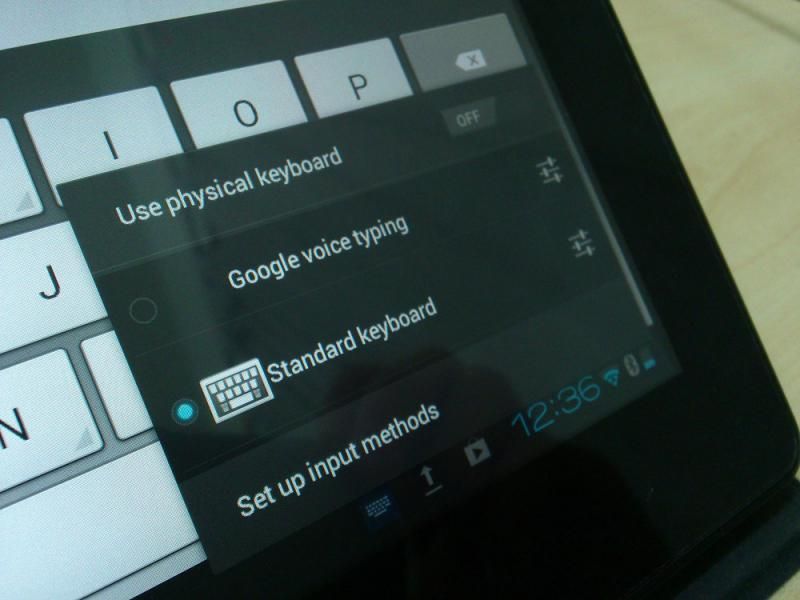
Who said you can't make it as a lower stand? Although the physical keyboard still reacts to it, you need to turn off the function first before you use the on-screen keyboard. Nice option if you put the tablet on a coffee table or on a lower gesture.
user posted image

Turn off the "Physical Keyboard" if you want to use the on-screen keyboard on a lower position.
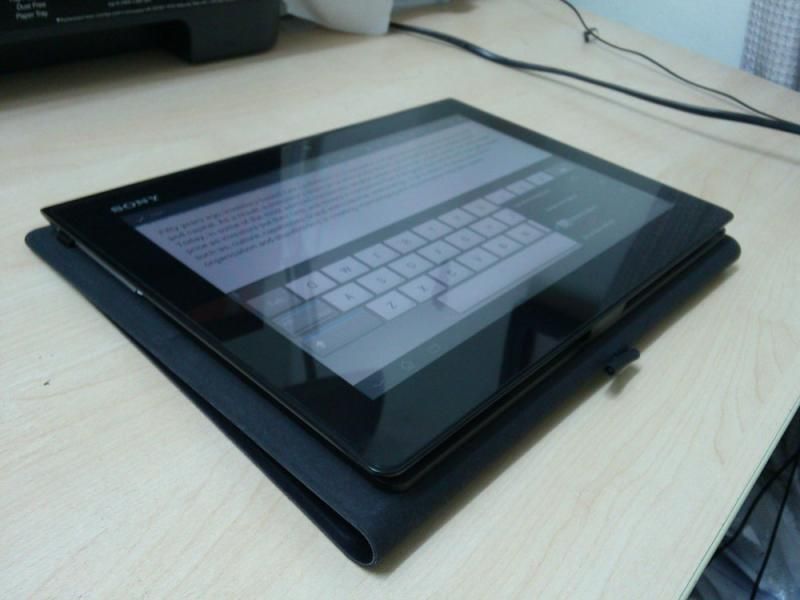
user posted image

You can also fold like normal tablet. The keyboard will deactivate automatically.
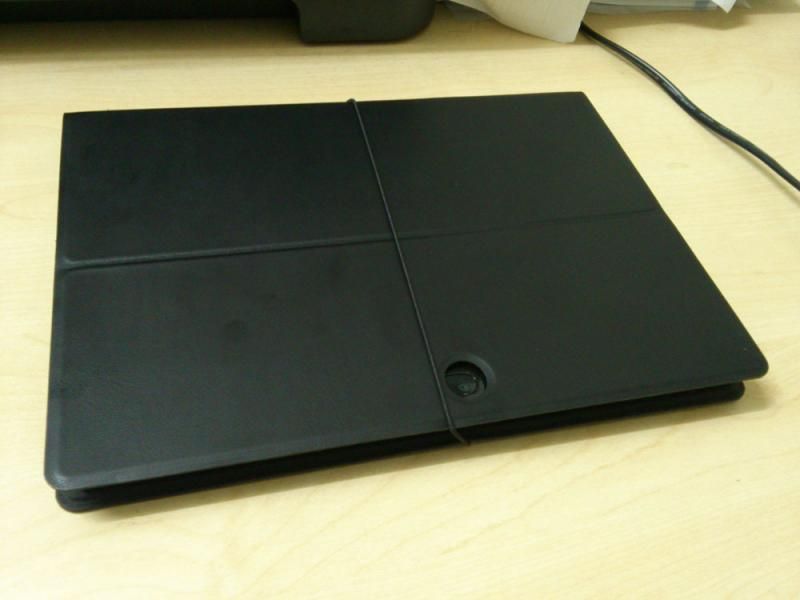
user posted image

The outer case is a smooth high quality leather. But if you have oily hands you're gonna leave some smudges on it. Like you see on the picture.

Well that's it. Totally worth it if you want to type on the tablet without pulling down your neck. IMO this type of case is better than the Tablet Z version in terms of the lightweight. But in term of typing comfy, Tablet Z case is much better.

This post has been edited by sleever: Apr 18 2013, 01:30 AM

lerijiso
post Apr 18 2013, 02:02 AM

Enthusiast
*****
Senior Member
842 posts

Joined: Nov 2010
From: No Man's Land


QUOTE(sleever @ Apr 18 2013, 01:22 AM)
It's ok bro it's already solved. Just turned off the numeric keypad function and it's all right. lol
I just updated to the latest version (not JB though), why going backwards?
*
Glad you've found the solution.

Factory reset wont restore your tablet back to earlier version of android. It wont reverse the firmware update that you've already did. It will only reset the current version of the OS/firmware (which you already updated) to its pure state, wiping all apps that you've installed plus all personal information such as your Google account information.
kerorokatak
post Apr 18 2013, 10:03 AM

Getting Started
**
Junior Member
100 posts

Joined: Mar 2007
Congratulation to XTS owner.... jellybean update start 18/4/2013... but no news for STS....

Info Link

This post has been edited by kerorokatak: Apr 18 2013, 10:03 AM
psyeo
post Apr 18 2013, 11:51 AM

Look at all my stars!!
*******
Senior Member
2,605 posts

Joined: Jan 2003
Hooray Jelly bean coming

Hmm anyone interested in the Xperia Tablet S with busted 3G sim card slot? I damaged while trying to take out a micro sim with adapter...lol. Now the Xperia Tablet S together with HP touchpad sitting on my desk collecting dust for a few months now...

Do you guys think RM900 is reasonable for 3G Xperia Tablet S without 3G + additional 1 charging cable and 1 OTG cable?

Bought another replacement unit for my dad without him knowing. He ended up losing that unit as well.


Initially plan to use as a universal remote, but now I have a xperia ZL for that purpose

This post has been edited by psyeo: Apr 18 2013, 03:56 PM
Azureknight94
post Apr 18 2013, 12:29 PM

Regular
******
Senior Member
1,667 posts

Joined: Oct 2006


Anyone planning to get the tablet z? biggrin.gif Sony mobile malaysia fb keep teasing about the tablet z recently. Wondering if the release date is near
uzary
post Apr 18 2013, 12:45 PM

J@ck da D0n
*******
Senior Member
3,149 posts

Joined: Mar 2007
From: Kuala Terengganu


QUOTE(Azureknight94 @ Apr 18 2013, 12:29 PM)
Anyone planning to get the tablet z? biggrin.gif Sony mobile malaysia fb keep teasing about the tablet z recently. Wondering if the release date is near
*
i will get xperia tablet z once it released. just hop the price will be 1.5k for 16gb wifi only. now i also hope sony wont released any more tablet for example a smaller version like a 8" with the same spec as tablet z, or else.i will be regret. i kinda like 8" form factor now. xperia tablet z 10.1 kinda big imo. but nvermmind, it slim n light enough tongue.gif
tzershi
post Apr 18 2013, 12:50 PM

Casual
***
Junior Member
404 posts

Joined: Mar 2012


QUOTE(Azureknight94 @ Apr 18 2013, 01:29 PM)
Anyone planning to get the tablet z? biggrin.gif Sony mobile malaysia fb keep teasing about the tablet z recently. Wondering if the release date is near
*
QUOTE(uzary @ Apr 18 2013, 01:45 PM)
i will get xperia tablet z once it released. just hop the price will be 1.5k for 16gb wifi only. now i also hope sony wont released any more tablet for example a smaller version like a 8" with the same spec as tablet z, or else.i will be regret. i kinda like 8" form factor now. xperia tablet z 10.1 kinda big imo. but nvermmind, it slim n light enough tongue.gif
*
+1
sleever
post Apr 18 2013, 09:31 PM

New Member
*
Junior Member
16 posts

Joined: May 2006
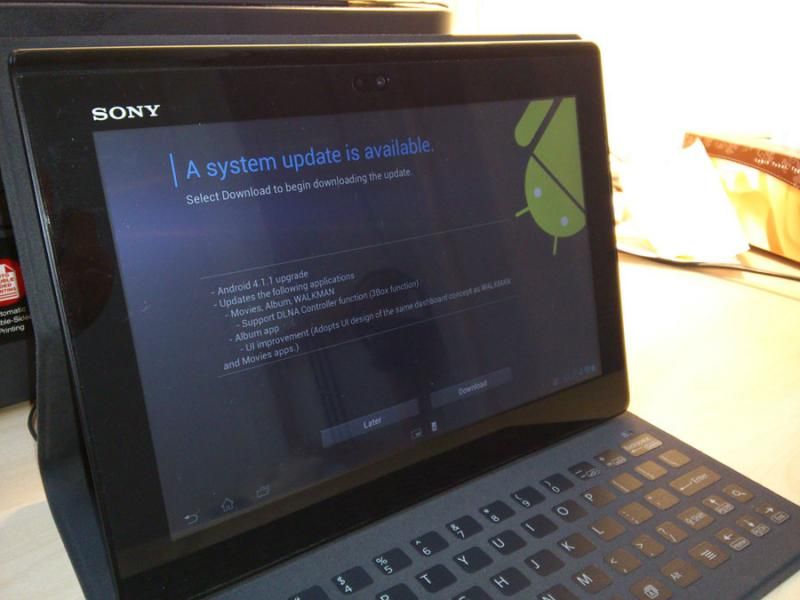
user posted image

There you go folks. Jelly. But my unifi today totally sucks, too frickin' slow.
lerijiso
post Apr 18 2013, 10:20 PM

Enthusiast
*****
Senior Member
842 posts

Joined: Nov 2010
From: No Man's Land


QUOTE(sleever @ Apr 18 2013, 09:31 PM)
user posted image

There you go folks. Jelly. But my unifi today totally sucks, too frickin' slow.
*
Finally..it took forever for Sony to roll out JB for Xperia tablet. Only 4.1.1 summore..pfft. Makes you wonder are they even thinking about the old Tablet S.
kerorokatak
post Apr 19 2013, 09:27 AM

Getting Started
**
Junior Member
100 posts

Joined: Mar 2007
QUOTE(lerijiso @ Apr 18 2013, 10:20 PM)
Finally..it took forever for Sony to roll out JB for Xperia tablet. Only 4.1.1 summore..pfft. Makes you wonder are they even thinking about the old Tablet S.
*
Bye-bye jellybean.... STS owner here cry.gif
uzary
post Apr 19 2013, 11:00 AM

J@ck da D0n
*******
Senior Member
3,149 posts

Joined: Mar 2007
From: Kuala Terengganu


if sony didnt announced xperia tablet z, i already buy xperia tablet s due to still.wedge but so slim design, a quad.core proc too. but only today.jellybean is out for xts, i gues i will buy xperia tablet z, i believe it will.came.out nex month. but 10.1, i kinda wish sony make a 8" version with the same design like xtz, but i couldnt wait any longer. most important thing bout xtz is.i hope the screen will be much better than than both.sts n xtz, n not stupid viewing angle issue like on the xperia z.
uzary
post Apr 19 2013, 11:20 AM

J@ck da D0n
*******
Senior Member
3,149 posts

Joined: Mar 2007
From: Kuala Terengganu


QUOTE(sleever @ Apr 18 2013, 09:31 PM)
user posted image

There you go folks. Jelly. But my unifi today totally sucks, too frickin' slow.
*
kindly give review.bout that update k. i wonder does it solve the constant reboot/restart problem.

71 Pages « < 67 68 69 70 71 >Top
 

Change to:
| Lo-Fi Version
0.0229sec    0.70    6 queries    GZIP Disabled
Time is now: 12th December 2025 - 08:06 PM