Welcome Guest ( Log In | Register )

11 Pages « < 5 6 7 8 9 > » Bottom

Outline · [ Standard ] · Linear+

 Acer TimelineX 3820TG & 4820TG V3, Owners and visitors discussion

views
     
hottemper
post Mar 27 2012, 10:00 AM

Getting Started
**
Junior Member
248 posts

Joined: Feb 2006
From: KL


QUOTE(kizwan @ Mar 26 2012, 12:05 AM)
Look like this is not rare issue with TF2. No proper solution I can find. You can try fresh windows installation. You can try uninstall the audio driver & just use default windows driver.
I don't know whether Acer highpoint provide this kind of service or not. You can do it yourself. You should learn doing it yourself.
*
Sifu, can you teach me??? I search online they using compressed air can, i dunno where can find it..
TSkizwan
post Mar 27 2012, 01:37 PM

BÖw DÖwn TÖ LÖrd PringlËs
*****
Senior Member
826 posts

Joined: Jan 2009


Using compressed air is one of the method to clear dust at fan grills. You also can disassemble your notebook & use little brush to clean the dust on the fan & grills. The latter is preferred because you need to reapply the thermal paste too.
hottemper
post Mar 27 2012, 07:13 PM

Getting Started
**
Junior Member
248 posts

Joined: Feb 2006
From: KL


Doesn't dissembling the notebook void the warranty??
xhakox
post Mar 31 2012, 07:34 PM

Enthusiast
*****
Senior Member
744 posts

Joined: Sep 2011


My laptop speakers are annoying! Crackling sound when I play games. Ughhh..
Anime4000
post Apr 2 2012, 07:58 PM

Look at all my stars!!
*******
Senior Member
2,399 posts

Joined: Jul 2009
From: /dev/null


QUOTE(xhakox @ Mar 31 2012, 07:34 PM)
My laptop speakers are annoying! Crackling sound when I play games. Ughhh..
*
I also have that problem, suddenly game slow (fps bit drop) and speaker come cracking sound = =
After restart, now Won't start, stuck at Windows Logo boot, with HDD LED always on = =
my hard disk: Western Digital
xhakox
post Apr 2 2012, 09:25 PM

Enthusiast
*****
Senior Member
744 posts

Joined: Sep 2011


QUOTE(Anime4000 @ Apr 2 2012, 07:58 PM)
I also have that problem, suddenly game slow (fps bit drop) and speaker come cracking sound = =
After restart, now Won't start, stuck at Windows Logo boot, with HDD LED always on = =
my hard disk: Western Digital
*
Annoying right? I've tried uninstalling it and let windows install new driver. But still the same, crackling sound all the way.. :s
TSkizwan
post Apr 2 2012, 09:34 PM

BÖw DÖwn TÖ LÖrd PringlËs
*****
Senior Member
826 posts

Joined: Jan 2009


QUOTE(hottemper @ Mar 27 2012, 07:13 PM)
Doesn't dissembling the notebook void the warranty??
*
If your warranty still not expired, technically yes, it can void the warranty. However, if there is no warranty sticker on the screws or/and chassis, they won't be able to tell that you already opened your notebook.
skeleton202
post Apr 3 2012, 12:14 AM

Perdana Malaysia ke-9
******
Senior Member
1,132 posts

Joined: Jan 2010
From: shit island

do i nid to use paid av or free one?

seems my current paid av expired tho =.=
Anime4000
post Apr 3 2012, 12:38 AM

Look at all my stars!!
*******
Senior Member
2,399 posts

Joined: Jul 2009
From: /dev/null


QUOTE(xhakox @ Apr 2 2012, 09:25 PM)
Annoying right? I've tried uninstalling it and let windows install new driver. But still the same, crackling sound all the way.. :s
*
very annoying, I play BF3 online it very disturbing when fps drop + cracking sound.
before I run mod, I check WD Hard disk, my HDD now in Caution mode:
user posted image

So I just ignore = =... run/edit HDD APM to "EFh/255" by use quiteHDD, and I try solve bit, but still have.

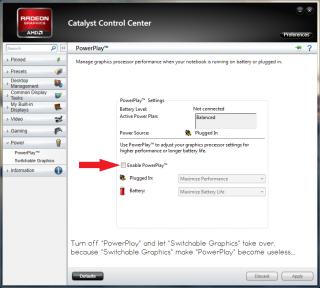
Some one also say, disable "PowerPlay™". By logic, "PowerPlay™" completely useless because "Switchable Graphics" take place:
Attached Image

I didn't test yet off "PowerPlay™"... later I come with result = =

This post has been edited by Anime4000: Apr 3 2012, 12:46 AM
SUSngkhanmein
post Apr 3 2012, 09:20 AM

カラカラ Karakara
*******
Senior Member
7,727 posts

Joined: Jan 2010
From: Ara Damansara, Petaling Jaya & Batu Pahat, Johor.


@Anime4000 click the "caution" > drag the 3 sector to 128 80h > apply

if ur lappy still under warranty.. change hdd.. i think get seagate better. nowadays WD seems prone more issue that other like toshiba, hitachi & samsung..

tick the powerplay.. enable it.. remove ur battery while playing bf3!
Anime4000
post Apr 3 2012, 12:10 PM

Look at all my stars!!
*******
Senior Member
2,399 posts

Joined: Jul 2009
From: /dev/null


QUOTE(ngkhanmein @ Apr 3 2012, 09:20 AM)
@Anime4000 click the "caution" > drag the 3 sector to 128 80h > apply

if ur lappy still under warranty.. change hdd.. i think get seagate better. nowadays WD seems prone more issue that other like toshiba, hitachi & samsung..

tick the powerplay.. enable it.. remove ur battery while playing bf3!
*
My laptop warranty just last 19/March expired and come disk health: caution = =

I play game sure remove battery (unlike 4830TG)
why need enable PowerPlay? since Switchable Graphics take over?
Just last night I test play BF3 with disable PowerPlay, it improve performance, less drop fps..
SUSngkhanmein
post Apr 3 2012, 12:22 PM

カラカラ Karakara
*******
Senior Member
7,727 posts

Joined: Jan 2010
From: Ara Damansara, Petaling Jaya & Batu Pahat, Johor.


follow my instruction 1st.
Anime4000
post Apr 3 2012, 01:08 PM

Look at all my stars!!
*******
Senior Member
2,399 posts

Joined: Jul 2009
From: /dev/null


QUOTE(ngkhanmein @ Apr 3 2012, 12:22 PM)
follow my instruction 1st.
*
I follow, except Enable PowerPlay = =
SUSngkhanmein
post Apr 3 2012, 01:43 PM

カラカラ Karakara
*******
Senior Member
7,727 posts

Joined: Jan 2010
From: Ara Damansara, Petaling Jaya & Batu Pahat, Johor.


so now become green color good?
Anime4000
post Apr 3 2012, 01:55 PM

Look at all my stars!!
*******
Senior Member
2,399 posts

Joined: Jul 2009
From: /dev/null


QUOTE(ngkhanmein @ Apr 3 2012, 01:43 PM)
so now become green color good?
*
not green still yellow, =(
I had make topic: http://forum.lowyat.net/index.php?showtopic=2291417 you can see I run Extended Test, come error: Too many bad sector,
I have back up all file, now that bad sector can be fix by LLF/Zero-Fill format?
SUSngkhanmein
post Apr 3 2012, 03:16 PM

カラカラ Karakara
*******
Senior Member
7,727 posts

Joined: Jan 2010
From: Ara Damansara, Petaling Jaya & Batu Pahat, Johor.


reformat the hdd. must clean! the last resort!
Anime4000
post Apr 3 2012, 03:28 PM

Look at all my stars!!
*******
Senior Member
2,399 posts

Joined: Jul 2009
From: /dev/null


QUOTE(ngkhanmein @ Apr 3 2012, 03:16 PM)
reformat the hdd. must clean! the last resort!
*
Full Format?
some advice me that run Write Zero and do partition and format
SUSngkhanmein
post Apr 3 2012, 03:28 PM

カラカラ Karakara
*******
Senior Member
7,727 posts

Joined: Jan 2010
From: Ara Damansara, Petaling Jaya & Batu Pahat, Johor.


also can.
Anime4000
post Apr 3 2012, 04:15 PM

Look at all my stars!!
*******
Senior Member
2,399 posts

Joined: Jul 2009
From: /dev/null


I download from WD and burn in CD, currently AHCI not detect, so I change IDE.
Now I running "Write Zero" then create partition as-usual. change back to AHCI, and install windows.
user posted image

dose my step correct?

This post has been edited by Anime4000: Apr 3 2012, 04:18 PM
SUSngkhanmein
post Apr 4 2012, 09:21 AM

カラカラ Karakara
*******
Senior Member
7,727 posts

Joined: Jan 2010
From: Ara Damansara, Petaling Jaya & Batu Pahat, Johor.


nod.gif

11 Pages « < 5 6 7 8 9 > » Top
 

Change to:
| Lo-Fi Version
0.0235sec    0.74    6 queries    GZIP Disabled
Time is now: 10th December 2025 - 08:18 PM