Welcome Guest ( Log In | Register )

Outline · [ Standard ] · Linear+

 Acer TimelineX 3820TG & 4820TG V3, Owners and visitors discussion

views
     
Anime4000
post Mar 8 2012, 06:15 AM

Look at all my stars!!
*******
Senior Member
2,399 posts

Joined: Jul 2009
From: /dev/null


I have question, about Graphics Driver,
I had download driver at amd site for my 4820TG:
http://support.amd.com/us/gpudownload/wind...ob_win7-64.aspx

I run installer, says that ati/amd gpu not detected, so I restart and change to "Discrete" mode, and run installer again, seem graphics driver installer can install, but I think:

what if in discrete mode, I install latest ati/amd driver, then I change back to "Switchable" it will effect/problem?
Anime4000
post Mar 20 2012, 01:48 AM

Look at all my stars!!
*******
Senior Member
2,399 posts

Joined: Jul 2009
From: /dev/null


As My previous question. Use latest official ATI/AMD driver on Timeline 4820TG. So I did!

First I go to BIOS, change [Switchable] to [Discreet]
Download and Install Catalyst Version: 12.3
Once Install complete, with no error, restart and change back to [Discreet] to [Switchable]

See:
Attached Image


Intel GPU use previous driver where ATi/AMD GPU use latest driver
Attached Image


About performance, based on Windows Experience Index,
[Switchable] "Graphics: 4.5" "Gaming Graphics: 6.1" (High performance GPU mode)
[Discreet] "Graphics: 6.7" "Gaming Graphics: 6.7"

About Intel driver, I think it use previous driver where I use Acer packaging Catalyst, mean need to install Acer packaging Catalyst version 8.84.7.4, then install latest official ATI/AMD driver in [Discreet] mode as mentions above.

This post has been edited by Anime4000: Mar 20 2012, 01:50 AM
Anime4000
post Apr 2 2012, 07:58 PM

Look at all my stars!!
*******
Senior Member
2,399 posts

Joined: Jul 2009
From: /dev/null


QUOTE(xhakox @ Mar 31 2012, 07:34 PM)
My laptop speakers are annoying! Crackling sound when I play games. Ughhh..
*
I also have that problem, suddenly game slow (fps bit drop) and speaker come cracking sound = =
After restart, now Won't start, stuck at Windows Logo boot, with HDD LED always on = =
my hard disk: Western Digital
Anime4000
post Apr 3 2012, 12:38 AM

Look at all my stars!!
*******
Senior Member
2,399 posts

Joined: Jul 2009
From: /dev/null


QUOTE(xhakox @ Apr 2 2012, 09:25 PM)
Annoying right? I've tried uninstalling it and let windows install new driver. But still the same, crackling sound all the way.. :s
*
very annoying, I play BF3 online it very disturbing when fps drop + cracking sound.
before I run mod, I check WD Hard disk, my HDD now in Caution mode:
user posted image

So I just ignore = =... run/edit HDD APM to "EFh/255" by use quiteHDD, and I try solve bit, but still have.

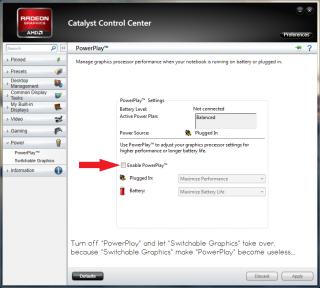
Some one also say, disable "PowerPlay™". By logic, "PowerPlay™" completely useless because "Switchable Graphics" take place:
Attached Image

I didn't test yet off "PowerPlay™"... later I come with result = =

This post has been edited by Anime4000: Apr 3 2012, 12:46 AM
Anime4000
post Apr 3 2012, 12:10 PM

Look at all my stars!!
*******
Senior Member
2,399 posts

Joined: Jul 2009
From: /dev/null


QUOTE(ngkhanmein @ Apr 3 2012, 09:20 AM)
@Anime4000 click the "caution" > drag the 3 sector to 128 80h > apply

if ur lappy still under warranty.. change hdd.. i think get seagate better. nowadays WD seems prone more issue that other like toshiba, hitachi & samsung..

tick the powerplay.. enable it.. remove ur battery while playing bf3!
*
My laptop warranty just last 19/March expired and come disk health: caution = =

I play game sure remove battery (unlike 4830TG)
why need enable PowerPlay? since Switchable Graphics take over?
Just last night I test play BF3 with disable PowerPlay, it improve performance, less drop fps..
Anime4000
post Apr 3 2012, 01:08 PM

Look at all my stars!!
*******
Senior Member
2,399 posts

Joined: Jul 2009
From: /dev/null


QUOTE(ngkhanmein @ Apr 3 2012, 12:22 PM)
follow my instruction 1st.
*
I follow, except Enable PowerPlay = =
Anime4000
post Apr 3 2012, 01:55 PM

Look at all my stars!!
*******
Senior Member
2,399 posts

Joined: Jul 2009
From: /dev/null


QUOTE(ngkhanmein @ Apr 3 2012, 01:43 PM)
so now become green color good?
*
not green still yellow, =(
I had make topic: http://forum.lowyat.net/index.php?showtopic=2291417 you can see I run Extended Test, come error: Too many bad sector,
I have back up all file, now that bad sector can be fix by LLF/Zero-Fill format?
Anime4000
post Apr 3 2012, 03:28 PM

Look at all my stars!!
*******
Senior Member
2,399 posts

Joined: Jul 2009
From: /dev/null


QUOTE(ngkhanmein @ Apr 3 2012, 03:16 PM)
reformat the hdd. must clean! the last resort!
*
Full Format?
some advice me that run Write Zero and do partition and format
Anime4000
post Apr 3 2012, 04:15 PM

Look at all my stars!!
*******
Senior Member
2,399 posts

Joined: Jul 2009
From: /dev/null


I download from WD and burn in CD, currently AHCI not detect, so I change IDE.
Now I running "Write Zero" then create partition as-usual. change back to AHCI, and install windows.
user posted image

dose my step correct?

This post has been edited by Anime4000: Apr 3 2012, 04:18 PM
Anime4000
post Apr 4 2012, 06:03 PM

Look at all my stars!!
*******
Senior Member
2,399 posts

Joined: Jul 2009
From: /dev/null


After doing "Write Zero" and Install Windows 7 then Updates, I feel much faster then previous format without "Write Zero", I use Windows 7 Professional SP1 from MSDNAA, now my hard disk back to normal biggrin.gif
Attached Image
Anime4000
post Apr 5 2012, 08:49 PM

Look at all my stars!!
*******
Senior Member
2,399 posts

Joined: Jul 2009
From: /dev/null


Talk about Flash HDD firmware, I think I try find seem impossible.
Anime4000
post Apr 14 2012, 01:44 AM

Look at all my stars!!
*******
Senior Member
2,399 posts

Joined: Jul 2009
From: /dev/null


You have idea, what ever I play game, Steam or Origin, it sure have cracking sound middle playing, it very disturbing,

Pirate? nah... I buy damn game, so original, it should no problem,
BF3 quite happening when play, sound disappear then cracking happen...
Anime4000
post Apr 14 2012, 01:58 AM

Look at all my stars!!
*******
Senior Member
2,399 posts

Joined: Jul 2009
From: /dev/null


QUOTE(lee_what2004 @ Apr 14 2012, 01:45 AM)
Try uninstall the sound driver and use the Windows default one ?
*
use Windows default driver, make BF3 no sound, = = I try before, play game no sound. sad.gif
Anime4000
post Apr 15 2012, 09:14 PM

Look at all my stars!!
*******
Senior Member
2,399 posts

Joined: Jul 2009
From: /dev/null


QUOTE(lee_what2004 @ Apr 14 2012, 07:37 AM)
Only the BF3 no sound? The sound from Windows? Video/music ? also no sound?
*
some games no sound, play video music ok, but FLStudio (with ASIO 12ms latency) on Windows Default driver show very crap, some time play without ASIO4ALL clicking sound come, even audio latency in highest setting
Anime4000
post May 4 2012, 07:46 PM

Look at all my stars!!
*******
Senior Member
2,399 posts

Joined: Jul 2009
From: /dev/null


QUOTE(TheLaptopDudeGuy @ May 3 2012, 11:23 AM)
Want to update my HD5650 drivers to catalyst 12.4, is it ok to download and install this one? http://www2.ati.com/DriVeRs/mobile/12-4_mo...7_64_dd_ccc.exe
*
you can see my post: http://forum.lowyat.net/index.php?showtopi...post&p=49866316 and it's work fine~


Attached Image
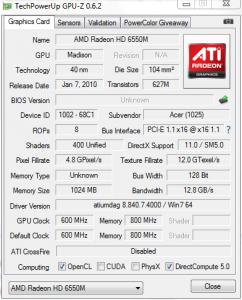
there any oc tool? i want increase bandwidth, I play BF3 quite slow = =
and GPU-Z view seen something go problem
Anime4000
post May 8 2012, 01:22 PM

Look at all my stars!!
*******
Senior Member
2,399 posts

Joined: Jul 2009
From: /dev/null


QUOTE(TheLaptopDudeGuy @ May 6 2012, 11:29 AM)
Thanks for your reply, all i did was just straight install the catalyst 12.4 drivers. So far so good, bf3 seems much smoother too, can play low around 30-40 fps no problem  smile.gif
*
what setting you use? it is AUTO?
Anime4000
post May 9 2012, 07:26 PM

Look at all my stars!!
*******
Senior Member
2,399 posts

Joined: Jul 2009
From: /dev/null


QUOTE(ngkhanmein @ May 9 2012, 02:17 PM)
he set low.. if auto fps is less than 30..
*
well, seem same as me, need setting low can play smooth a bit = =
maybe 12GB/s bandwidth? can overclock?
Anime4000
post Jun 20 2012, 08:34 AM

Look at all my stars!!
*******
Senior Member
2,399 posts

Joined: Jul 2009
From: /dev/null


only me or anyone notice that, when running in battery mode (Intel GPU) screen contrast changing,
Anime4000
post Jul 14 2012, 09:46 PM

Look at all my stars!!
*******
Senior Member
2,399 posts

Joined: Jul 2009
From: /dev/null


by the way ngkhanmein, you know how to make permenent setting for Intel Graphics, everytime change GPU, it's keep change to default, which enable display power saving that changing Display Contrast


Added on August 15, 2012, 6:49 pmAnother Question, why AMD APP/AMD Video Converter not available on Switchable mode?
Most 3rd party converter report that Intel GPU rather then AMD GPU.

This post has been edited by Anime4000: Aug 15 2012, 06:49 PM
Anime4000
post Feb 16 2013, 04:55 PM

Look at all my stars!!
*******
Senior Member
2,399 posts

Joined: Jul 2009
From: /dev/null


I just reformat to Ubuntu then change back to Windows, using Acer provided GPU driver,

I just realize that I play game (default setting) consistent 60fps!
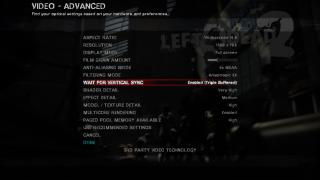
Attached Image

I think update driver via AMD official might having issue since AMD not provide Switchable GPU, feel stick with default driver
(seem Ubuntu patch hardware?)

2 Pages  1 2 >Top
 

Change to:
| Lo-Fi Version
0.0759sec    0.46    7 queries    GZIP Disabled
Time is now: 13th December 2025 - 08:11 PM