

let say, I still want to proceed rooting mine, and do all the steps using older techniques, mean that I downgraded my firmware la kan?
Rooting your Samsung Galaxy SII (I9100G), also updating/repairing a bricked one
Rooting your Samsung Galaxy SII (I9100G), also updating/repairing a bricked one
|
|
 Nov 11 2011, 10:31 PM Nov 11 2011, 10:31 PM
|
 
Junior Member
14 posts Joined: Nov 2011 
|
let say, I still want to proceed rooting mine, and do all the steps using older techniques, mean that I downgraded my firmware la kan?
|
|
|
|
|
|
Nov 11 2011, 11:32 PM
|

Senior Member
1,766 posts Joined: Jan 2003 From: Astana 
|
The older technique can be used for both firmwares. Just that the new DZKJ2 doesnt have a rooted kernel.
Anybody with DZKJ2 can confirm this? I'm still with older DZKI1.  Added on November 12, 2011, 12:41 amStill waiting for reviews on the First Custom ROM. This post has been edited by EightPhantomz: Nov 12 2011, 12:41 AM |
|
|
Nov 12 2011, 02:16 AM
|
|
Junior Member
63 posts Joined: Sep 2011
|
YAY! found out the problem with the script
 I was typing the command line by line, therefore there was time for the device to reboot and reconnect to the adb interface. What you need to do is to basically add a pause command, "@pause" right after the deleted line. Please refer the first posting for reclarification. This will allow you to give around 20 second time frame for device reconnection. The first method should now work... If not, please share your output This post has been edited by I9100G: Nov 12 2011, 02:52 AM |
|
|
Nov 12 2011, 03:25 AM
|
|
Newbie
1 posts Joined: Nov 2011
|
I tried v1 and v2 of the DooMLord method but I get the "The system cannot find the path specified" after each command executed in the batch file (runme.bat).
What am I doing wrong? Update: I found I was moving the runme.bat in the files folder. It should stay out side the files folder. Trying it now on my Galaxy S II I9100G. Update 2: worked well for my phone. At the restart prompt (the pause added), I unplugged and replugged my phone and after drivers installed I "hit any key to continue" and all worked well. Many thanks to all. This post has been edited by ammarmalhas: Nov 12 2011, 04:01 AM |
|
|
Nov 12 2011, 09:52 AM
|

Junior Member
474 posts Joined: Aug 2007 From: Kota Kinabalu, Sabah
|
QUOTE(fuzore @ Nov 11 2011, 08:29 PM) well anyone tested the new and only custom rom for G plz raise ur hand plz I tested. Nothing too special. Just something fixed like browser lag. And batt sightly can last longer. Still waiting for the custom rom and kernel that compatible with tegrak overclock thats why we can over clock it. Conclusion. Nothing too special for this new custom rom. Maybe its the 1st custom rom so it doesnt changed too much yet |
|
|
Nov 12 2011, 12:03 PM
|

Junior Member
100 posts Joined: Nov 2011
|
why mine cannot? =(
--------------------------------------------------------------- Easy rooting toolkit (v2.0) created by DooMLoRD using exploit zergRush (Revolutionary Team) Credits go to all those involved in making this possible! --------------------------------------------------------------- [*] This script will: (1) root ur device using latest zergRush exploit (10 Nov) (2) install Busybox (1.18.4) (3) install SU files (binary: 3.0.3 and apk: 3.0.6) [*] Before u begin: (1) make sure u have installed adb drivers for ur device (2) enable "USB DEBUGGING" from (Menu\Settings\Applications\Development) (3) enable "UNKNOWN SOURCES" from (Menu\Settings\Applications) (4) [OPTIONAL] increase screen timeout to 10 minutes (5) connect USB cable to PHONE and then connect to PC (6) skip "PC Companion Software" prompt on device --------------------------------------------------------------- CONFIRM ALL THE ABOVE THEN Press any key to continue . . . --- STARTING ---- --- WAITING FOR DEVICE --- cleaning --- pushing zergRush" 726 KB/s (23056 bytes in 0.031s) --- correcting permissions --- executing zergRush [**] Zerg rush - Android 2.2/2.3 local root [**] © 2011 Revolutionary. All rights reserved. [**] Parts of code from Gingerbreak, © 2010-2011 The Android Exploid Crew. [+] Found a GingerBread ! 0x0002e118 [+] Found a Samsung, running Samsung mode [*] Scooting ... [*] Sleeping a bit (~40s)... [*] Waking ! [*] Sending 149 zerglings ... [*] Sleeping a bit (~40s)... [*] Waking ! [*] Sending 189 zerglings ... [+] Zerglings found a way to enter ! 0x18 [+] Overseer found a path ! 0x000305e0 [*] Sleeping a bit (~40s)... [*] Waking ! [*] Sending 189 zerglings ... [+] Overseer found a path ! 0x000305e0 [*] Sleeping a bit (~40s)... [*] Waking ! [*] Sending 189 zerglings ... [-] Zerglings did not leave interesting stuff --- WAITING FOR DEVICE TO RECONNECT if it gets stuck over here for a long time then try: disconnect usb cable and reconnect it toggle "USB DEBUGGING" (first disable it then enable it) --- DEVICE FOUND Press any key to continue . . . --- pushing busybox 1157 KB/s (1075144 bytes in 0.907s) --- correcting permissions --- remounting /system mount: permission denied (are you root?) --- copying busybox to /system/xbin/ /system/xbin/busybox: cannot open for write: Read-only file system --- correcting ownership Unable to chmod /system/xbin/busybox: No such file or directory --- correcting permissions Unable to chmod /system/xbin/busybox: No such file or directory --- installing busybox /system/xbin/busybox: not found --- pushing SU binary failed to copy 'files\su' to '/system/bin/su': Read-only file system --- correcting ownership Unable to chmod /system/bin/su: No such file or directory --- correcting permissions Unable to chmod /system/bin/su: No such file or directory --- correcting symlinks rm failed for /system/xbin/su, Read-only file system link failed Read-only file system --- pushing Superuser app failed to copy 'files\Superuser.apk' to '/system/app/./Superuser.apk': Read-only file system --- cleaning --- rebooting ALL DONE!!! Press any key to continue . . . |
|
|
|
|
|
Nov 12 2011, 12:54 PM
|

Senior Member
2,142 posts Joined: Jan 2008 From: who wants to know? 
|
@I9100G u are really the man of the year....
 adding @pause made it happened i got it working now pass installing superuser... 
|
|
|
Nov 12 2011, 01:01 PM
|

Senior Member
1,218 posts Joined: Jan 2010 From: Today 06.09 am
|
QUOTE(fuzore @ Nov 12 2011, 12:54 PM) @I9100G u are really the man of the year.... Confirmed working too. adding @pause made it happened i got it working now pass installing superuser...
 |
|
|
Nov 12 2011, 01:21 PM
|
|
Junior Member
63 posts Joined: Sep 2011
|
QUOTE(fauzi_91 @ Nov 12 2011, 12:03 PM) ... [-] Zerglings did not leave interesting stuff ... 1. Have you enabled the USB debugging and Uknown sources? 2. Can you confirm your firmware version? QUOTE(fuzore @ Nov 12 2011, 12:54 PM) @I9100G u are really the man of the year.... adding @pause made it happened i got it working now pass installing superuser...
QUOTE(Keatsan @ Nov 12 2011, 01:01 PM) Confirmed working too. Nice!!! Can you guys confirm your firmwares? Thanks |
|
|
Nov 12 2011, 01:25 PM
|
|
Senior Member
1,218 posts Joined: Jan 2010 From: Today 06.09 am
|
QUOTE(I9100G @ Nov 12 2011, 01:21 PM) It seems the tools was having problems with your phone. Mine 2.3.6 i9100G1. Have you enabled the USB debugging and Uknown sources? 2. Can you confirm your firmware version? Nice!!! Can you guys confirm your firmwares? Thanks |
|
|
Nov 12 2011, 01:59 PM
|
|
Senior Member
2,142 posts Joined: Jan 2008 From: who wants to know?
|
QUOTE(I9100G @ Nov 12 2011, 01:21 PM) It seems the tools was having problems with your phone. Mine also 2.3.6 i9100GDZKJ21. Have you enabled the USB debugging and Uknown sources? 2. Can you confirm your firmware version? Nice!!! Can you guys confirm your firmwares? Thanks 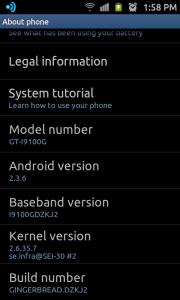
|
|
|
Nov 12 2011, 02:09 PM
|
|
Junior Member
14 posts Joined: Nov 2011
|
QUOTE(fauzi_91 @ Nov 12 2011, 12:03 PM) why mine cannot? =( I'd also happened to face the same problem as u,... but then, I kill the adb process in my task manager, and then deleted the runme.bat and files folder, extract fresh new file from zip file, deleted and added the necessary file in the runme.bat file, and tried again... but i don't know whether it'll work for u.....cause it worked for me... wallah i'm succeed.... u rock I9100G thank you ~ : This post has been edited by liyan: Nov 12 2011, 02:14 PM |
|
|
Nov 12 2011, 02:21 PM
|
|
Junior Member
100 posts Joined: Nov 2011
|
QUOTE(I9100G @ Nov 12 2011, 01:21 PM) It seems the tools was having problems with your phone. yes..i enable both of them..i use 2.3.6 DZKJ2..sumone help me please.. 1. Have you enabled the USB debugging and Uknown sources? 2. Can you confirm your firmware version?  This post has been edited by fauzi_91: Nov 12 2011, 02:22 PM Attached thumbnail(s) 
|
|
|
|
|
|
Nov 12 2011, 02:23 PM
|
|
Junior Member
63 posts Joined: Sep 2011
|
QUOTE(fauzi_91 @ Nov 12 2011, 02:21 PM) yes..i enable both of them..i use 2.3.6 DZKJ2..sumone help me please.. Try doing what liyan did. Also try using different version of the tool |
|
|
Nov 12 2011, 02:26 PM
|
|
Junior Member
100 posts Joined: Nov 2011
|
QUOTE(liyan @ Nov 12 2011, 02:09 PM) I'd also happened to face the same problem as u,... how to kill the adb process in task manager?is it in the laptop or phone?sorry asking noob Q..i really dunno..but then, I kill the adb process in my task manager, and then deleted the runme.bat and files folder, extract fresh new file from zip file, deleted and added the necessary file in the runme.bat file, and tried again... but i don't know whether it'll work for u.....cause it worked for me... wallah i'm succeed.... u rock I9100G thank you ~ : |
|
|
Nov 12 2011, 02:29 PM
|

Junior Member
150 posts Joined: Oct 2011
|
QUOTE(liyan @ Nov 12 2011, 02:09 PM) I'd also happened to face the same problem as u,... Would you mind to share your edited file?? but then, I kill the adb process in my task manager, and then deleted the runme.bat and files folder, extract fresh new file from zip file, deleted and added the necessary file in the runme.bat file, and tried again... but i don't know whether it'll work for u.....cause it worked for me... wallah i'm succeed.... u rock I9100G thank you ~ :  This post has been edited by hermanchb: Nov 12 2011, 02:35 PM |
|
|
Nov 12 2011, 02:36 PM
|
|
Junior Member
14 posts Joined: Nov 2011
|
QUOTE(fauzi_91 @ Nov 12 2011, 02:26 PM) how to kill the adb process in task manager?is it in the laptop or phone?sorry asking noob Q..i really dunno.. i killed the one in my laptop....@hermanchb well, for the edited file.... I just follow exactly what I9100G told us to.. » Click to show Spoiler - click again to hide... « This post has been edited by liyan: Nov 12 2011, 02:47 PM |
|
|
Nov 12 2011, 03:03 PM
|
|
Junior Member
100 posts Joined: Nov 2011
|
QUOTE(hermanchb @ Nov 12 2011, 02:29 PM) Would you mind to share your edited file?? did u managed to do it or not??  |
|
|
Nov 12 2011, 03:15 PM
|

Junior Member
96 posts Joined: Jun 2009
|
Just roooted successfully my i9100G ver.2.3.6~ Thanks for the step by step guide ya! TS! x)
|
|
|
Nov 12 2011, 03:17 PM
|
|
Junior Member
150 posts Joined: Oct 2011
|
QUOTE(fauzi_91 @ Nov 12 2011, 03:03 PM) did u managed to do it or not?? haven't tried 。。。  Added on November 12, 2011, 3:17 pm QUOTE(liyan @ Nov 12 2011, 02:36 PM) i killed the one in my laptop.... must be 2.3.6?? @hermanchb well, for the edited file.... I just follow exactly what I9100G told us to.. » Click to show Spoiler - click again to hide... « This post has been edited by hermanchb: Nov 12 2011, 03:17 PM |
| Change to: |  0.0303sec 0.0303sec
 0.49 0.49
 6 queries 6 queries
 GZIP Disabled GZIP Disabled
Time is now: 12th December 2025 - 04:35 AM |
 Quote
Quote