

QUOTE(maxcheam @ Nov 8 2012, 01:25 PM)
i don't feel that on my unit. what should I expect to experience? 

I actually don't feel it too but the USB cannot drive my modem properly, easily D/C compared to MR3420 or PCP/S mine is 1043ND V1.8
Tp Link TL-MR3420 3G/3.75G router owner club V1
|
|
 Nov 8 2012, 02:57 PM Nov 8 2012, 02:57 PM
|
 
Elite
8,415 posts Joined: Jul 2008  
|
QUOTE(maxcheam @ Nov 8 2012, 01:25 PM) i don't feel that on my unit. what should I expect to experience? I actually don't feel it too but the USB cannot drive my modem properly, easily D/C compared to MR3420 or PCP/S mine is 1043ND V1.8 |
|
|
|
|
|
Nov 8 2012, 03:07 PM
|

Elite
6,931 posts Joined: Apr 2011 From: Bolehland for sure ^_^ 
|
QUOTE(blacktubi @ Nov 8 2012, 02:57 PM) I actually don't feel it too but the USB cannot drive my modem properly, easily D/C compared to MR3420 or PC can always consider 4300 for sure P/S mine is 1043ND V1.8  |
|
|
Nov 8 2012, 03:20 PM
|
 
Junior Member
384 posts Joined: Jan 2006 From: Penang 
|
QUOTE(blacktubi @ Nov 8 2012, 02:57 PM) I actually don't feel it too but the USB cannot drive my modem properly, easily D/C compared to MR3420 or PC I'll check what version is mine tonight. Have you tested it with the USB Y-cable to supply more power to the modem like Chuah was using last time? If it's the same, it might not be power issue already. P/S mine is 1043ND V1.8  Sell it cheap cheap to me if you intend to let go.  This post has been edited by maxcheam: Nov 8 2012, 03:23 PM |
|
|
Nov 8 2012, 04:04 PM
|
|
Elite
6,931 posts Joined: Apr 2011 From: Bolehland for sure ^_^
|
QUOTE(maxcheam @ Nov 8 2012, 03:20 PM) I'll check what version is mine tonight. Have you tested it with the USB Y-cable to supply more power to the modem like Chuah was using last time? If it's the same, it might not be power issue already. Sell it cheap cheap to me if you intend to let go.  cheap cheap cheap cheapget 4300 and see should be a lot better than 1043ND |
|
|
Nov 8 2012, 04:08 PM
|
|
Junior Member
384 posts Joined: Jan 2006 From: Penang
|
QUOTE(chuahcs79 @ Nov 8 2012, 04:04 PM) cheap cheapget 4300 and see should be a lot better than 1043ND  |
|
|
Nov 8 2012, 04:10 PM
|
|
Elite
6,931 posts Joined: Apr 2011 From: Bolehland for sure ^_^
|
QUOTE(maxcheam @ Nov 8 2012, 04:08 PM) it's more than 200 leh.. i'm quite content with another 1043ND, just need it for local wireless network. Not planning to use 3G modem with it. oh, though the 4300 is dual wifi band with 3 external antenna  |
|
|
|
|
|
Nov 8 2012, 04:12 PM
|
|
Junior Member
384 posts Joined: Jan 2006 From: Penang
|
QUOTE(chuahcs79 @ Nov 8 2012, 04:10 PM) oh, though the 4300 is dual wifi band with 3 external antenna yup, but i don't have any 5GHz devices to enjoy 4300. |
|
|
Nov 8 2012, 04:13 PM
|
|
Elite
6,931 posts Joined: Apr 2011 From: Bolehland for sure ^_^
|
QUOTE(maxcheam @ Nov 8 2012, 04:12 PM) yup, but i don't have any 5GHz devices to enjoy 4300. i believe soon u will have, it is just matter of time |
|
|
Nov 8 2012, 05:45 PM
|
|
Junior Member
384 posts Joined: Jan 2006 From: Penang
|
QUOTE(maxcheam @ Nov 8 2012, 03:20 PM) I'll check what version is mine tonight. Have you tested it with the USB Y-cable to supply more power to the modem like Chuah was using last time? If it's the same, it might not be power issue already. just checked that I'm using v1.8 as well.Sell it cheap cheap to me if you intend to let go. |
|
|
Nov 8 2012, 06:23 PM
|

Junior Member
223 posts Joined: Nov 2008
|
I am having problem setting DNS to my MR3420 only able to set primary but unable to set secondary. Is it normal to have 3 DNS?
 This post has been edited by mushashi87: Nov 8 2012, 06:27 PM |
|
|
Nov 8 2012, 06:45 PM
|
|
Elite
6,931 posts Joined: Apr 2011 From: Bolehland for sure ^_^
|
QUOTE(mushashi87 @ Nov 8 2012, 06:23 PM) I am having problem setting DNS to my MR3420 only able to set primary but unable to set secondary. Is it normal to have 3 DNS? u need to click the circle part then u can enter second set DNS[attachmentid=3145526] |
|
|
Nov 8 2012, 06:55 PM
|
|
Junior Member
223 posts Joined: Nov 2008
|
QUOTE(chuahcs79 @ Nov 8 2012, 06:45 PM) u need to click the circle part then u can enter second set DNS Tried many times but nothing pop out. [attachmentid=3145526] 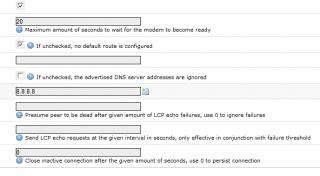
|
|
|
Nov 8 2012, 07:11 PM
|
|
Elite
6,931 posts Joined: Apr 2011 From: Bolehland for sure ^_^
|
QUOTE(chuahcs79 @ Nov 8 2012, 06:45 PM) u need to click the circle part then u can enter second set DNS if u did correctly,[attachmentid=3145526] it should look like this : [attachmentid=3145556] |
|
|
|
|
|
Nov 8 2012, 07:20 PM
|
|
Junior Member
223 posts Joined: Nov 2008
|
QUOTE(chuahcs79 @ Nov 8 2012, 07:11 PM) if u did correctly, That why i am weird how come i have 3 DNS. Any solution? tried few times still same.it should look like this : [attachmentid=3145556] |
|
|
Nov 8 2012, 07:22 PM
|
|
Elite
6,931 posts Joined: Apr 2011 From: Bolehland for sure ^_^
|
QUOTE(mushashi87 @ Nov 8 2012, 07:20 PM) That why i am weird how come i have 3 DNS. Any solution? tried few times still same. u can go to -> system -> backup/Flash Firmware -> performs reset -> redo all the setup in openwrt |
|
|
Nov 8 2012, 07:24 PM
|
|
Senior Member
1,019 posts Joined: Nov 2006
|
QUOTE(chuahcs79 @ Nov 8 2012, 07:11 PM) if u did correctly, just share with you something weird.it should look like this : [attachmentid=3145556] as you know i just bought a powerful fan and manage to keep both the modem and router at room temperature. somehow, i found that when the speed are lower (1-3mbps)when i on the fan, and higher (5-10mbps) when i turn the fan off. not sure whether is coincidence or what....... is that possible ? |
|
|
Nov 8 2012, 07:40 PM
|
|
Elite
6,931 posts Joined: Apr 2011 From: Bolehland for sure ^_^
|
QUOTE(chulk @ Nov 8 2012, 07:24 PM) just share with you something weird. nope, that's quite impossible,as you know i just bought a powerful fan and manage to keep both the modem and router at room temperature. somehow, i found that when the speed are lower (1-3mbps)when i on the fan, and higher (5-10mbps) when i turn the fan off. not sure whether is coincidence or what....... is that possible ? just make sure the router + modem is not been moved or vibrate shifted a bit,. u need to find perfect spot  |
|
|
Nov 8 2012, 07:43 PM
|

Junior Member
316 posts Joined: Oct 2009
|
since v2 had released , should I get it rather than v1 ? any known issue on v2 ?
|
|
|
Nov 8 2012, 07:46 PM
|
|
Elite
6,931 posts Joined: Apr 2011 From: Bolehland for sure ^_^
|
QUOTE(n0v1ce @ Nov 8 2012, 07:43 PM) since v2 had released , should I get it rather than v1 ? any known issue on v2 ? well it is up to personal choices,some user feed back V2 is barely even warm, so temperature wise confirm is winner |
|
|
Nov 8 2012, 07:46 PM
|
|
Senior Member
1,019 posts Joined: Nov 2006
|
QUOTE(chuahcs79 @ Nov 8 2012, 07:40 PM) nope, that's quite impossible, what you mean by "vibtate shift"?just make sure the router + modem is not been moved or vibrate shifted a bit,. u need to find perfect spot and i found that direct connect to router 100% better than use usb cable.....in term of stability Added on November 8, 2012, 7:47 pm QUOTE(chuahcs79 @ Nov 8 2012, 07:46 PM) well it is up to personal choices, V2 usb port designed on the side, is easier for usb allocation compare to insert from the back.some user feed back V2 is barely even warm, so temperature wise confirm is winner This post has been edited by chulk: Nov 8 2012, 07:47 PM |
|
Topic ClosedOptions
|
| Change to: |  0.0285sec 0.0285sec
 0.50 0.50
 6 queries 6 queries
 GZIP Disabled GZIP Disabled
Time is now: 14th December 2025 - 04:30 AM |
 Quote
Quote