

 Nov 28 2011, 09:21 PM


QUOTE(pal33x @ Nov 28 2011, 09:17 PM)
alrite thnx for the answer.
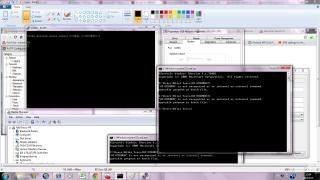
but from ur guide it seem just open cmd and then type AT+ZCDRUN=8 but it tell me that AT+ZCDRUN=8 is not recognized as internal or external command operable program or batch file which mean it cannot open the software
so any1 can teach me step by step to disable it? cuz i scared it will void my umobile modem warranty and how to revert it back

which window u use ? xp or 7 ?but from ur guide it seem just open cmd and then type AT+ZCDRUN=8 but it tell me that AT+ZCDRUN=8 is not recognized as internal or external command operable program or batch file which mean it cannot open the software
so any1 can teach me step by step to disable it? cuz i scared it will void my umobile modem warranty and how to revert it back
Added on November 28, 2011, 9:26 pmfor window 7
->plug your modem into your pc and wait for pc to recognise it ( close the dialer if it pop up )
-> click start
-> enter CMD in search column
-> type in AT+ZCDRUN=8 (Disable cd /flashdrive autorun )
-> press enter -> done ( u will see a message showing u that autorun is disable )
-> unplug the modem from pc
-> plug it in your tp link 3G router
-> router will auto recognize it now
This post has been edited by chuahcs79: Nov 28 2011, 09:26 PM
 Quote
Quote



 )
)




 0.0199sec
 0.89
0.89
 6 queries
 GZIP Disabled