Welcome Guest ( Log In | Register )

Bump Topic Topic Closed RSS Feed
131 Pages « < 4 5 6 7 8 > » Bottom

Outline · [ Standard ] · Linear+

 Tp Link TL-MR3420 3G/3.75G router owner club V1

views
     
TSchuahcs79
post Nov 19 2011, 05:53 AM

Look at all my stars!!
Group Icon
Elite
6,931 posts

Joined: Apr 2011
From: Bolehland for sure ^_^


QUOTE(layr @ Nov 19 2011, 01:20 AM)
I couldn't test the Australian ISP 636 bin file. It's too big for uploading (at least that's the error i got)

Nope, haven't flashed the modem; only thing i have done is disabling the autorun with AT command, and that was done after i got the router.
*
have you flash your router to latest firmware yet? Or you can try to restore factory setting . It might work out for your zte mf636.
layr
post Nov 19 2011, 01:21 PM

New Member
*
Junior Member
9 posts

Joined: Nov 2011


QUOTE(chuahcs79 @ Nov 19 2011, 12:53 AM)
have you flash your router to latest firmware yet? Or you can try to restore factory setting . It might work out for your zte mf636.
*
Tried different firmwares, restoring etcetc (you have to restore after upgrading firmware anyway).

But never mind, i'll buy an old MF100 and everything should be ok:)
TSchuahcs79
post Nov 19 2011, 03:34 PM

Look at all my stars!!
Group Icon
Elite
6,931 posts

Joined: Apr 2011
From: Bolehland for sure ^_^


QUOTE(layr @ Nov 19 2011, 01:21 PM)
Tried different firmwares, restoring etcetc (you have to restore after upgrading firmware anyway).

But never mind, i'll buy an old MF100 and everything should be ok:)
*
why not u get yourself a Huawei E1762 instead of ZTE MF100 ? most of us here using E1762 and it support by this router and speed can gain higher than ZTE MF100 too hmm.gif hmm.gif
hwazai
post Nov 21 2011, 10:21 AM

New Member
*
Junior Member
41 posts

Joined: Nov 2007
Hi, Chuah sifu smile.gif

Is all SE phone compatibale with this router? i have SE K530i and K770i, but i facing the problem to connect to the router. The router need configuration file to detect the SE phone. Your help is highly appreciated.

Thanks
TSchuahcs79
post Nov 22 2011, 08:04 PM

Look at all my stars!!
Group Icon
Elite
6,931 posts

Joined: Apr 2011
From: Bolehland for sure ^_^


QUOTE(hwazai @ Nov 21 2011, 10:21 AM)
Hi, Chuah sifuĀ  smile.gif

Is all SE phone compatibale with this router? i have SE K530i and K770i, but i facing the problem to connect to the router. The router need configuration file to detect the SE phone. Your help is highly appreciated.

Thanks
*
not all model, i believe those SE phone under SE own OS can work,. use the usb cable and plug it in,. go to setting->usb -> usb network -> usb network type -> phone as modem,.. then plug it into router,.. it will auto recognize after,..

u also need to make sure your router firmware is up to date,.. and your phone firmware too,.

This post has been edited by chuahcs79: Nov 22 2011, 08:05 PM
vostro78
post Nov 23 2011, 11:24 AM

Look at all my stars!!
*******
Senior Member
6,804 posts

Joined: Sep 2010


SE Elm works for me...the rest i not sure.
TSchuahcs79
post Nov 23 2011, 05:17 PM

Look at all my stars!!
Group Icon
Elite
6,931 posts

Joined: Apr 2011
From: Bolehland for sure ^_^


QUOTE(vostro78 @ Nov 23 2011, 11:24 AM)
SE Elm works for me...the rest i not sure.
*
good to know,.. rclxms.gif
lwk523
post Nov 24 2011, 12:33 PM

Premium Q Trader
******
Senior Member
1,040 posts

Joined: Mar 2006


Hi,
Does yall can visit this www.moneybookers.com with this router ? I cant access the website with this modem and especially SSL page. Need help sad.gif Any idea ? I had tired 4 pc which is connect with this router so i dont think the problem is come from the pc/browser.

Thanks
TSchuahcs79
post Nov 24 2011, 12:53 PM

Look at all my stars!!
Group Icon
Elite
6,931 posts

Joined: Apr 2011
From: Bolehland for sure ^_^


QUOTE(lwk523 @ Nov 24 2011, 12:33 PM)
Hi,
Does yall can visit this www.moneybookers.com with this router ? I cant access the website with this modem and especially SSL page. Need help sad.gif Any idea ? I had tired 4 pc which is connect with this router so i dont think the problem is come from the pc/browser.

Thanks
*
yes no problems in access that pages

[attachmentid=2551196]

am using this router with Huawei E1762 modem + open DNS ( 208.67.222.222 , 208.67.220.220 )

by the way, what modem u use ?

This post has been edited by chuahcs79: Nov 24 2011, 12:54 PM
layr
post Nov 25 2011, 04:54 AM

New Member
*
Junior Member
9 posts

Joined: Nov 2011


QUOTE(chuahcs79 @ Nov 19 2011, 10:34 AM)
why not u get yourself a Huawei E1762 instead of ZTE MF100 ? most of us here using E1762 and it support by this router and speed can gain higher than ZTE MF100 tooĀ  hmm.gifĀ  hmm.gif
*
Had to get it fast and it was available (and cheap lol). Also the speeds rarely get beyond MF100 limits here.

New question - I can't access my ssh server from outside; neither can I ping my IP, even if the server is DMZ-d.
(and I did forward the port i'm using for SSH to the server)

It should also be mentioned, that ports are opened from the ISP side.

This post has been edited by layr: Nov 25 2011, 11:09 PM
pal33x
post Nov 28 2011, 02:42 PM

Casual
***
Junior Member
379 posts

Joined: Jan 2006
From: BbBangi,Miat-Easa


hye... i try the command AT+ZCDRUN=8 in cmd but it tell me that AT+ZCDRUN=8 is not recognized as internal or external command,
operable program or batch file

so actually what is step by step way to disable the autorun?

i try the method here https://wiki.archlinux.org/index.php/ZTE_MF626_/_MF636

but cant find hyperterminal software
TSchuahcs79
post Nov 28 2011, 03:12 PM

Look at all my stars!!
Group Icon
Elite
6,931 posts

Joined: Apr 2011
From: Bolehland for sure ^_^


QUOTE(pal33x @ Nov 28 2011, 02:42 PM)
hye... i try the command AT+ZCDRUN=8 in cmd but it tell me that AT+ZCDRUN=8 is not recognized as internal or external command,
operable program or batch file

so actually what is step by step way to disable the autorun?

i try the method here https://wiki.archlinux.org/index.php/ZTE_MF626_/_MF636

but cant find hyperterminal software
*
go to comand prompt and type in the comand and press enter when u done,..
kizwan
post Nov 28 2011, 03:33 PM

BƖw DƖwn TƖ LƖrd PringlƋs
*****
Senior Member
826 posts

Joined: Jan 2009


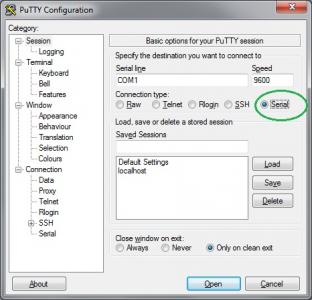
I found PDF file explaining how to properly disabled autorun on ZTE modem. Instead Hyperterminal, you can use Putty too.

Attached File  USB_Modem_Config_Procedure.pdf ( 27.2k ) Number of downloads: 128


Attached Image

To know the correct COM# port, I believe you can check it in Device Manager, under "Ports (COM & LPT)". After you have put the correct settings in Putty, click Open to make the connection. In case you only see black terminal, press "Enter" one time.
Attached Image

This post has been edited by kizwan: Nov 28 2011, 03:37 PM
TSchuahcs79
post Nov 28 2011, 03:36 PM

Look at all my stars!!
Group Icon
Elite
6,931 posts

Joined: Apr 2011
From: Bolehland for sure ^_^


QUOTE(kizwan @ Nov 28 2011, 03:33 PM)
I found PDF file explaining how to properly disabled autorun on ZTE modem. Instead Hyperterminal, you can use Putty too.

Attached File  USB_Modem_Config_Procedure.pdf ( 27.2k ) Number of downloads: 128


Attached Image

To know the correct COM# port, I believe you can check it in Device Manager, under "Ports (COM & LPT)". Then click Open to make the connection. In case you only see black terminal, press "Enter" one time.
Attached Image
*
that's a good solution, i will pitch this at first post,.. thanks for sharing,.. rclxms.gif rclxms.gif
maxcheam
post Nov 28 2011, 08:02 PM

Casual
***
Junior Member
384 posts

Joined: Jan 2006
From: Penang


QUOTE(layr @ Nov 25 2011, 04:54 AM)
Had to get it fast and it was available (and cheap lol). Also the speeds rarely get beyond MF100 limits here.

New question - I can't access my ssh server from outside; neither can I ping my IP, even if the server is DMZ-d.
(and I did forward the port i'm using for SSH to the server)

It should also be mentioned, that ports are opened from the ISP side.
*
As far as I know, we can't host anything using Maxis Mobile Internet or Maxis Broadband. Not sure about corporate plans though.
TSchuahcs79
post Nov 28 2011, 08:04 PM

Look at all my stars!!
Group Icon
Elite
6,931 posts

Joined: Apr 2011
From: Bolehland for sure ^_^


QUOTE(maxcheam @ Nov 28 2011, 08:02 PM)
As far as I know, we can't host anything using Maxis Mobile Internet or Maxis Broadband. Not sure about corporate plans though.
*
QUOTE(layr @ Nov 11 2011, 10:37 PM)
Hey, as TP-LINK support was as useless as it can get, i believe you guys are more competent.
Problem: 3G connection gets randomly disconnected in every 20min - 1hour.
Router has only 3G connection; newest firmware.
Location: Estonia (north-eastern Europe); carrier EMT.
Modem ZTE MF636
Settings: link 1 and link 2
>Log containing the '3g link is down' part.
As time goes by, suddenly the connection drops, for a minute or so router's admin page says nothing about disconnection, then "3G USB Modem:" field goes "Identifying..." and status is "connecting..."
Also the dialing takes forever. The steady light on modem, indicating active 3.5g connection, comes alive long before the router gets connected. Modem identification isn't too quick either.

Signal strength is between 35-50%, never had similar problems with modem connected directly to computer.
Any suggestions?

Edit: following instructions found on this topic, I also disabled autorun on the modem.
*
Max, he is from Estonia,..
maxcheam
post Nov 28 2011, 08:04 PM

Casual
***
Junior Member
384 posts

Joined: Jan 2006
From: Penang


QUOTE(vostro78 @ Nov 23 2011, 11:24 AM)
SE Elm works for me...the rest i not sure.
*
I've tested SE Cedar and it's working as well. Just need to change the USB default mode to "Other OS - Mac or Linux" instead of "PC Mode for Windows". The router that we're using runs on Linux. wink.gif


Added on November 28, 2011, 8:06 pm
QUOTE(chuahcs79 @ Nov 28 2011, 08:04 PM)
Max, he is from Estonia,..
*
haha.. pardon me for not checking properly. Can't help there. Just need to make sure your mobile broadband provider allows you to host servers using their service. tongue.gif

This post has been edited by maxcheam: Nov 28 2011, 08:06 PM
TSchuahcs79
post Nov 28 2011, 08:06 PM

Look at all my stars!!
Group Icon
Elite
6,931 posts

Joined: Apr 2011
From: Bolehland for sure ^_^


QUOTE(maxcheam @ Nov 28 2011, 08:04 PM)
I've tested SE Cedar and it's working as well. Just need to change the USB default mode to "Other OS - Mac or Linux" instead of "PC Mode for Windows". The router that we're using runs on Linux. wink.gif


Added on November 28, 2011, 8:06 pm

haha.. pardon me for not checking properly. Can't help there. Just need to make sure your mobile broadband provider allows you to host servers using their service. tongue.gif
*
nice to know this router is so flexible to support SE,.. rclxms.gif


Added on November 28, 2011, 8:07 pm
QUOTE(maxcheam @ Nov 28 2011, 08:04 PM)


Added on November 28, 2011, 8:06 pm

haha.. pardon me for not checking properly. Can't help there. Just need to make sure your mobile broadband provider allows you to host servers using their service. tongue.gif
*
LOL laugh.gif laugh.gif

This post has been edited by chuahcs79: Nov 28 2011, 08:07 PM
maxcheam
post Nov 28 2011, 08:13 PM

Casual
***
Junior Member
384 posts

Joined: Jan 2006
From: Penang


QUOTE(chuahcs79 @ Nov 28 2011, 08:06 PM)
nice to know this router is so flexible to support SE,..  rclxms.gif
too bad using SE phone doesn't help me in my area. Speed is worse than my E1762.

I'm waiting for this new travel 3G router from TP-Link - TL-MR3020 to be available in Malaysia. Would love to use it whenever I travel. It can be powered by any kind of USB power sources. I don't like to use MiFi devices as they need to use with battery. Though Yes Huddle can be used without the battery, but it's still expensive to use Yes 4G all over the place. Currently using it for CCTV and VNC purposes only. icon_rolleyes.gif
pal33x
post Nov 28 2011, 09:17 PM

Casual
***
Junior Member
379 posts

Joined: Jan 2006
From: BbBangi,Miat-Easa


alrite thnx for the answer.

but from ur guide it seem just open cmd and then type AT+ZCDRUN=8 but it tell me that AT+ZCDRUN=8 is not recognized as internal or external command operable program or batch file which mean it cannot open the software

so any1 can teach me step by step to disable it? cuz i scared it will void my umobile modem warranty and how to revert it back

131 Pages « < 4 5 6 7 8 > » Top
Topic ClosedOptions
 

Change to:
| Lo-Fi Version
0.0291sec    0.26    6 queries    GZIP Disabled
Time is now: 7th December 2025 - 05:17 PM