

Before 11.11a
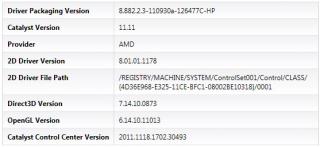
After 11.11a

HP Pavillion DV6-6XXX series Owners Lounge V4, -162 owners. Y U NO INTEL + AMD CFX!!
|
|
 Nov 25 2011, 04:25 PM Nov 25 2011, 04:25 PM
Return to original view | Post
#41
|
 
Junior Member
114 posts Joined: Apr 2006  
|
Updated my intel driver through device manager. Now on version 8.882.2.3000 then realized my ATI driver was older than before upgrade so I had to reinstall 11.11a again.
Before 11.11a
After 11.11a
|
|
|
|
|
|
Nov 25 2011, 04:40 PM
Return to original view | Post
#42
|
|
Junior Member
114 posts Joined: Apr 2006
|
QUOTE(ngkhanmein @ Nov 25 2011, 04:37 PM) spicediablo: uninstall it all included control panel the driver at there. ngkhanmein: Mine is already latest version. U mean uninstall AMD catalyst install manager from control panel? |
|
|
Nov 25 2011, 04:44 PM
Return to original view | Post
#43
|
|
Junior Member
114 posts Joined: Apr 2006
|
QUOTE(ngkhanmein @ Nov 25 2011, 04:42 PM) just keep the very 1st driver that u bought the lappy earlier. Sorry i cant brain...if i uninstall from device manager, means no more that driver. How to keep the 1st driver? |
|
|
Nov 25 2011, 04:52 PM
Return to original view | Post
#44
|
|
Junior Member
114 posts Joined: Apr 2006
|
QUOTE(ngkhanmein @ Nov 25 2011, 04:44 PM) got those previous driver still at there since unused just del it. arggg... I cant find it. Any snapshot? I selected update driver and browse file but then it will ask me to find the driver which I wanna install... Added on November 25, 2011, 4:47 pm right click on the update driver... > browser file > there got a lot previous driver. i found out del it will be come more stable. mine from very early till 11.9 got at least 15++  |
|
|
Nov 25 2011, 05:12 PM
Return to original view | Post
#45
|
|
Junior Member
114 posts Joined: Apr 2006
|
QUOTE(ngkhanmein @ Nov 25 2011, 05:07 PM) tmr i print screen for u. Thanks!! Sorry to trouble u bro but I noob....today only heard can selectively uninstall old drivers...  |
|
|
Nov 25 2011, 09:06 PM
Return to original view | Post
#46
|
|
Junior Member
114 posts Joined: Apr 2006
|
QUOTE(ngkhanmein @ Nov 25 2011, 05:45 PM) device manager > display adapters > ati xxx right click > update driver software... > browse my computer for driver s/w > let me pick > u will notice a lot previous driver.. There is no uninstall option....uninstall it at the display adapters there depend which old driver u wanna del it. |
|
|
|
|
|
Nov 26 2011, 11:50 AM
Return to original view | Post
#47
|
|
Junior Member
114 posts Joined: Apr 2006
|
QUOTE(ngkhanmein @ Nov 26 2011, 09:10 AM) 11.11b is out but i felt no different for crossfirex user only. stacked with 8.93 r more better if u playing those 1st & 3rd shooting game. if i click uninstall, it will uninstall the driver without letting me choose which to uninstall....spicediablo: c the pic uninstall the driver which u dun1. (u can use ccleaner or driver sweeper or delete %temp%) keep those u need driver. u dun worry if u uninstall all. cos win 7 will help u find the driver itself. now u can dl the newest driver u wan or wateva. |
|
|
Nov 26 2011, 12:10 PM
Return to original view | Post
#48
|
|
Junior Member
114 posts Joined: Apr 2006
|
QUOTE(ngkhanmein @ Nov 26 2011, 11:58 AM) ya but u can pick which 1 u like to del at >> device manager > display adapters > ati xxx right click > update driver software... > browse my computer for driver s/w > let me pick > u will notice a lot previous driver.. This is the page i'm at. I tried right clicking on the drivers but there was nothing. If I press next, it will proceed to install the old drivers.u can uninstall it 1 by 1. after uninstall u need restart & wait win7 detect driver for u. i did this more than 10 times. now mine become stable! 
|
|
|
Nov 26 2011, 03:04 PM
Return to original view | Post
#49
|
|
Junior Member
114 posts Joined: Apr 2006
|
QUOTE(spicediablo @ Nov 23 2011, 07:19 PM) Mine even worse. After i click BF3.exe. Nothing happens but can see the process in task manager. Then the process disappears after a while. Mine is ahem version.... Managed to get BF3 to work. Just deleted 'TM' from installed folder name and it works!!  |
|
|
Nov 26 2011, 06:50 PM
Return to original view | Post
#50
|
|
Junior Member
114 posts Joined: Apr 2006
|
QUOTE(Acid_RuleZz @ Nov 26 2011, 05:55 PM) Do this if you want to remove those old drivers from Windows... Great!! Thanks acid!!Is it possible to just clean the old drivers so that I don't have to reinstall the newest driver? Maybe you should pin this in the first page. I think it's useful.
Ps: If somehow u can't enter window after step 8, press F8 after post and select "Enable VGA Mode" » Click to show Spoiler - click again to hide... « Ps2: Ultimately, you can just use ""pnputil -d <insert the driver u want to remove>" in command prompt without -f syntax. It will remove the driver if its not in use/old. No need to reboot/safemode. What u mean its empty? Can u click "Refresh Now" button? Added on November 26, 2011, 5:57 pm Yes, you need to use fixed switching in BIOS and manually switch the GPU in Window. Only for 6100/6b00/6c00 series.  This post has been edited by spicediablo: Nov 26 2011, 06:51 PM |
|
|
Nov 26 2011, 07:54 PM
Return to original view | Post
#51
|
|
Junior Member
114 posts Joined: Apr 2006
|
QUOTE(Acid_RuleZz @ Nov 26 2011, 07:45 PM) Yes it is. Acid,my butter fingers deleted one of the wrong drivers (non-display adaptor driver) during safe mode. Win7 will connect to internet to reinstall the driver should I need it in the future right?I don't know either. I don't think there is any indicator to show which GPU is running. Yes you can, just do it without -f I will.  This post has been edited by spicediablo: Nov 26 2011, 08:02 PM |
|
|
Nov 26 2011, 10:17 PM
Return to original view | Post
#52
|
|
Junior Member
114 posts Joined: Apr 2006
|
QUOTE(Acid_RuleZz @ Nov 26 2011, 09:45 PM) What driver? Can't recall which driver but it's not display driver and i think it's with f command. But these drivers are either built into win7 or installed myself right? So if it's built in win7,then should be able to get through online if I need it next time(using search online option during installation of driver)? If u delete it without -f mean that driver is not needed. You can do it with any driver actually.. not just display driver. moar detail pl0x. |
|
|
Nov 27 2011, 11:49 AM
Return to original view | Post
#53
|
|
Junior Member
114 posts Joined: Apr 2006
|
QUOTE(Acid_RuleZz @ Nov 26 2011, 11:56 PM) I get no crash with DNA 11.8.3-prev. Tried that already? I'm currently using v8.93 but it crashes sometimes, notably when playing flash video.(Youtube) But good performance though.. No drivers missing in the device manager.. Yes, any driver missing in your device manager? Added on November 27, 2011, 1:03 pmBF3 screen frozen halfway playing. Anybody have this problem? This post has been edited by spicediablo: Nov 27 2011, 01:03 PM |
|
|
|
|
|
Nov 27 2011, 03:42 PM
Return to original view | Post
#54
|
|
Junior Member
114 posts Joined: Apr 2006
|
QUOTE(tongaz86 @ Nov 27 2011, 03:12 PM) The DVD driver should have light on them right The light is not really apparent. You have to look from certain angle to see it. The button is also quite hard to press. If possible, try to eject using the OS in my computer right click on the drive and select eject. It will save u some frustration. When i wanna open the tray it won't respon sometimes and there's no light on the button Don't tell me i have to send laptop back  Not even 1 day yet Not even 1 day yet  |
|
|
Nov 27 2011, 04:23 PM
Return to original view | Post
#55
|
|
Junior Member
114 posts Joined: Apr 2006
|
QUOTE(tongaz86 @ Nov 27 2011, 04:16 PM) More like no light at all I'm using 6114 and it lights up but it is very dim(really dim  Yup i do use OS to eject it My worry is the driver might be broken Have to try more DVD 1st Yup i do use OS to eject it My worry is the driver might be broken Have to try more DVD 1st  ). Perhaps try in a dark room? ). Perhaps try in a dark room? |
|
|
Nov 27 2011, 05:34 PM
Return to original view | Post
#56
|
|
Junior Member
114 posts Joined: Apr 2006
|
QUOTE(Cap Jones @ Nov 27 2011, 05:30 PM) Has Anyone has update their HP DV6 software & hardware yet through HP support assistant ? I have..works fine |
|
|
Nov 28 2011, 12:00 PM
Return to original view | Post
#57
|
|
Junior Member
114 posts Joined: Apr 2006
|
BF3 keeps crashing with my 11.11a driver.. downgraded to 11.11. Less crashing but still very annoying..Which is the best driver for BF3 in terms of stability?
|
|
|
Nov 28 2011, 12:42 PM
Return to original view | Post
#58
|
|
Junior Member
114 posts Joined: Apr 2006
|
Thanks..8.93 is pre12.1 right?
This post has been edited by spicediablo: Nov 28 2011, 12:43 PM |
|
|
Nov 28 2011, 02:17 PM
Return to original view | Post
#59
|
|
Junior Member
114 posts Joined: Apr 2006
|
QUOTE(Acid_RuleZz @ Nov 28 2011, 02:13 PM) Acid sifu,Any detail instructions? I'm downloading v8.93 now. Will clean install later according to instructions in 1st page. In case I need to uninstall, I can follow the instructions. Thanks!! This post has been edited by spicediablo: Nov 28 2011, 02:19 PM |
|
|
Nov 28 2011, 05:46 PM
Return to original view | Post
#60
|
|
Junior Member
114 posts Joined: Apr 2006
|
Thanks. Just clean install 8.93. Still facing crash in BF3 though. Will feedback after some more gaming.
|
|
Topic ClosedOptions
|
| Change to: |  0.0846sec 0.0846sec
 0.27 0.27
 7 queries 7 queries
 GZIP Disabled GZIP Disabled
Time is now: 4th December 2025 - 04:01 AM |
 Quote
Quote

