Welcome Guest ( Log In | Register )

7 Pages « < 2 3 4 5 6 > » Bottom

Outline · [ Standard ] · Linear+

Enterprise Networking Mikrotik Routers (RouterBoard & RouterOS), User and owner discussion group

views
     
go626201
post May 29 2023, 09:48 PM

Regular
******
Senior Member
1,882 posts

Joined: Sep 2017
QUOTE(1zx @ May 29 2023, 08:56 PM)
Hi go626201,
May I ask why do you need to redirect your traffic to 104.16.166.129? What's on this IP?

You don't really need to restart the device to clear the connections (ok, maybe you can restart your browser), you can just select and remove the firewall connections.  nod.gif
*
I just use tools to get optimized cloudflare cdn ip and redirect to that ip.

Yup,restart is not a must,but it is easily to just restart for fully clear connection.

Edited:
Due to TM crap routing,sometimes TM to some cloudflare ip will just reroute to HKG or other country that out of MY or SG,which will cause the performance degradation for browsing website that using Cloudflare CDN.
So i just redirect all Cloudflare IP to the best ip that will get low ping and high speed.

Edited 2:
With redirect IP,I can just redirect Cloudflare usage to JHB/KUL/SGP CF node for better connection.

This post has been edited by go626201: May 29 2023, 10:23 PM
go626201
post May 30 2023, 04:24 PM

Regular
******
Senior Member
1,882 posts

Joined: Sep 2017
QUOTE(OlgaC4 @ May 30 2023, 10:59 AM)
What test speed you use to check the TM crap routing?

Going to collect evidence now to terminate my unfi contract by reporting MCMC
*
I usually use pingplotter as it will show every network node between the connection.
For the simple latency,i just add to my smokeping for monitoring.

I not sure why start from 1-2 weeks ago,i cant connect to Cloudflare IP - 172.64.80.1
As i was using it for weeks,and suddenly i cant connect to it anymore,but other than that 172.64.80.2 - 172.64.80.255 all accessible...
go626201
post May 31 2023, 11:03 PM

Regular
******
Senior Member
1,882 posts

Joined: Sep 2017
QUOTE(1zx @ May 31 2023, 08:10 PM)
Ok, understood what you're trying to do.
I'm not so picky with most of my connections, so I'll just let the provider do it's job unless it's very slow.
What ping latency are you getting with 104.16.166.129?

I just did 20 pings,

--- 104.16.166.129 ping statistics ---
20 packets transmitted, 20 received, 0% packet loss, time 48ms
rtt min/avg/max/mdev = 1.855/2.310/2.845/0.217 ms

Also just saw your SmokePing, nice!  thumbsup.gif
Great list of hosts to check.
Care to direct me to where I could find a list of hosts like what you're doing?  blush.gif
*
Waoooo.... your ping is ridiculous low....

Pinging 104.16.166.129 with 32 bytes of data:
Reply from 104.16.166.129: bytes=32 time=6ms TTL=60

Ping statistics for 104.16.166.129:
Packets: Sent = 4, Received = 4, Lost = 0 (0% loss),
Approximate round trip times in milli-seconds:
Minimum = 6ms, Maximum = 6ms, Average = 6ms

I just get the list from a repository on Github.
https://github.com/XIU2/CloudflareSpeedTest

They had compile a list of most possible ips range that might use for CDN visit usage.

Can you send a traceroute or pingplotter or mtr result here?

The reason for doing this is because sometime the routing to those CF ip might route with 40-100ms,and sometimes with packet lost.

This post has been edited by go626201: May 31 2023, 11:06 PM
go626201
post Jun 1 2023, 02:11 AM

Regular
******
Senior Member
1,882 posts

Joined: Sep 2017
QUOTE(1zx @ Jun 1 2023, 01:17 AM)
Thanks for the list, I'll take a look.

Traceroute? Mine?
If you're asking for results to all the ranges in the list, I'll have to get back to you later.  tongue.gif

CODE
traceroute to 104.16.166.129 (104.16.166.129), 30 hops max, 60 byte packets
1  10.1.1.1 (10.1.1.1)  0.726 ms  0.831 ms  0.859 ms
2  202.186.192.1 (202.186.192.1)  3.047 ms  2.918 ms  2.783 ms
3  * * *
4  * * *
5  223.28.52.58 (223.28.52.58)  4.239 ms  4.105 ms  4.091 ms
6  211.25.221.206 (211.25.221.206)  3.961 ms  3.276 ms  3.562 ms
7  104.16.166.129 (104.16.166.129)  2.703 ms  2.876 ms  3.219 ms

*
Ah...you Time ISP... I thought u TM unifi... no wonder u can get below 2ms... notworthy.gif
go626201
post Jun 2 2023, 05:30 PM

Regular
******
Senior Member
1,882 posts

Joined: Sep 2017
QUOTE(MX510 @ Jun 2 2023, 04:07 PM)
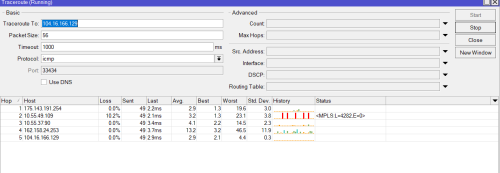
user posted image

From IP 175.xxx.xxx.xxx
*
Yours also good...
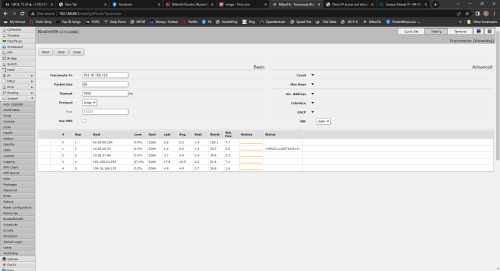
I am located at Johor... cry.gif
user posted image
go626201
post Jun 2 2023, 05:38 PM

Regular
******
Senior Member
1,882 posts

Joined: Sep 2017
QUOTE(OlgaC4 @ Jun 2 2023, 05:35 PM)
user posted image

Can we file a complaint?
*
As long as the end point didn't have packet loss, it is okay. The traceroute showing packet loss between nodes is not really affecting the connection.
go626201
post Oct 6 2023, 06:11 PM

Regular
******
Senior Member
1,882 posts

Joined: Sep 2017
QUOTE(jusbella @ Oct 6 2023, 05:52 PM)
Hi guy, I would like you guy recommend me a compact size Mikrotik or equivalent Mikrotik router that capable 800mbps or 1gbps ISP provider. Using 12v 1A/2A should be sufficient. 4 port is enough, with WAN port configured as PPPoE without vlan tag.

So which model Mikrotik I can take?
*
I was using RB750Gr3 before 2020 with 800mbps plan,it works without any issue.
For now hAP AX2 or AX3 should be enough for up to 1G if you do not need any multiple complicated rule for the firewall.

If u have more budget,just straight up to RB5009 is also can. (which included 1x 10G SFP+ and 1x2.5G ethernet port)
go626201
post Oct 6 2023, 09:42 PM

Regular
******
Senior Member
1,882 posts

Joined: Sep 2017
QUOTE(jusbella @ Oct 6 2023, 07:03 PM)
Thank bro.

What about L41G-2axD aka hAP ax lite can hit 1gbps WAN from ISP?
*
Just take a look on it, and mikrotik test show that its cpu is weaker than Hap ac2.

So my suggestion is better take hap AX2 or AX3 for more cpu power.
More cpu power mean more customize setting can be done without cpu bottleneck. (Like VPN tunnel on Mikrotik can run higher speed without affecting network stability)
go626201
post Oct 6 2023, 09:55 PM

Regular
******
Senior Member
1,882 posts

Joined: Sep 2017
QUOTE(jusbella @ Oct 6 2023, 09:45 PM)
Yeah just saw it as well, and I might go for AX2 since I don't need the wifi.

Is there Mikrotik router without wifi model?
*
Yes - https://mikrotik.com/products/group/ethernet-routers
Those are mainly for non-wifi usage.
go626201
post Oct 9 2023, 11:10 PM

Regular
******
Senior Member
1,882 posts

Joined: Sep 2017
QUOTE(jusbella @ Oct 9 2023, 10:44 PM)
Anyone can clarify this model can support 1gbps ISP?

RB760iGS
*
With fasttrack,should be okay,but if you need additional firewall rule and without fasttrack ,the cpu power is not enough for 1gbps.
go626201
post Nov 29 2023, 01:24 PM

Regular
******
Senior Member
1,882 posts

Joined: Sep 2017
Just preorder from distributor?
2 years ago ,I preorder RB5009 after Mikrotik public release while Subtel didn't have the stock in Aug 2021. (I think i might be the first people or within 5-10 person that bought first batch RB5009 in Malaysia)
go626201
post Nov 30 2023, 12:41 PM

Regular
******
Senior Member
1,882 posts

Joined: Sep 2017
QUOTE(myxery @ Nov 30 2023, 10:05 AM)
berapa harga during that time? now price increase ady kan?
*
RM999 to Sublime in Aug 2021. (included RM10 delivery fee)
Now price i dont know, but i think should be price up for inflation.

Edited:
Lazada Subtel showing RM1122 but out of stock.
https://www.lazada.com.my/products/mikrotik...1382899891.html

This post has been edited by go626201: Nov 30 2023, 12:44 PM
go626201
post Dec 1 2023, 02:00 PM

Regular
******
Senior Member
1,882 posts

Joined: Sep 2017
QUOTE(Sky.Live @ Dec 1 2023, 01:51 PM)
RB5009 the 1 with POE is about 1800+RMB in taobao.. thinking to get that but dont know if region is a problem or not
*
I think it should be the same for all of the world since the firmware is the same one.


And also I think next year end, mikrotik might release a new generation ethernet router with more 2.5G port. (8 port?)

This post has been edited by go626201: Dec 1 2023, 02:00 PM
go626201
post Jan 6 2024, 05:25 PM

Regular
******
Senior Member
1,882 posts

Joined: Sep 2017
QUOTE(Quanta @ Jan 6 2024, 04:29 PM)
My RB750Gr3 is not able to keep up to IPV6 speed. Not able get 100% BW and always lingering around 300-333Mbps. My IPV4 is able to get 510Mbps easily.

Also, the Maxis Koan router has no problem on both IPV6 and IPV4. Able to get 510/106Mbps.

Is there any solution to boost RB750Gr3 IPV6's speed to 500Mbps?
*
CPU bottleneck,change to Hap ax2 or ax3 should be able to hit more than 600M.
go626201
post Jan 6 2024, 07:48 PM

Regular
******
Senior Member
1,882 posts

Joined: Sep 2017
QUOTE(Quanta @ Jan 6 2024, 07:08 PM)
thxn for the recommendation. anything that can fool-proof it? like no issue with 1Gbps on ipv6 as well.
*
RB5009 should be enough. (But with 1.X-2X price compare to AX2 or AX3)

If not urgent use,just wait for another 1-2 years for next gen of RB5009 which should be having more 2.5G port. (My guess only)
And disable ipv6 until 2025,now ipv6 still not suitable for wide usage.
go626201
post Jan 6 2024, 09:10 PM

Regular
******
Senior Member
1,882 posts

Joined: Sep 2017
QUOTE(kwss @ Jan 6 2024, 08:37 PM)
Telling people to disable IPv6 simply because you feel Mikrotik equals superiority is plain wrong.
I not sure did you saw a post/replies on lowyat from few weeks or months ago or not.
There is someone who having problem while using mikrotik router and ipv6 with full speed steam download causing Mikrotik router cpu overload,and the internet connectivity will be unstable at the time.
So unless Mikrotik update the routeros with ipv6 fasttrack,then those lower grade mikrotik router will not have enough cpu power to run ipv6 with high speed usage.
(To be clear,i had using RB750Gr3 for few years before i getting my current RB5009)

And the reason why i said ipv6 is not suitable to enable at current state,is because most countries isp or hosting provider does not really care about ipv6 performance/routing connectivity at current state, they just provide the ipv6 connectivity,
and didn't put enough effort to optimize the ipv6 connectivity.
Simple example,enable ipv6 with unifi will having some foreign site loading slower compare to ipv4. (Cloudflare site is fast for most time, but there are still lot of site not using CF)

go626201
post Jan 7 2024, 08:20 PM

Regular
******
Senior Member
1,882 posts

Joined: Sep 2017
QUOTE(soonwai @ Jan 7 2024, 04:44 PM)
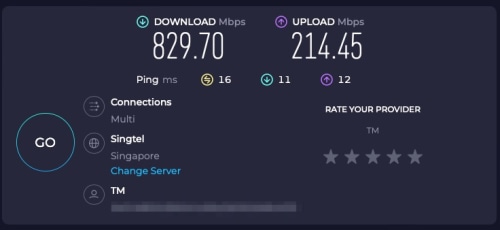
Ya, RB5009 no problem. I usually run my Mikrotiks without Fasttrack anyway.
user posted image
https://ipv6.speedtest.net
*
That ipv6.speedtest.net does not mean speedtest with ipv6 only.
This link is 100% same to speedtest.net.
But it is possible that speedtest with ipv6 on speedtest.net,some speedtest server is ipv6 enabled(Which mean ipv4 and ipv6 dns resolve with same hostname or server)
so if the hostname is resolve to ipv6,then it is speedtest with ipv6.
And when ipv6 is disabled,it will speedtest with ipv4.

The fastest way to speedtest with ipv6,is disable your ipv4 on your device and run speedtest on those ipv6 supported site.
Like speed.cloudflare.com is supported.
Later if i found any ipv6 speedtest site can hit more than 600mbps with unifi,then i will post here.

Edited:
I had setup a ipv6 only speedtest server on my next week expiring 10G SG vps.
Feel free to speedtest with it. (If ipv6 is not enabled,then u might not be able to access the site)
http://v6test.mywebping.com/

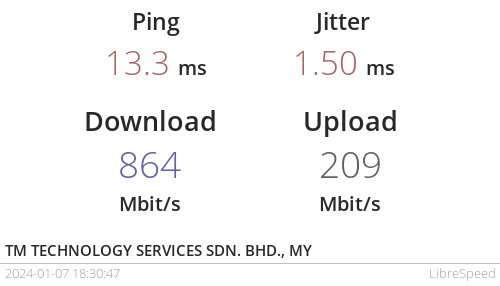
Just now i tried can hit full speed without any issue. (Device RB5009 + 2.5G PC)
Please don't spam too many time speedtest on it,thanks.

With Queue-
user posted image
Without Queue-
user posted image
Time need +8hour (2.30am)

This post has been edited by go626201: Jan 8 2024, 02:31 AM
go626201
post Jan 10 2024, 12:47 AM

Regular
******
Senior Member
1,882 posts

Joined: Sep 2017
QUOTE(neuromancerx @ Jan 10 2024, 12:02 AM)
I'm planning to set up a new networking system for my new double-storey house. I'm thinking of placing a MikroTik CSS610-8G-2S+IN on the first floor and a CRS112-8G-4S-IN on the second floor, with multimode fiber for the interconnect.

Is it possible to configure LACP between a CRS running RouterOS and a CSS running SwOS?
*
10G not enough for your usage?
I think 10G should be enough for next 5 years for most people.

My advice just pull 1 fiber and 1 ethernet cable to every room in your house for future proof.
Incase you want to setup 100% super stable high speed wifi mesh in future.
And you can also have 10G Lan port for any device you want in every room.
go626201
post Jan 13 2024, 01:43 PM

Regular
******
Senior Member
1,882 posts

Joined: Sep 2017
Cat6A is enough for next 5-10 years. (The standard longevity for standard quality ethernet cable is around 8-10year)
When the time higher speed release for public, the cable is out of tech already.
And Cat8 cable is super thick.

And Remember to test the cable before fully finishing renovation to ensure the cable is okay to be use.
I had bought a short Cat8 Ugreen cable in few years ago,and the cable seems like having some issue,that will flip the speed rate and sudden disconnect and reconnect.
go626201
post Jan 13 2024, 03:01 PM

Regular
******
Senior Member
1,882 posts

Joined: Sep 2017
QUOTE(OlgaC4 @ Jan 13 2024, 01:54 PM)
8-10 years you still have not finish your house installment. Time to move out? dig again and change to cat9 or cat 20
*
I am just saying Cat8 is not worth at current stage,and the longevity is just a estimate for the worst situation.
And also at the time when it start having issue,most people might already plan to move or re-renovation again. (like 12-14years or more)
Secondly,10G is good enough for 99% of device for next 5-10years.

Cat6A is still the better choice that considering money cost + tech level ,as current time - most installer does not crimp Cat8 properly, which might causing more issue.

7 Pages « < 2 3 4 5 6 > » Top
 

Change to:
| Lo-Fi Version
0.0290sec    0.35    7 queries    GZIP Disabled
Time is now: 2nd December 2025 - 02:38 AM