

QUOTE(wong_86 @ Nov 2 2021, 03:13 PM)
anyone can guide how to make setup pihole as DNS server in mikrotik device ?

U mean u want to change the DHCP DNS setting or setup the pihole DNS service on Mikrotik router?Enterprise Networking Mikrotik Routers (RouterBoard & RouterOS), User and owner discussion group
|
|
 Nov 2 2021, 04:00 PM Nov 2 2021, 04:00 PM
Return to original view | Post
#21
|
 
Senior Member
1,882 posts Joined: Sep 2017 
|
QUOTE(wong_86 @ Nov 2 2021, 03:13 PM) anyone can guide how to make setup pihole as DNS server in mikrotik device ? U mean u want to change the DHCP DNS setting or setup the pihole DNS service on Mikrotik router? |
|
|
|
|
|
Nov 5 2021, 05:33 PM
Return to original view | Post
#22
|
|
Senior Member
1,882 posts Joined: Sep 2017
|
QUOTE(loonsave @ Nov 5 2021, 04:56 PM) Hi Sifu, I used to use pfsense for more that 10 years. But I am going to turn off my VM to reduce energy usage. hAP ac2 (Disable Wifi function) should be enough for your usage. (hEX should also suitable but CPU will be a bit weaker)Please recommend me an entry-level of Mikrotik router to achieve function below. I am subscribing to 300Mbps Tm UniFi. 1. Site-to-Site VPN to Surfshark with destination route for certain websites via the VPN tunnel. 2. Road warrior VPN, prefer OpenVPN/Wireguard. 3. Block access to certain websites at certain hour. 4. Working well with TP-Link Deco X20 AP Mode. 5. VLAN separation for IoT/Security devices. Thank you.  |
|
|
Nov 6 2021, 11:22 PM
Return to original view | Post
#23
|
|
Senior Member
1,882 posts Joined: Sep 2017
|
QUOTE(Gaara92 @ Nov 6 2021, 10:52 PM) What is your budget? If below rm1k then get the latest new model RB5009 equipped with 10Gbps SFP+ FTW. Otherwise you can get a hEX S, or hAP ac2 or hAP ac3. But it would be a waste since you already got your own Deco AP, get an RB5009 instead it is using native RouterOS v7 already and support WireGuard and ZeroTier also! Currently ROS7 still at beta stage... IPv6- DHCPv6 PD not working for Unifi. Better wait for 6month later to get ROS7 only device... So i suggest in current state and for his requirements just get a device that cost about RM300 is enough for now since it is his first time to join Mikrotik. |
|
|
Nov 7 2021, 12:49 AM
Return to original view | Post
#24
|
|
Senior Member
1,882 posts Joined: Sep 2017
|
QUOTE(Gaara92 @ Nov 7 2021, 12:15 AM) Why would you use DHCPv6? Isn't unifi provide IPv6 using stateless SLAAC mode? Emm actually i not sure,i just follow soonwai 's tutorial to use IPv6 on ROS6,but currently the same way on ROS7 is not working,waiting Mikrotik to fix it. |
|
|
Nov 7 2021, 12:45 PM
Return to original view | Post
#25
|
|
Senior Member
1,882 posts Joined: Sep 2017
|
QUOTE(soonwai @ Nov 7 2021, 12:38 PM) Getting RB5009 soon. Later I check how to configure IPv6 or why it doesn’t work. I also follow the guides previously posted. ROS 7 bug,Mikrotik forum already have people talks about that,and the latest beta version still not fixed.Other than that,i also still try to learn how to use the Wireguard as client on ROS7...Trying to redirect china traffic with vpn service to mitigate the crap routing on unifi. Currently using IKEv2 IPsec VPN on Mikrotik but the cpu usage is quite high when the speed is higher without fasttrack.(VPN usage does not work with fasttrack so cpu usage will be higher) |
|
|
Nov 15 2021, 03:08 PM
Return to original view | Post
#26
|
|
Senior Member
1,882 posts Joined: Sep 2017
|
QUOTE(cwtien @ Nov 15 2021, 02:48 PM) Anybody know where I can get RB5009 rackmounting kit (K-79). I asked Subtel but they were showing me the wall mount plugs that came in the box.... I think Subtel misunderstood the item u ask,the box only come with K-55 screw kit,does not come with RB5009 rackmount kit K-79.I also don't see any in Synchroweb. Maybe u can ask subtel again? |
|
|
|
|
|
Nov 26 2021, 01:18 AM
Return to original view | Post
#27
|
|
Senior Member
1,882 posts Joined: Sep 2017
|
QUOTE(rezzorix @ Nov 26 2021, 12:34 AM) Hi. I am new here... just recently got a RB5009. Not sure Time also use DHCP-v6 to get ipv6 address on mikrotik or not. If similar way to unifi,then it is a bug on ROS7,need to wait Mikrotik to fix it. (I think need to wait next year will fix it)So far all wonderful, got it working and network runs well. Only thing I dont get to work somehow is ipv6 with Time Internet. I get an ipv6 from Time, however my clients dont get an ipv6 and cant connect to any ipv6-address on WAN. I looked for some kind of tutorial for setting this up, can someone hint me into the right direction or even give me simple instructions? Would be very much appreciated.  |
|
|
Nov 26 2021, 08:17 PM
Return to original view | Post
#28
|
|
Senior Member
1,882 posts Joined: Sep 2017
|
QUOTE(Oltromen Ripot @ Nov 26 2021, 04:48 PM) Home use. Wireless feature unnecessary as I wire-backhaul to 2 Deco M9 Plus. 1.You can use other port for redundancy.Just need to do additional setup.I am looking into automated failover from primary (1) Unifi (dial out PPPoE) to secondary (2) Huawei B618. Questions: (1) I see all Mikrotik 5-port routers have dedicated 1-port WAN. Does this mean I cannot use additional port (s) to achieve multi-WAN? (2) Mikrotik routers can handle fibre vlan? (already have tp-link vlan switch to (un)tag vlan500 if necessary) (3) Mikrotik routers can handle DHCPv4? DHCPv6 and/or similar? (4) Mikrotik routers can do DDNS to any provider? (i use cloudns) (5) Mikrotik routers have firewall to prevent intrusion from outside? (6) Mikrotik have access to command line? Is it linux? Can install packages? to run any command? (7)n Which Mikrotik router is capable of handling 1Gbps fibre? (for future-proof). The Hex? (w/ tp-link vlan switch, i was already able to use huawei b618 to prioritise dial to unifi and failover to lte-a network. however i was disappointed that the gigabit wan and lan port on b618 was only able to max 171Mbps regardless fibre or lte-a. all cables used during test are CAT6e. replacing b618 back to tm-supplied router was able to get back ~500Mbps as subscribed, so test wasn't influenced by wifi speed.) 2.Yes,it can handle the vlan. 3.Yes. 4.You can write your own script to update the ddns or find online.(As long as the router can run the script,then ddns update is easy work for mikrotik) 5.Yes,u can customize the firewall with very specific rule. Like block a specific ip or ip prefix or only allow a port to access by specific ip or anything.(Mikrotik can setup with any rule) 6.Yes,u can access it with telnet or anyway u like,most people use Winbox-Mikrotik official software/app for mikrotik device. As for packages,no it does not support any application that not provided by Mikrotik.(But ROS7 is providing Docker functionality,so u can install anything that can work in docker) |
|
|
Dec 8 2021, 11:57 AM
Return to original view | Post
#29
|
|
Senior Member
1,882 posts Joined: Sep 2017
|
QUOTE(benson208 @ Dec 8 2021, 04:06 AM) anyone already try RouterOS 7.1 stable release? If you want stability then stay at ROS6 for 1 more years.Or better stay at LTS 6.48.6 If you want new features then u can upgrade to ROS7,but with more bugs. (And also DHCPv6-IPv6 with PPPoE might not functionable without manual workaround) |
|
|
Dec 11 2021, 01:19 AM
Return to original view | Post
#30
|
|
Senior Member
1,882 posts Joined: Sep 2017
|
QUOTE(syahpian @ Dec 10 2021, 07:43 PM) btw, i want to upgrade my old rb2011, is hex good enough for 800Mbps without enabling fasttack? hex without fasttrack only get about 300mbps in my memory.(But with fasttrack 800mbps is possible) this rb2011 cannot get full speed without enabling fasttrack, maybe because hardware too old already  Better atleast get hap ac2 or hapac3 or higher series. (should be around 500mbps without fasttrack) I suggest add abit more to your budget since u are using it for years,just get a rb4011 or rb5009 should be enough for future 3/5 years usage. After getting my RB5009,next time i will targeting on CCR series haha. This post has been edited by go626201: Dec 11 2021, 01:21 AM syahpian liked this post
|
|
|
Dec 29 2021, 11:05 PM
Return to original view | Post
#31
|
|
Senior Member
1,882 posts Joined: Sep 2017
|
I rolled back to v7.1.1 already...
Not sure is that v7.2rc1 having ethernet port flapping problem or not. I had few days of sudden Wan Ethernet Port down,and 1sec up again. one day happens 2-3 times. (BTU Lan 1 to RB5009 Ethernet Port 2) Or is that BTU fault? |
|
|
Feb 20 2022, 05:00 PM
Return to original view | Post
#32
|
|
Senior Member
1,882 posts Joined: Sep 2017
|
QUOTE(Anime4000 @ Feb 20 2022, 04:18 PM) sorry interject here, since my RB3011 died because of port flop, plan to buy RB5009 but out of stock, so I bought ER-12 while waiting RB5009 become available Get CCR series better.  I am using RB5009 but now i more recommend CCR for more cpu core. (Because of IPsec performance not good with RB5009 and WG setting got abit problem) |
|
|
Feb 20 2022, 05:13 PM
Return to original view | Post
#33
|
|
Senior Member
1,882 posts Joined: Sep 2017
|
QUOTE(Anime4000 @ Feb 20 2022, 05:07 PM) Which CCR are you recommend? You need so many SFP Port?CR2004-1G-12S+2XS is good? I like to use SFP XPON ONU Stick, some router have compatibility issue. For me i prefer CCR2004-16G-2S+,maybe because i dont need so many SFP port,(And also I though S+RJ10 or similar adapter quite hot?) |
|
|
|
|
|
Feb 20 2022, 05:59 PM
Return to original view | Post
#34
|
|
Senior Member
1,882 posts Joined: Sep 2017
|
QUOTE(Anime4000 @ Feb 20 2022, 05:36 PM) not really, but doing 10GbE networking is nice tho, 1GbE hardly over-saturated SSD NAS. S+RJ10 should be getting more higher temp than normal SFP adapter so i still not going to play around with it.. Indeed SFP run hot even SFP XPON ONU can reach 61°C, Realtek SoC + Laser is very hot, pumping ~3dB back to TM OLT, [attachmentid=11097607]  maybe next few year got better chip or solution then at that time,i will try to get one for use. (Future-maybe with CCR router ) |
|
|
Mar 3 2022, 02:39 PM
Return to original view | Post
#35
|
|
Senior Member
1,882 posts Joined: Sep 2017
|
QUOTE(Anime4000 @ Mar 3 2022, 01:10 PM) quadcube Gaara92 DHCPv6-PD problem only happens on PPPoE VLan... I also waiting mikrotik to solve it,but i think maybe need wait half year to one year until they solve other ROS7 issue first...Yesterday I went and buy RB5009 [attachmentid=11106066] after finish configure [attachmentid=11106067] that USB cable is Maxis 4G Dongle problem with 7.x DCHPv6-PD not working, it keep searching... Mikrotik forum got workaround to mitigate the issue,but i dont know how to do without additional device.(Someone said add another switch that handle vlan can mitigate it) |
|
|
Mar 3 2022, 07:38 PM
Return to original view | Post
#36
|
|
Senior Member
1,882 posts Joined: Sep 2017
|
QUOTE(Anime4000 @ Mar 3 2022, 04:58 PM) Thing I have tried RB5009 is ROS v7 only,downgrade is not possible.CODE sfp-sfpplus1 -> vlan621 == bridge -> pppoe-out1 CODE sfp-sfpplus1 == bridge -> vlan621 -> pppoe-out1 both not work, someone said downgrade to v6.49.4, I not tried it yet |
|
|
Mar 23 2022, 10:15 PM
Return to original view | Post
#37
|
|
Senior Member
1,882 posts Joined: Sep 2017
|
What's new in 7.2rc5 (2022-Mar-23 12:04):
*) ipv6 - fixed VLAN tagged PPPoE packet receiving on RB5009; Finally fix? I haven't install the new beta,going to try it later tonight.  Edit: Fix confirmed. Unifi ipv6 prefix working now. This post has been edited by go626201: Mar 24 2022, 02:20 AM |
|
|
Apr 22 2022, 09:34 PM
Return to original view | IPv6 | Post
#38
|
|
Senior Member
1,882 posts Joined: Sep 2017
|
RouterOS 7 quite stable now.
So RB5009 is quite useful for most people. (But for me it got a downside- vpn encryption hardware acceleration is not working or not fully functional,so the vpn speed will be lower and also cpu usage is quite high for vpn usage) My vpn usage for Wireguard and IPsec - 500+ mbps download cost 60+% cpu utilization. Other then that,so far so good. 800mbps unifi only use below 10% cpu with fasttrack,and without fasttrack also quite good in my memory. Update:  Wireguard Server: Nordvpn SG (Midnight can run full unifi speed to SG) This post has been edited by go626201: Apr 23 2022, 02:32 AM |
|
|
Apr 24 2022, 07:56 PM
Return to original view | IPv6 | Post
#39
|
|
Senior Member
1,882 posts Joined: Sep 2017
|
QUOTE(OlgaC4 @ Apr 24 2022, 04:50 PM) RB 5009 very hot when operating. Is this normal? Can u check the temp showing on the Winbox-System-Health?Mine is showing 40°C CPU temp with a 2x12cm usb fan under RB5009. (Normally should between 45-55°C) I didn't use the 2.5Gb and SFP+ port. This post has been edited by go626201: Apr 24 2022, 07:57 PM |
|
|
Apr 24 2022, 11:08 PM
Return to original view | IPv6 | Post
#40
|
|
Senior Member
1,882 posts Joined: Sep 2017
|
QUOTE(machai_world @ Apr 24 2022, 10:23 PM)  Hi... im using Hap ac2, dun have any idea to apply ipv6 public and private ip? no idea to setting...but still stuck at ipv4 public.. and didnt found to fast track ipv6 If not strongly needed for ipv6,better do not enable ipv6 on unifi now.(maybe next year or next 2 year better,now still not stable enough to use) Mikrotik IPv6 does not support fasttrack now,it will be implement in ROS7 future version but still does not have timeframe for it,so i think next year or next 2 year should be getting IPv6 fasttrack on mikrotik. Currently,for RB5009 without ipv6 fasttrack,the cpu usage to use full 800mbps unifi is around 25-35% for 800mbps download,and around 6-12% for 200mbps upload. 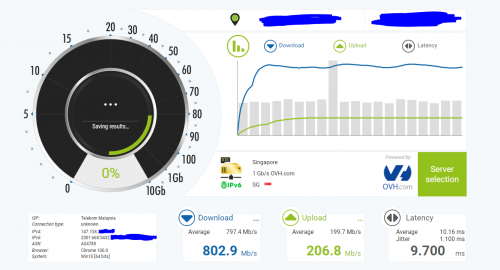 |
| Change to: |  0.0250sec 0.0250sec
 0.68 0.68
 7 queries 7 queries
 GZIP Disabled GZIP Disabled
Time is now: 2nd December 2025 - 01:05 PM |
 Quote
Quote