Welcome Guest ( Log In | Register )

7 Pages « < 3 4 5 6 7 >Bottom

Outline · [ Standard ] · Linear+

Enterprise Networking Mikrotik Routers (RouterBoard & RouterOS), User and owner discussion group

views
     
go626201
post May 8 2024, 01:00 PM

Regular
******
Senior Member
1,882 posts

Joined: Sep 2017
QUOTE(loonsave @ May 8 2024, 10:44 AM)
I am using Asus TUF AX5400 currently in a 900sqft condo. So far the Wifi coverange is acceptable. The WiFi and Internet speed somehow unstable and I schedule to reboot it every night. Another problem is after I disable the Surfshark VPN connection in the router. The streaming quality constant at 480p until I reboot the router.

I have few requirements for a wireless router, and wonder mikrotik hap ax3 fit into it or not.

1. Docker services, eg: HomeAssistant/Uptime
2. VPN services to Surfshark
3. Decent and stable wifi coverage for whole house
4. Split the 2.4G/5G SSID due to some smart home devices cannot connect to 5Ghz network

user posted image
*
1. if i am not wrong,u need a pendrive / external usb ssd/hdd drive for docker related services
2. With Wireguard protocol yes,but the speed might not be able to hit the max speed with your internet plan. (And while utilize high speed with vpn,your router cpu usage will also be high due to vpn data encryption)
3. Use your current Asus TUF AX5400 as Wifi AP,the processing power stress will be lower for both device. (Or you can place both on different place with connected ethernet connection)
4. Yes,routeros does support this kind of wifi setup.
go626201
post May 8 2024, 03:07 PM

Regular
******
Senior Member
1,882 posts

Joined: Sep 2017
QUOTE(loonsave @ May 8 2024, 01:14 PM)
2. I don't need max speed, as long as it able to stream with decent quality. It's acting weird on current router, where it can stream fine with Surfshark Wireguard VPN, but as soon as I disconnect the VPN, the streaming quality dropped to 480p, until I restart the router.
3. I was thinking to make current Asus TUF AX5400 as access point, but I also want to keep minimal devices. That's why I am considering hap ax3 instead of RB5009UG. It's a small condo and I don't have ethernet connection else where. I have around 30 devices connected via WiFi, and half of them are smart home devices. Thus, WiFi coverage and stability is the utmost important requirement.
*
I would suggest to use the Asus router as AP 1st,and if you still having issue,then setup another ssid on mikrotik hap ax3 for the iot devices.

go626201
post Jan 26 2025, 11:17 PM

Regular
******
Senior Member
1,882 posts

Joined: Sep 2017
Guys!!
Mikrotik RouterOS Finally implement IPv6 Fasttrack!!!

What's new in 7.18beta2 (2025-Jan-21 11:27):
*) ipv6 - added FastTrack support;
*) ipv6 - added routing FastPath support;
go626201
post Jan 31 2025, 09:34 PM

Regular
******
Senior Member
1,882 posts

Joined: Sep 2017
QUOTE(biatche @ Jan 31 2025, 03:50 PM)
for years now, i only do ipv4 on my mikrotik,

anyone willing share copy paste fw rules for ipv6 (i use unifi)? (ya i know how to edit)

i actually dont understand ipv6 very well, from my understanding, we're given a subnet instead of a single ip address right? and each pc behind the router is given this 'external ip' ? or did i understand this incorrectly?

based on what someone else said a few weeks ago, its possible i may get unthrottled speeds with ipv6.... more speed is all i hope for.
*
If you using Unifi,and enable ipv6 with unifi. U will get /64 subnet which will auto distribute by the router to device.
And every device under the network will get a unique ipv6 address with 3 days lease time. (Which mean every 3days or eveytime you reboot your router,your device ipv6 address will changes)

Unless you only enable the ipv6,and only allow local ipv6 address,then u will only have one ipv6 address with your router,and all ipv6 will be running under NAT mode.

This post has been edited by go626201: Jan 31 2025, 09:35 PM
go626201
post Feb 14 2025, 01:39 PM

Regular
******
Senior Member
1,882 posts

Joined: Sep 2017
QUOTE(kwss @ Feb 14 2025, 03:06 AM)
go626201
In 7.18 beta 6:
CODE

*) ipsec - added hardware acceleration support for hEX refresh (additional fixes);


Not sure what's the performance but it is finally here.

From:
https://help.mikrotik.com/docs/spaces/ROS/p...areacceleration

Comparing rb5009 (88F7040) and hex refresh (EN7562CT), you lose sha512 and aes-gcm.
Not sure what is your use case but just sharing it for your consideration.
*
I mainly use pppoe and wireguard with alot of Mangle only.
BGP or others like openvpn or something else no use.
But use somemore on address-list for mangle usage.

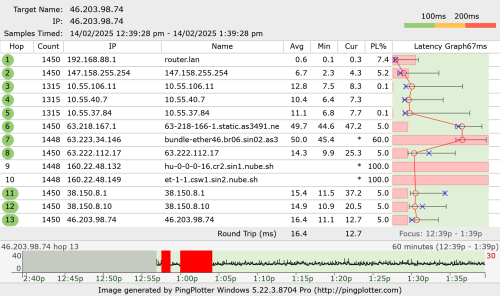
And i just update my rb5009 status on unifi thread, i "almost" overturn my assumption on rb5009 death. (1:39PM)
user posted image

Edited:
dc again after 1+hours. Now change back to hEX for further monitoring.

This post has been edited by go626201: Feb 14 2025, 03:26 PM
go626201
post Feb 14 2025, 02:54 PM

Regular
******
Senior Member
1,882 posts

Joined: Sep 2017
QUOTE(biatche @ Feb 14 2025, 02:11 PM)
if only they'd make 2.5gbps ethernet product at affordable rates... would be bestseller.
*
Yesterday night i see the Subtel price the RB5009 at RM1400++ shocking.gif
I bought it few year ago below rm1k... cool2.gif
Almost 40-50% price up....
go626201
post Feb 14 2025, 05:51 PM

Regular
******
Senior Member
1,882 posts

Joined: Sep 2017
QUOTE(kwss @ Feb 14 2025, 05:07 PM)
Whenever you use rb5009, your packet loss will be very high, even to rb5009.
This is from your PC to router, before they even reach your ONU.

Looks like your Windows PC is missing IPv6 for rb5009 as well? Or this is an IPv4 test on purpose?

From your youtube video, I cannot really tell for sure if the port is flapping just from the way it blinks.
So regardless which ONU the rb5009 will still dc right? Just depends on how long you need to wait?

And this is all without using UPS, all with their own original power brick? + new network cable?
*
No, ipv6 for windows already fix either for hEX or RB5009. no longer drop. And yes i choose random ipv4 result just now to prove the connection still alive for 40min with rb5009. but die after around 90-100mins.

Yes,but i did change to old onu for now.and now using hEX again for monitoring purpose. and dc occurs once 20mins after switch to hEX. So this make me think it is still a possibility that tm faults.
But after that dc,so far no dc occurs from 3.34pm until now. (Old ONU using new ONU adapter,and hEX using own adapter,new cable between Old onu and hEX)

Dont test with that ip,not stable,the host keep suffer attack now.so the line might be packet lost for current time.

I start a pingplotter to 8.8.8.8 just now.later i will upload the screenshot. (This was done with old ONU + hEX (Vention cable),PC connected to 2.5G switch and connected with 1G hEX-Ugreen cable)

This post has been edited by go626201: Feb 14 2025, 05:56 PM
go626201
post Feb 14 2025, 05:59 PM

Regular
******
Senior Member
1,882 posts

Joined: Sep 2017
QUOTE(kwss @ Feb 14 2025, 05:55 PM)
Can you keep your torrent client on while doing the test?
I wonder if generating more traffic will make you dc faster.

That day you left it and went sleep it is on for 6 hours straight right? That was with a quiet network?
*
U mean Wednesday when we discuss right,yes after thursday 3am+ i going to sleep,and no dc at all,but the dc occurs after afternoon yesterday.

If i start torrenting,i think the latency will spikes. torrenting causing different issue,but still usable. But should not cause disconnect i think.

And about the last replies before sleep,u suggest me to use hEX or refresh.
I just use hEX with queue,the speed will be limited to around 600M/300M. (With upload queue only)

This post has been edited by go626201: Feb 14 2025, 06:04 PM
go626201
post Feb 14 2025, 06:05 PM

Regular
******
Senior Member
1,882 posts

Joined: Sep 2017
okay good i dc now!!!!
go626201
post Feb 14 2025, 06:08 PM

Regular
******
Senior Member
1,882 posts

Joined: Sep 2017
QUOTE(kwss @ Feb 14 2025, 06:07 PM)
You means purposely dc to change setup or randomly dc again?
*
just dc after i started the qbittorrent.
I 1000% confirm not my device issue now!!! mad.gif

Same log pattern occurs on hEX with old ONU to RB5009 with new ONU.
user posted image

This post has been edited by go626201: Feb 14 2025, 06:10 PM
go626201
post Feb 14 2025, 06:13 PM

Regular
******
Senior Member
1,882 posts

Joined: Sep 2017
QUOTE(kwss @ Feb 14 2025, 06:11 PM)
Well, if you can dc yourself just by starting a torrent client then I think it is a good news?
You can officially report to TM, wait for them to come and test till they fix it.

1000x better than some random dc that need few hours to show up.
*
Now keep dc... But is a good news for me actually that i no need to waste money to buy new router. cool2.gif

I stop torrent to see how 1st.

This post has been edited by go626201: Feb 14 2025, 06:14 PM
go626201
post Feb 14 2025, 06:20 PM

Regular
******
Senior Member
1,882 posts

Joined: Sep 2017
QUOTE(kwss @ Feb 14 2025, 06:18 PM)
I think I will catch you tomorrow again. Gotta off already.

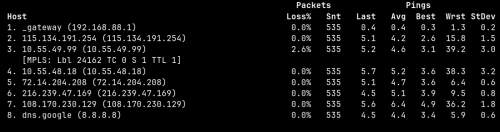
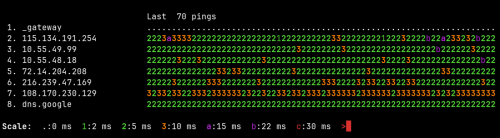
Sharing my 8.8.8.8 result for you to compare later:

user posted image

user posted image
*
Thanks for your helps.
Now my result not accurate...haha cant compare.
Let me fix it with TM 1st. I observe tonight,maybe will contact TM tomorrow or Sunday.
go626201
post Feb 14 2025, 11:53 PM

Regular
******
Senior Member
1,882 posts

Joined: Sep 2017
QUOTE(biatche @ Feb 14 2025, 11:39 PM)
"hi sir, what router are u using?"
"mikrotik"
"sorry sir, what is that"

"can you please turn off your modem and turn it on again after 5minutes? "

sudden hangup.

"hello? mr patel do we still have you on the line?"
*
haha but i livechat to complain not calling 100.
TM will send their technical team come to check tomorrow morning.
I already expect them to said is my fault,but i still need to report 1st.
Or they will not take a look on my issue.
I will appeal if they not fix my issue.

And update to my network status:
I have about 3-4 hours of stable network.
But after 11pm until now,the disconnection had occurs for 4 time already.
About every 10min happens once.

This post has been edited by go626201: Feb 14 2025, 11:55 PM
go626201
post Feb 15 2025, 01:26 AM

Regular
******
Senior Member
1,882 posts

Joined: Sep 2017
QUOTE(hsbb @ Feb 15 2025, 12:59 AM)
Is there anything in your pppoe config related to PADT/I or LCP echo request or Auto retry or system retry? Or in torrent setting which related to idle, need to reduce the time.
*
I got mikrotik pppoe log running. and this disconnect is not cause by torrenting. The disconnect on last evening is totally a coincidence. (After that dc,i have about 3 hours okay)
After 11pm,i get a frequent disconnection even until now. (Torenting off)

QUOTE(kwss @ Feb 15 2025, 01:14 AM)
Remember to borrow all their ONU, login and check the error rate while they are here.
Check the error statistic for fiber too. You had a small number of them.

Can you post the full ONU log showing the port flapping? Save a copy.
Show them your 2 Tik + 1 TP-Link as device under test too. This should save both party a lot of time.

Also ask them for the password and VoIP PIN.
See if they can swap your old ONU with another model from Huawei or ZTE?
Perhaps ask them what OLT are you using now.
Plus if there's another optical splitter that can connect you to a different line card.
*
Let them check 1st.
No port flapping now. both side no log related to ethernet for disconnection.

My thought: ONU is not the main cause of this issue,it might be something wrong else.
Mikrotik support did said this:
" I would say that the number of active PPPoE sessions exceeds the value configured on server, contact your ISP or check server configuration."


Updated:
With attached a short log about pppoe disconnection.
https://pastebin.com/TnUwxk9V

user posted image

This post has been edited by go626201: Feb 15 2025, 01:34 AM
go626201
post Feb 15 2025, 09:23 AM

Regular
******
Senior Member
1,882 posts

Joined: Sep 2017
QUOTE(kwss @ Feb 15 2025, 07:11 AM)
Read the log file. It's not timeout. The server send you terminate request even immediately after a successful lcp-echo lcp-reply pair.
Did you sold off any of your old router?
I would try to request a PPPoE password change. I suspect someone is trying to use your 1gig password.
If it happen right after FSU, could be that technician.

But this didn't discount the fact you still get tons of Ethernet error on the ONU
*
QUOTE(hsbb @ Feb 15 2025, 07:35 AM)
Change your pppoe 1st in desktop self care. Double login can also make existing connection auto terminated.
*
Never sold my router.
Later 10.30am tm will come and check.
Even if the problem really on password being use,i still need to fix the upload latency spikes.
It came back again in the 1st second when i start upload data.

And attached a overnight pingplotter here.
user posted image
After 2.45am no more downtime.

This post has been edited by go626201: Feb 15 2025, 09:24 AM
go626201
post Feb 15 2025, 11:00 AM

Regular
******
Senior Member
1,882 posts

Joined: Sep 2017
QUOTE(kwss @ Feb 15 2025, 10:21 AM)
Can you try connect your PC directly to the Mikrotik and run ping plotter again? Bypass the switch.

You don't get spike while using HEX. Probably because with HEX you cannot use the DAC. So that might be the problem. Look at the massive amount of packet loss with your router.

I'm confident you have more than one issue with your network. None of the problems you are facing is mutually exclusive.

The high error is one.
PPPoE disconnect is another.
Latency spike is the third one.
*
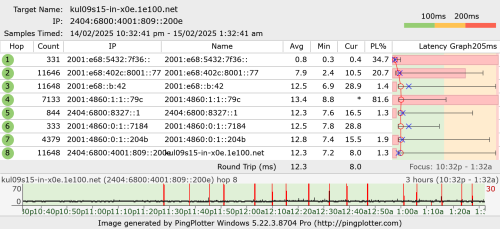
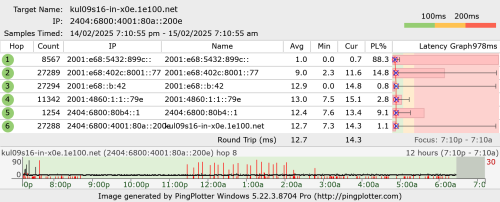
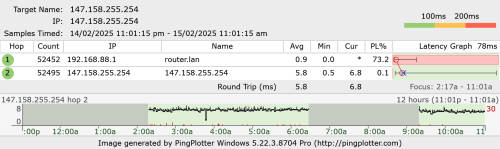
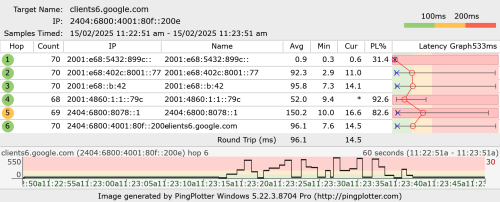
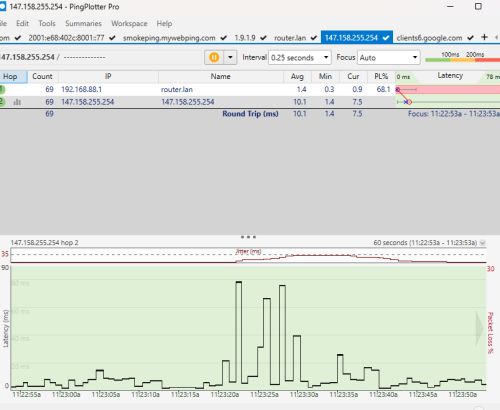
Emm hEX should having the same issue. (upload packet lost and high latency only mainly occurs on ipv6)
The first hop packet lost is normal. Chatgpt said router will not respond 100% with non-direct traceroute.
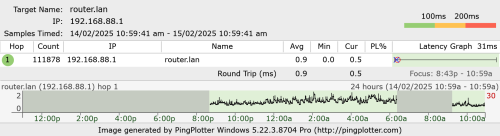
If i pingplotter to router, no packet at all.

user posted image

For this packet lost is according to the disconnection with unifi.
user posted image

This bypass 2.5G switch. PC direct to mikrotik. (while uploading)
user posted image

This post has been edited by go626201: Feb 15 2025, 11:06 AM
go626201
post Feb 15 2025, 11:16 AM

Regular
******
Senior Member
1,882 posts

Joined: Sep 2017
QUOTE(kwss @ Feb 15 2025, 11:07 AM)
It's normal for a lot of ASIC data plane to throttle or filter TTL Time Exceeded packet because they need to software process them in the control plane.

rb5009 is not one of them. You also get a small loss with Hex, which is also not one of them. I tested with mtr which mimic ping plotter and as you can see all zero loss.

But er .. if you say no problem then just ignore it.
*
For what i tested,the ipv6 high latency might be due to the bufferbloat when hitting more than 4XXmbps upload with ipv6. (If i using queue and set it limited in 4XXmbps,no spikes at all)
OR maybe if upload with ipv4 then will be ipv4 packet lost and high latency,this one i haven't test.
go626201
post Feb 15 2025, 11:25 AM

Regular
******
Senior Member
1,882 posts

Joined: Sep 2017
QUOTE(kwss @ Feb 15 2025, 11:22 AM)
Actually for this question, I think only those senior people in TM knows the answer.
I tested mine extensively and don't have this problem. Maybe because my area no longer have local congestion.
I did face this issue last time when local congestion is a daily affair.

It's the same as all the mobile network where they use deep buffer to keep link utilization high.

But I found it weird to only happen for IPv6 as the configuration should be protocol agnostic.
*
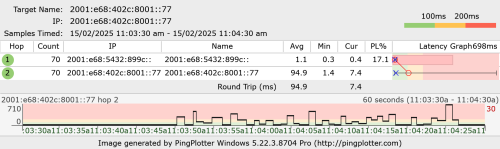
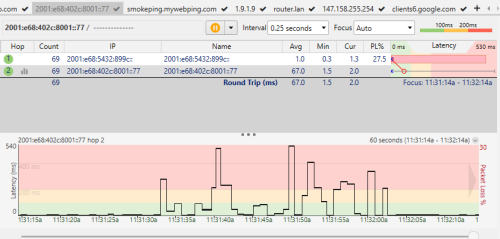
Ah i just tested to force upload to google drive with ipv4.
IPv4 spikes abit,this i can understand most likely due to bufferbloat. (80ms)
IPv6 spikes more abnormal. (more than 400ms)
So when uploading file,ipv6 latency much higher than ipv4.

user posted image

user posted image

For packet mark, not now.
I had reset my mikrotik router,now only pppoe and queue is using on mikrotik. all other function and setting is by default.

This post has been edited by go626201: Feb 15 2025, 11:29 AM
go626201
post Feb 15 2025, 11:30 AM

Regular
******
Senior Member
1,882 posts

Joined: Sep 2017
QUOTE(kwss @ Feb 15 2025, 11:22 AM)
Actually for this question, I think only those senior people in TM knows the answer.
I tested mine extensively and don't have this problem. Maybe because my area no longer have local congestion.
I did face this issue last time when local congestion is a daily affair.

It's the same as all the mobile network where they use deep buffer to keep link utilization high.

But I found it weird to only happen for IPv6 as the configuration should be protocol agnostic.

EDIT:
Did you actually use packet mark inside RouterOS? I have a suspicion you match ipv4 address list and mark only ipv4 packet. Hence the behavior
*
QUOTE(kwss @ Feb 15 2025, 11:29 AM)
I updated my previous reply while you posted lol.
Can you revisit it? Maybe describe a bit how you use mangle and address list?
*
Just updated my replies, after reset mikrotik no additional setting except pppoe and queue. (And if upload queue disabled packet lost issue much worse)
go626201
post Feb 15 2025, 11:33 AM

Regular
******
Senior Member
1,882 posts

Joined: Sep 2017
QUOTE(kwss @ Feb 15 2025, 11:31 AM)
How about you delete all the queue rules altogether and test? Is it still spiking on ipv6 only?
*
all Queue disabled. Now no packet lost but latency spikes still occurs.
The fully packet lost when upload seems like very random,last week i tried,it will totally packet lost when utilize high upload speed.

user posted image

Edited:
11.37am already, after the slot appointment time,no technician came. blush.gif
But the tm site show it is onsite...
Although i did report and tell them to check their device 1st before coming.

This post has been edited by go626201: Feb 15 2025, 11:39 AM

7 Pages « < 3 4 5 6 7 >Top
 

Change to:
| Lo-Fi Version
0.0230sec    0.39    7 queries    GZIP Disabled
Time is now: 4th December 2025 - 06:14 PM