Welcome Guest ( Log In | Register )

7 Pages < 1 2 3 4 5 > » Bottom

Outline · [ Standard ] · Linear+

Enterprise Networking Mikrotik Routers (RouterBoard & RouterOS), User and owner discussion group

views
     
go626201
post May 3 2022, 10:43 AM

Regular
******
Senior Member
1,882 posts

Joined: Sep 2017
QUOTE(1zx @ May 3 2022, 10:10 AM)
I have to differ.
I don't recall having much issues with IPv6 on UniFi previously (since 5Mbps days, then 10Mbps)  smile.gif
No issues on TIME now too.

All my supported end devices have global IPv6 addresses, been running this for many years.

I usually use this to test IPv6 connectivity, unless there's any major issues, it's 10/10.
https://test-ipv6.com/

On Tests Run tab,
Test with IPv4 DNS record   
ok (1.032s) using ipv4
Test with IPv6 DNS record   
ok (0.820s) using ipv6
Test with Dual Stack DNS record   
ok (0.813s) using ipv6
Test for Dual Stack DNS and large packet   
ok (0.333s) using ipv6
Test IPv6 large packet   
ok (2.110s) using ipv6
Test if your ISP's DNS server uses IPv6   
ok (1.390s) using ipv6
Find IPv4 Service Provider   
ok (1.091s) using ipv4 ASN 9930
Find IPv6 Service Provider   
ok (0.929s) using ipv6 ASN 9930
Other IPv6 test sites,
https://ipv6-test.com/    <- I get 19/20 on this, because there's no reverse DNS record.
https://ipv6test.google.com/
*
I mean the unifi ipv6 routing is crap,for local service is okay,but for service that hosted outside of SG/MY then the routing might be quite not stable and causing the speed is lower than ipv4 to the same server(compare with ipv4/ipv6).

And of course even to Cloudflare, Unifi ipv4 and ipv6 also not having good everday,sometimes will reroute to HK area(TM- routing faults),so in this situation for important site,using self-choosing cloudflare ip entering to hosts file is better.
go626201
post May 6 2022, 10:35 AM

Regular
******
Senior Member
1,882 posts

Joined: Sep 2017
QUOTE(ahlong @ May 6 2022, 01:21 AM)
are unifi ipv6's down in certain area? everything bound but no ipv6 when doing test

btw, just upgrade to 7.2.3
*
no problem on my end-Johor.
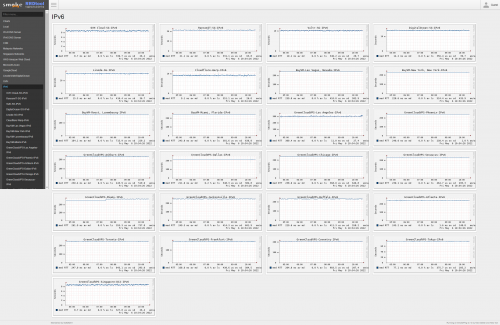
http://smokeping.mywebping.com/smokeping/?target=IPv6
user posted image
go626201
post Jun 14 2022, 03:59 PM

Regular
******
Senior Member
1,882 posts

Joined: Sep 2017
I just put a 240mm usb fan under RB5009. Temp 39°C. brows.gif
Attached Image

You guys got use Queue(QoS) or only enable fasttrack only for unifi/maxis?

I trying to setup queue but the result still not satisficed , running max download speed still affected latency...
Bufferbloat test keep giving A only,still unable to get A+

This post has been edited by go626201: Jun 14 2022, 04:31 PM
go626201
post Jun 14 2022, 04:30 PM

Regular
******
Senior Member
1,882 posts

Joined: Sep 2017
QUOTE(OlgaC4 @ Jun 14 2022, 04:14 PM)
That is very old btu
*
I thought bridge mode btu does not affect performance?
I also want to change the btu,because i think this btu got some problem,but i not sure is my area issue or not,
Sometime the rj11 phone will suddenly drop the call while using the phone. (And i having this issue about 6-7 years ao since from my previous home with the same btu and nearby resident area-different taman)
go626201
post Jun 14 2022, 05:14 PM

Regular
******
Senior Member
1,882 posts

Joined: Sep 2017
QUOTE(soonwai @ Jun 14 2022, 04:45 PM)
Still setting up the RB5009 so min config at the moment. Basic firewall, no queues, Fasttrack is off, bridge VLAN filtering is on for 500, 600, 50 (my LAN) and 50+600 trunk to downstairs.

You use waveform to test? I alternate between A or A+.
https://www.waveform.com/tools/bufferbloat?...67-53fcae3768a8

My BTU is Huawei HG8240w but it shouldn't make any difference.
*
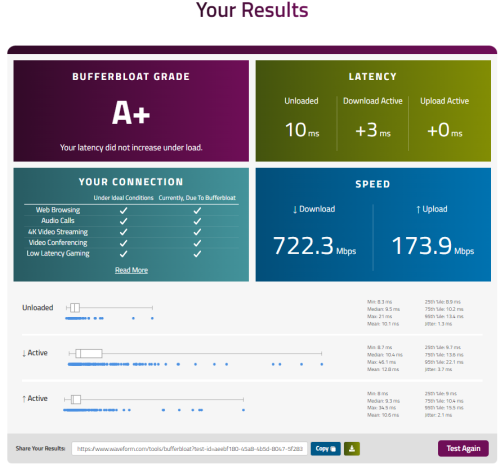
Ya waveform,i think yours download speed not running full speed so the latency not affected,mine during test totally eat 800+mbps dl and 200mbps+ up speed,so the latency is affected.
Later I try to limit my speed to see got difference or not.

QUOTE(OlgaC4 @ Jun 14 2022, 05:02 PM)
Replace free mah. So pandai pandai lah
*
Dont know use what reason the force them to replace...Since I cant pretend btu broken without btu off...
So nvm la,just wait for a few more years when they introduce higher plan then at that time btu must be change.

This post has been edited by go626201: Jun 14 2022, 05:16 PM
go626201
post Jun 14 2022, 05:33 PM

Regular
******
Senior Member
1,882 posts

Joined: Sep 2017
QUOTE(soonwai @ Jun 14 2022, 05:28 PM)
This waveform test, can select server? I keep getting 200-300Mbps only.

Tried again got 760Mbps but upload 50Mbps.
https://www.waveform.com/tools/bufferbloat?...f9-d765420083e8
*
I think nope,seems like your unifi ip range not getting stable routing to the server.

And i just tried simple queue with 90% speed limit - 750M and 180M ,and the result is good.

https://www.waveform.com/tools/bufferbloat?...47-5f2837d2ebe1

user posted image
go626201
post Aug 3 2022, 06:38 PM

Regular
******
Senior Member
1,882 posts

Joined: Sep 2017
QUOTE(soonwai @ Aug 3 2022, 06:25 PM)
Awesome! hAP ax2. Can’t wait till it’s available here. Of course news of this has to come out just after I got a 2-pack of Deco X20.
*
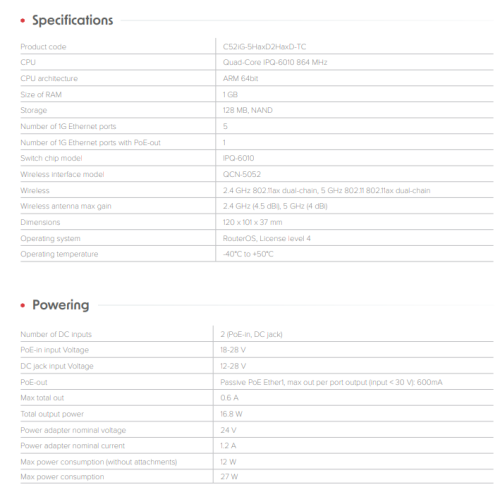
Not sure what spec for the new hAP ax2. If like ax5000+ then i might get one for second floor wifi.
If good enough and acceptable coverage then i going to replace my xiaomi ax3600 for ground floor.
go626201
post Aug 3 2022, 11:02 PM

Regular
******
Senior Member
1,882 posts

Joined: Sep 2017
QUOTE(soonwai @ Aug 3 2022, 10:48 PM)
Someone posted the link to the brochure in Mikrotik forums.
https://mt.lv/hap_ax2
*
Should be able to "overclock" to 1.2 GHz. (IPQ6010)

user posted image
go626201
post Aug 3 2022, 11:24 PM

Regular
******
Senior Member
1,882 posts

Joined: Sep 2017
For this spec,i might just skip this one 1st. and wait for an upgrade version. AX1800 quite low now,atleast ax3000 or ax3200 for future proof should be enough for most people. Although nowadays most people still didn't need high wifi speed,but a wifi router should last for more than 3years.
(Since 2.5Gbe is be mainstream within 2-3years. China is starting to distribute affordable(still a little expensive) 2.5Gbe BTU for market in this years end,so 2024 or 2025 more people will also be using better internet)

For me i think one year one set is quite unacceptable for me.
I change router about every 2-3years. (Next time should be around new series that replace RB5009 level,but i might be getting CCR series for whole house 10G network)
go626201
post Nov 27 2022, 11:57 AM

Regular
******
Senior Member
1,882 posts

Joined: Sep 2017
QUOTE(karenzayn @ Nov 27 2022, 10:08 AM)
Hi, first timer Mikrotik user here
i have a Mikrotik RB750Gr3 for free, so i was thinking that i wanna rebuild my network again previously i'm running OpnSense
For PPPOE Setup for unifi i think i can but i wanna take it a step further with my setup by:

1. Running a Wireguard server or any VPN to remote access my PC
2. Firewall
3. VLAN tagging and dhcp coz i have a 8port smart switch lying around
4. Extensive bandwith monitoring and optimization
5. Cloudflare DDNS
ETC.
So, hope yall can show me da way for this small box, Thanks  biggrin.gif
*
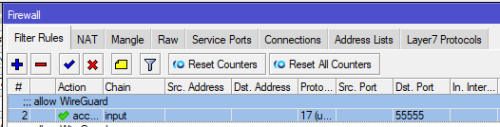
1.Youtube got alot of tutorial just follow it.(Remember to add a Firewall rules- Filter rules - add input allow for Wireguard UDP port access)
user posted image

2.Reset the hEX,and the default generated firewall rules should be enough for most people,and just add or edit from the default conf.
3.Follow Soonwai thread : https://forum.lowyat.net/index.php?showtopic=4202122 for VLAN tagging.
4.For me i just us the fq_codel for queue to every interface with specific interface speed limitation to avoid high bufferbloat.
5.Search on google,should have alot of CF DDNS script that can be modified for use.


go626201
post Apr 19 2023, 12:25 PM

Regular
******
Senior Member
1,882 posts

Joined: Sep 2017
QUOTE(soonwai @ Apr 19 2023, 01:59 AM)
No wor, ax3 faster a bit than Deco x20. But 1 ax3 = 1 x20 2-pack with a lot of change.. sweat.gif

Actually ax2 is a fairer comparison with x20. ax2 specs closer to x20. Price still bit more expensive. Anyway ax2 oos forced me to buy ax3 but now I'm glad that happened. I really like ax3 because got USB port for thumbdrive to run containers. The container feature is really good. Especially because I don't have Raspi or other device running 24/7.

Can't say anything about Asus or Ubiquiti which I don't use.
*
What thumbdrive you are using?

I was thinking to get a ssd to play with containers on RB5009. (Although i have a RPi 4 running 24/7 too)
Because pendrive is not design for long operating time,and the overall performance and life cycle is lower than ssd.
go626201
post May 5 2023, 03:06 PM

Regular
******
Senior Member
1,882 posts

Joined: Sep 2017
I think it quite normal happens on mikrotik router,as sometimes i can see people talks about their ethernet port died on mikrotik forum. (Amost every model will have the possibility of ethernet died)
go626201
post May 5 2023, 03:46 PM

Regular
******
Senior Member
1,882 posts

Joined: Sep 2017
QUOTE(tng55 @ May 5 2023, 03:10 PM)
how about ubiquiti router possible ethernet died
*
I dont have UBNT eqipment,so not sure about that.
I using Xiaomi Wifi router as my AP setup, UBNT device not cheap if want full setup for whole house.
go626201
post May 6 2023, 02:28 AM

Regular
******
Senior Member
1,882 posts

Joined: Sep 2017
QUOTE(tng55 @ May 6 2023, 12:52 AM)
yah i know UBNT Device not cheap and mikrotik also not cheap i am correct ???

look Enterprise router
*
I think Mikrotik price is more reasonable and cheaper, which can think we actually is buying routeros software with free mikrotik hardware.
I bought RB750Gr3 few years ago because of Soonwai. tongue.gif
Thanks to Soonwai for bringing me to the Mikrotik RouterOS world,
I using alot of wireguard service with worldwide vps as VPN usage. brows.gif

My future plan will be 1-2 years(2024/2025) later that i will just buy CCR model to replace my RB5009. (Current usage for Wireguard is "performance hungry")
My estimated model will need atleast 2 SFP+ port with at least 1 10G Ethernet and maybe multiple 2.5G ethernet port.
1G can have or not,as i not really care about it,and I just bought a 2.5G switch(8x 2.5G and 1x SFP+ port) on taobao with 10G DAC cable to link with RB5009.

And i hope at the that time,Mikrotik have change their router to use the newer generation CPU(like recent 1-2 years released) for their router.
Current CCR cpu grade seems like not so powerful.

go626201
post May 10 2023, 01:34 AM

Regular
******
Senior Member
1,882 posts

Joined: Sep 2017
QUOTE(tng55 @ May 10 2023, 12:24 AM)

we waiting RB5009 upgrade more i think coming soon i not sure
*
I dont think so ,i estimate next RB5009 full/big upgrade model will be release ’1+’ - ‘3’ years later.
RB5009 just release 1 years plus only.
(I was one of the first who getting RB5009 in Malaysia)
go626201
post May 10 2023, 02:04 PM

Regular
******
Senior Member
1,882 posts

Joined: Sep 2017
My suggestion:
If u do not need 10G managed switch,then just get a cheapo 10G unmanaged switch from somewhere else.
Mikrotik device is mainly use for managed network usage.

Mikrotik 4 SFP+ port 10G managed switch (CRS305-1G-4S+IN) cost RM729.
TP-Link CN 8 SFP+ port 10G unmanaged switch (TL-ST1008F) cost CNY609-749 (Around RM450+-)

4port vs 8 port
Almost RM 150-300 price difference.

And if 10G not a must for you at current stage,just wait for another 1-2 years,the price will be lower,as the hardware is cheaper and more cheaper soon with higher stability. (I estimate at least 20% more cheaper)

2.5G is a sweet spot for current stage,the price had came down from few months ago,As realtek release new chip for 2.5G switch.
Previously 5port 2.5G unmanaged switch cost around RM300-400,but now 8port 2.5G switch is cheaper than that.
I just bought one unmanaged switch with 8x 2.5G port + 1x 10G SFP+,and it cost me only RM250+

This post has been edited by go626201: May 10 2023, 02:06 PM
go626201
post May 10 2023, 02:14 PM

Regular
******
Senior Member
1,882 posts

Joined: Sep 2017
QUOTE(tng55 @ May 10 2023, 02:47 AM)
i looking switch 48 Ports 1GBPS enough

because i have HP Switch 16 Ports 1GBPS but fully Port for my office
CCTV+PC+photostat printing machine+Other thing weight machine barcode scan for counter PC using cari pos
HP Switch bad quality due sometime slow and my office many pc always use local file sharing networks + internet too
sometime slow and dc its was using unifi line good
router is ac68u no problem its 4 port not enough

that why i need more add Ports that why i take 48 ports future proof 1GBPS enough

i need stable switch faster

i don't know how is quality TPLink i saw 48 Ports i scared will slow file sharing network local pc and photostat printing machine
that why don't want trouble for office
*
Your usage better get a managed switch to separate your CCTV and PC network and other device.
And router upgrade might be needed,since AC68U is not for business usage,it might only use for lower concurrent device number with non-high concurrent usage.
go626201
post May 11 2023, 05:32 PM

Regular
******
Senior Member
1,882 posts

Joined: Sep 2017
QUOTE(NovaPrime @ May 11 2023, 05:27 PM)
After using the quick set template that you could fill in my WAN credential and wifi SSID and PWD then i can connect to the internet flawlessly already or i still need to tinker the SQM and firewall thing?
*
Normally no need to do extra settings for internet access,but if you not going to tinkering with it,better buy other consumer grade router.
Normal RM300+ router should be enough for most 90% people. And need bigger coverage just buy another one to pair mesh network.
go626201
post May 12 2023, 03:21 PM

Regular
******
Senior Member
1,882 posts

Joined: Sep 2017
QUOTE(tng55 @ May 11 2023, 11:37 PM)
Most business or enterprise grade managed switch should be okay.
For brand i cant give any recommendation,since i never get used to any managed switch.

My suggestion is get a managed switch(IF Not using enterprise grade switch ),
And split your network to multiple switch,
All CCTV use 1 switch,PC use 1 switch, Wifi AP use 1 switch,others device use 1 switch or just connect to PC or Wifi switch.

Concept 1:
BTU <Ethernet> Enterprise grade router <Ethernet / SFP+> Multiple Switch <>end device
This way u just setup switch on the router size,should be isolate different switch.(Example setup Router Lan Port 2 and 4 cant communicate directly)

Concept 2:
BTU <Ethernet> mid-high Consumer grade router <Ethernet> Managed Switch <Ethernet / SFP+> managed/unmanaged Switch <>end device
This way the router is not powerful,but the traffic exchange task given to Managed switch chip to manage. (But the total uplink bandwidth is low ,unless the router and switch support LACP or LAN aggregation OR 10G router + switch)

Example: (With Mikrotik) RB5009 As router. (CCR router should be better,If you have VPN tunnel usage,get better grade router)
BTU <LAN 1 --- LAN 2> RB5009 For Unifi Access

RB5009 <LAN 3 --- LAN1> Switch A - 1G POE switch For CCTV
RB5009 <LAN 4 --- LAN1> Switch B - 1G POE or non-POE switch For AP/Mesh
RB5009 <LAN 5/6 --- LAN1/2> Switch C - 1G managed switch For PC (2Port with LACP/Link Aggregation)
RB5009 <LAN 7 --- LAN1> Switch D - 1G switch for other device

RB5009 <LAN 1 --- LAN 1> 2.5G LAN device / 2.5G switch or 2.5G Fiber optic converter(with GPON Stick to Replace BTU/ONR)

RB5009 <SFP+> 10G Server or switch or something else or GPON Stick(to Replace BTU/ONR)


Keep in mind: RB5009 Switch only have total 10G link to Router CPU.

go626201
post May 23 2023, 11:12 PM

Regular
******
Senior Member
1,882 posts

Joined: Sep 2017
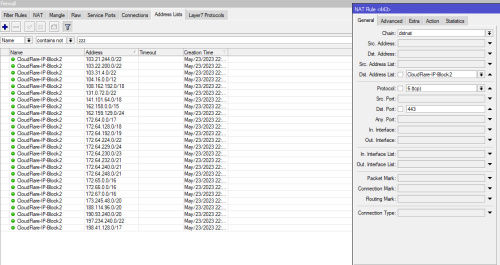
Just tried to redirect most cloudflare https usage to optimized speed and ping ips. (Should be cover 99.5% of cloudflare cdn accessible ips)
Use for few hours, for the result - work very well.
user posted image

user posted image

Edited:
UDP for 443 is also needed. (Due to QUIC is using UDP)

Edited 2:
After adding NAT setting,better restart your device or router or browser,as the connection is still established with old ips.

This post has been edited by go626201: May 24 2023, 01:27 AM

7 Pages < 1 2 3 4 5 > » Top
 

Change to:
| Lo-Fi Version
0.0870sec    0.27    7 queries    GZIP Disabled
Time is now: 1st December 2025 - 06:37 PM