Welcome Guest ( Log In | Register )

26 Pages « < 15 16 17 18 19 > » Bottom

Outline · [ Standard ] · Linear+

Enterprise Networking Mikrotik Routers (RouterBoard & RouterOS), User and owner discussion group

views
     
soonwai
post Jan 2 2019, 10:47 PM


********
All Stars
11,456 posts

Joined: Oct 2007
From: KL


QUOTE(hnr2802 @ Jan 2 2019, 01:28 PM)
Hi all,

Need your advice.
Currently using Mikrotik RB2011UiAS-2HnD-IN.

Upgraded to turbo 800mbps . Plan to replace my route to

1. RB4011iGS+5HacQ2HnD-IN
or
2. Asus AC5300 china set

which one you guys would recommend.

my priority is wifi coverage & speed
*
I'd choose the RB4011 as a router only + a cheap wifi AP. Currently I'm using an RM149 Aztech FG7008GR which is basically 5HacQ2HnT.

Am able to get sustained 850Mbps using 3-chain wifi to LAN locally. Dun have a 4-chain device.
https://forum.lowyat.net/topic/4543383/all
soonwai
post Jan 3 2019, 12:31 AM


********
All Stars
11,456 posts

Joined: Oct 2007
From: KL


QUOTE(hnr2802 @ Jan 3 2019, 12:06 AM)
The sustained 850Mbps using 3 chain wifi is from aztech touter?
*
Yeah, using the Aztech router. MBP shows link speed as 1300Mbps ie: 433x3
Unfortunately the Aztech can't see any link info.

MBP <--wifi--> Aztech <--Gbe--> Server

Mind you, it's just an artificial iperf3 test.
soonwai
post Jan 3 2019, 12:46 AM


********
All Stars
11,456 posts

Joined: Oct 2007
From: KL


QUOTE(chanti-sama @ Jan 3 2019, 12:33 AM)
Hi soonwai

I followed your steps in the post. Checking the logs i can see the unifi is authenticated and connected. But im not getting data thru. Its very strange, i did a ping to the gateway x.x.88.1 is responsive but when ping to google or major site.. seems like no data is coming out.

I left the firewall rules as the default configuration. Could it be dhcp?

When i checked the peer dns. It auto assigned the default unifi dns
And the nat is masquerade and bind to the unifi-internet interface

By now the laptop at port 2 should have access to internet. But its not so.
*
Can you post "/export compact hide-sensitive" ? Just dump the whole thing , it's not too long. Remove any sensitive info. No need to do any guesswork if you can do this.

Can you ping 8.8.8.8 from PC? If no, probably masq is set wrongly.

Can you dig or nslookup google.com and get an IP address? If no, maybe DNS set wrongly.

As for DHCP, is your PC getting the correct ip, mask, router ip and DNS? DNS should be the router.

Since you were having prob earlier, did you start from scratch? 1. Reset to defaults 2. Use Quickset for initial settings?

This post has been edited by soonwai: Jan 3 2019, 12:57 AM
soonwai
post Jan 5 2019, 12:39 PM


********
All Stars
11,456 posts

Joined: Oct 2007
From: KL


QUOTE(chanti-sama @ Jan 5 2019, 10:32 AM)
Hi Guys... Just a little update. I managed to get the router working. Strange i repeated the steps from soonwai a few times only now got it up.

Also can i check does the google n open dns still works? The unifi router goes crazy when i inpt those valeues
*
Google and OpenDNS works. Put the IPs in /ip dns and uncheck pppoe-client's "use peer dns". Uncheck so your router only use the DNS defined by you. Checked also can, your router will use the DNS you set plus the ones that PPPoE gets from TM.

This post has been edited by soonwai: Jan 13 2019, 11:35 PM
soonwai
post Jan 8 2019, 12:45 PM


********
All Stars
11,456 posts

Joined: Oct 2007
From: KL


QUOTE(ahlong @ Jan 7 2019, 12:12 PM)
hi guys..

so need any pro user here to advice. im going to upgrade my router (RB951G-2HnD) that support my newly turbo-ed 800mbps. Atleast can support faster wifi speed than previous model.

thank you in advance
*
hAP AC2 & hEXGr3 are the 2 cheapest Mikrotik's that can support up to 800Mbps.

I suppose you want to upgrade your wifi to AC. If that's the case then hAP AC2 is the obvious choice.

If you need router only, no wifi then hEXGr3 is slightly cheaper.

A few things to note. From my experience using hEXGr3.

hEXGr3:
1. Can support 800Mbps with Fasttrack, no problem. ie: basic config is OK but once you start using queues or other stuff, it'll slow down. Worst case (Fasttrack off) 300-400Mbps.
2. If you use VLANs, eg: internal VLANs or a HyppTV/Internet trunk. The most it can handle is 500-640Mbps. This is because bridge port hw_offload is disabled when vlan filtering is on. Maybe can be avoided using switch chip vlans.

hAP AC2:
Have not played around much with this but it looks good. It can handle 500Mbps with Fasttrack off. Have not tested with 800Mbps.
https://forum.lowyat.net/index.php?showtopi...post&p=90581142

I'm planning on replacing the hEXGr3 with hAP AC2 in the next few days to see how well it handles the vlans and my HyppTV trunk.

As of now, I think go for the hAP AC2. The only things going for hEXGr3 are more RAM (256vs128) and SD card slot. Also early production runs of hAP AC2 had 256MB instead of 128MB.

This post has been edited by soonwai: Jan 14 2019, 08:06 AM
soonwai
post Jan 13 2019, 06:32 PM


********
All Stars
11,456 posts

Joined: Oct 2007
From: KL


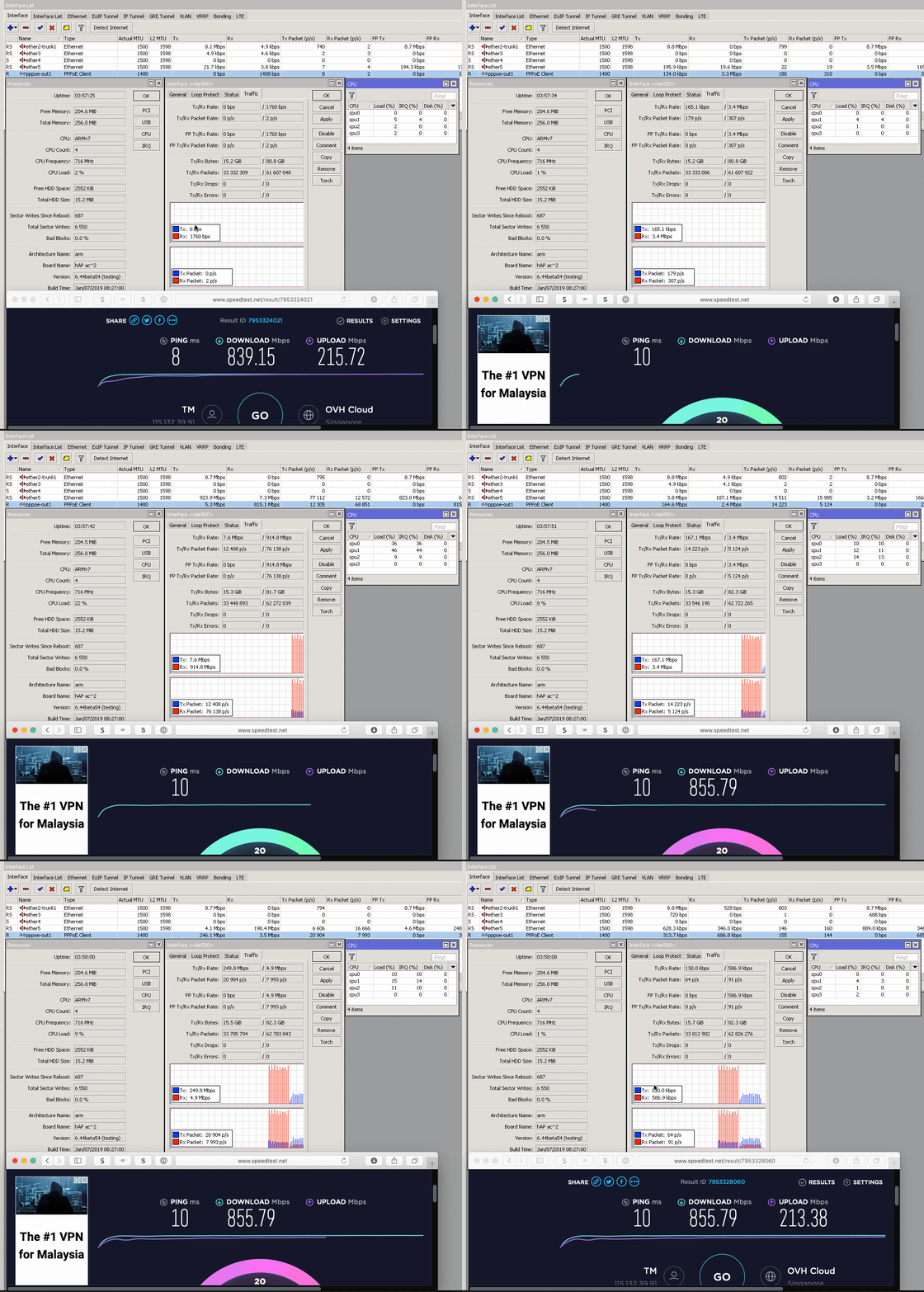
Trying out hAP AC2 as my RB750Gr3 was not fast enough to handle Turbo800 due to my use of local VLANs and a VLAN trunk for HyppTV and Internet.

Happy to report hAP AC2 more than capable. See the screen recording for CPU usage. HyppTV is also streaming at the same time as the test. Have to put off buying the RB4011 for now. sad.gif

hAP AC2
ether1 - Unifi BTU
ether2 - vlan 50 and 600 trunk to RB2011UAS downstairs
ether5 - to my MacBook Pro (Thunderbolt GbE adaptor)

Fasttrack: ON
Bridge ports hw_offload: OFF (auto off due to vlans in bridge)

VLANs configured are 500, 600, 50 (ipv4 LAN), 56 (ipv6 LAN) and 70 (IoT LAN)

user posted image

user posted image
https://res.cloudinary.com/soonwai/image/up...t-cpu_usage.gif

This post has been edited by soonwai: Jan 13 2019, 11:37 PM
soonwai
post Jan 14 2019, 09:08 AM


********
All Stars
11,456 posts

Joined: Oct 2007
From: KL


QUOTE(amirsubhi @ Jan 14 2019, 02:40 AM)
Wow that's a good speed from Singapore
*
Yeah, pretty good right? And quite consistent too with OVH SG.

Normally I would use speedtest.tm.com.my but I've been getting fluctuating results from both 203.121.106.74 and 58.26.239.30 of 500-750Mbps. Seldom goes above 800. Not sure what the problem is. Perhaps many people, like me smile.gif , who still haven't gotten over the novelty of speed testing 800meg.

Anyway the most consistent tests now are with http://testyourspeed.time.com.my and speedtest.net OVH Cloud SG.

This post has been edited by soonwai: Jan 14 2019, 12:52 PM
soonwai
post Jan 14 2019, 04:03 PM


********
All Stars
11,456 posts

Joined: Oct 2007
From: KL


QUOTE(loslocos @ Jan 10 2019, 04:47 PM)
Hi Bro,
router hAP AC2 can support how many user? is it can support up to 100 user? for office purpose.tq in advance
*
I think should be no problem for routing. What speed is your internet?

My auntie’s Office is using an old RB750Gr2 with Unifi 100Mbps and approx 120 active devices during the day. Roughly 40-50 PCs/laptops and the rest are mobiles. Runs quite well and stable.
soonwai
post Jan 24 2019, 12:43 AM


********
All Stars
11,456 posts

Joined: Oct 2007
From: KL


Does this happen to you? I'm on hAP AC2 6.44beta54.

tl;dr: DHCP server works even when disabled.

Disabled DHCP server.
Disabled static DHCP leases
Reboot router.
Reboot PC.
PC and all other devices on the network still gets its IP addresses assigned via DHCP according to its respective static leases.

Yes, it's the only DHCP server defined. No other DHCP servers, not even disabled ones.

This post has been edited by soonwai: Jan 24 2019, 07:10 PM
soonwai
post Feb 14 2019, 11:21 PM


********
All Stars
11,456 posts

Joined: Oct 2007
From: KL


Mikrotik RB750GL from 2011. Still relevant in 2019.
RouterOS 6.43.12
Fasttrack ON
CPU Usage: ~80%
user posted image
Tested on Turbo 800Mbps.

This post has been edited by soonwai: Feb 14 2019, 11:21 PM
soonwai
post Feb 19 2019, 02:39 PM


********
All Stars
11,456 posts

Joined: Oct 2007
From: KL


QUOTE(MX510 @ Feb 19 2019, 11:30 AM)
Hehehe just a quick update

Manage to play the RB4011 with WiFi using 1 Gbps Fibre

Speed is quite great

Only able to pust maximum capacity speed with fasttrack rule enable
...
*
Very nice bro. How fast can the RB4011 go with Fasttrack OFF?
soonwai
post Feb 19 2019, 03:39 PM


********
All Stars
11,456 posts

Joined: Oct 2007
From: KL


QUOTE(MX510 @ Feb 19 2019, 03:37 PM)
Around 300 to 500
*
Seriously? That's really slow. About the same as the hAP AC2.
soonwai
post Feb 20 2019, 12:03 AM


********
All Stars
11,456 posts

Joined: Oct 2007
From: KL


Just thought I do a quick test with hAP AC2 6.44rc1 with Fasttrack OFF. A but surprised.

cpu0 & cpu1 at constant 100%

user posted image
server is TIME, not sure why it's 600miles.

Will double check later but:
1. Fasttrack rule disabled
2. Fasttrack counter dummy rule does not increase

Fasttrack ON as per my earlier test is slightly higher at 850Mbps with substantially lower CPU%.
https://forum.lowyat.net/index.php?showtopi...&#entry91511605

This post has been edited by soonwai: Feb 20 2019, 12:12 AM
soonwai
post Feb 21 2019, 12:36 AM


********
All Stars
11,456 posts

Joined: Oct 2007
From: KL


QUOTE(MX510 @ Feb 20 2019, 06:41 AM)
However cpu load is very low

It was at my friend house not mine hehehe not much time to do tweak
*
If possible, test again please. I'm planning to get the RB4011 but not if it can't route 800Mbps with Fasttrack off.
soonwai
post Feb 21 2019, 08:13 PM


********
All Stars
11,456 posts

Joined: Oct 2007
From: KL


QUOTE(Gaara92 @ Feb 21 2019, 10:01 AM)
you have to disable fastpath and route cache in the IP Settings also. Also bridge setting set to use IP Firewall.
*
Thanks but that's not what I'm looking to do.

QUOTE(raymond82 @ Feb 21 2019, 06:14 AM)
[attachmentid=10186557]

800mbps is nth to this beast biggrin.gif
*
It's awesome! Definitely planing to get one. What do you think of mx510's test results?

This post has been edited by soonwai: Feb 21 2019, 08:15 PM
soonwai
post Mar 6 2019, 05:58 PM


********
All Stars
11,456 posts

Joined: Oct 2007
From: KL


QUOTE(johnsdoes @ Mar 6 2019, 05:10 PM)
if possible, after reset remove default rules.
Im using cheap mikrotik hap AC2,  handle 800mpbs perfectly with very low cpu and ram usage.
device connected more than 10.
*
Me too. Cheap(ish) awesomeness.
https://forum.lowyat.net/index.php?showtopi...post&p=91511605
soonwai
post Mar 6 2019, 08:26 PM


********
All Stars
11,456 posts

Joined: Oct 2007
From: KL


QUOTE(long2292 @ Mar 6 2019, 12:49 PM)
Hi all,
    My router and modem place at first floor. Wifi signal for First floor is good for both 2.4G and 5G. Ground floor is cover by 2.4G but 5G signal is not good at some area.
I plan to buy an access point to put at ground floor to cover up. Please recommend me an access point.
My current setup as below:

Miktrotik RB750G - Asus RT-AC55uhp (configure as access point)
*
Any old spare router? Or just get something used and cheap. Plenty of almost new UniFi freebie WiFi routers available in Garage Sales. Personally I’m using Singtel’s freebie, the Aztech FG7008GR(AC). RM150 new for quad chain 5Ghz. If you have someone to buy it for you, a forumer here bought one from Carousell SG for RM80.
soonwai
post Mar 12 2019, 01:09 PM


********
All Stars
11,456 posts

Joined: Oct 2007
From: KL


QUOTE(Sky.Live @ Mar 12 2019, 09:42 AM)
Where did you guys buy mikrotik router now? i used to buy from a reseller here.. seems cant locate him anymore
*
eurodk, Sublime and Synchroweb.
soonwai
post Mar 29 2019, 11:21 AM


********
All Stars
11,456 posts

Joined: Oct 2007
From: KL


QUOTE(MX510 @ Mar 29 2019, 07:05 AM)
Hehehe rbgr3 is a perodua myvi and 4011 is bmw :-)

That is how it's different hehehe
*
Wait guys, don't forget the hAP AC2, that's the Wira with Evo9 engine.
soonwai
post Mar 29 2019, 11:54 PM


********
All Stars
11,456 posts

Joined: Oct 2007
From: KL


QUOTE(aztech @ Mar 29 2019, 09:32 PM)
this should be it - but now waiting for further test, seems like without fasttrack seems to perform like vios rather than bmw smile.gif
*
A few tests I did on RB750Gr3 on Turbo500.
https://forum.lowyat.net/index.php?showtopi...post&p=90581142
https://forum.lowyat.net/index.php?showtopi...post&p=90471918

Marginal for 500Mbps. If you're doing more with the router, definitely not good enough.

https://forum.lowyat.net/index.php?showtopi...post&p=91511605
hAP AC2 on Turbo 800. Much better.

26 Pages « < 15 16 17 18 19 > » Top
 

Change to:
| Lo-Fi Version
0.0580sec    0.45    7 queries    GZIP Disabled
Time is now: 4th December 2025 - 05:39 AM