

QUOTE(cyberic @ Jul 28 2018, 11:09 PM)
Planning to get CCR1009 with Unifi ac pro soon. Are those TM unifi guide for Hex still apply to CCR?

Yes can, from RM100 to RM10000, same RouterOS same config for UnFi.Enterprise Networking Mikrotik Routers (RouterBoard & RouterOS), User and owner discussion group
|
|
 Jul 31 2018, 02:49 PM Jul 31 2018, 02:49 PM
Return to original view | Post
#301
|
 
All Stars
11,458 posts Joined: Oct 2007 From: KL  
|
QUOTE(cyberic @ Jul 28 2018, 11:09 PM) Planning to get CCR1009 with Unifi ac pro soon. Are those TM unifi guide for Hex still apply to CCR? Yes can, from RM100 to RM10000, same RouterOS same config for UnFi. |
|
|
|
|
|
Aug 1 2018, 09:39 PM
Return to original view | IPv6 | Post
#302
|
|
All Stars
11,458 posts Joined: Oct 2007 From: KL
|
Finally got my hAP AC, used unit at a significant discount. I didn't want to pay full price for it as I've a feeling it's going to be replaced with another 3-chain model soon.
Anyway will test it later and see if it can beat my RM250 Aztech FG7009 which set this, I think, rather impressive benchmark. iPerf3  800Mbps+ iPerf3 from MacBook Pro Retina 2013 (USB3 GBe Ethernet) to MacBook Pro Retina 2013 (5Ghz AC 80MHz) Aztech is 4-chain 5Ghz (Quantenna). MacBooks are 3 (Broadcom). This post has been edited by soonwai: Aug 1 2018, 09:42 PM |
|
|
Aug 2 2018, 05:17 PM
Return to original view | Post
#303
|
|
All Stars
11,458 posts Joined: Oct 2007 From: KL
|
|
|
|
Aug 6 2018, 04:23 PM
Return to original view | Post
#304
|
|
All Stars
11,458 posts Joined: Oct 2007 From: KL
|
QUOTE(cyberic @ Aug 6 2018, 04:16 PM) What is the distance? Same room, about 6ft. |
|
|
Aug 20 2018, 08:56 PM
Return to original view | IPv6 | Post
#305
|
|
All Stars
11,458 posts Joined: Oct 2007 From: KL
|
QUOTE(skywardsword @ Aug 20 2018, 05:29 PM) Omg 4011iGS+5HacQ2HnD-IN-US Can't wait for this.I can decipher. 10gigabit port. 1SFP 4CHAIN WIRELESS 5ghz 2chain wireless 2.4ghz In time for 800mbps? I will relegate the asus86ac to secondary WiFi duty. I want to get another 4 cap AC to go with this SFP port is SFP+, nice. 10 gigabit ports is actually 10 x gigabit ports. At first I read that as 10 x 10GBe ports. LOL. Looks like Annapurna 4-core CPU, maybe same as RB1100AHx4? 4 external 5 Ghz antennas, outer 2 are shared with 2Ghz. Similar design to the RB2011. More info here: https://fccid.io/TV74011GS-5HQ2HD This post has been edited by soonwai: Aug 20 2018, 09:04 PM |
|
|
Aug 22 2018, 12:15 PM
Return to original view | Post
#306
|
|
All Stars
11,458 posts Joined: Oct 2007 From: KL
|
QUOTE(skywardsword @ Aug 22 2018, 09:20 AM) ...iGS – PoE (i)n, (G)igabit Ethernet, (S)FP; The "i" in the name is actually for PoE-Out. Hopefully more than one PoE port but at least one. And there's also a console RJ45 port at the back.... 5. Power supply and PoE: 18-57v with jack or PoE in via Ether1. According to photo, Ether10 capable to PoE-Out (PoE passthrough?) ... I wonder if can swap the R11e-2HPnD out for an R11e-LTE card. This post has been edited by soonwai: Aug 22 2018, 12:16 PM |
|
|
|
|
|
Aug 22 2018, 12:58 PM
Return to original view | Post
#307
|
|
All Stars
11,458 posts Joined: Oct 2007 From: KL
|
QUOTE(skywardsword @ Aug 22 2018, 12:18 PM) Having fun trying to figure out what is the feature of the mikrotik router using its model serial. Haha, yeah I also like to have 2-3 Poe out. For CAP AC expansion. Finally being able to good coverage and let the routers and AP drop connection that are too low in signal strenght. Yeah, you can see almost all the features in its product name. Everything letter or number has a meaning. But looks like this RB4011 has no USB or SD card slot? I couldn't tell from the FCC docs but the name has no "U" in it. Also no "A" so probably Level 4 license? But that's a software thing so I guess they can add it in later and it won't affect the FCC cert.the R11e-LTE card is like your own personal LTE network? The LTE card is for mobile broadband. Just add a SIM card. Not sure about the antennas though. |
|
|
Sep 19 2018, 05:17 PM
Return to original view | Post
#308
|
|
All Stars
11,458 posts Joined: Oct 2007 From: KL
|
QUOTE(yushin @ Sep 19 2018, 04:18 PM) For those using Microtik routers on fiber, anyone using Microtik's own GPON ONY SFP module? TM's ONT only use password authentication to the OLT so theoretically should work if we have the password. Problem is getting the password from the ONT after it has been locked down.I wonder how to persuade telekom to configure it from their side. ... |
|
|
Oct 4 2018, 12:46 AM
Return to original view | IPv6 | Post
#309
|
|
All Stars
11,458 posts Joined: Oct 2007 From: KL
|
A few quick tests on "my" Turbo500 and RB750Gr3.
Fasttrack On: DL: 530Mbps UL: 110Mbps Fasttrack Off: DL: 270Mbps UL: 110Mbps 5 simple queues (1 900M queue for the test PC), 19 firewall rules (including the 2 for Fasttrack), no mangles, vlan50 for LAN traffic. Queue for test PC removed. Fasttrack Off: DL: 350Mbps UL: 110Mbps Will test again when I get my 800Mbps Turbo. This post has been edited by soonwai: Oct 4 2018, 12:46 AM |
|
|
Oct 9 2018, 05:50 PM
Return to original view | Post
#310
|
|
All Stars
11,458 posts Joined: Oct 2007 From: KL
|
QUOTE(greyshadow @ Oct 5 2018, 05:19 PM) Bro, can help to recommend a model as replacement for the crappy DLink DIR-842 supplied by Unifi? Am on 100mbps unifi now. Was thinking to grab Tenda AC18, but add on a bit I can get a better Mikrotik, but not sure which model to get basically I'll need stable & powerful wifi, vpn client built in, static route and gigabit port thanks in advance QUOTE(MX510 @ Oct 6 2018, 09:08 AM) hAP AC is not very good. I definitely do not recommend using it as your main router and AP. I did some tests here, https://forum.lowyat.net/topic/4658454, and CPU usage was 50% pushing 400Mbps from Ethernet to wlan. Tested with iPerf3, minimal config as an AP, no routing, and FastPath on. And it’s not cheap.For now, budget choices are: All-in-one: hAP AC2 but only 2x2 MIMO or router only: RB750Gr3 This post has been edited by soonwai: Oct 9 2018, 05:57 PM |
|
|
Oct 10 2018, 06:05 PM
Return to original view | IPv6 | Post
#311
|
|
All Stars
11,458 posts Joined: Oct 2007 From: KL
|
QUOTE(Dato @ Oct 10 2018, 04:14 PM) Greetings, Check your Fasttrack counters to see if your Speedtest is being fasttracked. Perhaps something is preventing it.I got "TURBO-ed" today, from 100 to 800Mbps. I use a hEX RB750GR3 as first point of connection after GPON. It is running CAPsMAN for a hAP AC2 (that is connected to the hEX and that I connect to via WiFI) and a number of cAP ACs and wAPs. Have tested connection via WiFi and CAT6 and speeds are equivalent. I have tried various combinations of FastTrack, FastPath and enabling and disabling PPPoE encryption. ~14% is the highest I have seen the CPU. 231Mbps down and 153Mbps down is the best result from a single test. I have seen the uploads over 230Mbps but the downloads were terrible at that time. Could anyone with a similar connection please point me in the right direction? Thanks. The overall CPU usage remains low for me too when I max out the RB750Gr3 with Fasttrack Off. Check individual CPU threads (/system resource cpu). In my case one of the threads maxes out. Mine is Turbo500. Fasttrack On: DL: 530Mbps UL: 110Mbps Fasttrack Off: DL: 270Mbps UL: 110Mbps 5 simple queues (1 900M queue for the test PC), 19 firewall rules (including the 2 for Fasttrack), no mangles, vlan50 for LAN traffic. After removing the 900M queue for test PC. Fasttrack Off: DL: 350Mbps UL: 110Mbps 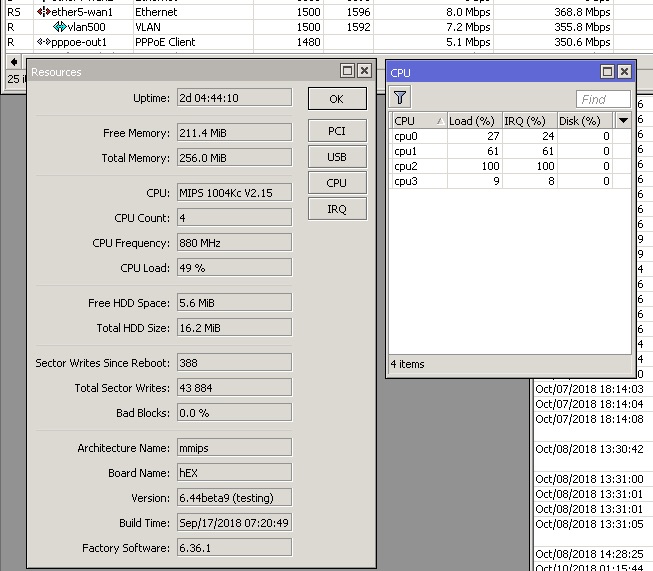 With Fasttrack off. CPU at 50%. One core is maxed out. I'm not using CAPSMAN. I do use VLANs so hardware offload for the switch is off due to that. This post has been edited by soonwai: Oct 10 2018, 06:23 PM |
|
|
Oct 10 2018, 06:33 PM
Return to original view | IPv6 | Post
#312
|
|
All Stars
11,458 posts Joined: Oct 2007 From: KL
|
QUOTE(Dato @ Oct 10 2018, 06:12 PM) Traffic seems to be fasttracked. I mean check the Fasttrack dummy rule in /ip firewall. See whether it increases when you do your speedtest. If it does, means it's being fasttracked.ip-forward: yes send-redirects: yes accept-source-route: no accept-redirects: no secure-redirects: yes rp-filter: no tcp-syncookies: no max-neighbor-entries: 8192 arp-timeout: 30s icmp-rate-limit: 10 icmp-rate-mask: 0x1818 route-cache: yes allow-fast-path: yes ipv4-fast-path-active: no ipv4-fast-path-packets: 0 ipv4-fast-path-bytes: 0 ipv4-fasttrack-active: yes ipv4-fasttrack-packets: 536551 ipv4-fasttrack-bytes: 591550858 |
|
|
Oct 10 2018, 06:53 PM
Return to original view | IPv6 | Post
#313
|
|
All Stars
11,458 posts Joined: Oct 2007 From: KL
|
QUOTE(Dato @ Oct 10 2018, 06:41 PM) Confirmed it does go up. Must be something else then. I don’t use capsman so not sure if that affects anything. It shouldn’t if your test pc is connected directly to the rb750gr3. Got another computer to test. Not windows if possible. |
|
|
|
|
|
Oct 11 2018, 04:18 PM
Return to original view | IPv6 | Post
#314
|
|
All Stars
11,458 posts Joined: Oct 2007 From: KL
|
QUOTE(Boldnut @ Oct 11 2018, 04:06 PM) hey guys how to sync time with mikrotik router? Mine is like this:I put google NTP server IP on my router winbox-->system-->NTP client, but it end up on wrong time despite I set GMT+8. for example 4pm become yesterday 8.30pm... wtf everytime I reboot my router they get the wrong time. /system ntp client set enabled=yes server-dns-names=pool.ntp.org /system clock set time-zone-name=Asia/Kuala_Lumpur |
|
|
Oct 12 2018, 06:53 PM
Return to original view | IPv6 | Post
#315
|
|
All Stars
11,458 posts Joined: Oct 2007 From: KL
|
QUOTE(weikee @ Oct 11 2018, 04:50 PM) Hi All, I did some quick tests here with the hAP AC2. It's OK. Wifi performance is average for 2x2. Can't say anything about reliability yet.Long time didn't visit this thread. FYI (if it have not mention before) Mikrotik have a new feature for you to get the Unifi Dynamic IP and you can skip the subscription of noip or similar services. https://wiki.mikrotik.com/wiki/Manual:IP/Cloud BTW, anyone using rbd52g-5hacd2hnd-tc ? Is it stable. Last i read it have some wifi connection speed issue. https://forum.lowyat.net/index.php?showtopic=4658454 |
|
|
Oct 14 2018, 05:25 AM
Return to original view | Post
#316
|
|
All Stars
11,458 posts Joined: Oct 2007 From: KL
|
QUOTE(soonwai @ Oct 4 2018, 12:46 AM) A few quick tests on "my" Turbo500 and RB750Gr3. Did another test on a default config RB750Gr3. (6.44beta20)Fasttrack On: DL: 530Mbps UL: 110Mbps Fasttrack Off: DL: 270Mbps UL: 110Mbps 5 simple queues (1 900M queue for the test PC), 19 firewall rules (including the 2 for Fasttrack), no mangles, vlan50 for LAN traffic. Queue for test PC removed. Fasttrack Off: DL: 350Mbps UL: 110Mbps Will test again when I get my 800Mbps Turbo. One Speedtest Fasttrack On: DL: 530Mbps UL: 110Mbps Fasttrack Off: DL: 448Mbps UL: 110Mbps (50%, one CPU at 100%) Two Speedtests Fasttrack Off: DL: 480Mbps UL: 110Mbps (one CPU at 100%, one at 90%) And a test on a default config hAP AC2. (6.44beta20) Fasttrack On: DL: 530Mbps UL: 110Mbps Fasttrack Off: DL: 527Mbps UL: 110Mbps (one CPU at 30-50%) Will need to wait for my Turbo800 to test again. The hAP AC2 is looking good. |
|
|
Oct 17 2018, 04:25 PM
Return to original view | IPv6 | Post
#317
|
|
All Stars
11,458 posts Joined: Oct 2007 From: KL
|
QUOTE(zuewhyrie @ Oct 16 2018, 10:30 PM) Can we configure hypptv setting without using bridge? Anyone have try it? On my ccr1009 currently configured using bridge.. Dunno if this counts. On my RB2011 which receives the vlan trunk from my RB750Gr3, the incoming trunk and outgoing untagged ports are configured using /switch only. |
|
|
Nov 25 2018, 12:02 AM
Return to original view | Post
#318
|
|
All Stars
11,458 posts Joined: Oct 2007 From: KL
|
QUOTE(jAsOs @ Nov 24 2018, 10:49 PM) Hi, is the Mikrotik RB750Gr3 hEX compatible with Unifi 500 Mbps? https://forum.lowyat.net/index.php?showtopi...post&p=90581142My tests with UniFi 500Mbps and RB750Gr3. |
|
|
Nov 29 2018, 02:18 PM
Return to original view | Post
#319
|
|
All Stars
11,458 posts Joined: Oct 2007 From: KL
|
QUOTE(zzzhhhzzz @ Nov 29 2018, 09:45 AM) just wondering.. when you enable fastrack you are bypassing all your firewall and filters... isnt it making your connection unsafe ? That's correct. But it's OK, it's just for the test. Normally I have Fasttrack off. Just gotta make sure the router is fast enough for your speed. |
|
|
Jan 2 2019, 10:31 PM
Return to original view | Post
#320
|
|
All Stars
11,458 posts Joined: Oct 2007 From: KL
|
QUOTE(chanti-sama @ Dec 31 2018, 04:13 PM) Hi all i have issue connecting to tm using the mikrotik hexS. I followed the step by step guide to setup mikrotik for tmunifi Managed to get it working? The guide kinda works. Just have to make sure "use-peer-dns" is checked. There's also one here: https://forum.lowyat.net/topic/4202122/allhttps://wiki.mikrotik.com/wiki/Mikrotik_and...y_arpee/soonwai Below is my topology: Modem > hexS > laptop These are the steps i did 1. Plugged wan cable to port 1 2. Via quick set configured ppoe - username/password 3. Set vlan500 to interface 1 4. Set ppoe-out1 to vlan500 By now the guide said i should have internet. It didnt... I checked the logs it shows the router trying to connect and disconnect immediately. Im not sure how to furthee trace... So right now i revert back to the unifi router they gave me. Not sure which part i missed out.. The one on Mikrotik's wiki won't/can't be updated since Mikrotik disabled non-staff access to it. Assuming you used QuickSet, a few things to note. I'll update the guide one of these days. 1. As mhwee said, ignore the master/slave stuff. 2. If you're getting connect/disconnect, check that you have set vlan500 interface vlan-id to 500. Common oversight. 3. Incorrect username/password will also cause this, log shows auth error, but I'm sure no-one here will make that mistake. 4. In pppoe-client, check use-peer-dns. Previously default was checked but not anymore. So: 1. If you did #4, you don't need to set DNS. 2. If you used QuickSet, the correct NAT (srcnat) rule will be set. 3. If you didn't use QuickSet, make sure you have proper firewall rules to the input chain. A common result of not having these is that your router will be participating in a DNS or other amplification attack in a matter of hours or days. This post has been edited by soonwai: Jan 2 2019, 10:48 PM |
| Change to: |  0.0253sec 0.0253sec
 0.51 0.51
 7 queries 7 queries
 GZIP Disabled GZIP Disabled
Time is now: 8th December 2025 - 10:01 PM |
 Quote
Quote