Outline ·
[ Standard ] ·
Linear+
Enterprise Networking Mikrotik Routers (RouterBoard & RouterOS), User and owner discussion group
|
soonwai
|
 Sep 1 2019, 11:11 PM Sep 1 2019, 11:11 PM
|

|
QUOTE(Garena @ Sep 1 2019, 10:51 PM) Of course i know what i'm saying. Anandtech reported that those smartphones that packed with the Broadcom chip that i mentioned do indeed support MU-MIMO because it's a 802.11ac Wave 2 chip. Anandtech referred to the teardown reports by third parties like TechInsights so i trust their source. I hope you go dig deeper and read. Well if you wanna think that the iPhone Xs, Xs Max, Xr do not support MU-MIMO nobody's stopping you thinking that way though, it's up to you. There're Wave 2 chip equipped devices which don't support Wave 2 features like MU-MIMO. In fact, Mikrotik has one. Can't recall which one though. Edit: grammar This post has been edited by soonwai: Sep 2 2019, 02:28 AM |
|
|
|
|
|
soonwai
|
Sep 3 2019, 04:49 PM
|
|
|
QUOTE(thongjj2 @ Sep 2 2019, 01:43 PM) Yea, this is what I know so far when setting up time, but i can't ping to google dns at all, even setting dns like I do when using maxis. I can go to a few website like idownloadblog.com but not the major site like Google or youtube. The dlink 882 doesn't give me this issue though. Post your /export here. Could be NAT or routing problem. Are you running IPv6? This post has been edited by soonwai: Sep 3 2019, 04:49 PM |
|
|
|
|
|
soonwai
|
Sep 6 2019, 07:54 PM
|
|
|
QUOTE(paisyam @ Sep 6 2019, 07:05 PM) hi. anyone using RB4011iGS+RM with latest routerOS and firmware? i'm using unifi 800mbps. using TM DLink 842 router i able to get 800++. but using RB4011iGS+RM i only get 200 -300mbps each port. anyone can help? Post /export for us to have a look. |
|
|
|
|
|
soonwai
|
Sep 6 2019, 09:47 PM
|
|
|
paisyam Your queues limiting the speed maybe? Which port and ip when you do the test that results in ~200Mbps?
A quick test you can do is disable all your queues and run the Speedtest again.
|
|
|
|
|
|
soonwai
|
Nov 5 2019, 07:38 PM
|
|
|
QUOTE(boxsystem @ Nov 5 2019, 06:57 PM) Guyss Stupid question, mikrotik routers able to combine both Maxis and Unifi connection concurrently? Yes, can. |
|
|
|
|
|
soonwai
|
Dec 16 2019, 11:42 PM
|
|
|
QUOTE(th3game @ Dec 16 2019, 10:27 PM) done changeNAT out. interface to to ppoe-out1 but how about DHCP Client..should be ether1? 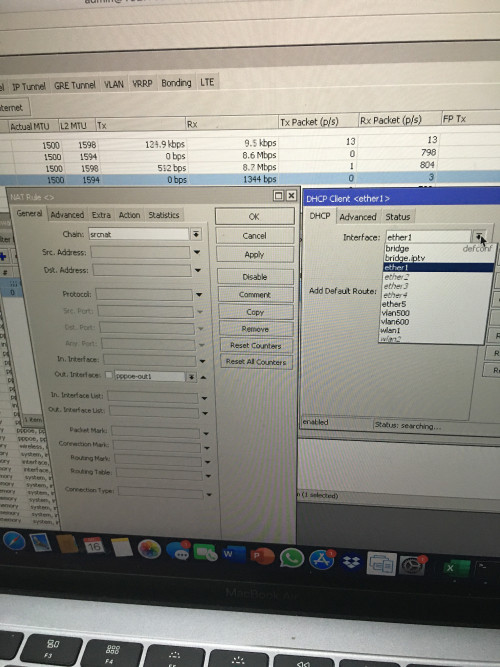 As asellus said, you can delete or disable the DHCP client. Your WAN interface list has ether1 and pppoe-out1. You can remove ether1 from the WAN address list. Once you've done that, it's the same as setting the masquerade rule explicitly to pppoe-out1 instead of interface list WAN. The masquerade rule will work either way. |
|
|
|
|
|
soonwai
|
Dec 26 2019, 02:09 PM
|
|
|
QUOTE(boxsystem @ Dec 26 2019, 09:49 AM) Okay, I am looking into Audience now which way cheaper than asus routers and what I am using currently. Audience has MESH capabilities which is one of the criteria that ticks the box. I believe and I have asked previously that mikrotik routers can do and combine dual WAN, which in this case I am subscribed to both Maxis and TM. Despite the difference in VLAN id both are able to be combined into a load balancing setup. Correct me if I am wrong? Asus seems to having issues with dual WAN especially with dual PPPoE connections. I'm not too confident about the Audience. Does it have anything that helps clients roam? I asked in the Mikrotik forums about 802.11 KVR and no-one answered. As far as I can tell, it only has an extra 5Ghz radio. Dual WAN with Mikrotik is no problem. It's up to your imagination how to configure the dual WANs and balancing. Dual PPPoE, no problem, or weirder setups like what I did previously - My UniFi's PPPoE and a wifi bridge to my neighbours UniFi. |
|
|
|
|
|
soonwai
|
Dec 31 2019, 01:08 PM
|
|
|
QUOTE(boxsystem @ Dec 31 2019, 10:38 AM) Does this work as failover only? What about combining both connections? @soonwai I used both-addresses-and-ports for pcc. Try that. This is because Speedtest opens multiple connections to different ports to the same server. Same IP address but different ports. That's why you need both-addresses-and-ports. If you test with torrents, I think you'll find your both-addresses pcc is already working. CODE action=mark-connection chain=prerouting dst-address-type=!local in-interface=bridge-vlan50 new-connection-mark=WAN1_conn passthrough=yes per-connection-classifier=both-addresses-and-ports:2/0
add action=mark-connection chain=prerouting dst-address-type=!local in-interface=bridge-vlan50 new-connection-mark=WAN2_conn passthrough=yes per-connection-classifier=both-addresses-and-ports:2/1
My /ip settings ip-forward is enabled. I also had problems with Fasttrack and dual wan pcc. https://forum.lowyat.net/index.php?showtopi...post&p=83915805Had to exclude WAN2 from Fasttrack. But this was a couple of years ago. So not sure if the problem still occurs with recent RouterOS versions. Currently I'm not using dual WAN. This post has been edited by soonwai: Dec 31 2019, 01:18 PM |
|
|
|
|
|
soonwai
|
Dec 31 2019, 04:31 PM
|
|
|
QUOTE(boxsystem @ Dec 31 2019, 04:03 PM) Still doesn't work for me. Still getting 300mbps only during speedtest. Even for torrents? |
|
|
|
|
|
soonwai
|
Apr 30 2020, 12:19 PM
|
|
|
hAP AC3 with 5Gb ports announced but still 2x2. Nevertheless see what price first.
Sorry it's 5 x 1Gb ports.
This post has been edited by soonwai: May 1 2020, 02:50 PM
|
|
|
|
|
|
soonwai
|
May 1 2020, 03:09 AM
|
|
|
QUOTE(th3game @ May 1 2020, 03:04 AM) what's the major difference between this hap ac3 n hap ac2? is it only LTE support? HAP AC3 CatalogueNo idea, I only saw the 5GBe ports and posted. Haven't looked into it yet. |
|
|
|
|
|
soonwai
|
May 1 2020, 02:49 PM
|
|
|
QUOTE(asellus @ May 1 2020, 08:05 AM) Major difference looks like to be the LTE6 modem and the brand new casing. It has 5 1Gbe ports, not 5Gbe ports. I don't think Mikrotik has 5GBe ports outside SFP cages. My bad, my bad,, I was looking for 5/10 gbps stuff and then came across the hap ac3. I think my brain was stuck on 5Gbps. |
|
|
|
|
|
soonwai
|
Dec 10 2020, 01:56 AM
|
|
|
Anyone here with a hAP AC2 that has 128MB of RAM? Can you post the output of "/system resource irq print"? I'm wondering if your CPU is IPQ4018 or IPQ4019 or whether it's just cosmetic. CODE [admin@hAPac2] /system> /system resource irq print
Flags: ro - read-only
# IRQ USERS CPU ACTIVE-CPU COUNT
0 ro 97 edma_eth_tx0 auto 9 193
1 ro 98 edma_eth_tx1 auto 9 386
2 ro 99 edma_eth_tx2 auto 10 255
3 ro 100 edma_eth_tx3 auto 83 608
4 127 78b5000.spi auto 0 1
5 164 usb1 auto 1 824
6 200 ipq4019_ahb auto 2 771
7 201 ipq4019_ahb auto 3 771
8 ro 239 qca_crypto auto 0
9 ro 272 edma_eth_rx0 auto 49 635
10 ro 273 edma_eth_rx1 auto 9 818
11 ro 274 edma_eth_rx2 auto 50 627
12 ro 275 edma_eth_rx3 auto 69 638
13 351 gpiolib This is the output from mine which has 256MB RAM. This post has been edited by soonwai: Dec 10 2020, 02:03 AM |
|
|
|
|
|
soonwai
|
Dec 24 2020, 03:43 PM
|
|
|
QUOTE(afif92 @ Dec 24 2020, 03:39 PM) Hi, is there Mikrotik router that support for AES-NI like RT-AX86U or RT-AC86U and capable to set up as Openvpn client? Thanks I think only ROS x86 supports AES-NI (since v6.39). So no. This post has been edited by soonwai: Dec 24 2020, 03:44 PM |
|
|
|
|
|
soonwai
|
Dec 31 2020, 11:26 PM
|
|
|
QUOTE(piju @ Dec 31 2020, 10:53 PM) Guys, any tutorials how to enable IPV6 on maxis fibre with mikrotik hap lite tc ? This is more or less all you need. CODE /ip dns
set allow-remote-requests=yes servers=8.8.8.8,8.8.4.4,2001:4860:4860::8844
/ipv6 address
add from-pool=ipv6pool50 interface=vlan50
/ipv6 dhcp-client
add add-default-route=yes interface=pppoe-out1 pool-name=ipv6pool50 request=prefix use-peer-dns=no
/ipv6 nd
set [ find default=yes ] interface=vlan50 mtu=1480
/ipv6 nd prefix default
set preferred-lifetime=1h valid-lifetime=2h
Forgot to add this:
/ipv6 firewall filter add action=accept chain=input dst-port=546 in-interface=unifi protocol=udp src-address=fe80::/16
The DNS command is just to add an IPV6 DNS server. Replace vlan50 with your bridge. Check that your ipv6 firewall allows icmpv6 and dhcpv6 client port 546. This post has been edited by soonwai: Jan 1 2021, 02:22 PM |
|
|
|
|
|
soonwai
|
Jan 1 2021, 02:17 PM
|
|
|
QUOTE(piju @ Dec 31 2020, 11:34 PM) thanks, but not working. dhcpv6 status is still searching I knew I forgot something. Check your IPv6 firewall. See if you have this or similar rule for port 546. CODE /ipv6 firewall filter add action=accept chain=input dst-port=546 in-interface=pppoe-out1 protocol=udp src-address=fe80::/16 Port 546 is for your DHCPv6 client. Happy New Year! This post has been edited by soonwai: Jan 1 2021, 02:23 PM |
|
|
|
|
|
soonwai
|
Jan 1 2021, 03:13 PM
|
|
|
QUOTE(piju @ Jan 1 2021, 03:05 PM) thanks. now i can get IPv6 address but my client still can connect with IPv6 address yet. Can you post your /export ? Are your devices getting an IPv6 address? |
|
|
|
|
|
soonwai
|
Jan 1 2021, 03:16 PM
|
|
|
Just for fun. I think I have posted before long time ago. https://r-1.ch/mikrotik-unicode-ssid-generator.phpNow you can use emoji for your SSID. Warning, some older devices dun like it.  |
|
|
|
|
|
soonwai
|
Jan 1 2021, 03:56 PM
|
|
|
QUOTE(piju @ Jan 1 2021, 03:21 PM) CODE /ipv6 address
add from-pool=myPool interface=bridge
/ipv6 dhcp-client
add add-default-route=yes interface="maxis pppoe" pool-name=myPool request=\
prefix use-peer-dns=no
/ipv6 firewall filter
add action=accept chain=input dst-port=546 in-interface="maxis pppoe" protocol=\
udp src-address=fe80::/16
add action=accept chain=input dst-port=546 in-interface="maxis pppoe" protocol=\
udp src-address=fe80::/16
/ipv6 nd
set [ find default=yes ] interface=bridge mtu=1480
/ipv6 nd prefix default
set preferred-lifetime=1h valid-lifetime=2h
https://ibb.co/r4yFpppLooks OK, is your Mikrotik router getting an IPv6 address from the pool? If it is, RADVD is already working. |
|
|
|
|
|
soonwai
|
Jan 1 2021, 04:26 PM
|
|
|
QUOTE(piju @ Jan 1 2021, 04:21 PM) done. manually add ipv6 dns on clients resolve this issue. thank you very much for your help. Ahh, ok, sorry my bad, I assumed you were using the router as DNS server. |
|
|
|
|



 Quote
Quote
 0.0456sec
 0.47
0.47
 7 queries
 GZIP Disabled