

turned off fast dormancy.. will observe if the network keeps on "jumping" or not
SAMSUNG GALAXY S II Official thread V14, Be a SMART user - Pls read Page 1 first
SAMSUNG GALAXY S II Official thread V14, Be a SMART user - Pls read Page 1 first
|
|
 Sep 18 2011, 11:23 AM Sep 18 2011, 11:23 AM
|
 
Senior Member
8,306 posts Joined: Jan 2003 From: Puchong Melaka Cyberjaya  
|
turned off fast dormancy.. will observe if the network keeps on "jumping" or not
|
|
|
|
|
|
Sep 18 2011, 11:24 AM
|

All Stars
10,873 posts Joined: Apr 2009
|
QUOTE(chicken12345 @ Sep 18 2011, 11:15 AM) what rom are u using? =) In my sig. But I have added some tweaks also. |
|
|
Sep 18 2011, 11:25 AM
|
|
Senior Member
8,306 posts Joined: Jan 2003 From: Puchong Melaka Cyberjaya
|
QUOTE(TheLaptopDudeGuy @ Sep 18 2011, 08:18 AM) My camera same as you, got delay after capture a pic. I dun tink is rom related, cuz every rom i use like that. mate.. try to turn off fast dormancy and see if this improve thing?Added on September 18, 2011, 8:24 amAlamak! 2nd night, 66% become 52%  dunno why battery drain happen at night only, daytime when standby batt usually very impressive... anyways, heres my batt usage and betterbatterystats image. *#9900# disable fast dormancy |
|
|
Sep 18 2011, 11:27 AM
|
|
All Stars
10,873 posts Joined: Apr 2009
|
QUOTE(davidlow7 @ Sep 18 2011, 11:23 AM) turned off fast dormancy.. will observe if the network keeps on "jumping" or not I dont think malaysia telco support this yet. So no difference I think. |
|
|
Sep 18 2011, 11:33 AM
|
|
Senior Member
8,306 posts Joined: Jan 2003 From: Puchong Melaka Cyberjaya
|
QUOTE(antt00 @ Sep 18 2011, 11:27 AM) I dont think malaysia telco support this yet. So no difference I think. One of the main reasons for me to turn off is to save battery if Malaysia Telco does not support this.Well, I need to test it out and see if it does help. |
|
|
Sep 18 2011, 11:36 AM
|

Senior Member
2,583 posts Joined: Oct 2010
|
QUOTE(davidlow7 @ Sep 18 2011, 11:25 AM) mate.. try to turn off fast dormancy and see if this improve thing? Already turned that off.*#9900# disable fast dormancy Added on September 18, 2011, 11:37 am QUOTE(antt00 @ Sep 18 2011, 10:53 AM) My batt drain last night was only from 99 to 96 with data off. Alrkeady uninstalled facebook[attachmentid=2440608] Seems like facebook is waking up your phone to sync. This post has been edited by TheLaptopDudeGuy: Sep 18 2011, 11:37 AM |
|
|
|
|
|
Sep 18 2011, 11:40 AM
|
|
All Stars
10,873 posts Joined: Apr 2009
|
You don't really have to uninstall it. I also got facebook installed. Just disable auto sync if you do not need it.
|
|
|
Sep 18 2011, 11:44 AM
|

Senior Member
2,000 posts Joined: Oct 2004
|
wat is this fast dormancy thingy?..
|
|
|
Sep 18 2011, 11:49 AM
|

Senior Member
5,105 posts Joined: Mar 2007 From: In front of my desktop/laptop/phone 
|
QUOTE(ndragon @ Sep 18 2011, 11:44 AM) wat is this fast dormancy thingy?.. Ask unker google... |
|
|
Sep 18 2011, 11:54 AM
|
 
Elite
27,801 posts Joined: Jun 2007 From: Johor
|
QUOTE(ndragon @ Sep 18 2011, 11:44 AM) wat is this fast dormancy thingy?.. Refer page 1 FAQ Q16 ; repost herePhones Today became more and more sophisticated. They are no longer devices for placing calls or for sending and receiving text messages only. They have become more “smart” and feature packed. A phone is now a PDA, a media player, an internet device and much more which is entirely different from what it was like say 10 years ago. The advancement of the cell phone technology has caused these devices to demand more power. Sadly (and this is my personal opinion) the advancement in Battery technology has not been on par with progress in cellular devices, standards and networks. This is where new network technologies like Fast Dormancy come in play in an attempt to optimize battery live of our power hungry Devices. What is Fast Dormancy? In simple terms its a device feature that enables mobile devices to notify the cellular base stations when the radio resource allocated to the device is no longer in use, so that the radio resource could be immediately released other than waiting for a timeout event. For instance lets say you are browsing a webpage using your cellular data plan. You stop at a certain webpage (for example to read this article) the connection is maintained and the device will be registered on the network even if data isn’t received or transmitted (always on) and will remain like that until a timeout event is invoked (as per the network rules as to how much time to wait before connection is terminated due to idle timeout). During this time the device’s battery will be drained needlessly in addition to increased congestion on the cellular network due to numerous idle connections. From a device perspective radio power consumes battery so employing fast dormancy should save battery power and increase its life. This also has an advantage to networks as it reduces congestion. But This doesn’t come without a major disadvantage to the very same cellular networks and operators. The making and breaking of the connections increases the signaling traffic and wastes network resources. The workaround to this was done by Nokia Siemens in collaboration with Qualcomm to employ NCFD or Network Control Fast Dormancy in which the device is put on a battery saving idle state while maintaining its network identity without the need to establish a new connection and request a new identity for the device on the network. How does this affect/benefit us Android Users? Well, too many factors come into play here. The most important being your operator’s network being optimized for Fast Dormancy. In addition each device manufacturer has its own proprietary approach to deploy Fast Dormancy (and well all know proprietary and android don’t play nice regarding third party development). Also the NFCD and other carrier enforced approaches will be designed to override any individual device settings that may ignore the Network Controls. Finally Fast dormancy benefits those who use cellular Data, its of little or no value to those who use wifi for internet and other related services. |
|
|
Sep 18 2011, 11:58 AM
|
|
Senior Member
2,000 posts Joined: Oct 2004
|
QUOTE(benny888 @ Sep 18 2011, 11:54 AM) Refer page 1 FAQ Q16 ; repost here thx benny!.. sry didnt search 1st page.. google lead to other forum asking to disable or not only.. so since msia telco most likely dun support it.. so we r better off disabling it.. jimat the phone's job..» Click to show Spoiler - click again to hide... « This post has been edited by ndragon: Sep 18 2011, 12:04 PM |
|
|
Sep 18 2011, 12:39 PM
|

Junior Member
481 posts Joined: Dec 2008 From: Earth 
|
QUOTE(destEX @ Sep 18 2011, 11:14 AM) i've never lost a WiFi connection, ever, very stable, using tp-link so better u check if got any apps interfering, or if u plan to flash/root, then u go flash latest modem, or u can try update to the KH2 see it improves or not, if not, to the SC u go Ok...now i dont know what u're talking.Btw guys, attached it about my phone. Is everything up to date? 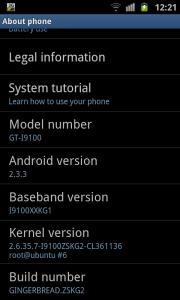
This post has been edited by Mollai: Sep 18 2011, 12:54 PM |
|
|
Sep 18 2011, 12:39 PM
|
|
Junior Member
481 posts Joined: Dec 2008 From: Earth
|
QUOTE(destEX @ Sep 18 2011, 11:14 AM) i've never lost a WiFi connection, ever, very stable, using tp-link so better u check if got any apps interfering, or if u plan to flash/root, then u go flash latest modem, or u can try update to the KH2 see it improves or not, if not, to the SC u go Ok...now i dont know what u're talking.Btw guys, attached it about my phone. Is everything up to date? |
|
|
|
|
|
Sep 18 2011, 12:40 PM
|

Senior Member
4,349 posts Joined: Mar 2005 From: Johor Bahru, Malaysia
|
QUOTE(Mollai @ Sep 18 2011, 01:39 PM) Ok...now i dont know what u're talking. looks grest1Btw guys, attached it about my phone. Is everything up to date? |
|
|
Sep 18 2011, 12:45 PM
|
|
Junior Member
481 posts Joined: Dec 2008 From: Earth
|
QUOTE(megadisc @ Sep 18 2011, 12:40 PM) looks grest1 How come i dont see the attachment using mobile? |
|
|
Sep 18 2011, 01:22 PM
|

Senior Member
998 posts Joined: Nov 2006
|
Anyone here facing bluish tint effect over da screen coz i duno i just go ask for a warranty claim
|
|
|
Sep 18 2011, 01:26 PM
|

Senior Member
1,334 posts Joined: Jun 2011 From: ++TGG++
|
QUOTE(blackrobin @ Sep 18 2011, 01:22 PM) Anyone here facing bluish tint effect over da screen coz i duno i just go ask for a warranty claim i've seen quite numbers of people is having this problem. will loading the custom ROM repair this issue? |
|
|
Sep 18 2011, 01:27 PM
|
|
Elite
27,801 posts Joined: Jun 2007 From: Johor
|
QUOTE(blackrobin @ Sep 18 2011, 01:22 PM) Anyone here facing bluish tint effect over da screen coz i duno i just go ask for a warranty claim That is not a problem. Google about superamoled display |
|
|
Sep 18 2011, 01:29 PM
|

Junior Member
386 posts Joined: Jan 2003
|
hi guy shave some problom with my s2.
i have tried to enable rooting for my phone and i think i forgot to backup the original kernel do anybody know where can i find malaysia version? what i have done are 1) downloaded Odin3-v1.85 2) Downloaded XWKDD_insecure 3) Unlock my phone with the XWKDD kernel 4) use S2Root_1.3.1_Release to enable rooting on the phone. after i did all of the phone now have power user in it so i can use the droid wall. but every time i restart the phone i still can see the triangle icon. read at net they can remove the icon by puting back the original kenel but i dont what is my version... anybody can help? |
|
|
Sep 18 2011, 01:39 PM
|
|
Senior Member
998 posts Joined: Nov 2006
|
QUOTE(benny888 @ Sep 18 2011, 01:27 PM) That is not a problem. Google about superamoled display Haha this is what i wan coz i just knw it, i jsut wan someone to see it |
|
Topic ClosedOptions
|
| Change to: |  0.0289sec 0.0289sec
 0.62 0.62
 6 queries 6 queries
 GZIP Disabled GZIP Disabled
Time is now: 10th December 2025 - 09:20 AM |
 Quote
Quote