

one of his memorial work...ink pen.

This post has been edited by Agito666: Feb 2 2012, 05:32 PM
::: ART ATTACK V3 :::, all about handmade ART :D
|
|
 Feb 2 2012, 05:30 PM Feb 2 2012, 05:30 PM
|
 
Elite
11,861 posts Joined: Oct 2008 From: Bangalasia 
|
seaedge is far more awesome..but he really rarely posting .... last time use N900 drawing there...
one of his memorial work...ink pen. This post has been edited by Agito666: Feb 2 2012, 05:32 PM |
|
|
|
|
|
Feb 2 2012, 10:14 PM
|
 
Junior Member
72 posts Joined: Jul 2008 From: Bandar Baru Bangi 
|
iphone also got. i got test use that app. wah nice wor that app
 too bad my fingers too big =3= keep wrong aim to draw lol too bad my fingers too big =3= keep wrong aim to draw lol |
|
|
Feb 3 2012, 01:09 AM
|

Senior Member
1,023 posts Joined: May 2010
|
QUOTE(inachi @ Feb 2 2012, 03:12 PM) lion u mean =) oh yea..lion lol   |
|
|
Feb 3 2012, 01:18 AM
|
|
Senior Member
1,023 posts Joined: May 2010
|
QUOTE(farique @ Feb 2 2012, 05:25 PM) i wanna buy S2. LOL lol..so guys..Galaxy Ace also can use this apps right? He's way too good.  anyway this make me wanna take note or S2 lol..  |
|
|
Feb 3 2012, 01:42 AM
|
|
Junior Member
72 posts Joined: Jul 2008 From: Bandar Baru Bangi
|
for ifag also can. ask agito download and test xD
|
|
|
Feb 5 2012, 01:17 AM
|

Senior Member
2,610 posts Joined: Aug 2011
|
Character #1 complete:
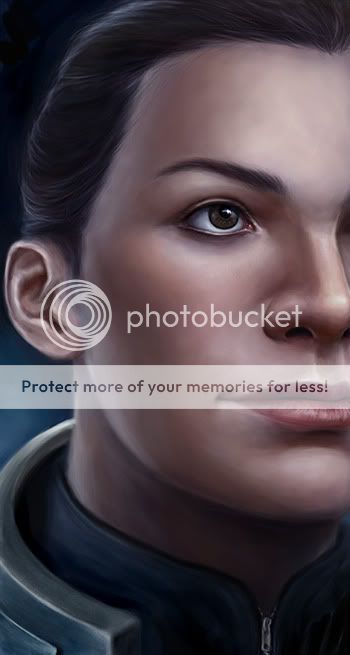 Working on Character #2 now: 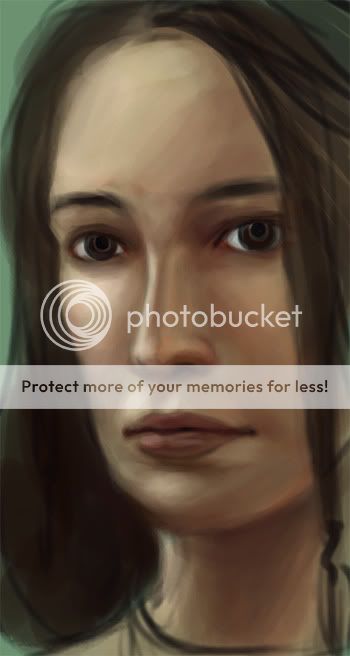 |
|
|
|
|
|
Feb 5 2012, 08:36 PM
|
|
Senior Member
1,023 posts Joined: May 2010
|
hoho that 1st guy baju makes me remember to Mass Effect
  |
|
|
Feb 5 2012, 10:30 PM
|
|
Senior Member
2,610 posts Joined: Aug 2011
|
@ Sai
It IS Commander Shepard, actually Or one player's version of her, anyway (this is for an art trade. I make her a set of paintings, she makes me a pair of earrings)Also, update on the second: 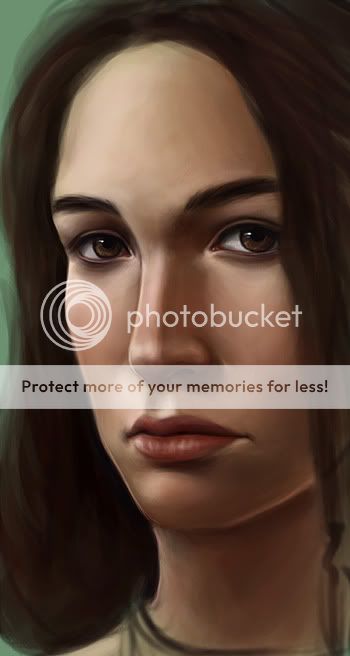 This post has been edited by DragonReine: Feb 5 2012, 10:37 PM |
|
|
Feb 5 2012, 10:37 PM
|

Junior Member
140 posts Joined: Mar 2009 
|
Wow. Awesome piece there Dragon. Thumbs up.
 How many hours? This post has been edited by vypur85: Feb 5 2012, 10:38 PM |
|
|
Feb 5 2012, 10:42 PM
|
|
Senior Member
2,610 posts Joined: Aug 2011
|
Thank you! <3
Uh, around 6-7 hours so far for the second painting? Haven't done the hair and the leather choker yet, and that's going to be a b***h to paint, so there will be another >5 hours for that. Thankfully I have the next two days off, so I can finish this series by Tuesday, and I can get my earrings (image below) mailed over, yay!  |
|
|
Feb 6 2012, 03:19 AM
|

Senior Member
711 posts Joined: Jul 2011 From: Soulport
|
 photoshop sifus,so how can I get it filled with complete white? I mean super clean one. how ah? |
|
|
Feb 6 2012, 07:18 AM
|
|
Senior Member
2,610 posts Joined: Aug 2011
|
@ Adam
My way of getting clean lineart/sketches. Which may or may not be the most optimal way of doing things, but it works for me: Firstly, you'd need to get a much better image of that scan than what you've taken. Right now it's rather obvious that the area on the left side of the image is somewhat darker than the right, and you can see the table at the top of the image, and there's an obvious colour cast (I'm guessing you photographed this under incandescent light), which may cause noise issues. You'll need to get it as evenly illuminated as possible, otherwise you'll get an image that has patches of gray which will be hard to remove unless you're willing to spend time hand-painting it away. Ideally, you should get this scanned using a scanner. Otherwise, you need to get a really clean photograph with no shadows. Suggest reading these to get the optimal image: http://emptyeasel.com/2007/01/19/how-to-ph...r-the-internet/ and http://emptyeasel.com/2009/09/17/camera-ti...rk-for-the-web/ Once you get your clean photo/scan, it's ready for processing in Photoshop. This is what I'd do in Photoshop CS5: (Steps 1 and 2 are actually optional, but I use them if the image has a colour cast, so I can get a clean grayscale sketch) 1) Layers -> New Adjustment Layer -> Channel Mixer. 2) Select option of channel mixing that produces the cleanest image, i.e. the least noise. There are various preset "B&W with X filter" options, you'd have to test for yourself to see which preset produces the cleanest grayscale image. 3) Layers -> New Adjustment Layer -> Levels 4) Push the white slider towards the left to get pure whites. You will probably have push the gray and/or black slider towards the right to compensate for "blowout" or loss of colour. A more obvious tutorial (with helpful images) can be found here: http://www.jmort.com/tutorials/scanning.html#levels This post has been edited by DragonReine: Feb 6 2012, 07:19 AM |
|
|
Feb 6 2012, 12:11 PM
|
|
Senior Member
711 posts Joined: Jul 2011 From: Soulport
|
haha yeah,thats the light from a table lamp.
and I took this using my phone's camera. I need to know a technique on how get this clean and it turns out that you are asking me to get a scanner... T.T thanks for the tutorial,im going to get it illuminated as much as possible. |
|
|
|
|
|
Feb 6 2012, 07:02 PM
|
|
Senior Member
711 posts Joined: Jul 2011 From: Soulport
|
 thank you dragonreine,some of your tutorial works for me in kinda way. after couple of hours spent on this,and the result is,hmmmm not bad,I thought I cant pull this off coz I used the same photo  lol pain in the ass for only one hairstyle...Im not sure if I can do another hairsyle This post has been edited by Adamiquesce: Feb 6 2012, 07:08 PM |
|
|
Feb 6 2012, 08:34 PM
|
|
Senior Member
2,610 posts Joined: Aug 2011
|
Ah, you merged it with your previous avatar, didn't you? Clever. Although the purples don't quite match, LOL
|
|
|
Feb 6 2012, 09:52 PM
|
|
Senior Member
711 posts Joined: Jul 2011 From: Soulport
|
hahaha yeah,I select some random purple,but still looks okay right?
I mixed it with blue and other colours that fit.Single colour only is boring. |
|
|
Feb 6 2012, 11:03 PM
|
|
Senior Member
2,610 posts Joined: Aug 2011
|
Looks fine, as long as one doesn't look too closely. I'm just the kepoh type that likes to inspect every pixel of people's avaters
(joking, but I tend to notice colour shifts, it's hard to ignore) |
|
|
Feb 7 2012, 12:06 AM
|
|
Senior Member
711 posts Joined: Jul 2011 From: Soulport
|
QUOTE(DragonReine @ Feb 6 2012, 11:03 PM) Looks fine, as long as one doesn't look too closely. I'm just the kepoh type that likes to inspect every pixel of people's avaters if like that I'll change the color for your convenience then. (joking, but I tend to notice colour shifts, it's hard to ignore) erm but looking at my previous avatar,the colour seems similar.    This post has been edited by Adamiquesce: Feb 7 2012, 01:35 AM |
|
|
Feb 7 2012, 07:39 PM
|
|
Senior Member
2,610 posts Joined: Aug 2011
|
Portrait #2 complete:
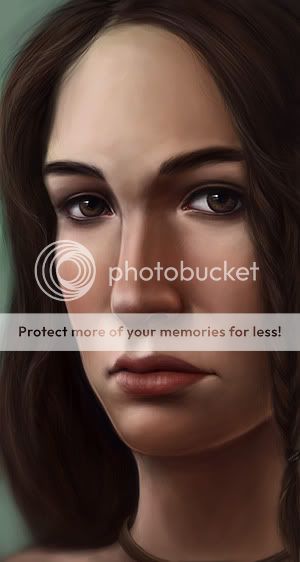 Now working on portrait #3 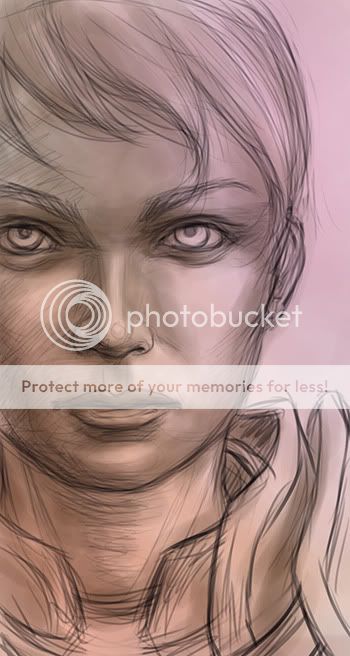 |
|
|
Feb 7 2012, 11:23 PM
|

Senior Member
1,097 posts Joined: Oct 2009 
|
a sharing to you guys..
A very very great artist. http://www.facebook.com/sam.spratt?flyingspaghettimonster=ts Take a look at this album..he actually painted a series of memes. http://www.facebook.com/media/set/?set=a.2...20470458&type=3 and his latest sketch on eyes study.  |
|
Topic ClosedOptions
|
| Change to: |  0.0363sec 0.0363sec
 0.51 0.51
 6 queries 6 queries
 GZIP Disabled GZIP Disabled
Time is now: 4th December 2025 - 08:11 PM |
 Quote
Quote