

QUOTE(Maxieos @ Apr 9 2012, 06:28 PM)
does a Dell 2312 have 4:3 setting menu for convenience ?

yup.CLOSED
|
|
 Apr 9 2012, 06:55 PM Apr 9 2012, 06:55 PM
|
 
Junior Member
29 posts Joined: Mar 2012  
|
QUOTE(Maxieos @ Apr 9 2012, 06:28 PM) does a Dell 2312 have 4:3 setting menu for convenience ? yup. |
|
|
|
|
|
Apr 9 2012, 11:35 PM
|

Senior Member
3,765 posts Joined: May 2008
|
QUOTE(Maxieos @ Apr 9 2012, 06:28 PM) does a Dell 2312 have 4:3 setting menu for convenience ? QUOTE(Diablo !!! @ Apr 9 2012, 06:55 PM) yup. Thanks , any 2312hm owner ? ,another few more important question :1. Dell warranty on dead pixel or bright pixel for ultrasharp monitor ? 2. Does 2312hm having some whining or high pitch sound or electric sound like zerrrr or buzzzz behind the LCD display ? (put your ear behind the LCD at night in a quiet room) http://en.community.dell.com/support-forum...t/19409584.aspx http://www.google.com/search?hl=en&site=&s...aqi=&aql=&gs_l= 3. How does the viewing angle on pivot view ? is it comfortable and accurate ? and other updown leftright of viewing angle ? 4. which REV on the monitor currently ? 5. Anyone OC the monitor to 75 Hz ? http://wondercsabo.szunyi.com/PH/U2312_50_72.inf |
|
|
Apr 10 2012, 12:27 AM
|

Senior Member
960 posts Joined: Mar 2009
|
QUOTE(Maxieos @ Apr 9 2012, 11:35 PM) Thanks , any 2312hm owner ? ,another few more important question : i'm using u2312hm rite now 1. Dell warranty on dead pixel or bright pixel for ultrasharp monitor ? 2. Does 2312hm having some whining or high pitch sound or electric sound like zerrrr or buzzzz behind the LCD display ? (put your ear behind the LCD at night in a quiet room) http://en.community.dell.com/support-forum...t/19409584.aspx http://www.google.com/search?hl=en&site=&s...aqi=&aql=&gs_l= 3. How does the viewing angle on pivot view ? is it comfortable and accurate ? and other updown leftright of viewing angle ? 4. which REV on the monitor currently ? 5. Anyone OC the monitor to 75 Hz ? http://wondercsabo.szunyi.com/PH/U2312_50_72.inf  1. Quote from Cyntrixtech QUOTE WHAT IS DELL's ADVANCED EXCHANGE WARRANTY? DELL Will offer 0 DEAD PIXEL for 3/5 years. If your monitor is defective, CALL DELL @ 1800-88-1306 and provide them with your service tag (found at the back of monitor). Dell will arrange for a PICK UP at your location next business day, and deliver a REPLACEMENT Monitor to you when picking up the defective monitor. You do NOT need to leave your house, you do NOT need to go to a service center, you do NOT need to take a number, you do NOT need to take half day leave. No time wasted, No down time. AWESOME! 2.so far no buzzing sound behind monitor 3.viewing angle is good, just it looks a bit grainy if view from top (but the colour still looks accurate)..other's is fine 4. REV02 |
|
|
Apr 10 2012, 12:31 AM
|

Senior Member
8,461 posts Joined: Mar 2007 From: Kota Bharu,Kelantan 
|
QUOTE(our_team89 @ Apr 9 2012, 02:47 AM) are u sure on B number?coz i tried on my u2312hm it become to bluish Different individual units bro,you can't use his setting and expect it to be exactly the same.If you're serious about calibrating it then borrow a colorimeter from someone else or just use the standard preset.  |
|
|
Apr 10 2012, 10:24 AM
|

Junior Member
235 posts Joined: Mar 2012
|
Ask question for those buy monitor straight from Dell before, how long it wait until Dell decuct our money from Bank after we palce the order?
My previous U2312HM order i notice no money are been deduct and the order suddenly be cancel after few day? Procedure error??? |
|
|
Apr 10 2012, 08:57 PM
|

Senior Member
843 posts Joined: May 2008 From: S'wak Kuching
|
Normally i place order at night via credit card. on the next day bank will call me for verify the payment. after that 3days working the monitor will send to my house
|
|
|
|
|
|
Apr 10 2012, 11:34 PM
|

Senior Member
2,587 posts Joined: Oct 2008 From: Malysia 
|
want to any recommned monitor samsung or other brand to play ps3 and normal usuge? inch around 23-27 in between... thx
|
|
|
Apr 11 2012, 09:32 AM
|
|
Senior Member
960 posts Joined: Mar 2009
|
QUOTE(tabs @ Apr 10 2012, 11:34 PM) want to any recommned monitor samsung or other brand to play ps3 and normal usuge? inch around 23-27 in between... thx u2312hm.i use it with my ps3 now..the image is bright and colour reproduction is good. if u worried about 8ms response time, i used this monitor to play pes2012. no ghosting. |
|
|
Apr 11 2012, 01:08 PM
|

Junior Member
100 posts Joined: Apr 2012
|
QUOTE(our_team89 @ Apr 11 2012, 09:32 AM) u2312hm.i use it with my ps3 now..the image is bright and colour reproduction is good. if u worried about 8ms response time, i used this monitor to play pes2012. no ghosting. how about sound? |
|
|
Apr 11 2012, 02:45 PM
|
|
Senior Member
960 posts Joined: Mar 2009
|
QUOTE(Ips3Ds @ Apr 11 2012, 01:08 PM) how about sound? it doesn't have speaker.. |
|
|
Apr 11 2012, 02:56 PM
|

Junior Member
432 posts Joined: Jan 2007 From: i can haz cheezburger
|
yo bros,if my monitor ada masalah flickering or show black screen even the powa light is on...can repair one ar?
as far as i know, no 1 mahu repair monitor... |
|
|
Apr 11 2012, 03:06 PM
|
Senior Member
683 posts Joined: Jun 2009
|
QUOTE(our_team89 @ Apr 11 2012, 09:32 AM) u2312hm.i use it with my ps3 now..the image is bright and colour reproduction is good. if u worried about 8ms response time, i used this monitor to play pes2012. no ghosting. you can swich on "OVERDRIVE" at U2312HM..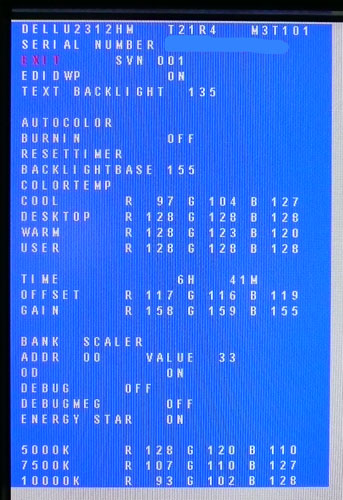 Before we get in to the get into the side by side screen comparisons I want to quickly talk about the overdrive control available through the screens factory menu. Dell have not made this option available through the normal OSD menu, but if you want, you can turn it on and off. It is labelled in the factory menu under "OD" as shown above. 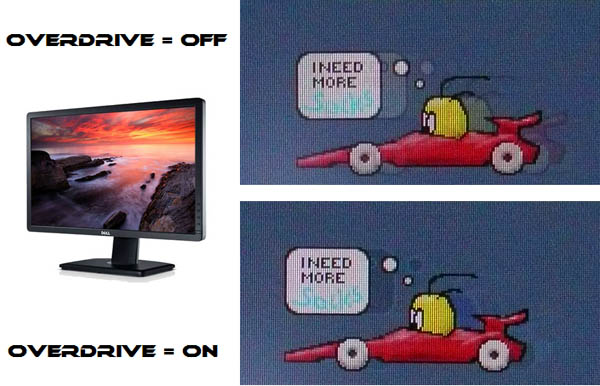 SOS Display Comparisons  23" 8ms G2G LG.Display e-IPS (W-LED)  23" 5ms G2G LG.Display e-IPS (W-LED)  23" 14ms LG.Display e-IPS (W-LED)  23" 5ms G2G LG.Display e-IPS (W-LED) - Trace Free setting 40 This post has been edited by matnur_83: Apr 11 2012, 03:11 PM |
|
|
Apr 11 2012, 03:17 PM
|
|
Senior Member
960 posts Joined: Mar 2009
|
QUOTE(matnur_83 @ Apr 11 2012, 03:06 PM) you can swich on "OVERDRIVE" at U2312HM.. can see improvement if overdrive is on..but for now i feel ok with this response time..lazy to open factory menu settingBefore we get in to the get into the side by side screen comparisons I want to quickly talk about the overdrive control available through the screens factory menu. Dell have not made this option available through the normal OSD menu, but if you want, you can turn it on and off. It is labelled in the factory menu under "OD" as shown above. The screen was tested using the chase test in PixPerAn, a good bit of software for trying to quantify differences in real terms responsiveness between monitors. As a reminder, a series of pictures are taken on the highest shutter speed and compared. The images above are the best case examples from the U2312HM with the overdrive (OD) function disabled and then enabled. When OD is turned off there is a more pronounced motion blur which is noticeable to the naked eye. It doesn't have any severe ghosting but the blur is certainly more obvious. When you enable OD the blur is reduced but there is still some minimal motion blur detectable. While the blurring is improved quite nicely, the OD impulse does introduce a bit of an overshoot in the form of a dark trail behind the moving car. This is caused by the aggressive application of an overdrive impulse, causing the pixels to change orientation too far before reverting to the desired position. This characteristic trailing can happen on screens where overdrive impulses are applied, where it is either too aggressive (to try and boost response times even more) or poorly controlled. SOS |
|
|
|
|
|
Apr 11 2012, 03:20 PM
|
|
Senior Member
683 posts Joined: Jun 2009
|
QUOTE(our_team89 @ Apr 11 2012, 03:17 PM) can see improvement if overdrive is on..but for now i feel ok with this response time..lazy to open factory menu setting same with me  |
|
|
Apr 11 2012, 04:03 PM
|
|
Senior Member
2,587 posts Joined: Oct 2008 From: Malysia
|
QUOTE(our_team89 @ Apr 11 2012, 09:32 AM) u2312hm.i use it with my ps3 now..the image is bright and colour reproduction is good. if u worried about 8ms response time, i used this monitor to play pes2012. no ghosting. really? how much is the price? and the 8ms will it slow? how is the quality?? is lcd or led.. haha.. haven do survery yet on it.. any other recommend? AOC or HP is tat okie? personal prefer samsung as samsung good in term of quality laAdded on April 11, 2012, 4:13 pm QUOTE(our_team89 @ Apr 11 2012, 03:17 PM) can see improvement if overdrive is on..but for now i feel ok with this response time..lazy to open factory menu setting can it tahan? as for me i almost open almost long time of period. will it okie? 5 year warranty is how?This post has been edited by tabs: Apr 11 2012, 04:13 PM |
|
|
Apr 11 2012, 04:18 PM
|

Senior Member
2,954 posts Joined: Apr 2008
|
QUOTE(tabs @ Apr 11 2012, 04:03 PM) really? how much is the price? and the 8ms will it slow? how is the quality?? is lcd or led.. haha.. haven do survery yet on it.. any other recommend? AOC or HP is tat okie? personal prefer samsung as samsung good in term of quality la U2312 is using IPS screen with LED Added on April 11, 2012, 4:13 pm can it tahan? as for me i almost open almost long time of period. will it okie? 5 year warranty is how? As I'm using U2412 because the resolution and I don't cant see any ghosting on Crysis 2, Battlefield 3, MWF3 and GTA IV. I use it almost 12hours a day.. It seem fine to me.. What's your budget? Added on April 11, 2012, 4:20 pmBtw, my colour setting on u2412 R 98 G 90 B 94 This post has been edited by KKW: Apr 11 2012, 04:20 PM |
|
|
Apr 11 2012, 04:29 PM
|
|
Senior Member
2,587 posts Joined: Oct 2008 From: Malysia
|
QUOTE(KKW @ Apr 11 2012, 04:18 PM) U2312 is using IPS screen with LED Hi there, actually after i see through many website i also not sure what is the best actually.. As I'm using U2412 because the resolution and I don't cant see any ghosting on Crysis 2, Battlefield 3, MWF3 and GTA IV. I use it almost 12hours a day.. It seem fine to me.. What's your budget? Added on April 11, 2012, 4:20 pmBtw, my colour setting on u2412 R 98 G 90 B 94  here is the model that i looking forward at the moment. U2311H, PX2370, ASUS Pa246Q my budget is around 700-800 roughly around that lo.. actually when u buy monitor what spec you should see? my connectivity i need to find those like HDMI, DVI, and audio output. any recommend? |
|
|
Apr 11 2012, 04:35 PM
|
|
Senior Member
2,954 posts Joined: Apr 2008
|
QUOTE(tabs @ Apr 11 2012, 04:29 PM) Hi there, actually after i see through many website i also not sure what is the best actually.. When I look for screen only few spec I will look into it which is IPS, usb hub, warranty, and durability of colour reproduction here is the model that i looking forward at the moment. U2311H, PX2370, ASUS Pa246Q my budget is around 700-800 roughly around that lo.. actually when u buy monitor what spec you should see? my connectivity i need to find those like HDMI, DVI, and audio output. any recommend? I don't really look into the connectivity because mac can use any by changing the adapter but at long is digital signal. If you want HDMI and audio output, I recommend look for samsung LED monitor usually they include audio output |
|
|
Apr 11 2012, 04:43 PM
|
|
Senior Member
2,587 posts Joined: Oct 2008 From: Malysia
|
QUOTE(KKW @ Apr 11 2012, 04:35 PM) When I look for screen only few spec I will look into it which is IPS, usb hub, warranty, and durability of colour reproduction regarding the u2321 right? how to connect the ps3 only got sound a? lol..I don't really look into the connectivity because mac can use any by changing the adapter but at long is digital signal. If you want HDMI and audio output, I recommend look for samsung LED monitor usually they include audio output |
|
|
Apr 11 2012, 04:46 PM
|
|
Senior Member
2,954 posts Joined: Apr 2008
|
QUOTE(tabs @ Apr 11 2012, 04:43 PM) regarding the u2321 right? how to connect the ps3 only got sound a? lol.. Err using VGA output?If not mistaken, video connect using HDMI to DVI on monitor then audio use VGA to connect to speaker or sound system |
|
Topic ClosedOptions
|
| Change to: |  0.0192sec 0.0192sec
 1.21 1.21
 6 queries 6 queries
 GZIP Disabled GZIP Disabled
Time is now: 17th December 2025 - 01:17 PM |
 Quote
Quote