Welcome Guest ( Log In | Register )

Bump Topic Topic Closed RSS Feed
122 Pages  1 2 3 > » Bottom

Outline · [ Standard ] · Linear+

 Official N45/N55 Club ♥ V2, Closed :)

views
     
TSsimon3041
post Aug 21 2011, 05:25 PM, updated 15y ago

LoV3
******
Senior Member
1,528 posts

Joined: May 2011
From: Your Home


Greetings all... =) I will be glad to start an official N45/N55 Club V2... sorry to keep you all waiting...

QUOTE
Asus presented its new N series notebook at Computex 2011 in Taiwan, the Asus N55SF.  This multimedia laptop is bringing Asus SonicMaster Technology that developed with Bang & Olufsen ICEpower, and based on Intel Sandy Bridge platform.  The asus N55SF notebook packs 15.6-inch glossy / matte display with a resolution of 1366x768  or  1920x1080 pixels and paired with 1GB / 2GB of Nvidia GeForece GT555M graphics that is ideal for gaming. It's equipped with a Blue-ray Drive and 2nd generation Intel Core i3 / i5 / i7 processors, up to 16GB DD3 RAM (1,333MHZ), with 750GB Hard Disk Drive ( 5400RPM / 7200 RPM) Besides that, it has two USB 3.0 ports, VGA out and also HDMI out.

Diagonal screen ASUS N45SF - 14 inches, N55SF - 15,6 inches


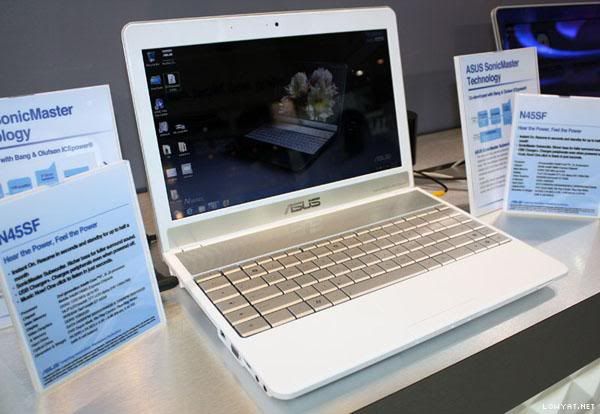
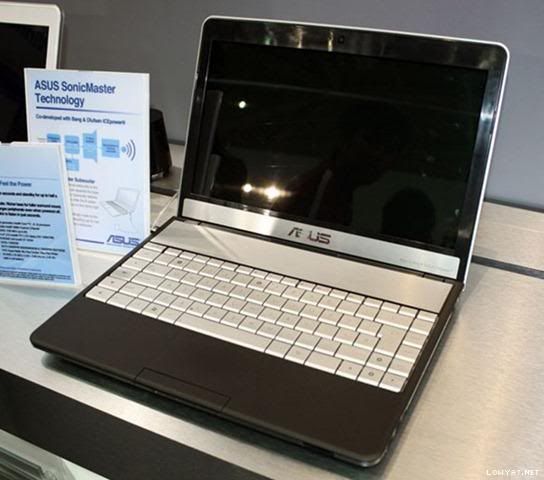
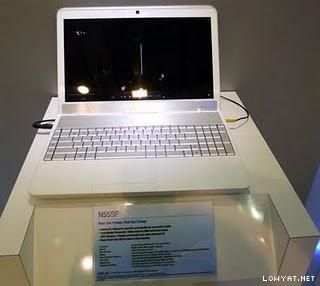
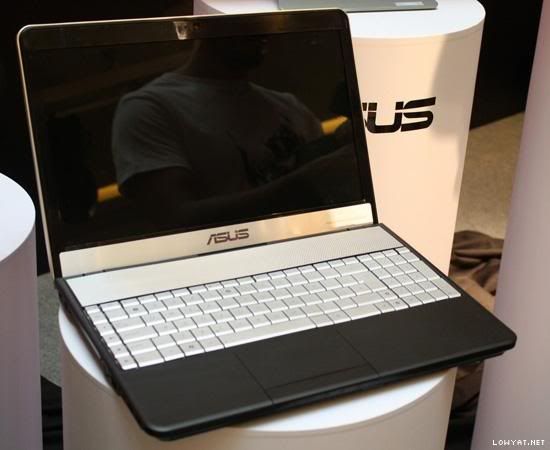
All rite.. Let's start with appearance.. There are two colours... white one and black one (Unsure that white will be available in Malaysia )
We have to admit the design is elegant, almost noble is not that bad. The Asus N55SF is made out of a blend of materials such as hard plastic, aluminium and rubber. The black glossy plastic is proved to be too dust and fingerprint friendly. Opening the lid reveals the full-sized keyboard. At first glance it may look like aluminium but the keys are made of plastic and painted with a special coat that should last long enough. You’ll find aluminium just about the keyboard where the speakers are placed. The perforated aluminium grill looks good. The power button is now a part of the keyboard and that took a while to get used to. We also had to get used with the multimedia keys placed on the first left column. If you get past these details the keyboard is really good. We didn’t experience any typing errors and the writing was smooth.
The rubber materials have a pleasant feeling but you’re going to clean the dust and fingerprints from time to time. As you can see it looks fantastic when it’s clean.


White colour N45SF
user posted image

Black colour N45SF
user posted image

White colour N55SF
user posted image

Black colour N55SF
user posted image

Side view for n45/n55
user posted image

This post has been edited by simon3041: Sep 1 2011, 04:45 AM
TSsimon3041
post Aug 21 2011, 05:25 PM

LoV3
******
Senior Member
1,528 posts

Joined: May 2011
From: Your Home


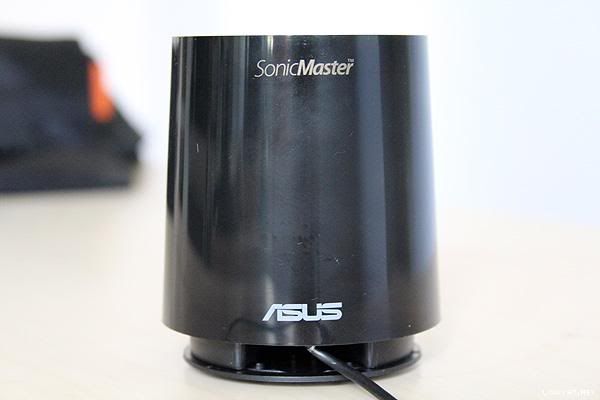
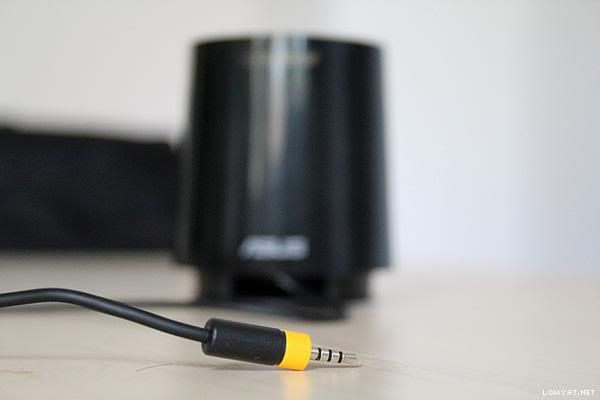
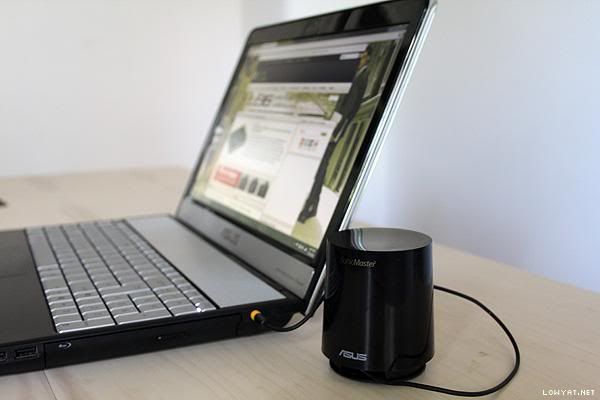
The most interesting port is (of course) the yellow one which connects the external subwoofer to the laptop. It was made out of hard plastic and it was light, not at all what we expected. However the sound quality is amazing when we fired up a video. Don’t get us wrong: it will not replace your Hi-Fi audio system but for a 2.1 audio laptop the sound was amazing. In terms of laptop audio quality it comes second after the much appreciated Asus NX90.

There are some photos for the subwoofer as well as the yellow port... wink.gif
user posted image

user posted image

user posted image


And then to speakers...

SonicMaster is a standard that defines audio specifications based on usage scenarios. There are three different levels, with the lowest guaranteeing users clear voice and speech — this is critical in business applications. The highest level resembles the quality of a high-end audio system, with extremely faithful music reproduction. Users can choose quality levels based on need.
In addition to these objective quality levels, we also have subjective specifications, which relate to how people feel about good audio. For example, many people feel live performances sound better than recordings, and that loud volume is important in noisy environments. Some people prefer vocals in pop music and movies, and most are uncomfortable with noise. SonicMaster standards cover the entire audio system of a laptop, including the line-out and headphone sockets. Users who choose to listen with headphones or an external speaker system will still benefit from the difference in sound quality. ASUS has developed a platform that allows all audio applications to achieve optimum performance. This means SonicMaster doesn’t focus on boosting only certain aspects of audio, instead it reproduces all sound faithfully..... =) and also it comes with asus subwoofer.... brows.gif
" Bundled SonicMaster subwoofer "
In addition to the already spectacular precision of SonicMaster audio, ASUS is offering an external subwoofer to increase low-note performance and result in even more impactful output. It enables a wider sound range, providing listeners with an even richer bass experience.

Some features for N45/N55SF...

Video Magic
» Click to show Spoiler - click again to hide... «


Music Now
Users press one button and can enjoy music in 8 seconds

(sounds cool lol... especially for me who love music so much)

USB Charger+ fast device recharging in any situation

» Click to show Spoiler - click again to hide... «


This post has been edited by simon3041: Aug 21 2011, 05:30 PM
TSsimon3041
post Aug 21 2011, 05:26 PM

LoV3
******
Senior Member
1,528 posts

Joined: May 2011
From: Your Home


Now to the GPU... brows.gif
Basically, GT555M have few versions... N45/N55 are using The GT555M version B2 with DDR3 128 bit... blink.gif
NVIDIA GeForce GT 555M

The NVIDIA GeForce GT 555M is a fast middle class graphics card for laptops. It is based on the same GF106 core as the GeForce GT 445M but offers slightly higher clock rates and support for DDR3 running at 900 MHz. The other features like PureVideo HD (VP4), 3DVision, HD Audio support, ... are identical to the GT445M. The chip can be used with DDR3 or GDDR5 graphics memory. Depending on the configuration, the performance can differ significantly.

NVIDIA GeForce GT 555M "A" (details)
» Click to show Spoiler - click again to hide... «


NVIDIA GeForce GT 555M "B1"
» Click to show Spoiler - click again to hide... «


GPU-Z for VB1
user posted image

NVIDIA GeForce GT 555M "B2"
» Click to show Spoiler - click again to hide... «


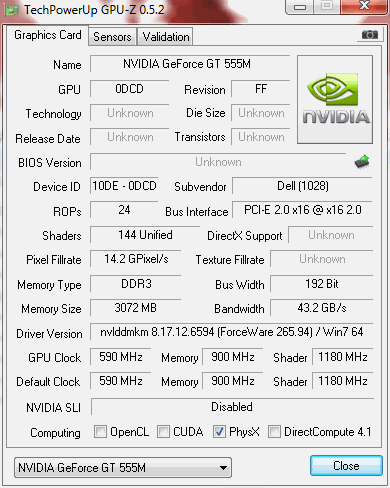
GPU-Z for VB2
user posted image

Summary from above is, GT555M A version is the GDDR5 one 96SP/128bit. while B1 is DDR3 144SP/192bit and B2 DDR3 144SP/128bit....

okay so.. let's see this
Compared to the GeForce GT 540M, the GT 555M is much more powerful. These are the benchmarks I found, all in average framerates:
» Click to show Spoiler - click again to hide... «

Overall, it's around 40% faster. Pretty much all games are playable on medium/high settings combo at 1600x900. On the 540M, you have to go down into all medium settings at 1366x768. That, and the TDP is almost the same: 32W and 35W.

This post has been edited by simon3041: Aug 21 2011, 05:36 PM
TSsimon3041
post Aug 21 2011, 05:26 PM

LoV3
******
Senior Member
1,528 posts

Joined: May 2011
From: Your Home


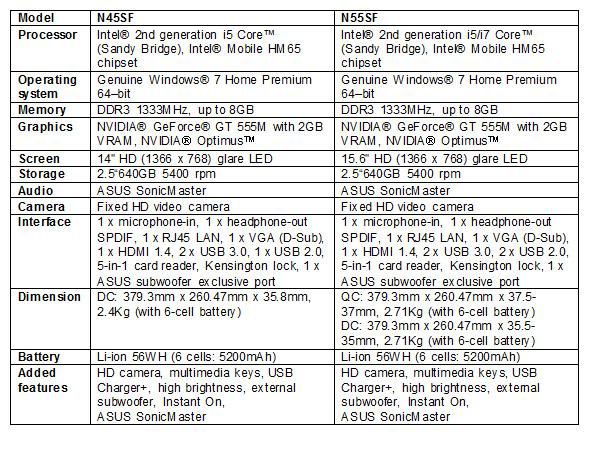
The specifications of N45/N55SF
user posted image

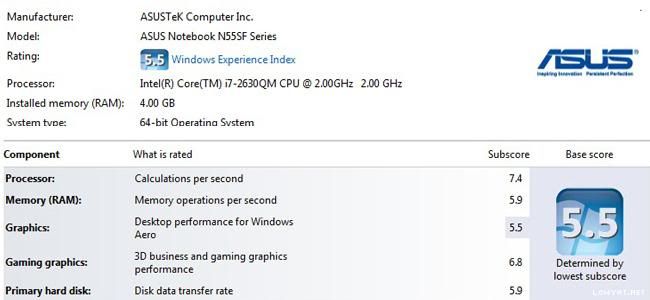
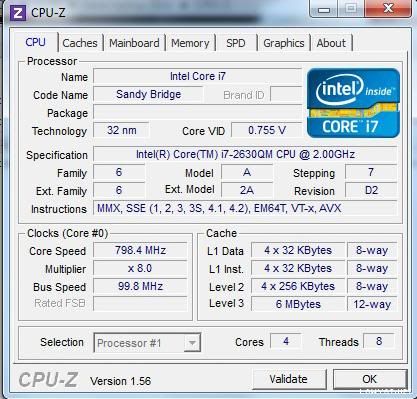
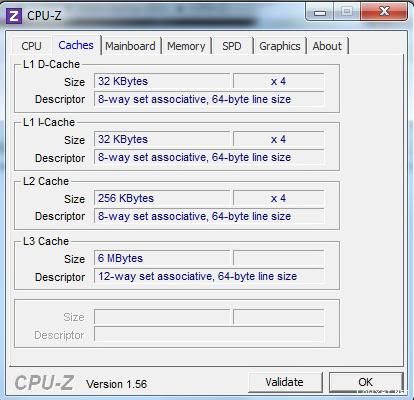
Windex for N45/N55 and also Cpu-Z
user posted image

user posted image

user posted image

user posted image

user posted image

user posted image

user posted image

user posted image


Asus has registered significant progress with its cooling technology and the N55SF temperatures were satisfying
Battery time was impressive although the N55SF is a multimedia laptop. Running in Classic mode it achieved 1.5 hours and under the Reader setting it passed the 3 hours barrier. The 6-cell battery copes well with a 15.6-inch display, a subwoofer and the powerful Nvidia graphics.

user posted image

This post has been edited by simon3041: Aug 21 2011, 05:40 PM
TSsimon3041
post Aug 21 2011, 05:27 PM

LoV3
******
Senior Member
1,528 posts

Joined: May 2011
From: Your Home


I think as far as all owner concerned, i would like to share some tips and guide for decreasing boot time... first of all, i will highly recommend you go and do a CLEAN FORMAT for your window.. it's a best way to clean ur bloatwares or wat so ever programs and return your laptop to a clean state and u r the one who determine wat to install in your laptop... I, did you this way to decrease my boot time, and hypothesis accepted... drool.gif boot time significantly dropped...

well... first of all... You will need to do back-up... 5 DVDs' ai recovery burner... if u dont know how, you can refer to user manual, or e manual... smile.gif It's kinda easy,but it took 1 hour and twenty minutes for me... okay... wat's the purpose of doing tat back up? First, it's for your recovery in case ur recovery paritition not working, u can use those 5 dvd's to do recovery.... okay so... IF YOU DID BACKUP, then proceed to second step... It will be reformat your window 7 ... but before tat, there's a optional step before u reformat which is insert your driver disc, try to see list of program/drivers... i think u need to click advance in order to view the applications/drivers tat were preinstalled... okay.. so after u get to know and ideas on which programs or drivers u need to install, then u r good to go....

All rite, reformat is kinda easy... smile.gif

First of all, you insert the win7 disc into your dvd room.
Then you will reboot your laptop. when the black screen appear, press F2 to enter bios setting,
and then you will go to boot tab, and find boot option #1, hit enter and change it to ur dvd room or Blue ray room, for my model, for instance, it shuld be Slimtype DVD A..
Then you will hav to hit F10 to save and exit...
so well now it will reboot and then a black screen with following words should pop out "press any keys to boot from CD and DVD" then u will hav to press any keys,
then will enter the setup... windows will gonna load the files... and starting windows...
then it will gonna ask you for language u wanna install, time and currency format, and the keyboard and input method... set that, and click next...
(do note that the window resolution might get low, instead of HD+ during reformat for i5 sf) and then click on the install now.
then the screen will show setup is starting... read the license terms and accept it and click next....
and select custom (advance),
so well, at here... you shall see three partitions... first it should be system recovery partition, 25gb of primary partition... DO NOT DELETE THE SYSTEM RECOVERY PARTITION, you will need tat for system recovery... Accept if u really need tat 25gb... i would say no. don touch the recovery partition...
and you should see second partition, usually named as OS (C:) and third partition Date (D:) for me...
so if u wan a clean format, you should delete tat two partitions, OS and Data D or wat so ever local disk or wat is named for your partition...
click drive option advance to delete the partition...
click okay if a warning pop out asking you whether u confirm wan to delete the partition...
all rite, then u should see Unallocated space... select it and click next...
once u clicked next, it gonna show window is installing... copying windows files, expanding window files, installing features, installing updates, and completing installation... (note that the expanding might take some time, so relax during window expanding the files) for me, it took around twenty minutes to done this process.
okay... now after the installation, the window is gonna restart, PLEASE MAKE SURE TAT YOU DONT CLICK ANYTHING WHEN IT SAY PRESS ANY KEY TO BOOT FROM DISC OR DVD.
then starting windows,updating your registry settings, setup is starting services, completing installation,
setup will continue after restarting the computer,
AND REMEMBER DON CLICK ANYTHING AT THE "PRESS ANY KEYS TO BOOT FROM CD OR DVD"
setup is preparing your computer for first use. then type in ur name and computer name, click next..
then for password, if u don wan any, leave it blank and click next.
your product key, key in the product key and click next, use recommended setting, set time and date click next and select your network...
after u enter the window, congratz.. reformat is done... a clean installation of windows....


okay... so after reformat your window, you might wan to repart your partition...
go start
then right click my computer
click manage
click disk management,
you will see the big partition.. it should be 25gb of primary recovery partition, then 100mb of system reserved after u reformat, then a big parition.. smile.gif it should be 571gb
so you right click on the 571gb, then click shrink volume
enter the amount of volume you wan to shrink
then u will see free space,
right click and click new simple volume, click next, next again, then assign the letter u wan for the new drive, then click next then next then finish...
then u r done... biggrin.gif

(Dont forget to go in your BIOS and adjust back the boot option 1 back to ur HDD instead of slimtype DVD.blue ray) so tat u get rid of the "press any keys to boot from cd or DVD"

All rite, lets proceed to the installation of driver/softwares from your disc.
tat's kinda easy...
first insert your disc into your dvd room/blue ray room
then run,
then u will see all the ticks on the recommended applications and drivers, from here u can tick or untick the programs u wan or don wan to installl
Personally, i installed all the drivers accept IRST, and then for recommended applications, i install INF update driver, touchpad, bluetooth, wireless console 3 and P4Gear...
that's all... smile.gif You may tick any program u need...
after tat, click start, then it will ask install now? you click yes, then wait for the drivers to be installed... it will be automatically installed, frequent reboots, and then you might need to get a cup of tea or coffee at the mean time, for some of the programs or driver, it needs you to click okay if it ask you whether you want to reboot or not... nod.gif after done, you can go start > then right click at my computer > then manage, then click device manager, see if any unknown device.. if no, then congratz.. reformat and install driver is done... cheers.gif

Credits go to sifu lee_what2004.... Thank you for reading.. hope my guide can be useful for all of you... bruce.gif


For new N45/N55 users, Below is a list of Asus utilities/bloatware that may come with your new Asus notebook. If you're unsure about which utilities are useful or safe to uninstall, this list should give you some insight.

Click here


and below is the guide to decrease boot-up time for ur n45/n55 series laptop....

QUOTE
» Click to show Spoiler - click again to hide... «
The following is the screenshot by our owner and the highlighted programs u can delete them if and only if u don need them
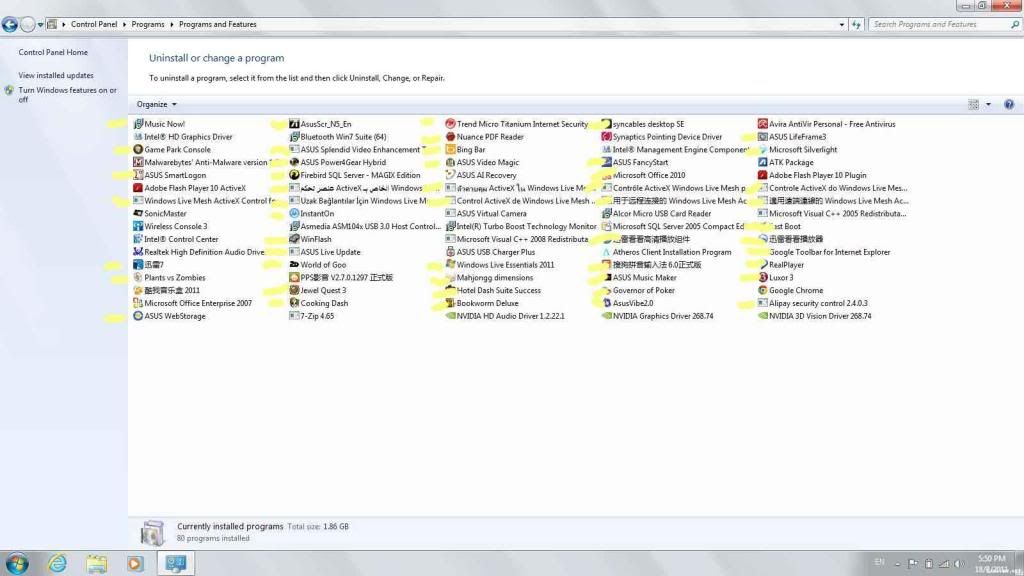
user posted image

credit goes to sifu lee_what =)

This post has been edited by simon3041: Sep 1 2011, 04:12 AM

TSsimon3041
post Aug 21 2011, 05:27 PM

LoV3
******
Senior Member
1,528 posts

Joined: May 2011
From: Your Home


Price according to seller's list
N55SF-SX047V 15.6" i7 RM3699
N55SF-S2043V(black) 15.6" i5 RM2799
N45SF-VX013V(black) 14" i5 RM2799
N55SF-S243V 15.6" RM3399 wo subwoofer, VGA diff, without usb charge


QUOTE
                                N45/N55 Owner Lists


                                                        adrian1984 - black N55SF (i7)  RM3550

                                                                  kgk6411 - Black N55SF (i7)

                                                                zHo3 - Black N45SF (i5) RM2620 ALL IT

                                                              lowjiunhorng - Black N55SF (i5)

                                                           shakz_orange - Black N45SF (i5) RM2580 ALL IT
                                                       
                                                          PoorVenderz - Black N55SF (i5)  Devour

                                                            shaff - Black N55SF (i5)  RM2699 w Freebies All IT

                                                          Duckies - Black N55sf (i5) RM2699 w Freebies RedCOm                      

                                                           stupiak07- Black N55sf(i7) w 1TB usb3.0 HDD NAVOTECH

                                                           lakost - Black N55SF (i7) RM3450

                                                           zharyn - Black N45SF (i5)

                                                           htpkevin - Black N45SF (i5)

                                                       Sridev Pro Designer - Black n45sf (i5) RM2650 CZone Digital Mall
                                                        
                                                         Watta?? -Black n55sf (i5) RM2630 at wawasan IT (digital mall)

                                                        Mohammad.2mt -Black N45sf(i5) RM2590+50 8GBram ALL IT


This post has been edited by simon3041: Aug 23 2011, 11:46 PM
TSsimon3041
post Aug 21 2011, 05:27 PM

LoV3
******
Senior Member
1,528 posts

Joined: May 2011
From: Your Home


Videos for N45/ N55/ N75 series laptop


N55 Audio Demo


Asus N45 and N75 laptops- hands-on from Computex 2011


Asus N55SF open box in thailand


Asus N45SF, N55SF e N75SF, notebook multimediali


More Photos for Nx5SF....
http://s651.photobucket.com/albums/uu235/s...mview=slideshow


This post has been edited by simon3041: Aug 21 2011, 06:17 PM
TSsimon3041
post Aug 21 2011, 05:28 PM

LoV3
******
Senior Member
1,528 posts

Joined: May 2011
From: Your Home


Some programs / drivers / applications for N45/N55 users... Credits go to bro trance notworthy.gif


http://gallery.live.com/liveItemDetail.asp...d39c7&bt=1&pl=1

or

http://addgadget.com/battery_meter/


http://gallery.live.com/liveItemDetail.asp...2e-b3416de5758b


GPU Driver...

http://www.nvidia.co.uk/Download/Find.aspx?lang=en-uk


Refer to following screenshots (how to Permanently run SPECIFIC GAMES on Nvidia)
user posted image

user posted image

user posted image


If anyone wants to test out how good their audio system is, here's a link to download Canon in D Major, FLAC quality.

http://www.mediafire.com/?van32jj5jxdef0t

This post has been edited by simon3041: Aug 22 2011, 10:12 PM
TSsimon3041
post Aug 21 2011, 05:28 PM

LoV3
******
Senior Member
1,528 posts

Joined: May 2011
From: Your Home


All rite... after facing one week of internet prob and some difficulties, finally i can write my own review rite now... well.... let's start with the look.... hmm... black colour not bad.... juz tat i really did put all my hope in the white one... ^^ oh well... i bought my 55sf (i5) with RM2699... at first, i tried to bargain the price, but only deduct RM50 for the exclusion of free gifts.... so i took the freebies, it's some useless thingy for me... haha.. a "classic" cooler pad, laptop lock, headset, lcd cleaner, keyboard protector... i bought my baby with 10 DVDs... biggrin.gif well... let's start from beginning.. hmmm. i walked into the shop, and then i tell the promoter i wan to test 55sf... because the display unit is not turned on... so.. i wan to confirm tat 55sf i5 is equipped with matte screen and HD+... so then the handsome promoter took 55sf out in a unsealed box (one thing i wan to say is the open box tradition here in my city, i hate it!) they claimed tat they will open the unit once it arrived at their shop, to make sure that the laptop is fine... some of them claimed tat they need to preinstall softwares for the customers so that they no need to wait after they paid..

Actually, i intend to buy a sealed unit, but no choice, i hav to buy by tat time to make sure the laptop is workiong fine before i leave my city next week... (i personally experienced EOL for N53s and n53sv) lol... tat's a quite bad experience,so i buy this baby after contemplate in a shorter preiod of time compare to n53sn and n53sv... hahaha.... tongue.gif all rite, erm, the promoter took sf out and turn it on... then i ask him can i feel the laptop? then i DXDIAG it, and also insert my external HDD to run cpu-z and gpu-z and test he 2 usb 2.0 ports and 2 usb 3.0 ports.... but one thing i hav to say is the desktop is full on programs and bloatwares... later i will provide relevant screenshots to support my statement here... haha laugh.gif then i check if there is any dead pixels.. i check for scratches.. hmmm... type on it... then i bought it home lol..... First nite, i apply the charging theory (8 hours charge) although i know tat's not necessary but i did it cause i arrived home at ten something and i slept after leave it charging overnite... haha...
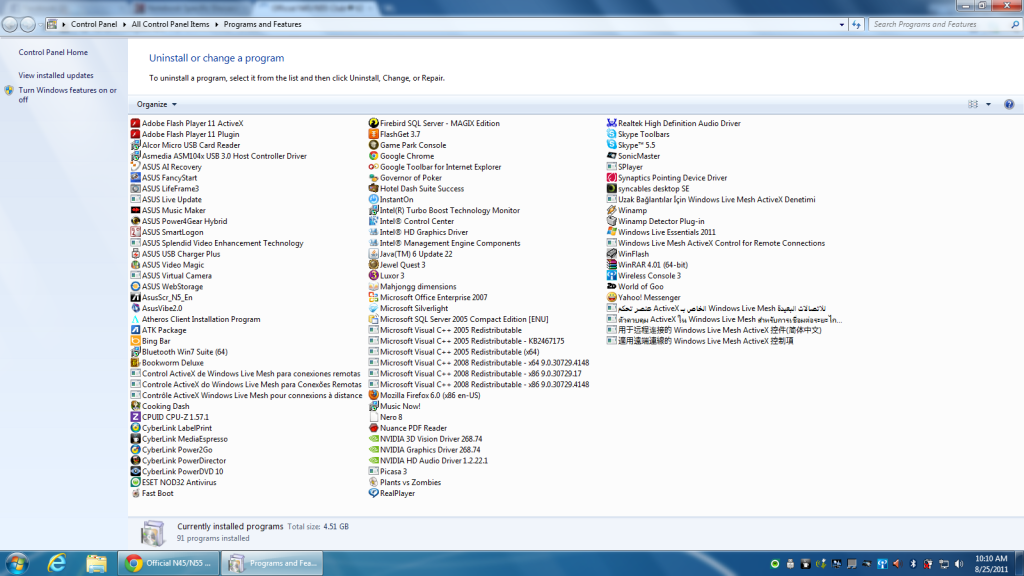
the next day, i woke up, i start to explore it... 91 programs installed, 4.53gb hahahaha then i was like O.O?!!! The boot time is slow... then i play music, then i was like hmmm? not bad, the subwoofer can barely replace ur 2.1 if u open quite loud... haha... but still i love the subwoofer as it's not tat bulky compare to my 2.1 which is impossible for mobility... i did bring y 2.1 to college before this, it's a nightmare when u wan to bring it to and back from collage... i can hear "thum thum" sound from the coke... i am satisfied with it, and i start to play around with asus sonic master... hmmm. can adjust bass, all those... i try to turn it off, it really makes some diff if u turn the sonic master off... brows.gif all rite.. hmmmm. then i did gaming... first game is er,nba 2k11... with HD+ resolution and all max... i am impressed because i am not able to do tat with my dekstop... hahaha... my internet is down tat time so i cant really reach lowyat or sifu here and cant download any test program for testing or stressing my laptop.. so by the time, i only play games tat i downloaded before this and kill some time... nod.gif

until er... 27 of august i think, i brought my lappy out and try to apply screen protector... at first, the seller said it's bad to hav screen protector attached, will spoil your screen bla bla bla... but after contemplate for some time, i planned to get one, juz in case my fren touch my dear screen with his finger. xD. then i installed a lid protector tat's NOT FIT at all. =.= juz a temp one to prevent the finger prints to get SO obvious... again and again... finger prints will kill you if u really don like ur lid to be full of prints like me... i like the matte screen, i try to shine my screen using LED emergency light.. haha... and i love the resolution... hmmm. i will say,i am used to my HD+ and when i use my desktop, i was like wat?! the resolution is so small... the desktop icon is so big! uncomfortable... hahahaha .... until er today... theoritically, i say today i juz can online after changing a new modem... although my old modem is still working but not compatible with the changed phone line... smile.gif currently typing on my lovely 55sf... erm.. i will say i5 is sufficient for me so far... and the... gpu i am satisfied with it... =) although it's crippled vb2 version.... but one thing i wan to highlight is if u r using the old GPU driver, your optimus will not working properly... for example, u can see clearly at ur notification icon, the colour is green plus grey... although u r not using ur GC, or idle... which means yr opti is working halfy... but u still can use ur GPU when gaming... so basically, i assume it drain more battery life when u r not using GC or doing task without GPU.... imho, you should install the new driver to get the opti working... as now, i can get a complete grey colour which indicate the gpu is at rest while not using it... wink.gif and i didnt find any flex on my keyboard, although i m not tat familiar with laptop keys yet... and erm... the multimedia key is quite useful... the volume up and volume down key is cool too... as well as p4g switching button... but one thing is my music now is not working... haha... will try it when i do another clean format lol... oh well... the batttery life i will do a test on myself and post it here..... notworthy.gif This is my review, correct me if i am wrong and thank you for reading them...

This post has been edited by simon3041: Sep 1 2011, 02:21 AM
TSsimon3041
post Aug 21 2011, 05:29 PM

LoV3
******
Senior Member
1,528 posts

Joined: May 2011
From: Your Home


Following is some screen shots from my laptop
user posted image
The picture above shows the programs and features installed in my laptop by the retailer and some bloatwares lol....

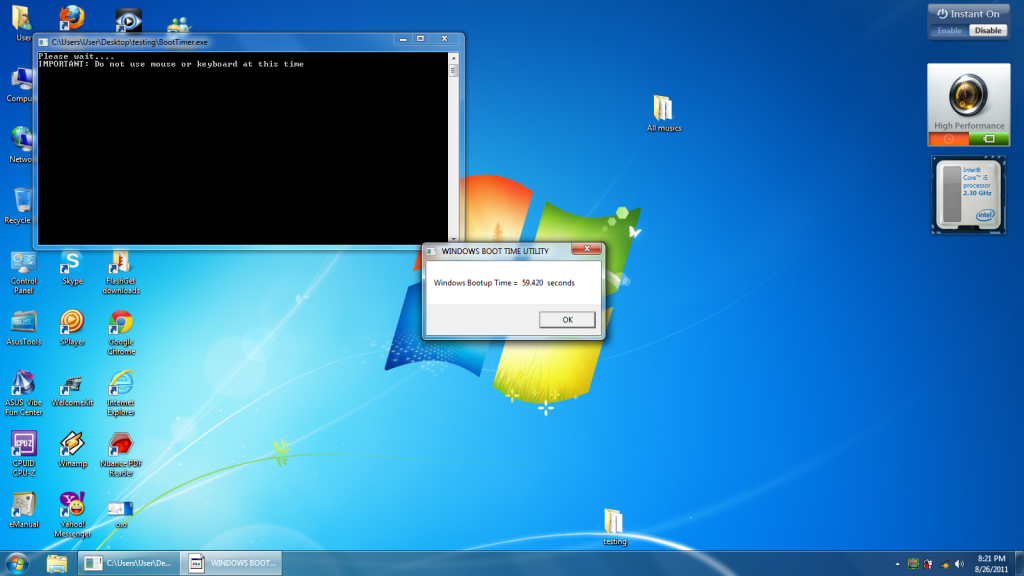
this is the boot time i got before i reformat my laptop.... shocking.gif

user posted image

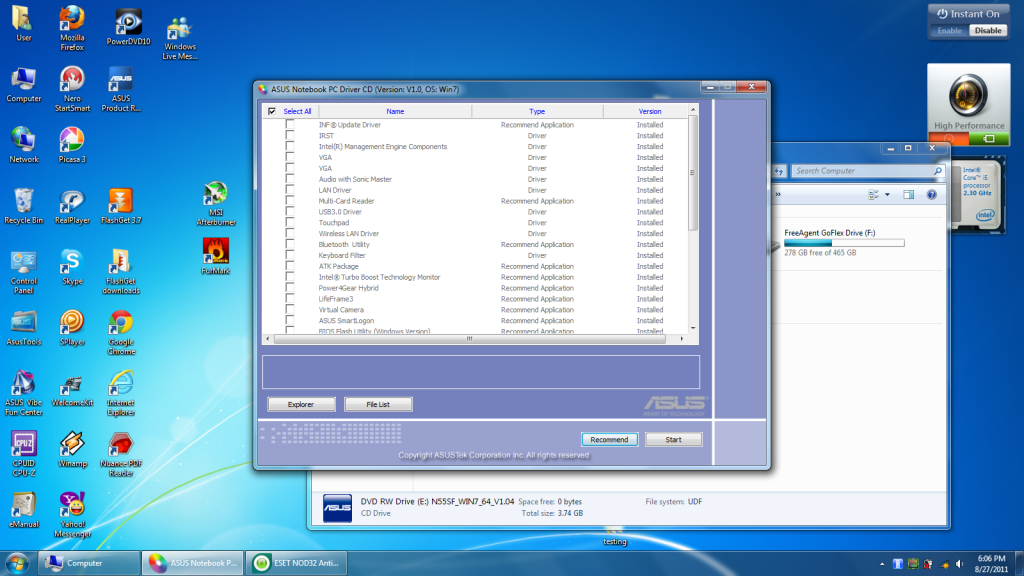
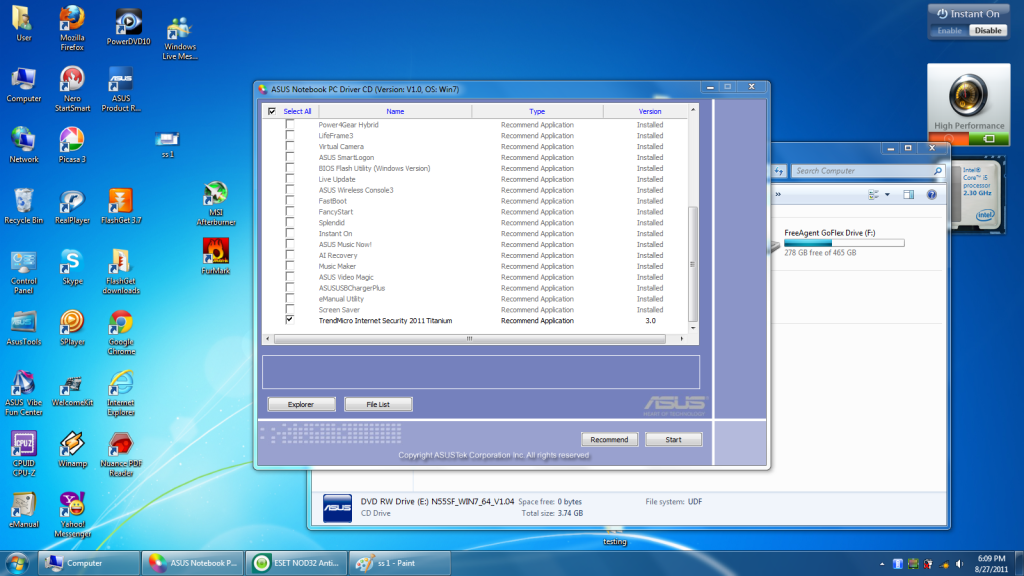
The following pictures are the screen shot from my driver disc..

user posted image

user posted image

For my laptop, they preinstalled all the drivers and all recommended applications accept Trend... sweat.gif

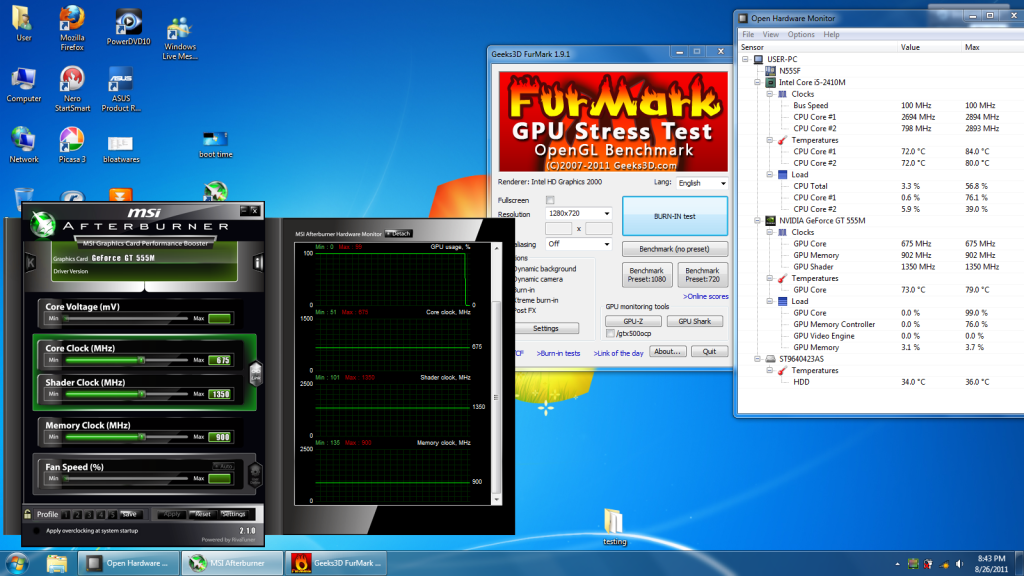
all rite, then this is the gpu graph i got from msi afterburn and openhardware after doing furmark... smile.gif

user posted image

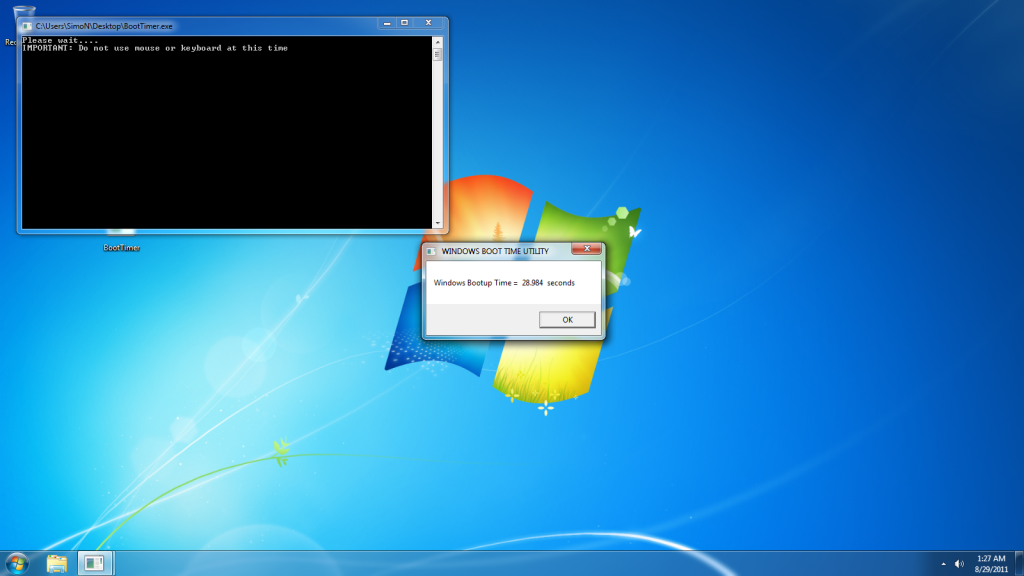
So right after i got my internet, i did a clean format and then i got these

user posted image
28.xx seconds is the best record i can go i think... doh.gif But still i can say it's cool.. at least better than the boot time before reformat... icon_idea.gif

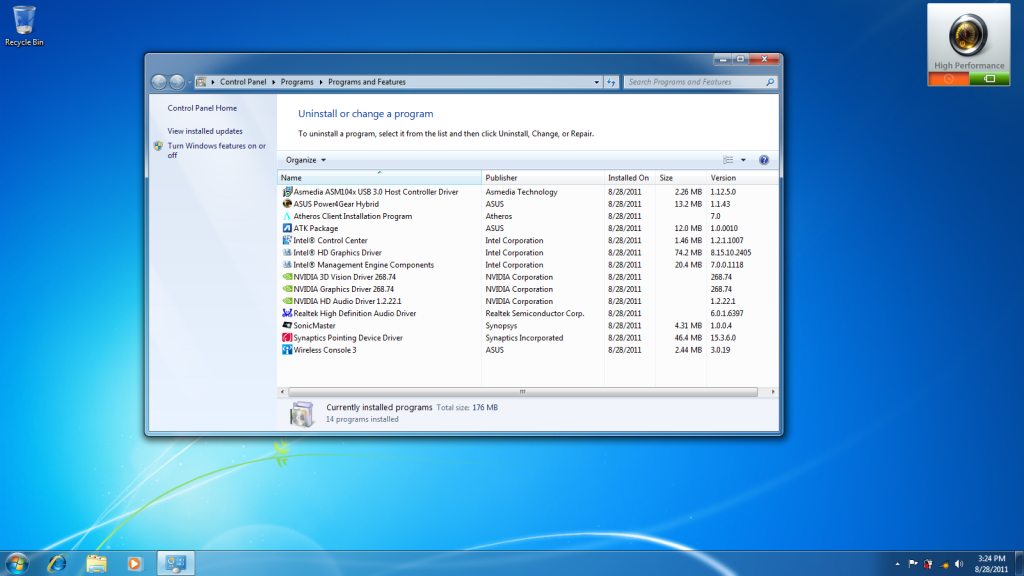
the program and features tat i hav after a clean format of window
user posted image


This post has been edited by simon3041: Sep 1 2011, 02:38 AM
TSsimon3041
post Aug 21 2011, 05:31 PM

LoV3
******
Senior Member
1,528 posts

Joined: May 2011
From: Your Home


reserved for my review... notworthy.gif

This post has been edited by simon3041: Aug 21 2011, 06:59 PM
TSsimon3041
post Aug 21 2011, 05:38 PM

LoV3
******
Senior Member
1,528 posts

Joined: May 2011
From: Your Home


reserved for personal review and photos...

This post has been edited by simon3041: Aug 21 2011, 07:00 PM
TSsimon3041
post Aug 21 2011, 05:42 PM

LoV3
******
Senior Member
1,528 posts

Joined: May 2011
From: Your Home


rclxms.gif
[PF] T.J.
post Aug 21 2011, 06:22 PM

20k VIP Club
Group Icon
Elite
24,193 posts

Joined: Feb 2010
From: Perak
Walao.... so many reservations laugh.gif
Grats on new thread yo simon notworthy.gif notworthy.gif

This post has been edited by [PF] T.J.: Aug 21 2011, 06:22 PM
TSsimon3041
post Aug 21 2011, 06:23 PM

LoV3
******
Senior Member
1,528 posts

Joined: May 2011
From: Your Home


QUOTE(PF T.J. @ Aug 21 2011, 06:22 PM)
Walao.... so many pages XD XD
*
lol... if u write too long, too many words gave me blank one... ....LOL forced to do like this.. even thumbnails also... i think use attachements will be okay but i don wan use attachments....
wilsonphua
post Aug 21 2011, 06:23 PM

Gear Up. Game On.
*******
Senior Member
2,152 posts

Joined: Nov 2008
2nd!!!

Reserved~
TSsimon3041
post Aug 21 2011, 06:24 PM

LoV3
******
Senior Member
1,528 posts

Joined: May 2011
From: Your Home


QUOTE(PF T.J. @ Aug 21 2011, 06:22 PM)
Walao.... so many reservations  laugh.gif
Grats on new thread yo simon  notworthy.gif  notworthy.gif
*
LOL! u edited it tongue.gif i am still beginner... D= don respect me... biggrin.gif i respect you more yo.... nod.gif notworthy.gif
PoorVenderz
post Aug 21 2011, 06:25 PM

Casual
***
Junior Member
380 posts

Joined: Jun 2011
From: Subang Jaya
Yea, finally V2 smile.gif
Sifu, post more about how to increase the boot time and how to maximize all this software in this laptop! smile.gif

[PF] T.J.
post Aug 21 2011, 06:26 PM

20k VIP Club
Group Icon
Elite
24,193 posts

Joined: Feb 2010
From: Perak
@Simon
Yeah, I understand what you mean laugh.gif
Been having some problems with the Notebook Price Catelog as well... too much contents doh.gif

Anyway, just came back from Digital Mall after buying Ivan's CM U2 laugh.gif
Managed to play with the Asus N45/55Sf again...
The touchpad buttons are not good imho.... seems like very hard to press laugh.gif
And the i5 variant really comes with HD+ laugh.gif
Couldn't get my hands on an i7 variant though T____T

The port placements is not very good.... The Lan port is on the middle on the left of the laptop... and almost all of the USB ports are at the front hmm.gif

This post has been edited by [PF] T.J.: Aug 21 2011, 06:26 PM
TSsimon3041
post Aug 21 2011, 06:29 PM

LoV3
******
Senior Member
1,528 posts

Joined: May 2011
From: Your Home


QUOTE(PoorVenderz @ Aug 21 2011, 06:25 PM)
Yea, finally V2 smile.gif
Sifu, post more about how to increase the boot time and how to maximize all this software in this laptop! smile.gif
*
check the post i posted.... it's on the top nod.gif


Added on August 21, 2011, 6:32 pm
QUOTE(PF T.J. @ Aug 21 2011, 06:26 PM)
@Simon
Yeah, I understand what you mean
Been having some problems with the Notebook Price Catelog as well... too much contents


Anyway, just came back from Digital Mall after buying Ivan's CM U2
Managed to play with the Asus N45/55Sf again...
The touchpad buttons are not good imho.... seems like very hard to press
And the i5 variant really comes with HD+
Couldn't get my hands on an i7 variant though T____T

The port placements is not very good.... The Lan port is on the middle on the left of the laptop... and almost all of the USB ports are at the front hmm.gif
*
laugh.gif yeah... thread starter's prob when starting a thread... credit goes to sifu lee_what... =D He thought me to seperate them... oh well, later i will update my personal review after seeing n45/n55sf in miri... kinda bad comments for promoters... lol laugh.gif i5 55sf with HD+ rite? wat's better? beside bigger resolution, see more cleary? filled with more pixels?

This post has been edited by simon3041: Aug 21 2011, 06:32 PM

122 Pages  1 2 3 > » Top
Topic ClosedOptions
 

Change to:
| Lo-Fi Version
0.0306sec    0.50    6 queries    GZIP Disabled
Time is now: 4th December 2025 - 12:53 PM