FAQ for Potential BuyersA. What is the type of Desire HD LCD Screen?
» Click to show Spoiler - click again to hide... «
It is TFT LCD. Although the colour saturation not as good as Amoled but the size of the screen is more than enough to compensate this little shortcoming.
B. How is the battery life?
» Click to show Spoiler - click again to hide... «
The battery can last a day for moderate usage. For heavy users, get yourself a second battery or a mobile battery booster. It is definitely not a deal breaker.
C. Does the GPS require Data Connection?
» Click to show Spoiler - click again to hide... «
For the HTC Navigation, you will receive a voucher code to select a map of a region for free, map can be pre-download to your Desire HD for navigation later. (only applicable for SiS Malaysia & HTC Singapore set).
Some popular GPS application like Papago X5 do not need a data connection for navigation purpose.
D. Where can I get the Desire HD?
» Click to show Spoiler - click again to hide... «
You can get the Desire HD from the following:
1. DiGi with 12 or 24 months SmartPlan contract.
2. SenQ / SenHeng
3. Other authorise dealer
E. What to look out/test when receiving your NEW Desire HD?
» Click to show Spoiler - click again to hide... «
1. Battery and sim card / microSD card cover – check whether it closes tightly before you open it.
2. Run some self test
a. Tap
Phoneb. Key in
*#*#3424#*#*c. You can find quite a number of tests here –
LED, Backlight, Vibrator, Display, Audio, Line Drawing, Button, HST status, Camera, System Info & Battery Run Down tests.
Note: This code will not work on custom ROM.
Also, for original set, remember to register your set to get 1+1 year warranty by SiS, the second year warranty only valid if you register online within 7 days of purchase.
Sis Web site: https://www.sis.com.my/siswarranty
There is an option to upload your purchase invoice online to SiS. So scan a copy of your invoice first and save into JPEG format.F. Okay. I think I'm getting one, but second-hand unit

. What should I do/check?
» Click to show Spoiler - click again to hide... «
REMINDER: Kindly request and print the transfer ownership form by SIS Warranty and fill it during COD. Failure to do so would mean a negation of warranty (no warranty at all), do not be tricked by those claiming that such a form is not needed.
Download ---> Transfer Ownership Form.pdf
After completing the transaction, scan/photo and upload the:-
(1) Invoice/Receipt with date of purchase clearly shown
(2) Filled Transfer Ownership Form with SIGNATURE
Mail it to SiS Warranty1. Check packages (see below for Standard Desire HD package)
2. Check phone conditions (external)
-- Check for Scratches / dent
-- Check the phone for stickers (if original set) and make sure the sticker, where usually is affixed to the SCREW is still there.
3. For Original SIS sets
-- If possible, request IMEI before you do COD and check online via:
-------
HTC Genuinity Check - Check and see if it says "Warranty in Malaysia!" or not.
-------
SIS Warranty Registration - Then, go to this link and paste the IMEI, Serial no(can anyhow fill), false other informations and click NEXT. If it says "Warranty is registered under <insert name here>", your interested set is original and registered for warranty extension! (extra 1 year of warranty from date of purchase).
-- Also, during COD, don't forget and check if the IMEI provided beforehand matches the unit you receive, and matches the BOX or not.
4. Check phone conditions (internal)
-- Make calls, test speaker, camera, check LCD for dead pixel (easier with the test key below)
-- You can do some tests via "
Phone > tap *#*#3424#*#*" and run some tests.
NOT WORKING ON SOME CUSTOM ROM!! -- To check if the firmware is stock or not, you can go to Menu > Settings > About Phone > Software Details and see. Custom Rom usually have different name like Android Revolution / Leedroid / Etc.
5. Make sure that receipt is provided, in case of warranty claim.
6. Basically that's all! Enjoy the second-hand unit that you bought and smile for the $$ saved

G. What is included in the Standard Desire HD package?
» Click to show Spoiler - click again to hide... «
1. HTC Desire HD x 1
2. Battery x 1 (preinstalled inside the phone, need to pull it out and remove a plastic sheet before the phone can be turned on)
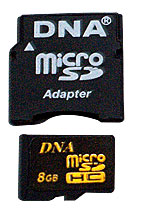
3. Samsung 8GB Class 2 microSD card x 1 (preinstall inside the phone) OR Sandisk 8GB Class 4 microSD card x1
4. Headset x 1
5. microUSB charge/data cable x 1
6. Charger x 1 (with SiS sticker)
7. 3-pin plug x 1
8. Warranty card x 1 (need to get dealer stamp)
9. HTC Locations Premium Navigation Voucher - small piece of paper with 12-digit code and barcode at the lower left. Refer to the instructions inside the paper on how to use it. Dun throw it away!!
10. A quick start guide and some other printed materials.
Note: The box is sealed with SiS hologram sticker. PLEASE BE CAREFUL IF THE SEAL IS BROKEN WHEN YOU RECEIVE IT, double check everything or best if possible - get a new sealed set. And there is a big SiS sticker on the left side with warranty information.
Warranty: 1+1 year warranty by SiS, the second year warranty only valid if you register online within 7 days of purchase.
Sis Web site:
https://www.sis.com.my/siswarrantyThere is an option to upload your purchase invoice online to SiS. So scan a copy of your invoice first and save into JPEG format.
A. How to activate Premium Navigation with the Voucher code bundled in SiS Malaysia Desire HD set? (posted by
soonlee33)
» Click to show Spoiler - click again to hide... «
go to location >> menu >> upgrade >> key in your voucher code - if its like forever verifying- go back to manage license and content- menu- sync license-jobs done
to double confirm u can see spore and malaysia (life cycle) under navigation
B. How to set up your Email Manually?
» Click to show Spoiler - click again to hide... «
go to email menu>more>newaccount
select (POP/IMAP) for Gmail/Yahoo/Hotmail then follow the automate setting if the auto setting fail to asign then should try below manual input.
GMAIL Setting
Protocol : IMAP
Email : xxxx@gmail.com
username : xxxx@gmail.com
password : xxxxxx
IMAP Server : imap.gmail.com
Security Type : SSL
Server Port : 993
NEXT
Login Required
Username: xxxx@gmail.com
Password : xxxxxxx
SMTP Server : smtp.gmail.com
Security Type : SSL
Server Port : 465
NEXT to asign your email Name then Finish Setup
Yahoo Mail Setting
Protocol : IMAP
Email : xxxx@yahoo.com
username : xxxx@yahoo.com
password : xxxxxx
IMAP Server : imap.mail.yahoo.com
Security Type : SSL
Server Port : 993
NEXT
Login Required
Username: xxxx@yahoo.com
Password : xxxxxxx
SMTP Server : smtp.mail.yahoo.com
Security Type : SSL
Server Port : 465
NEXT to asign your email Name then Finish Setup
MSN (Hotmail) Mail Setting
Protocol : POP
Email : xxxx@hotmail.com
username : xxxx@hotmail.com
password : xxxxxx
POP Server : pop3.live.com
Security Type : SSL
Server Port : 995
NEXT
Login Required
Username: xxxx@hotmail.com
Password : xxxxxxx
SMTP Server : smtp.live.com
Security Type : TSL
Server Port : 587
NEXT to assign your email Name then Finish Setup
C. My new Desire HD battery is draining fast, is it normal?
» Click to show Spoiler - click again to hide... «
Your Desire HD new battery may not reach its optimum level yet. Please use the Desire HD for a few weeks first. If the battery still draining fast, perform the Battery Calibration tip in the next post, it might help.
Generally, the following will conserve your battery too:
1. Turn down the brightness of your screen. [Menu>>Settings>>Display>>Brightness]
2. Tun off sync with HTCsense.com - it is not working at the moment so dun bother sync with it at the moment. [Menu>>Settings>>Accounts & Sync>>HTC Sense>>uncheck Sync HTC Sense]
3. Change your mobile network to GSM only when you are not using data connection. [Menu>>Settings>>Wireless & networks>>Mobile networks>>Network Mode>>select GSM only]
D. I have registered a HTCSense.com account but why I cannot make it working properly?
» Click to show Spoiler - click again to hide... «
Please do not bother with HTCSense.com as it is not working as it should now. So leave it alone and turn off your HTCSense.com at your Sync setting to conserve battery life.
E. I select the Navigation (
Blue Arrow) and turn on the GPS but why it stuck at "
Checking navigation availability"?
» Click to show Spoiler - click again to hide... «
This is Google Navigation which is not supported for Malaysia. To use the HTC Navigation, select Car Panel >> Navigation (with Green Arrow).
F. I just got my Desire HD and install some apps and games but it feels laggy and unresponsive.
» Click to show Spoiler - click again to hide... «
Turn on the USB Debugging Mode - Menu >> Settings >> Applications >> Development >> select USB debugging. This will solve the problem most of the cases.
G. How to change/add ringtone to the Desire HD?
» Click to show Spoiler - click again to hide... «
Copy the MP3 ringtone to the respective folder in the microSD card:
/sdcard/alarms OR /sdcard/media/alarms
/sdcard/notifications OR /sdcard/media/notifications
/sdcard/ringtones OR /sdcard/media/ringtones
This post has been edited by syuki: Nov 16 2011, 10:29 AM 

 Jul 30 2011, 12:03 PM, updated 14y ago








 Quote
Quote



 . You have been warned







 )
)

















 ).
).

 0.0340sec
 0.12
0.12
 6 queries
 GZIP Disabled