

 May 26 2011, 02:28 PM




Accessories
A. Screen Protector
» Click to show Spoiler - click again to hide... «
1. Clear type - excellent on screen clarity and colour saturation but will attract more fingerprint.
2. Matte type - fingerprint resistant but will affect the screen clarity or colour. However some users mention the effect is tolerable so it is personal preference.
2. Matte type - fingerprint resistant but will affect the screen clarity or colour. However some users mention the effect is tolerable so it is personal preference.
B. Casing
» Click to show Spoiler - click again to hide... «
1. Silicone/TPU casing
2. Case-mate - Barely There, Pop, Tough, Gelli and Safe Skin.
3. Otterbox - Commuter and Defender series.
4. Noreve Saint-Tropez Luxury Leather Case - can tailor made your very own case.
5. Epik Case
2. Case-mate - Barely There, Pop, Tough, Gelli and Safe Skin.
3. Otterbox - Commuter and Defender series.
4. Noreve Saint-Tropez Luxury Leather Case - can tailor made your very own case.
5. Epik Case
C. Car Charger
» Click to show Spoiler - click again to hide... «

Belkin USB Car Charger
Basically you can use any of the USB-to-microUSB Car Charger.. even my Belkin Charger + Nokia Cable works fine

D. Car Holder
» Click to show Spoiler - click again to hide... «
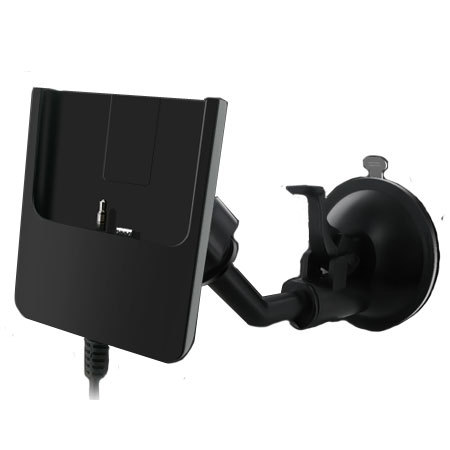
E. Mobile Charger/Booster
» Click to show Spoiler - click again to hide... «
F. Bluetooth Headset
» Click to show Spoiler - click again to hide... «
There's two type of Bluetooth Headset - Mono or Stereo
Bluetooth Mono Headset would be something like this
Bluetooth Stereo Headset would be something like this
Note: By default, Android does not support music/audio streaming (except calls, etc) via Bluetooth Headset (MONO). But STEREO ones are supported. A fix/temporary overcome is by using BTMono, available for free in the market.
However, the outcome quality from a MONO headset is . You have been warned
Bluetooth Mono Headset would be something like this
Bluetooth Stereo Headset would be something like this
Note: By default, Android does not support music/audio streaming (except calls, etc) via Bluetooth Headset (MONO). But STEREO ones are supported. A fix/temporary overcome is by using BTMono, available for free in the market.
However, the outcome quality from a MONO headset is
. You have been warned G. MicroSD Card
» Click to show Spoiler - click again to hide... «
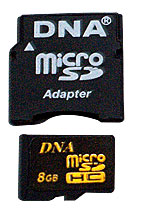
DNA MicroSD Card 16GB Class 10: RM90 ~ RM150
WARNING:
- To transfer your data to new MicroSD Card, do not Copy EVERYTHING and PASTE it in your NEW card via your PC, some forummers reported that your card will be unreadable by the system (Android). Do it in the following way:
- Unmount your current SDCard. (Setting > Storage > Unmount SD Card)
- Take it out, put the new one in
- Let the system detect the card, and usually will auto-mount it.
- Unmount it, and press 'Format SDCard'
- It'll auto mount after formatting.
- Use any method that you prefer, to transfer ALL the data from OLD SDCARD to NEW SDCARD. Since I already had my data's in my PC, I unmounted the card and put into a card reader, for a faster transfer.
- When you are prompted to replace ANY files, DO NOT replace!! DO NOT replace any files / folder at all!!
- You have done copying the old files to NEW SDCard, put it back to your phone and mount it, if you have to.
- Enjoy!
Another method, recommended by lunatique
» Click to show Spoiler - click again to hide... «
I have formatted the memory card, so you can just insert the card straight into your phone.
But if you want to copy files from your previous card into the new one:
Here's what i did, and what i advised others to:
1. put the old card in your phone
2. batch backup your apps using titanium backup
3. put the card into your phone.
4. copy the files from your previous card into your pc/laptop.
5. remove the new card from the phone and copy the files from your laptop/pc to the card.
6. Here's an example of list of files NOT TO BE COPIED.
- .adobe-digital-editions
- .android_secure
- . data
- Android
- .bookmark_thumb or vice versa
BASICALLY THESE ARE FILES PRODUCED BY THE PHONE ITSELF WHEN YOU INSTALL APPS. DONT COPY THEM.
LET THE PHONE REMAKE THESE FOLDERS BY ITSELF.
7. Files that can/should be copied:
Music
ClockworkMod (must copy - due to your backup files)
Titaniumbackup (must copy - due to your backup files)
Whatsapp
DCIM
Videos (if you have them)
8. This is because if you missed any apps or data that you saved, you can restore using Titanium Backup.
and this will automatically rewrite the folders automatically without any errors nor mistakes.
Author's Note: This is what i did and other customers tested ok on HTC Desire HDs.
I have no guarantee that it'll work for you. Just a reminder.
But if you want to copy files from your previous card into the new one:
Here's what i did, and what i advised others to:
1. put the old card in your phone
2. batch backup your apps using titanium backup
3. put the card into your phone.
4. copy the files from your previous card into your pc/laptop.
5. remove the new card from the phone and copy the files from your laptop/pc to the card.
6. Here's an example of list of files NOT TO BE COPIED.
- .adobe-digital-editions
- .android_secure
- . data
- Android
- .bookmark_thumb or vice versa
BASICALLY THESE ARE FILES PRODUCED BY THE PHONE ITSELF WHEN YOU INSTALL APPS. DONT COPY THEM.
LET THE PHONE REMAKE THESE FOLDERS BY ITSELF.
7. Files that can/should be copied:
Music
ClockworkMod (must copy - due to your backup files)
Titaniumbackup (must copy - due to your backup files)
DCIM
Videos (if you have them)
8. This is because if you missed any apps or data that you saved, you can restore using Titanium Backup.
and this will automatically rewrite the folders automatically without any errors nor mistakes.
Author's Note: This is what i did and other customers tested ok on HTC Desire HDs.
I have no guarantee that it'll work for you. Just a reminder.

This post has been edited by winter-X: May 26 2011, 02:37 PM
 Quote
Quote






 )
)














 (I hope winter-X already reserved all post up there.
  of course i am...thanks syuki for your guiding...


 0.0384sec
 0.19
0.19
 6 queries
 GZIP Disabled