Outline ·
[ Standard ] ·
Linear+
Hardware Hackintosh Thread V2.0, The Official OSX86 Thread (Hardware)
|
amenlo9
|
 Nov 23 2011, 12:15 AM Nov 23 2011, 12:15 AM
|

|
QUOTE(wiraone @ Nov 22 2011, 02:36 PM) Yes, you can try userdsdt but you need to have working DSDT for that. Easybeast usually will get you started and doesn't require DSDT. It will let you boot up. If you've problem with the graphics card, well, usually the Chimera usually cater for nvidia or ati graphics cards. If you can boot up using unibeast, check what they've in the org.chameleon.boot.plist in /Extra folder .. there might have specific parameters supplied to get it to work on your machine. when i first boot via unibeast to Lion partition, there is no /Extra folder inside the file system. First boot before applied multibeast the graphic is working except audio. after i applied multibeast and restarted, the graphic card gone but found the org.chameleon.boot.plist in /Extra folder with setting below: 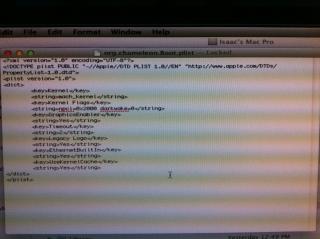
|
|
|
|
|
|
digswell
|
Nov 23 2011, 12:26 AM
|
|
|
QUOTE(amenlo9 @ Nov 23 2011, 12:15 AM) when i first boot via unibeast to Lion partition, there is no /Extra folder inside the file system. First boot before applied multibeast the graphic is working except audio. after i applied multibeast and restarted, the graphic card gone but found the org.chameleon.boot.plist in /Extra folder with setting below:
What GFX u using ?? |
|
|
|
|
|
amenlo9
|
Nov 23 2011, 12:34 AM
|
|
|
QUOTE(digswell @ Nov 23 2011, 12:26 AM) i am using nvidia Quadro FX380 it is so weird that it is working after fresh installed but not after applied multibeast  besides my mobo audio and LAN spec as below: Audio Realtek ALC887 High Definition Audio 2/4/5.1/7.1-channel * To configure 7.1-channel audio, you have to use an HD front panel audio module and enable the multi-channel audio feature through the audio driver. LAN 1 x Realtek RTL8111E chip (10/100/1000 Mbit) which setting should i tick on multibeast? |
|
|
|
|
|
tot31
|
Nov 23 2011, 01:47 AM
|
|
|
You should go here and read the in depth details explaining Multibeast i. http://www.mymac4music.com/2011/08/hackint...ion-multibeast/ii. http://www.mymac4music.com/2011/08/hackint...ings-in-detail/I had trouble like you before when using Multibeast as I was blindly tick the options but after reading through those links, I finally understand and my installation went smoothly. As for your LAN, you can use Lnx2Mac's Realtek RTL81xx Driver (it's in Multibeast) And for your audio, you can use ALC8xxHDA driver (also in Multibeast) |
|
|
|
|
|
amenlo9
|
Nov 23 2011, 03:40 AM
|
|
|
QUOTE(tot31 @ Nov 23 2011, 01:47 AM) You should go here and read the in depth details explaining Multibeast i. http://www.mymac4music.com/2011/08/hackint...ion-multibeast/ii. http://www.mymac4music.com/2011/08/hackint...ings-in-detail/I had trouble like you before when using Multibeast as I was blindly tick the options but after reading through those links, I finally understand and my installation went smoothly. As for your LAN, you can use Lnx2Mac's Realtek RTL81xx Driver (it's in Multibeast) And for your audio, you can use ALC8xxHDA driver (also in Multibeast) Yes thanks for your advise  After spent few hours of reading and forum searching, i applied the multibeast without Easybeast and Userdsdt and only tick the driver which support my LAN and audio. and finally both is working now  i did not tick driver for nvidia card as it is not match my card. so after reboot audio and LAN is working but graphic card is still not  found a MAC driver for Quadro from nvidia homepage, will try to install it tomorrow and see the outcome  |
|
|
|
|
|
OH-
|
Nov 25 2011, 05:58 PM
|
|
|
QUOTE(wiraone @ Nov 22 2011, 07:51 PM) Post here the kernel panic error and see if I can see something obvious .. Here you go Attached thumbnail(s)
|
|
|
|
|
|
TSwiraone
|
Nov 25 2011, 07:49 PM
|
|
|
QUOTE(OH- @ Nov 25 2011, 05:58 PM) Check out this link about pmVersion and sleepenabler if any that could help you to get going. http://www.notverycorrect.com/post/2627308...-10-6-6-upgrade |
|
|
|
|
|
OH-
|
Nov 25 2011, 09:27 PM
|
|
|
QUOTE(wiraone @ Nov 25 2011, 07:49 PM) Check out this link about pmVersion and sleepenabler if any that could help you to get going. http://www.notverycorrect.com/post/2627308...-10-6-6-upgradeNot working also bro. Perhaps I should reinstall using multibeast? Looks like something to try... |
|
|
|
|
|
hamswat
|
Nov 25 2011, 11:47 PM
|
|
|
Hi brothers !
I'm building a new PC soon which will be hackintoshed.
Please recommend me a sandybridge spec !! Looking for either i5 or i7 processors.
High specs also can.
Thanks.
This post has been edited by hamswat: Nov 25 2011, 11:54 PM
|
|
|
|
|
|
DarkNite
|
Nov 26 2011, 07:46 AM
|
|
|
QUOTE(hamswat @ Nov 25 2011, 11:47 PM) Hi brothers ! I'm building a new PC soon which will be hackintoshed. Please recommend me a sandybridge spec !! Looking for either i5 or i7 processors. High specs also can. Thanks.  You read the 1st post already? |
|
|
|
|
|
hamswat
|
Nov 26 2011, 09:01 AM
|
|
|
QUOTE(DarkNite @ Nov 26 2011, 07:46 AM) You read the 1st post already? Yes, but i want to know the brands that is good. |
|
|
|
|
|
amenlo9
|
Nov 26 2011, 10:06 AM
|
|
|
QUOTE(hamswat @ Nov 26 2011, 09:01 AM) Yes, but i want to know the brands that is good. please refer spec here to avoid headache for driver later on http://tonymacx86.blogspot.com/search/label/CustoMac |
|
|
|
|
|
TSwiraone
|
Nov 26 2011, 12:04 PM
|
|
|
QUOTE(amenlo9 @ Nov 26 2011, 10:06 AM) please refer spec here to avoid headache for driver later on http://tonymacx86.blogspot.com/search/label/CustoMacYup .. I'll suggest the same thing.. find a reference build and go from there. |
|
|
|
|
|
mazdagtr210
|
Nov 27 2011, 10:35 AM
|
|
|
acer aspire s3 i5 can been port to hackintosh?
no one can tell me?
This post has been edited by mazdagtr210: Dec 2 2011, 11:05 AM
|
|
|
|
|
|
sOuLx
|
Nov 28 2011, 01:25 PM
|
|
|
Where can i buy mac OS dvd other than online?how much it cost?
|
|
|
|
|
|
amenlo9
|
Nov 28 2011, 02:37 PM
|
|
|
anyone using any Lion compatible video cam? Can recommend 1 which is able to function out of box without any driver or tweak. thanks
|
|
|
|
|
|
speedtobeat
|
Nov 28 2011, 11:00 PM
|
Getting Started

|
QUOTE(speedtobeat @ Nov 14 2011, 12:47 AM) This is my system: MSI P67A-C45 Motherboard Intel Core i5-2500k Gigabyte AMD Radeon 6850 4GB DDR3 Ram Guys, I installed multi beast with these ticks: Easybeast Install System Utilities ALC8xxHDA AppleHDA Rollback ALC892 IOAHCIBlockStorageInjector USB 3.0 Realtek Gigabit Ethernet 2.0.6 for 10.7 Display off after the apple sign with loading circle....????!!! Pls Help, trying so many ways in Multibeast already, can't get it right! This post has been edited by speedtobeat: Nov 28 2011, 11:04 PM |
|
|
|
|
|
TSwiraone
|
Nov 29 2011, 06:28 AM
|
|
|
Try booting with -v option and see where it stuck. Might be your graphics card, might be something else.
|
|
|
|
|
|
speedtobeat
|
Nov 29 2011, 09:14 AM
|
Getting Started
|
QUOTE(wiraone @ Nov 29 2011, 06:28 AM) Try booting with -v option and see where it stuck. Might be your graphics card, might be something else. Sorry, what is a v-option and how do i do that? |
|
|
|
|
|
TSwiraone
|
Nov 29 2011, 09:40 AM
|
|
|
When you boot up, in chimera bootloader, choose which partition you want to boot and give the boot option -v there.. do search youtube, my unifi is down I couldn't help much .. Probably you can find it here: http://www.youtube.com/watch?v=FYVb1uzzz_M&feature=related |
|
|
|
|



 Quote
Quote


 0.0337sec
 0.28
0.28
 6 queries
 GZIP Disabled