Welcome Guest ( Log In | Register )

102 Pages « < 15 16 17 18 19 > » Bottom

Outline · [ Standard ] · Linear+

Hardware Hackintosh Thread V2.0, The Official OSX86 Thread (Hardware)

views
     
speedtobeat
post Nov 20 2011, 11:30 PM

Getting Started
**
Junior Member
146 posts

Joined: Feb 2008


Hi,

I just got to run the vmware version of Lion OS. I want to install Unibeast on my pen drive and dual boot it. But my dmg file is already in the /Applications like in the tonymac guide, but the Unibeast installation fails, and when checked in forums, they said I have to purchase original Lion OS. Is there other ways? Tq guys, have been trying hard and for so long time already. Haih...
tot31
post Nov 21 2011, 01:41 PM

I DON'T GIVE A DAMN
*******
Senior Member
2,451 posts

Joined: Jan 2003
From: GOD's Land


QUOTE(speedtobeat @ Nov 20 2011, 11:30 PM)
Hi,

I just got to run the vmware version of Lion OS. I want to install Unibeast on my pen drive and dual boot it. But my dmg file is already in the /Applications like in the tonymac guide, but the Unibeast installation fails, and when checked in forums, they said I have to purchase original Lion OS. Is there other ways? Tq guys, have been trying hard and for so long time already. Haih...
*
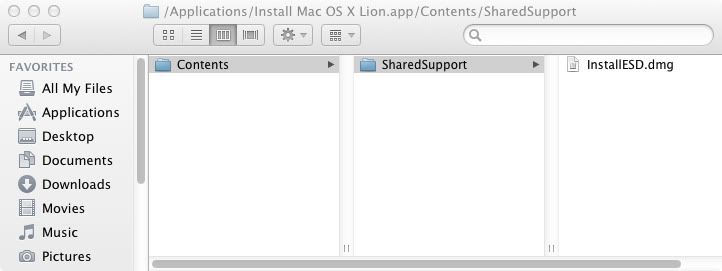
Go to Applications folder create a folder called Install Mac OS X Lion, then go to the Install Mac OS X Lion folder, create a folder called Contents, then go to the Contents folder create a folder called Shared Support. You should have these /Applications/Install Mac OS X Lion/Contents/SharedSupport. Copy the InstallESD.dmg file into the SharedSupport folder. Something like this

user posted image

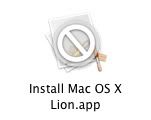
Now go back to Applications folder and put .app extension at the end of Install Mac OS X Lion folder, it will warn you just say Yes.

It will be like this user posted image

Now run again the UniBeast and you will be ok...

Hope this will hekp you.

This post has been edited by tot31: Nov 21 2011, 01:41 PM
TSwiraone
post Nov 21 2011, 01:44 PM

Who cares about all the stars?
*******
Senior Member
3,892 posts

Joined: Jan 2003
From: Back on earth!
QUOTE(amenlo9 @ Nov 20 2011, 09:28 PM)
anyone using Gigabyte G41MT-S2PT for their built? The problem is i can't find AHCI setting inside the BIOS. May i know where its located?

and i tried to boot it from unibeast and after partitioned the hard disk, the disk icon is showing yellow ! sign and i can't press Install to proceed.
*
I believe you can't use MBR partition to install OSX .. but there probably a way around it. What I usually do is to boot up into OSX installer, go to Disk Utility and use it to partition my HD. Beware, this will kill off you Win7 partition/MBR too.. I don't have a dual-boot/bootcamp setup anymore, so I can't really help if on that. The last time I did on mine, I installed OSX, then do the Win7 and reinstall Chrome.
amenlo9
post Nov 21 2011, 02:25 PM

Look at all my stars!!
*******
Senior Member
2,627 posts

Joined: Jan 2003
From: Sepang,Cheras,Jupiter


QUOTE(wiraone @ Nov 21 2011, 01:44 PM)
I believe you can't use MBR partition to install OSX .. but there probably a way around it. What I usually do is to boot up into OSX installer, go to Disk Utility and use it to partition my HD. Beware, this will kill off you Win7 partition/MBR too.. I don't have a dual-boot/bootcamp setup anymore, so I can't really help if on that. The last time I did on mine, I installed OSX, then do the Win7 and reinstall Chrome.
*
Yes, i did partitioned my hard disk to Format: Mac OS Extended (Journaled) without any other partition. Even with 1 partition i still not able to click Install button as it is grey out. sad.gif
I also wonder it might due to my motherboard don't have ACHI this option..... sad.gif
but i did saw some guy from forum able to setup by using similar motherboard which is also without ACHI option...

Attached Image
TSwiraone
post Nov 21 2011, 02:42 PM

Who cares about all the stars?
*******
Senior Member
3,892 posts

Joined: Jan 2003
From: Back on earth!
QUOTE(amenlo9 @ Nov 21 2011, 02:25 PM)
Yes, i did partitioned my hard disk to Format: Mac OS Extended (Journaled) without any other partition. Even with 1 partition i still not able to click Install button as it is grey out. sad.gif
I also wonder it might due to my motherboard don't have ACHI this option..... sad.gif
but i did saw some guy from forum able to setup by using similar motherboard which is also without ACHI option...

Attached Image
*
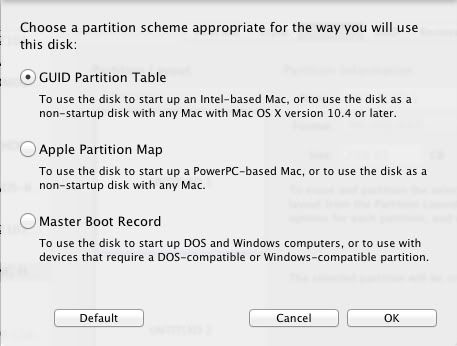
You won't get into the disk utility if your mobo doesn't support ACHI. I'll suggest to go back to Disk Utility, delete all partition and recreate a new one. Make sure that it is set to be GUID partition table:

http://support.apple.com/kb/ht2434


tot31
post Nov 21 2011, 03:39 PM

I DON'T GIVE A DAMN
*******
Senior Member
2,451 posts

Joined: Jan 2003
From: GOD's Land


yeah make sure to partition it to GUID like this...

user posted image
amenlo9
post Nov 21 2011, 05:38 PM

Look at all my stars!!
*******
Senior Member
2,627 posts

Joined: Jan 2003
From: Sepang,Cheras,Jupiter


many thanks to wiraone and tot31....figured out the problem....

now partitioned with 2 with 1 for Lion and another for Windows......

hope it will goes well for my dual boot eventually.
speedtobeat
post Nov 21 2011, 06:08 PM

Getting Started
**
Junior Member
146 posts

Joined: Feb 2008


@tot31,

Still can't Unibeast failed. Create the folder already, change to .app, then still cannot complete. I used the original file name, "h-ml1072.dmg", then changed to "InstallESD.dmg" also cannot work.

Should I try other installers?

This post has been edited by speedtobeat: Nov 21 2011, 06:15 PM
TSwiraone
post Nov 21 2011, 06:39 PM

Who cares about all the stars?
*******
Senior Member
3,892 posts

Joined: Jan 2003
From: Back on earth!
QUOTE(amenlo9 @ Nov 21 2011, 05:38 PM)
many thanks to wiraone and tot31....figured out the problem....

now partitioned with 2 with 1 for Lion and another for Windows......

hope it will goes well for my dual boot eventually.
*
To install Win7 later on, you need to use the disk utility and create a partition with FAT type before Win7 installer could recognise the partition. You can change it to NTFS during installation I believe, couldn't remember.
tot31
post Nov 21 2011, 07:01 PM

I DON'T GIVE A DAMN
*******
Senior Member
2,451 posts

Joined: Jan 2003
From: GOD's Land


QUOTE(speedtobeat @ Nov 21 2011, 06:08 PM)
@tot31,

Still can't Unibeast failed. Create the folder already, change to .app, then still cannot complete. I used the original file name, "h-ml1072.dmg", then changed to "InstallESD.dmg" also cannot work.

Should I try other installers?
*
that one is f***ed.....I've tried that before.... sad.gif Get a retail from Apple Store....

This post has been edited by tot31: Nov 21 2011, 07:03 PM
amenlo9
post Nov 22 2011, 01:53 AM

Look at all my stars!!
*******
Senior Member
2,627 posts

Joined: Jan 2003
From: Sepang,Cheras,Jupiter


QUOTE(wiraone @ Nov 21 2011, 06:39 PM)
To install Win7 later on, you need to use the disk utility and create a partition with FAT type before Win7 installer could recognise the partition. You can change it to NTFS during installation I believe, couldn't remember.
*
thanks wiraone....
already install Win 7 and Lion into the partition. biggrin.gif
the Lion is able boot from unibeast but after i applied the multibeast, it got me kernel panic screen every time and need to restart sad.gif
Is there anyway to fix it without reinstall the Lion?

and also when i restart it will load the chameleon but i dint see the dual boot system to let me choose between windows and OSX sad.gif
TSwiraone
post Nov 22 2011, 06:37 AM

Who cares about all the stars?
*******
Senior Member
3,892 posts

Joined: Jan 2003
From: Back on earth!
QUOTE(amenlo9 @ Nov 22 2011, 01:53 AM)
thanks wiraone....
already install Win 7 and Lion into the partition.  biggrin.gif
the Lion is able boot from unibeast but after i applied the multibeast, it got me kernel panic screen every time and need to restart  sad.gif
Is there anyway to fix it without reinstall the Lion?

and also when i restart it will load the chameleon but i dint see the dual boot system to let me choose between windows and OSX  sad.gif
*
Do you remember what you did when you run multibeast? Did you choose the easybeast method? Try restart using safe mode, during Chimera/Chameleon bootup, press space bar, it will let you enter boot option, specify -x. When you're already in OSX, if you can access the net, download the DSDT for your mobo, put it into our desktop and run multibeast by selecting the userdsdt option.

On Chimera bootloader, I believe if you press tab it will show you the option, on mine, I've disabled this in my config file. Replying this on my ipad, so couldn't remember the config file name.

This post has been edited by wiraone: Nov 22 2011, 07:40 AM
ShawnMamba
post Nov 22 2011, 08:17 AM

New Member
*
Junior Member
46 posts

Joined: Nov 2011


YEahhhhh .. WAtver !
amenlo9
post Nov 22 2011, 11:12 AM

Look at all my stars!!
*******
Senior Member
2,627 posts

Joined: Jan 2003
From: Sepang,Cheras,Jupiter


QUOTE(wiraone @ Nov 22 2011, 06:37 AM)
Do you remember what you did when you run multibeast? Did you choose the easybeast method? Try restart using safe mode, during Chimera/Chameleon bootup, press space bar, it will let you enter boot option, specify -x. When you're already in OSX, if you can access the net, download the DSDT for your mobo, put it into our desktop and run multibeast by selecting the userdsdt option.

On Chimera bootloader, I believe if you press tab it will show you the option, on mine, I've disabled this in my config file. Replying this on my ipad, so couldn't remember the config file name.
*
thanks for your tips rclxms.gif rclxms.gif
i already done reinstall last nite and using easybeast again. This time after applied easybeast my graphic card become not supported sad.gif . audio also not working sad.gif
i can't find any dsdt about my mobo, so i think i need to generate one by using ubuntu live cd. so that the dsdt i extracted from ubuntu will solved the audio and graphic issue? or it was just vanilla dsdt need to further tweak later?
besides, since i first setting is applied by Easybeast, how to i rollback Easybeast setting and using userdsdt ? or it will auto take care or everything without rollback> notworthy.gif
TSwiraone
post Nov 22 2011, 11:33 AM

Who cares about all the stars?
*******
Senior Member
3,892 posts

Joined: Jan 2003
From: Back on earth!
When I did my first hackintosh, I couldn't remember how many times I did my reinstallation smile.gif So, don't worry .. you'll experience this many many times .. to reduce reinstallation, you may want to create a small partition for your backup, probably a 20GB partition should be enough. Get the Carbon Copy Cloner, it helps a lot.

There is no roll-back, I don't use easybeast .. was using it the first time but did the manual selection afterward. The first time you install Hackintosh on your machine, the most important things from mutlibeast are the following:

FakeSMC
NullCPUPowerManagement
Chimera Bootloader

System definition,
MacPro or iMac, whichever appropriate

Don't forget to select the System Utilities too. This will generate the kexts cache and fixed the permission after the above kexts get copied.

Make sure you've the latest multibeast too.

When done, try to reboot and see if you could boot successfully. If it is okay, using CCC, copy into your backup partition.. this backup will be bootable .. if you messed up in your configuration in main partition, just boot from that backup, use CCC to copy back the backup to main partition and go ahead playing with it.

I don't have much info on DSDT, there is one forumner here (goodswill??) who can help you on DSDT. What you need to do is to bootup in Win7, and extract DSDT and pass it to him.

Good luck..!

This post has been edited by wiraone: Nov 22 2011, 11:34 AM

amenlo9
post Nov 22 2011, 02:08 PM

Look at all my stars!!
*******
Senior Member
2,627 posts

Joined: Jan 2003
From: Sepang,Cheras,Jupiter


QUOTE(wiraone @ Nov 22 2011, 11:33 AM)
When I did my first hackintosh, I couldn't remember how many times I did my reinstallation smile.gif So, don't worry .. you'll experience this many many times .. to reduce reinstallation, you may want to create a small partition for your backup, probably a 20GB partition should be enough. Get the Carbon Copy Cloner, it helps a lot.

There is no roll-back, I don't use easybeast .. was using it the first time but did the manual selection afterward. The first time you install Hackintosh on your machine, the most important things from mutlibeast are the following:

FakeSMC
NullCPUPowerManagement
Chimera Bootloader

System definition,
MacPro or iMac, whichever appropriate

Don't forget to select the System Utilities too. This will generate the kexts cache and fixed the permission after the above kexts get copied.

Make sure you've the latest multibeast too.

When done, try to reboot and see if you could boot successfully. If it is okay, using CCC, copy into your backup partition.. this backup will be bootable ..  if you messed up in your configuration in main partition, just boot from that backup, use CCC to copy back the backup to main partition and go ahead playing with it.

I don't have much info on DSDT, there is one forumner here (goodswill??) who can help you on DSDT. What you need to do is to bootup in Win7, and extract DSDT and pass it to him.

Good luck..!
*
thanks for all valuable tips....will learn and try by one. basically after failed and reinstalled for few time, now should be any problem for me to install dual boot and lion at all. now proceed to second stage which need to figure out how to get audio and graphic to work.

since there is no rollback, the first Easybeast i applied can't fixed the issue i have, can i reapplied with userdsdt option? or i need to do a clean installation again and apply with userdsdt?
TSwiraone
post Nov 22 2011, 02:36 PM

Who cares about all the stars?
*******
Senior Member
3,892 posts

Joined: Jan 2003
From: Back on earth!
Yes, you can try userdsdt but you need to have working DSDT for that. Easybeast usually will get you started and doesn't require DSDT. It will let you boot up. If you've problem with the graphics card, well, usually the Chimera usually cater for nvidia or ati graphics cards. If you can boot up using unibeast, check what they've in the org.chameleon.boot.plist in /Extra folder .. there might have specific parameters supplied to get it to work on your machine.
OH-
post Nov 22 2011, 06:19 PM

Regular
******
Senior Member
1,010 posts

Joined: Jan 2011
From: Stranded
Finally I got Snow Leopard running using the retail DVD 10.6.3 using EFI empire boot CD. Installed the myHack and all of that. But when I configured my smbios.plist, I got kernel panics on startup. I even tried booting in back with the EFI empire and deleting the smbios.plist, but still the kernel panic is there. How can I get this going?
speedtobeat
post Nov 22 2011, 06:25 PM

Getting Started
**
Junior Member
146 posts

Joined: Feb 2008


QUOTE(tot31 @ Nov 21 2011, 07:01 PM)
that one is f***ed.....I've tried that before.... sad.gif Get a retail from Apple Store....
*
That's way over my budget dude...no other ways? I'm searching InstallESD file and downloading now, fingers-crossed...huhu...
TSwiraone
post Nov 22 2011, 07:51 PM

Who cares about all the stars?
*******
Senior Member
3,892 posts

Joined: Jan 2003
From: Back on earth!
QUOTE(OH- @ Nov 22 2011, 06:19 PM)
Finally I got Snow Leopard running using the retail DVD 10.6.3 using EFI empire boot CD. Installed the myHack and all of that. But when I configured my smbios.plist, I got kernel panics on startup. I even tried booting in back with the EFI empire and deleting the smbios.plist, but still the kernel panic is there. How can I get this going?
*
Post here the kernel panic error and see if I can see something obvious ..

102 Pages « < 15 16 17 18 19 > » Top
 

Change to:
| Lo-Fi Version
0.0308sec    0.86    6 queries    GZIP Disabled
Time is now: 4th December 2025 - 06:08 AM