

1. Odin3 v1.7 software
2. P1000DXJPE ## firmware taken from SamFirmware
3. Bootloader unlocked - checked with Bootloader Patch
i'm good to go right?

SAMSUNG GALAXY TAB : Official Thread V3, Best and most portable 7" Android tablet
|
|
 Jul 3 2011, 12:58 PM Jul 3 2011, 12:58 PM
|
 
Senior Member
1,661 posts Joined: Oct 2008  
|
ok..i'm about to flash my 1st ROM which is Gingerbread 2.3.3..so i already have these things:
1. Odin3 v1.7 software 2. P1000DXJPE ## firmware taken from SamFirmware 3. Bootloader unlocked - checked with Bootloader Patch i'm good to go right? |
|
|
|
|
|
Jul 3 2011, 01:06 PM
|

Junior Member
29 posts Joined: Jul 2007
|
Already upgrade using kies...so far so good...i notice the battery last longer...hehehe....
|
|
|
Jul 3 2011, 02:03 PM
|

Junior Member
73 posts Joined: Apr 2010
|
how to access block website from gtab??
any suggestion? |
|
|
Jul 3 2011, 02:05 PM
|

Junior Member
225 posts Joined: Jul 2009
|
QUOTE(zerolord @ Jul 3 2011, 11:42 AM) can you enter download mode? How to know which state is download mode? All I get is this logo: 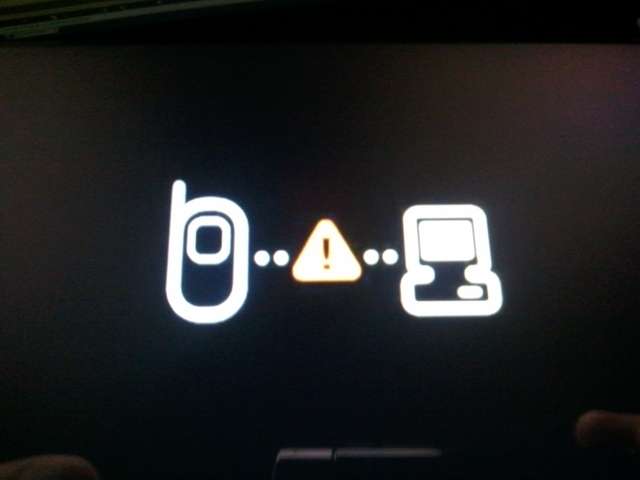 I already tried getting into recovery mode or whichever mode I read from forums, Power + Volume Up/Power + Volume Down. I just keep looping back into the image above. My unit was purchased from Maxis. EDIT: just called samsung. Told him I upgraded my Maxis Galaxy Tab through Kies, he was like so stunned. "So... You upgraded through Kies... Oh..." Sounds like Maxis units are not supposed to do that? But anyway, he asked me to bring it back to Service Center to get it fixed. Cuz all data has been wiped from my tab it seems. This post has been edited by kingster113: Jul 3 2011, 02:21 PM |
|
|
Jul 3 2011, 02:35 PM
|
|
Senior Member
1,661 posts Joined: Oct 2008
|
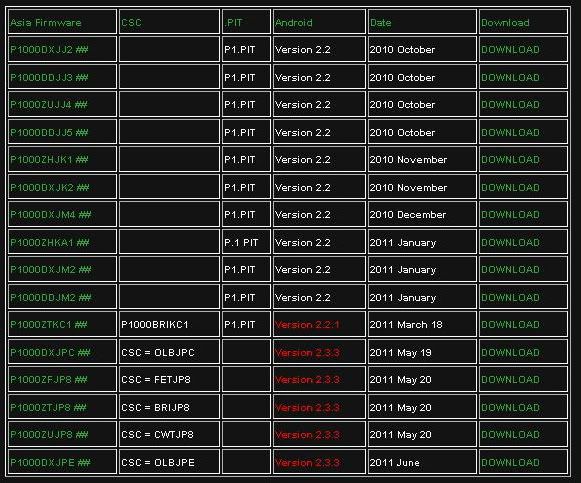
guys, i download the stock 2.3.3 ROM from samfirmware..so if u look at Malaysian firmware [DX], the pit column there is empty. So i dont need pit file is it? How about dbdata?
 |
|
|
Jul 3 2011, 05:17 PM
|
 
Elite
27,801 posts Joined: Jun 2007 From: Johor
|
QUOTE(kingster113 @ Jul 3 2011, 02:05 PM) How to know which state is download mode? your tab is in download mode so you can still save itAll I get is this logo: I already tried getting into recovery mode or whichever mode I read from forums, Power + Volume Up/Power + Volume Down. I just keep looping back into the image above. My unit was purchased from Maxis. EDIT: just called samsung. Told him I upgraded my Maxis Galaxy Tab through Kies, he was like so stunned. "So... You upgraded through Kies... Oh..." Sounds like Maxis units are not supposed to do that? But anyway, he asked me to bring it back to Service Center to get it fixed. Cuz all data has been wiped from my tab it seems. refer page 1 tech issues how to revive it |
|
|
|
|
|
Jul 3 2011, 09:04 PM
|
|
Junior Member
225 posts Joined: Jul 2009
|
QUOTE(benny888 @ Jul 3 2011, 05:17 PM) your tab is in download mode so you can still save it Thanks benny. I have downloaded odin 1.7.refer page 1 tech issues how to revive it So exactly what do I need to do? Sorry I'm very new to Android.  |
|
|
Jul 3 2011, 09:06 PM
|
|
Elite
27,801 posts Joined: Jun 2007 From: Johor
|
QUOTE(kingster113 @ Jul 3 2011, 09:04 PM) Thanks benny. I have downloaded odin 1.7. Read page 1 post # 4 Q15So exactly what do I need to do? Sorry I'm very new to Android. |
|
|
Jul 3 2011, 09:10 PM
|
|
Junior Member
225 posts Joined: Jul 2009
|
QUOTE(benny888 @ Jul 3 2011, 09:06 PM) Read page 1 post # 4 Q15 So power it up as instructed and connect to pc, start odin. Do i need to download anything else? I just press start? |
|
|
Jul 3 2011, 10:55 PM
|

Junior Member
10 posts Joined: Sep 2010
|
any idea price current for tab 16gb 3g m wifi? here in penang around 1499 if cheaper in kl i would rather buy there
|
|
|
Jul 3 2011, 11:12 PM
|
|
Elite
27,801 posts Joined: Jun 2007 From: Johor
|
QUOTE(kingster113 @ Jul 3 2011, 09:10 PM) So power it up as instructed and connect to pc, start odin. Do i need to download anything else? I just press start? i dont believe it. of course you must have a rom ready to flash. if you dont have go and download rotohammer jme rom - read page 1 post# 4 and see the links i have postedThis post has been edited by benny888: Jul 3 2011, 11:14 PM |
|
|
Jul 3 2011, 11:42 PM
|

Senior Member
2,682 posts Joined: Jul 2005 From: bukit jelutong, shah alam
|
QUOTE(kingster113 @ Jul 3 2011, 05:13 AM) shit. really need help guys. like what uncle benny888 say, download the files from here http://files.deodexed.com/ModADroid-Galaxy...Rotohammer/JME/Downloaded latest samsung kies. Performed upgrade for my tab. The firmware downloaded, and proceeded to Firmware Upgrade. My tab was showing the android with the shovel. And the Firmware Upgrade window on my laptop was stuck at 0% for 1 whole hour. I then proceeded to turn off my tab. Now I'm stuck at the phone and pc logo. Can't do anything. Need help pls. still dunno visit here.. http://forum.xda-developers.com/showthread.php?t=895827 good luck, dun worry, odin is ur saver.. is true..  |
|
|
Jul 4 2011, 12:22 AM
|
|
Junior Member
225 posts Joined: Jul 2009
|
QUOTE(kokifung @ Jul 3 2011, 11:42 PM) like what uncle benny888 say, download the files from here http://files.deodexed.com/ModADroid-Galaxy...Rotohammer/JME/ Thank you for your patient reply. still dunno visit here.. http://forum.xda-developers.com/showthread.php?t=895827 good luck, dun worry, odin is ur saver.. is true.. Appreciate it.*** Thanks benny. |
|
|
|
|
|
Jul 4 2011, 09:23 AM
|

Junior Member
274 posts Joined: May 2006
|
Very nice write up on Galaxy tab forum.
http://www.mygalaxytab.net/samsung-galaxy-...our-galaxy-tab/ i have yet to own a GTab. Currently using SGS. very satisfy with it with CM7 ROM. i am waiting for Gtab 8.9. Looking forward of owning 1 and joining you guys in the future |
|
|
Jul 4 2011, 09:30 AM
|
|
Newbie
2 posts Joined: Jul 2011
|
Hello there, I have a wifi version of the galaxy tab (p1010), I got from a foto shangrila looking store and I am just wondering whether I would be getting an update from the froyo to something better?
I have been following the galaxy tab forum and no one seems to pick up what I am asking. Probably they are thinking that I am a troll due to the low number of posts but I hope someone could help me here. Thanks in advance! |
|
|
Jul 4 2011, 10:08 AM
|

Senior Member
5,511 posts Joined: Jun 2006 From: On Earth. 
|
QUOTE(paulc @ Jul 4 2011, 09:30 AM) Hello there, I have a wifi version of the galaxy tab (p1010), I got from a foto shangrila looking store and I am just wondering whether I would be getting an update from the froyo to something better? most of us using a 3G version... and some of us who's not converting to a custom rom reported that they got an update from kies software from froyo to gingerbread. try checking yours...I have been following the galaxy tab forum and no one seems to pick up what I am asking. Probably they are thinking that I am a troll due to the low number of posts but I hope someone could help me here. Thanks in advance! |
|
|
Jul 4 2011, 10:44 AM
|
|
Junior Member
445 posts Joined: May 2006
|
i just solve the samsung kies connection with my galaxy tab.so many bug the samsung software have,even i contact samsung,also no solution wan,ask me bring the device to the service center.
|
|
|
Jul 4 2011, 11:23 AM
|

Junior Member
260 posts Joined: May 2008
|
QUOTE(kingster113 @ Jul 3 2011, 02:05 PM) How to know which state is download mode? Don't be surprised Samsung tech tells you "OMG KIES!?". I actually had an incident with them about the Kies upgrade. They claimed that any firmware upgrade through Kies voids the warranty. The only way to upgrade is to bring it back to the service centre. They said their firmware comes "directly from Korea". Do you believe this bull$?All I get is this logo: I already tried getting into recovery mode or whichever mode I read from forums, Power + Volume Up/Power + Volume Down. I just keep looping back into the image above. My unit was purchased from Maxis. EDIT: just called samsung. Told him I upgraded my Maxis Galaxy Tab through Kies, he was like so stunned. "So... You upgraded through Kies... Oh..." Sounds like Maxis units are not supposed to do that? But anyway, he asked me to bring it back to Service Center to get it fixed. Cuz all data has been wiped from my tab it seems. Digress... ANYONE knows how to convert to ext4 on JPD/JPE stock? EDIT: NVM, found out how. This post has been edited by Piccolo: Jul 4 2011, 12:12 PM |
|
|
Jul 4 2011, 12:01 PM
|
|
Senior Member
1,661 posts Joined: Oct 2008
|
QUOTE(PyOsE @ Jul 3 2011, 12:58 PM) ok..i'm about to flash my 1st ROM which is Gingerbread 2.3.3..so i already have these things: 1. Odin3 v1.7 software 2. P1000DXJPE ## firmware taken from SamFirmware 3. Bootloader unlocked - checked with Bootloader Patch i'm good to go right? QUOTE(PyOsE @ Jul 3 2011, 02:35 PM) guys, i download the stock 2.3.3 ROM from samfirmware..so if u look at Malaysian firmware [DX], the pit column there is empty. So i dont need pit file is it? How about dbdata? ok...flashed mine to Gingerbread already..  |
|
|
Jul 4 2011, 04:45 PM
|

Junior Member
19 posts Joined: Sep 2009
|
hi ,i'm new here although i hav been browsing this site since its first thread...i also a galaxy tab user 7". Currently updated my tab firmaware to gingerbread 2.3.3
|
|
Topic ClosedOptions
|
| Change to: |  0.0309sec 0.0309sec
 0.52 0.52
 6 queries 6 queries
 GZIP Disabled GZIP Disabled
Time is now: 5th December 2025 - 10:15 AM |
 Quote
Quote